
Last updated: June 26, 2026
When contact form spam increases, the first instinct is usually simple: add CAPTCHA.
If you searched for "honeypot vs CAPTCHA," use the same frame as "honeypot vs reCAPTCHA": a honeypot is a quiet signal for simple bots, while CAPTCHA-class tools provide stronger browser-token verification.
Then the options start to blur together. Google reCAPTCHA. Cloudflare Turnstile. hCaptcha. Honeypot fields. WordPress plugins. Custom backend checks. Score thresholds. Invisible challenges.
The practical question is not "Which one is strongest?"
The better question is: which option reduces automated abuse without blocking real inquiries, and what will you do with the unwanted messages that still get through?
CAPTCHA-style tools mainly protect the front door. They reduce automated submissions. They do not reliably stop a real person who opens the form, writes a sales pitch, and submits it.
This guide compares reCAPTCHA v3, Cloudflare Turnstile, hCaptcha, and honeypots for contact forms. It also explains why server-side verification matters and why post-submission sorting is still part of the system.
For Contact Form 7 specifically, read the Contact Form 7 spam defense guide. For Google Forms, read the Google Forms spam prevention guide.
Short Answer
Use this decision table first.
| Situation | Start Here |
|---|---|
| You only need a low-friction signal against simple bots | Honeypot |
| You are building a new public contact form | Turnstile or reCAPTCHA v3 |
| Your organization already standardizes on Google | reCAPTCHA v3 |
| You use Cloudflare or want less Google dependency | Cloudflare Turnstile |
| You are migrating from reCAPTCHA or already use hCaptcha | hCaptcha |
| You want a low-friction extra filter | Honeypot field |
| Sales pitches are the main problem | CAPTCHA plus post-submission classification |
Whichever option you choose, do not skip backend verification.
A widget in the browser is not enough. The token produced in the browser needs to be verified by the server before the submission is trusted.
Also avoid making the form hostile.
The goal of a contact form is not to block every suspicious interaction. The goal is to receive real inquiries while reducing obvious abuse.
If You Searched for Honeypot vs reCAPTCHA
The short version is: a honeypot is quieter, but reCAPTCHA is a stronger bot signal.
| Question | Honeypot | reCAPTCHA v3 |
|---|---|---|
| What it checks | Whether a hidden field was filled | A risk score from Google's bot-detection system |
| User friction | Usually none | Usually none in v3, but it still loads a third-party script |
| Backend requirement | Check the hidden field server-side | Verify the token and action server-side |
| Best at reducing | Simple bots that fill every field | Broader automated abuse patterns |
| Weak against | Careful bots and human sales pitches | Human sales pitches and poorly tuned thresholds |
| Operational risk | False positives from autofill or bad hiding | Overblocking if low scores are treated too aggressively |
Use a honeypot when you want a cheap, low-friction signal and the form is not under heavy attack.
Use reCAPTCHA when automated abuse is more serious, when your organization already uses Google security tooling, or when you need score-based tuning.
Do not treat the choice as permanent. Many contact forms use both a honeypot and a CAPTCHA-class layer: the honeypot catches obvious automation quietly, while reCAPTCHA, Turnstile, or hCaptcha handles the stronger bot-protection step.
The important boundary is this: neither a honeypot nor reCAPTCHA reliably stops a real person from submitting a sales pitch. That work belongs to the response workflow after submission.
hCaptcha vs Turnstile, Briefly
If your choice is between hCaptcha and Cloudflare Turnstile, start with your stack.
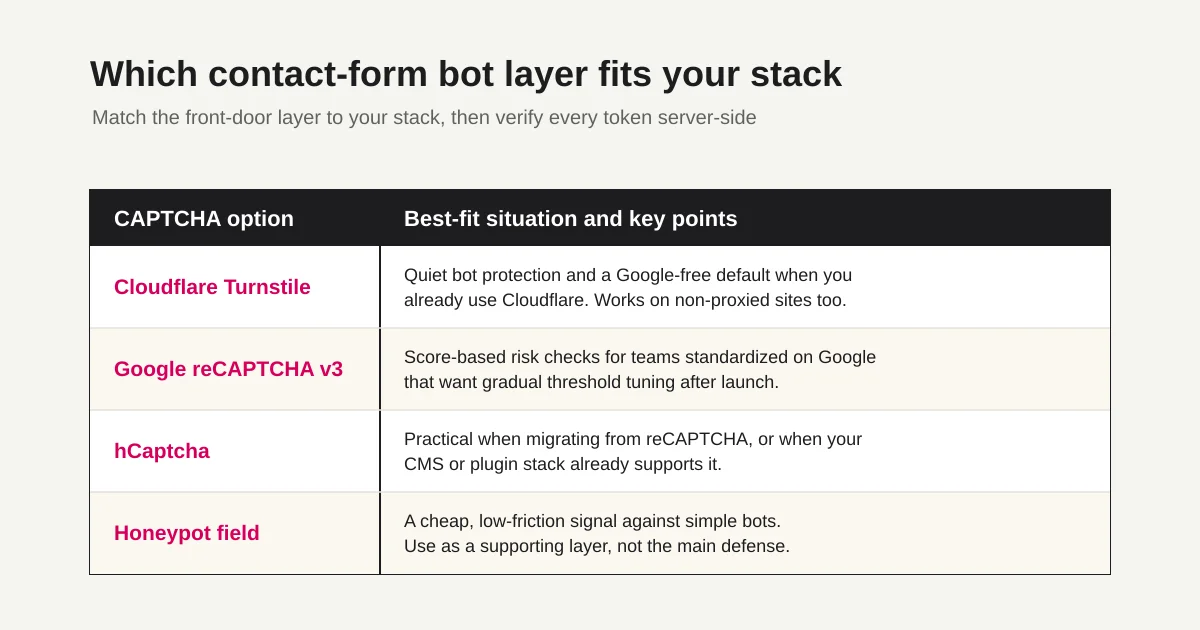
Turnstile is a natural default when you already use Cloudflare, want quiet bot protection, and want a provider-neutral alternative to Google reCAPTCHA.
hCaptcha is a natural candidate when your existing CMS, plugin stack, or migration path already supports it. hCaptcha's own docs call out that teams coming from reCAPTCHA can migrate with relatively small code changes because familiar methods and attributes are supported.
Both still need server-side verification. A widget alone is not enough.
For public lead and contact forms, also compare the privacy disclosure, accessibility behavior, language support, challenge rate, and failure handling before choosing.
What CAPTCHA Stops and What It Does Not
Before choosing a tool, separate the problems.
| Problem | Can CAPTCHA Reduce It? | What Else Is Needed |
|---|---|---|
| Automated bot submissions | Yes | Server-side verification, rate limits |
| Low-quality repeated submissions | Sometimes | IP, timing, and duplicate checks |
| Human-written sales pitches | Not reliably | Anti-solicitation copy, response classification |
| Uncertain inquiries | Should not be blocked blindly | Review status and triage |
| Notification emails going to spam | Different problem | Email authentication and sending setup |
This distinction matters.
If you add reCAPTCHA and sales pitches keep arriving, the CAPTCHA may not be failing. The remaining messages may be written by people or assisted workflows that behave like people.
Front-door protection is useful. It is just not the whole operating model.
Cloudflare Turnstile
Cloudflare Turnstile is a strong default for many contact forms.
Cloudflare's documentation describes the implementation as two connected steps. A browser-side widget generates a token, and your server sends that token to Cloudflare's Siteverify API to confirm it is valid. Cloudflare also says Turnstile can be used on sites that are not proxied through Cloudflare.
Turnstile fits when:
You want quiet bot protection.
You already use Cloudflare.
You want to avoid depending on Google services.
You are choosing a standard bot-protection layer for new forms.
The important implementation detail is server-side validation.
If the widget appears on the page but the backend does not validate the token, the protection is not complete. Treat the widget and backend verification as one feature.
FORMLOVA's public-form protection is built around Cloudflare Turnstile plus rate limiting, then response classification for the messages that still arrive.
Google reCAPTCHA v3
reCAPTCHA v3 is Google's score-based bot-protection option.
Google's documentation explains that reCAPTCHA v3 returns a score without interrupting users. You execute it on actions such as form submission, verify the token on your backend, confirm the action name, and choose what to do based on the score.
reCAPTCHA v3 fits when:
Your organization already uses Google's security tooling.
Your existing site already has reCAPTCHA in place.
You want score-based analysis and gradual tuning.
You are comfortable using the reCAPTCHA admin console.
The tuning part matters.
Do not immediately block every low-ish score after launch. Google's documentation recommends analyzing traffic and adjusting thresholds for the site's real risk profile. A brand-new form may not have enough signal yet.
A safer initial pattern is:
Let normal scores through.
Send low scores to review or extra checks.
Block only clear automation.
Tune thresholds after observing real submissions.
For contact forms, losing one real buyer inquiry can cost more than receiving one extra sales pitch.
hCaptcha
hCaptcha is another common choice for bot protection.
hCaptcha's documentation notes that reCAPTCHA users can migrate with relatively small code changes because methods such as render() and onload() are API-compatible. Its invisible mode can run in the background and show a challenge only when challenge criteria are met.
hCaptcha fits when:
You are migrating from reCAPTCHA.
Your CMS or form stack already supports hCaptcha.
You prefer hCaptcha's ecosystem.
You want an explicit checkbox or invisible challenge mode.
Like the other options, hCaptcha requires backend verification.
After the challenge succeeds, the frontend includes a token in the form data. Your backend sends that token to hCaptcha's verification endpoint before trusting the submission.
At the architecture level, the pattern is the same:
1. The browser gets a token.
2. The form submits the token to your backend.
3. The backend verifies the token with the provider.
4. The submission is accepted, rejected, or routed for review.
Honeypot Fields
A honeypot is a hidden field that real users should not fill.
Simple bots often fill every field they can find in the markup. If the hidden field contains a value, the submission can be treated as automated.
The benefit is low friction. Real users usually never see the field.
The limits are real too:
Honeypots do not stop human sales pitches.
Careful bots can detect or avoid hidden fields.
Poor implementation can affect accessibility.
Use honeypots as a cheap supporting layer, not the main defense. For server-side checks, accessibility risks, and autofill false positives, use the Contact Form Honeypot Guide.
Practical Selection Criteria
For most teams, the decision should follow the form's purpose.
1. Decide who should be able to submit.
2. Decide how much friction that audience can tolerate.
3. Choose one CAPTCHA-class layer.
4. Verify tokens server-side.
5. Add rate limiting or duplicate checks.
6. Route suspicious submissions to review.
7. Classify sales pitches after arrival.
Public contact forms should usually start with quiet protection and reasonable validation.
Internal forms, member-only forms, and account-based workflows can tolerate stricter controls. Public lead forms and first-touch contact forms usually cannot.
Google Search Central's user-generated spam guidance also points to signals such as form completion time, repeated requests from the same IP range, user agents, and submitted values. That is the right mental model: CAPTCHA is one signal, not the whole system.
What Not to Do
Avoid stacking defenses until the form becomes unpleasant.
These patterns often hurt real users:
Multiple CAPTCHA layers on one form.
Blocking every slightly low score.
Generic "invalid submission" errors.
Very long required message fields.
Large warning blocks that make real users feel accused.
If you show an error, make it recoverable. The form error message examples guide covers that in more detail.
Good form security should feel boring to legitimate users.
FAQ
Is a honeypot better than reCAPTCHA?
Not universally. A honeypot is better when you want a low-friction signal against simple bots. reCAPTCHA is better when you need a stronger bot-risk signal and are ready to verify tokens, monitor scores, and tune thresholds.
Can I use a honeypot and reCAPTCHA together?
Yes. A honeypot can catch obvious automation, while reCAPTCHA, Turnstile, or hCaptcha provides a stronger verification layer. The key is not to create unnecessary friction for real visitors.
Does reCAPTCHA stop contact form sales pitches?
Not reliably. reCAPTCHA is designed to reduce automated abuse. A real person or human-assisted workflow can still submit a sales message through the form. Use post-submission classification and response status to keep those messages out of the real inquiry queue.
Which is better for contact forms: Turnstile or hCaptcha?
Turnstile is a strong default if you already use Cloudflare or want quiet bot protection without depending on Google. hCaptcha is often practical when your existing CMS or plugin stack already supports it, or when you are migrating from reCAPTCHA.
Plan for What Gets Through
CAPTCHA is front-door protection.
Even with it, you may still receive human sales pitches, uncertain messages, duplicates, tests, and low-quality submissions.
That means the response workflow matters:
Sales pitch: remove from the reply queue.
Uncertain: review manually.
Real inquiry: prioritize.
Duplicate or test: exclude from reporting.
FORMLOVA treats this as part of form operations. Published forms use bot-protection and rate-limiting layers, and responses can then be classified, filtered, assigned a status, and excluded from analytics when needed.
For the broader sales-pitch problem, read the contact form spam guide.
Summary
Contact form CAPTCHA selection is not about finding one perfect shield.
Choose based on your stack and workflow.
Use reCAPTCHA v3 when your organization already standardizes on Google and wants score-based tuning. Use Turnstile when you want quiet, Cloudflare-friendly protection. Use hCaptcha when your stack or migration path points there. Use honeypots as a light supporting layer.
Whatever you choose, verify tokens on the backend.
And remember the limit: CAPTCHA reduces bots. It does not reliably stop human sales pitches. The stable pattern is to reduce abuse before submission, then classify what still arrives. The full operating playbook is summarized in the contact form operations guide.
Disclosure and Verification
- Verified on: June 18, 2026
- Main official sources checked:
- FORMLOVA product check: user-facing Turnstile/rate-limit copy, response classification, status management, and internal links to the contact-form operations cluster were reviewed.
- June 26, 2026 update: I updated the meta description and opening answer based on Search Console query wording; I did not add new external security or provider claims.
- Note: This article is operational guidance, not legal, security, privacy, or compliance advice for a specific site. Review your own form stack, accessibility needs, privacy requirements, and risk tolerance before changing production forms.
Related Articles
- Contact Form Response Management Guide -- Owners, Status, Sales Spam, and Follow-Up
- Contact Form Honeypot Guide -- Reduce Form Spam Without CAPTCHA
- MCP Form Service Guide -- From AI Creation to Form Operations
- FORMLOVA Form Automation Guide -- Auto-Replies, Routing, Sheets Sync, and MCP Operations
- Form Creation Guide -- Choose Templates, Fields, and Workflows
- Form Services Comparison Hub -- Pricing, Alternatives, and Operations