
Last updated: June 26, 2026
Google Forms is easy to share. That also means it can become easy for junk responses to find.
Teams often ask the same questions once spam starts arriving. Can I add CAPTCHA? Should I collect email addresses? Should I require sign-in? How do I stop duplicate submissions? Why are sales pitches still getting through?
The useful answer is not one setting.
Google Forms spam prevention has two layers. First, reduce low-quality submissions at the front door with sharing controls, email collection, one-response limits, response validation, and closing the form when it is no longer active. Then classify what still gets through, especially human-written sales pitches and uncertain responses.
This guide covers the Google Forms settings to check first, the tradeoffs behind each one, and when it makes sense to move response triage into FORMLOVA.
If you are comparing Google Forms with other tools, start with 3 Google Forms Alternatives Compared. This article focuses only on spam, duplicate responses, and junk-response handling.
Quick Answer: Google Anti-Spam Form Settings
If your search is "google anti-spam form" or "google form spam," start with the settings Google Forms actually gives you:
Restrict who can respond when the form is not public.
Collect email addresses when the extra friction is acceptable.
Limit each person to one response for signed-in use cases.
Use response validation on open fields.
Close the form after the campaign or event ends.
Classify sales pitches and junk responses after submission.
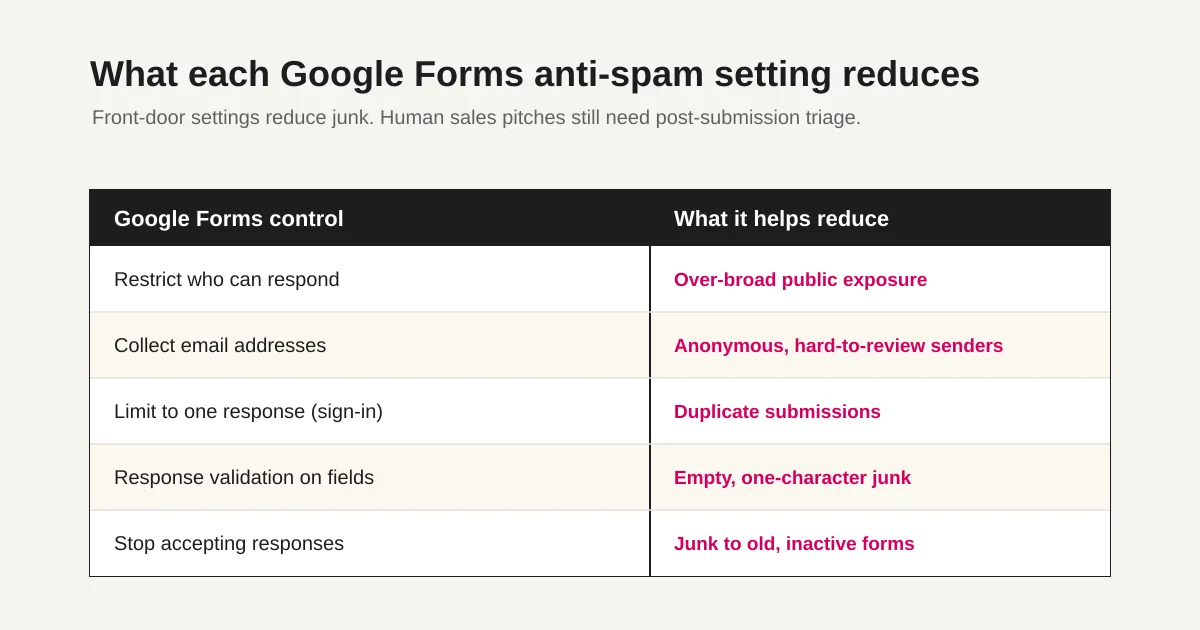
Google Forms does not give you the same CAPTCHA, Turnstile, hCaptcha, or honeypot control that a custom site form can provide. For a public contact form, use the lightest front-door controls first, then sort what still gets through.
First: Define the Spam Problem
"Spam" can mean several different things in Google Forms.
Treat them separately.
| Problem | Example | Can front-door settings reduce it? | Does post-submission triage matter? |
|---|---|---|---|
| Automated junk responses | Random text, repeated URLs, meaningless submissions | Somewhat | Yes |
| Duplicate responses | The same person submits multiple times | Somewhat | Sometimes |
| Sales pitches | Someone writes a pitch in a contact or inquiry form | Not reliably | Yes |
| Notification emails go to spam | Owner alerts or response receipts are missed | Different problem | Email setup needs review |
This distinction matters.
If duplicate responses are the problem, a one-response limit may help. If human sales pitches are the problem, a one-response limit does not solve much. The sender can still submit one pitch.
The goal is not to make every unwanted response impossible.
The goal is to keep real responses visible.
Check Settings in This Order
Use this order when cleaning up an existing Google Form:
1. Confirm the form is not shared more broadly than needed.
2. Decide whether to collect email addresses.
3. Decide whether to limit each person to one response.
4. Add response validation to open text fields.
5. Stop accepting responses when the campaign or event ends.
6. Classify the junk responses that still get through.
You do not need to enable every control.
Settings that require sign-in are especially important to consider carefully. They can reduce casual abuse, but they can also reduce legitimate responses. For internal surveys, member-only forms, or existing-customer forms, that may be fine. For public contact forms, ad landing pages, or first-touch event registration, it can be too much friction.
Spam prevention is not just about making the form stricter.
It is about choosing the lowest-friction control that protects the workflow enough.
Collect Email Addresses
Google Forms can collect respondent email addresses.
Google's help documentation describes two email collection modes: verified email collection from the respondent's Google Account, and manual respondent input.
From a spam-prevention perspective, email collection helps in two ways:
It makes the sender easier to review.
It makes follow-up and duplicate checks easier.
But email collection does not remove spam by itself.
Someone can still use a free mailbox, a temporary address, or a normal business email address to submit a sales pitch. So treat email collection as a light accountability layer, not a spam wall.
If you collect email addresses, explain why. Contact forms, resource request forms, and event registration forms should make the purpose clear. The Contact Form Privacy Consent Wording Guide covers that pattern in more detail.
Limit Responses to One Per Person
If duplicate responses are the problem, Google Forms can limit each person to one response.
The tradeoff is important: this requires the respondent to sign in with a Google Account.
That setting works well for:
Internal surveys
Member-only questionnaires
School or organization forms
Existing-customer feedback forms
Use it carefully for:
Public contact forms
Resource request forms from ads
First-touch event registration
Anonymous surveys
Requiring sign-in may reduce repeated submissions, but it can also block or discourage real respondents.
For public forms, I usually would not start there. First reduce avoidable junk with field design and response validation. If abuse continues, then consider sign-in, a different form workflow, or a tool that gives you more response triage control.
The sign-in required by the one-response control and the conditions that attach an email address to owner-visible response data are separate. The Google Forms anonymous response setup guide covers that privacy boundary; this article retains ownership of spam and repeat-submission controls.
Add Response Validation
Google Forms supports response validation on individual questions.
Google's help documentation explains that you can add rules based on the question type and show custom error text when a response does not follow the rule.
Useful validation examples:
Email: require an email-shaped answer.
Phone number: set a reasonable length or pattern.
URL field: include it only when truly needed.
Open text: require a minimum useful length.
Number fields: set a valid range.
If a contact message can be submitted with one character, low-effort junk becomes easier.
A calm validation message can help:
Please enter at least 20 characters so we can understand your request.
Do not overdo it.
If you require 200 characters, a legitimate short inquiry may drop. If phone validation is too strict, hyphenated numbers, international numbers, or office numbers can fail.
Validation should help real respondents recover. It should not sound like punishment. The Form Error Message Examples Guide covers that approach in more detail.
Review URL Fields and Open Text Fields
Some spam problems come from fields that are too open.
Watch for forms like this:
Company URL is optional but unnecessary.
The message field accepts almost anything.
Every intent is captured in one open textarea.
URL fields are fine when they are necessary.
But if the form does not need a URL, removing that field can reduce link-only submissions. For resource requests and event registrations, name, email, company, and interest area may be enough.
Open text fields also benefit from structure.
Instead of relying on one large "message" field, add an intent selector:
Inquiry type:
Product consultation
Resource request
Support
Hiring
Other
That simple field helps later. Sales pitches, uncertain submissions, and real requests are easier to separate when the response has a declared intent.
Stop Accepting Responses After the Window Ends
If a form is tied to an event, campaign, hiring round, or limited resource, close it when the window ends.
Google's help documentation explains that a published form can stop accepting responses and show a custom message to respondents.
Leaving an old form open creates an unnecessary target.
A closing message can be simple:
This form is no longer accepting responses.
For current inquiries, please use:
https://example.com/contact
This is basic, but it matters.
Old public forms often keep collecting junk long after the team has stopped watching them.
If Notification Emails Go to Spam, Treat It Separately
Some people search for "Google Forms spam" because owner notifications or response receipts are going to a spam folder.
That is a different problem.
Check:
Are owner response notifications enabled?
Are respondent email addresses being collected?
Are response receipts configured?
Is the message in a spam or promotions folder?
If Apps Script or another tool sends email, does the sender and content look trustworthy?
The Form Auto-Reply Email Setup Guide explains the difference between Google Forms response copies, Apps Script, and FORMLOVA auto-replies.
Do not mix the two problems.
Reducing junk submissions and improving email deliverability are separate workflows.
Human Sales Pitches Will Still Arrive
Even after you clean up settings, sales pitches may remain.
That does not mean the form is broken.
Some sales outreach is not automated. A person opens the form, writes or pastes a pitch, fills the required fields, and submits. Email collection, response validation, and one-response limits do not reliably stop that behavior.
Split the workflow:
Reduce at the front door:
Sharing scope, email collection, one-response limits, validation, and closing inactive forms.

Separate after submission:
Sales pitches, duplicate responses, uncertain messages, and real inquiries.
Google Search Central's guidance on user-generated spam also treats open input surfaces as a place where abuse can happen. It recommends monitoring patterns such as completion time and repeated requests from the same IP range, and considering verification challenges for high-risk sign-up flows.
With Google Forms, you do not control those layers as deeply as you would on your own site. If you control the site form itself and need to choose CAPTCHA or honeypot controls, use the Contact Form CAPTCHA Comparison and the Contact Form Honeypot Guide.
That is why post-submission triage matters.
Classify What Gets Through
Whether you keep Google Forms or move to another workflow, decide what happens after submission.
A practical triage model:
Sales pitch: exclude from the customer-response queue.
Duplicate response: keep the valid or latest response.
Needs review: send to a person.
Real inquiry: mark as waiting for response.
Junk response: exclude from reporting.
Google Forms can export responses to CSV or show them in Google Sheets. The Google Forms CSV Export Guide covers that path.
The hard part is not exporting the data.
The hard part is repeatedly deciding which rows matter.
FORMLOVA treats that as part of form operations. Responses can be classified as sales pitches, uncertain cases, and real inquiries. You can combine that with response status, filters, analytics exclusions, and follow-up workflows.
For the broader operating model, read the Contact Form Operations Guide. If your site uses WordPress and Contact Form 7, the Contact Form 7 Spam Defense Guide covers that stack separately.
Summary
Google Forms spam prevention is not one switch.
Review the form's sharing scope. Collect email addresses when it fits the use case. Use one-response limits when sign-in is acceptable. Add response validation to open fields. Close old forms when the response window ends.
Then handle what still gets through.
Human sales pitches, uncertain messages, duplicate responses, and low-quality submissions often need post-submission triage. The real goal is not to block every unwanted entry. The goal is to keep real responses visible and keep junk from distorting your queue and reporting.
Disclosure and Verification
- Verified on: May 11, 2026. Updated on June 26, 2026 for
google anti-spam form/google form spamquery wording after rechecking official Google Forms response-management and response-validation help. - Main official sources checked:
- FORMLOVA product check: response status, sales email detection, CSV/Google Sheets handling, and internal links to the contact form operations cluster were reviewed.
- Search Console evidence:
.tmp/search-console-performance-90d-2026-06-23-untapped.jsonshowed 49 impressions / average position 13.4 for this URL, led bygoogle anti-spam form,google form spam, andgoogle forms spam. - Note: This article is an operational guide, not legal, security, privacy, or email-deliverability advice for a specific organization. Review your own risk, compliance requirements, and respondent experience before changing a production form.
Related Articles
- Google Forms Multiple Answers -- Checkboxes, Selection Limits, and Analysis -- Use this when “multiple answers” means several selections inside one question, not repeated whole-form submissions.
- Contact Form Response Management Guide -- Owners, Status, Sales Spam, and Follow-Up
- Contact Form Honeypot Guide -- Reduce Form Spam Without CAPTCHA
- Form Response Status Management -- How to Design New, In Progress, Done, and Excluded
- Form Auto-Reply Email Examples -- Templates for Contact Forms, Downloads, Webinars, and Applications
- View, Filter, and Update Response Status with FORMLOVA
- Export Responses to CSV or Sync Them to Google Sheets with FORMLOVA