
Last updated: May 11, 2026
A honeypot is one of the quietest ways to reduce simple contact form spam.
The idea is simple. Add a field to the form that real visitors should never fill in. Hide it from normal users. If the field contains a value when the form is submitted, treat the submission as bot-like.
That works because many basic spam bots fill every input field they find.
But a honeypot is not magic.
It is not a full CAPTCHA replacement. It does not stop human sales pitches. If implemented poorly, it can also create accessibility and autofill problems for legitimate users.
This guide explains how contact form honeypots work, what they can reduce, how to validate them server-side, where accessibility risk appears, and when you should move to Turnstile, reCAPTCHA, hCaptcha, or post-submission classification instead.
For the broader decision between a honeypot, reCAPTCHA, Turnstile, and hCaptcha, read the honeypot vs reCAPTCHA comparison. For WordPress-specific setup, read the Contact Form 7 spam defense guide. For Google Forms settings such as email collection, one-response limits, and validation, use Google Forms Spam Prevention.
Short Answer
A honeypot is useful as a light bot signal.
It fits these situations best.
| Situation | Honeypot Fit |
|---|---|
| Small public contact form | Good fit |
| You do not want visible CAPTCHA | Useful supporting layer |
| Obvious automated submissions appear | Often helps |
| High-value lead or application form | Too weak alone |
| Aggressive bot traffic | Add Turnstile, reCAPTCHA, or hCaptcha |
| Human sales pitches are the main issue | Honeypot will not solve it |
The safest mental model is: a honeypot is a signal, not a security boundary.
If the field is filled, you can suppress notification, exclude the submission from analytics, log the event, or route it to a review bucket.
But do not assume the form is protected just because one hidden field exists.
Use it with rate limits, server-side validation, and response sorting.
How a Honeypot Works
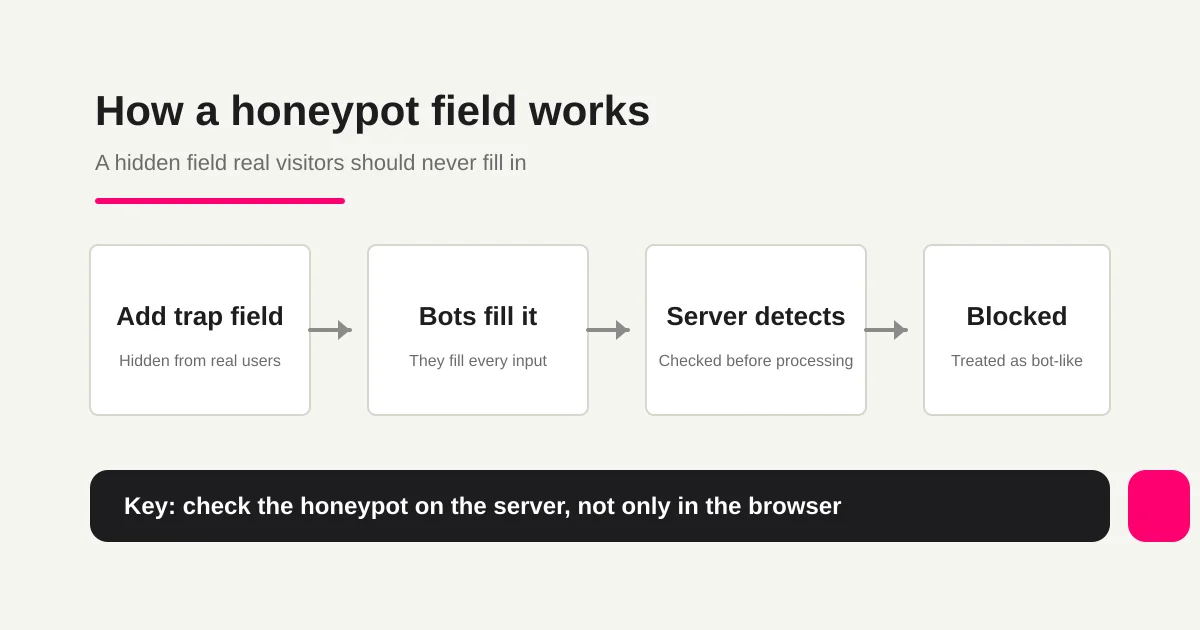
A honeypot field is not a field you want users to complete.
It is a field that should remain empty.
<form method="post" action="/contact">
  <label for="name">Name</label>
  <input id="name" name="name" autocomplete="name" required>

  <label for="email">Email</label>
  <input id="email" name="email" autocomplete="email" required>

  <div class="form-trap" aria-hidden="true">
    <label for="website_url">Website</label>
    <input id="website_url" name="website_url" tabindex="-1" autocomplete="off">
  </div>

  <button type="submit">Submit</button>
</form>
On the server, the rule is simple.
If website_url is empty, continue normal processing.
If website_url contains a value, treat the submission as bot-like.
The server-side part matters.
If you only block the submission with client-side JavaScript, a bot can bypass the page and post directly to your endpoint. Check the honeypot value before normal contact-form processing, notification, storage, or analytics.
Do Not Treat Hidden Inputs as Security
A honeypot may look similar to <input type="hidden">, but the two ideas should stay separate.
MDN's HTML reference explains that hidden inputs are used to include values that are not visible in the rendered page. It also warns developers not to rely on hidden inputs as a security mechanism, because submitted HTML values can be inspected and changed.
That warning is directly relevant here.
Do not put secrets, verification keys, or trust decisions inside a hidden field.
For a honeypot, the only signal is: this field should have stayed empty, but it did not.
Some simple bots may ignore type="hidden" fields. Some may fill CSS-hidden text fields. Some advanced bots may detect both. That is why the honeypot should be treated as a low-cost filter, not as proof that a visitor is human.
Accessibility and Autofill Risks
Forms should be understandable.
W3C WAI's forms guidance explains that form controls need labels that identify their purpose. For normal fields, that means visible or properly associated labels.
A honeypot field is different because users should not interact with it at all.
That creates a design choice.
| Approach | What It Means |
|---|---|
| Fully hide it from users | Remove it from keyboard flow, screen reader output, and normal interaction |
| Show it with instructions | Explain that it should be left blank, but this also makes the trap obvious |
For most contact forms, the first approach is more practical.
Before publishing, check the field with real interaction:
Tab key does not stop on the honeypot field.
Screen reader users do not hear a confusing extra field.
Browser autofill does not fill the honeypot accidentally.
Error messages do not mention a field users never saw.
Autofill is a common source of false positives.
If you name the field something generic like email, phone, name, or website, a browser or password manager may fill it for a real user. That can turn a legitimate inquiry into a false spam signal.
Use a name that does not compete with real contact fields, and test the form with common browsers and autofill enabled.
What Honeypots Catch
Honeypots work best against simple automation.
They can reduce bots that:
Fill every input field on the page.
Do not interpret labels deeply.
Submit CSS-hidden fields.
Post repeated form submissions quickly.
They are weaker against:
Bots that inspect HTML and CSS before submitting.
Bots that execute JavaScript and model the real form.
Site-specific spam scripts.
Human-written sales pitches.
Human-assisted outreach workflows.
So the promise should be modest.
A honeypot can reduce noisy, low-effort bot submissions. It will not clean your whole inbox by itself.
Implementation Checklist
Use this checklist before relying on a honeypot.
1. Give the trap field a name separate from real user fields.
2. Keep it out of normal user interaction and autofill.
3. Check the field on the server before normal processing.
4. Exclude trapped submissions from notifications and analytics.
5. Log IP, user agent, timestamp, and field values for review.
6. Check periodically for false positives.
7. Move to Turnstile or another CAPTCHA-class layer if spam adapts.
You do not need to tell a suspected bot exactly what happened.
Some teams return the normal success page while suppressing notification and storage. Others keep a separate review queue for suspicious submissions. That depends on the cost of losing a legitimate message.
For high-value forms, do not silently discard everything.
Job applications, consultation requests, reservations, and paid-intent lead forms may deserve a review bucket instead of immediate deletion.
Combine Honeypot With Rate Limits
A honeypot does not stop a bot that leaves the trap field empty.
That is why it should be combined with basic rate and duplicate checks.
Look for signals such as:
Many submissions from the same IP range.
Repeated use of the same email address.
Very short time from page load to submit.
Repeated message bodies.
Unusual user agents or request patterns.
Google Search Central's user-generated spam guidance recommends looking at signals such as form completion time, request counts from the same IP range, user agents, and submitted values. That is a useful model for contact forms too.
Do not rely on one hidden field.
Look at timing, repetition, content, and post-submission workflow together.
When to Use CAPTCHA, Turnstile, or hCaptcha Instead
The right next step depends on risk.
| Situation | Better Next Step |
|---|---|
| Occasional obvious bot submissions | Honeypot plus rate limits |
| Daily automated spam volume | Turnstile or reCAPTCHA |
| Account creation or authentication | CAPTCHA-class verification |
| High-value submissions | Review suspicious items, do not just delete |
| Human sales pitches | Response classification and routing |
Cloudflare Turnstile, reCAPTCHA, and hCaptcha use browser-side tokens that are checked by your server. Cloudflare and hCaptcha both document server-side verification as part of the implementation flow. If you are deciding whether that stronger layer is needed, use the honeypot vs reCAPTCHA comparison.
A honeypot is not equivalent to that token-verification model.
It is a quiet supporting layer.
Sales Pitches Are a Different Problem
Many teams say "spam" when they mean two different things.
One is automated bot spam.
The other is a real person or sales workflow submitting a pitch through the contact form.
A honeypot mainly helps with the first. It usually does little against the second. If a person opens the form and leaves the hidden field alone, the submission passes the honeypot.
For sales pitches, you need a different workflow:
Add anti-solicitation copy where appropriate.
Separate sales proposal categories from customer inquiries.
Classify sales pitches after submission.
Remove them from the reply queue.
Exclude them from analytics.
Prioritize real inquiries.
The contact form spam guide covers that broader problem.
FORMLOVA treats this as a two-layer workflow. Public forms can use Turnstile and rate limiting at the front door, then responses can be classified, filtered, assigned a status, and excluded from analytics when needed.
Be Careful With Error Messages
You do not need to expose the honeypot rule to the sender.
But you also need to think about false positives.
Possible handling patterns include:
Show a normal success page but suppress notification.
Store suspicious submissions in a review queue.
Block only repeated suspicious submissions.
Use a generic recoverable error for uncertain cases.
If you show an error, make it useful. Avoid confusing messages that mention a field the user never saw. The form error message examples guide covers recoverable copy in more detail.
Summary
A honeypot can be a good lightweight contact form spam defense.
It is especially useful when you want to avoid visible CAPTCHA and only need to reduce simple automated submissions.
But do not overstate it.
A honeypot is a weak signal against low-effort bots. It does not replace server-side checks, rate limits, CAPTCHA-class verification for higher-risk flows, or post-submission classification.
Implement it server-side. Test accessibility and autofill. Review false positives. Then combine it with response routing so real inquiries stay visible.
The stable pattern is not to stop everything at the front door. It is to reduce obvious abuse before submission, then sort what still arrives.
Disclosure and Verification
- Verified on: May 11, 2026
- Main official sources checked:
- FORMLOVA product check: user-facing Turnstile/rate-limit behavior, response classification, status management, sales-email detection, and internal links to the contact-form operations cluster were reviewed.
- Note: This article is operational guidance, not legal, security, accessibility, privacy, or compliance advice for a specific site. Review your own form stack, accessibility needs, privacy requirements, and risk tolerance before changing production forms.
Related Articles
- Contact Form Response Management Guide -- Owners, Status, Sales Spam, and Follow-Up
- Form Response Status Management -- How to Design New, In Progress, Done, and Excluded
- Form Auto-Reply Email Examples -- Templates for Contact Forms, Downloads, Webinars, and Applications
- View, Filter, and Update Response Status with FORMLOVA
- Export Responses to CSV or Sync Them to Google Sheets with FORMLOVA
- Set Up Inquiry Auto-Routing With FORMLOVA Workflows