

Choose a free form builder by response limits, storage, required fields, publication restrictions, exports, and AI-client terms as well as form count. Free form creation and free AI access are separate conditions. Test one use case through submission before deciding.
Last updated: October 15, 2026
If you search for a free form builder, free form generator, or free AI form builder, you probably want more than a product list.
You want to know what "free" actually means.
Can you create enough forms? Can you collect enough responses? Does AI create a real draft form or only suggest questions? Can you view all response data? Can you export CSV or Excel? Can you search responses, manage status, send email, or analyze what happened after submission?
Those questions matter because a form is not finished when it is generated.
For a small poll, generation may be enough. For a contact form, demo request form, webinar registration form, hiring intake, or customer survey, the real work starts after the first submission. Someone has to review responses, classify intent, export data, follow up, and decide whether the form is working.
This guide compares free form builder and AI form generator options from that angle: not only whether they can create a form, but whether the free plan can support the workflow after publishing.
For the broader pricing, free-plan, and alternative-service cluster, start with the parent form services comparison hub. If you want the MCP-specific category view first, read the MCP form service guide.
This page is specifically about free-plan comparison. If you want the conceptual difference between MCP form builders, AI form builders, and MCP form services first, read MCP Form Builder vs AI Form Builder.
Answer First: Best Free Form Builder or Free Form Generator?
If you searched for "free form generator," first decide whether you only need a draft or whether you need a live form that can collect and export real responses. If you searched for "free form builder," start with the free-plan limits: forms, responses, exports, branding, and what happens after submission.
| Use case | Good candidates | Why |
|---|---|---|
| Simple free forms | Google Forms / Tally | Easy to start, low learning curve |
| Broad free limits | Tally / FORMLOVA | Fewer form and response constraints |
| AI draft generation | Jotform / Google Forms with Gemini / Fillout / FORMLOVA | Prompt-to-form workflows exist |
| Business forms and logic | Fillout / Jotform | Strong practical form features |
| Polished conversational UX | Typeform | Strong one-question-at-a-time experience |
| ChatGPT or Claude form operations | FORMLOVA / Tally MCP | MCP support matters after creation |
If you only need a simple free form, Google Forms or Tally may be enough.
If you want AI to draft the first version, compare Jotform, Google Forms with Gemini, Fillout, and FORMLOVA.
If the form starts a real process, compare response management, exports, email, analytics, and MCP support. Free creation is useful. Free access to the work after creation is what prevents migration pain later.
If your immediate question is how to create a form in ChatGPT or Claude before comparing free-plan limits, start with the ChatGPT and Claude form builder guide. Then come back here to compare which free plan can support the work after responses arrive.
If You Searched for a Free Form Builder or Free Form Generator
Most people do not start by searching for "AI." They search for a free form builder, a free form generator, a free form maker, or simply "form builder free."
That broader intent matters. A free form builder should pass three checks before the AI features matter.
| Check | What to verify | Why it matters |
|---|---|---|
| Can I publish real forms for free? | Form count, response count, fair-use language, and branding limits | A builder is not free in practice if it stops at the first real campaign |
| Can I get the response data back? | Full response viewing, CSV / Excel / Sheets export, and search | Data lock-in is more painful than a weak template library |
| Can the workflow continue after submission? | Status, owner, email, notifications, reminders, analytics, or MCP operations | A generated form still creates work after people submit |
AI drafting is useful after those basics are clear. If the product can generate a nice form but hides responses, blocks exports, or gives no way to manage follow-up, it is a free generator for a test, not a free form system for operations.
Five Limits to Check
Do not evaluate a free AI form builder by the headline alone. The limit that hurts is often not the first one you notice.
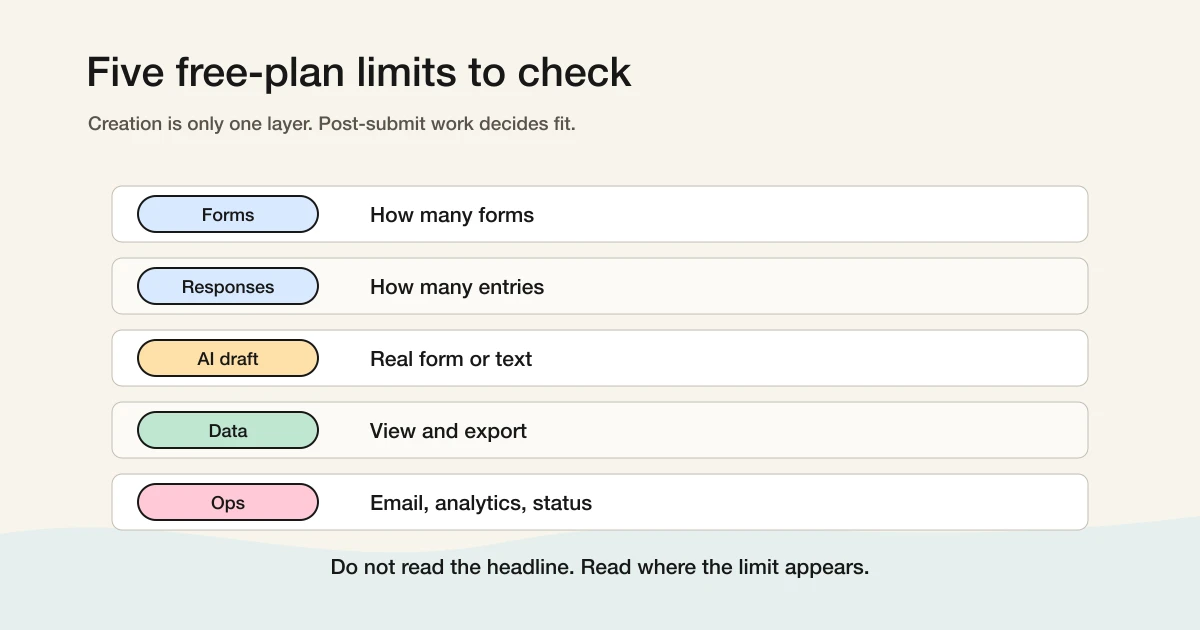
First, check form count. Test forms, campaign forms, event forms, team forms, and duplicate versions add up quickly.
Second, check response count. A free plan with a small response allowance may work for a test but fail during a launch, webinar, hiring campaign, or survey.
Third, check what AI actually does. Does it produce a real form inside the product, or only a list of suggested questions? Can you revise the generated form through chat?
Fourth, check data access. Can you view all responses? Can you export CSV, Excel, or Sheets data? A free plan is not useful if your data becomes difficult to retrieve.
Fifth, check post-submission operations. Search, status, email, notifications, reminders, analytics, routing, and spam or sales-pitch classification often matter more than generation.
Comparison of Major Free AI Form Builder Options
Checked October 15, 2026. Storage, publication conditions, AI access, and required features need separate checks.
| Service | Free-plan boundary | Comparison task |
|---|---|---|
| Google Forms | Standard per-form limits: 1 GB and 500,000 responses, with existing enterprise-form exceptions | Collection and Sheets; Gemini eligibility separately |
| Tally | Unlimited forms/submissions under fair use; official MCP | Drafting, logic, response review |
| Fillout | Unlimited forms, 1,000 responses/month | Logic, CSV, integrations |
| Jotform Starter | 5 active forms, 100 monthly submissions, 500 stored submissions, plus other quotas | Documents, approvals, integrations |
| Typeform | 10 responses/account/month; paid-feature trials can affect publication | Conversational display and publication |
| FORMLOVA | No form/response count cap; custom replies and detailed analytics require Standard or above | Draft, publish, search, status, CSV |
Google also documents native close dates and response caps. Simultaneous submissions can exceed the chosen response cap; a response limit is not a guaranteed seat reservation.
Google Forms: The Baseline Free Form Builder
Google Forms is a practical collection and Sheets option. It is not unlimited: its response-management help documents per-form limits, enterprise exceptions, and native close-date/response-limit settings.
Gemini-assisted creation has separate eligibility. Check the account and plan allowed by Help me create; ordinary Forms access does not mean every user has free Gemini creation. If collection and handoff already work, there is no need to migrate just to try AI.
Tally: Strong When the Main Requirement Is Free Usage
Tally is one of the strongest choices if your main requirement is broad free usage.
Tally's official pricing page presents a generous free plan, including unlimited forms and submissions under fair-use expectations. It also includes capabilities such as conditional logic and file uploads that many tools reserve for paid tiers.
Tally is also relevant in the MCP conversation. Its official content around MCP form builders shows that Tally is thinking about AI clients interacting with forms, not only manual dashboard editing.
Use Tally when you want a generous free form builder, need many forms or responses, prefer a lightweight writing-like editor, or want to explore MCP-related form workflows.
The question is what happens after submissions arrive. If you need response classification, status updates, lead routing, email follow-up, cross-form analytics, or team operations, check whether Tally alone covers it or whether you need other systems.
Fillout: Practical Free Plan for Business Forms
Fillout is strong when you want to test real business forms on a free plan.
Its official pricing page lists unlimited forms on the free plan and a clear monthly response allowance. It also includes useful capabilities such as multi-page forms, conditional logic, file uploads, workflows, and PDF generation.
Use Fillout when you need conditional logic, multi-page flows, business-style forms, or integrations with tools like Airtable, Notion, and Google Sheets.
The paid boundary to check is around scale, advanced analytics, branding, custom domains, and team features. If those matter, inspect the plan comparison before committing.
Jotform: Strong AI Creation and a Broad Platform
Jotform has a clear AI form creation story.
Its official AI Form Generator page describes a prompt-based workflow: describe the form, let AI create it, edit questions and design through chat, then review and share.
Jotform is also a broad form platform. Templates, widgets, payments, signatures, PDFs, apps, and integrations are all part of the ecosystem.
Use Jotform when you want AI-assisted creation plus a mature all-purpose platform. The free plan is useful for testing, but pay close attention to form count, monthly submissions, storage, branding, and AI-related usage caps.
If your Jotform question is specifically about the MCP Server rather than the free builder market, use the focused Jotform MCP Server and FORMLOVA comparison.
Typeform: Great Experience, Free Plan as Evaluation
Typeform is best known for its respondent experience.
The one-question-at-a-time interface can make forms feel more conversational and polished. If your form is part of a brand campaign, lead capture flow, customer research process, or landing page funnel, that experience can matter.
Typeform also has AI-assisted creation features, but the free plan is best treated as an evaluation tier. Official pricing materials describe the free plan as a way to try basic capabilities with limited response volume.
If your Typeform question is specifically about the MCP Server rather than free-plan evaluation, use the focused Typeform MCP Server and FORMLOVA comparison.
If the main requirement is "collect many responses for free," Typeform is usually not the first candidate. Compare Google Forms, Tally, Fillout, and FORMLOVA as well.
FORMLOVA: Free Forms and Responses, Operations When You Need More
FORMLOVA's Free plan has unlimited forms and unlimited responses.
It also allows full response viewing, response search, status management, CSV / Excel export, basic analytics, and chat-driven creation and review. The intent is simple: do not hold user data hostage.
The free plan covers the basic loop:
Create forms
Publish them
Collect responses
View all response data
Search and manage responses
Export CSV or Excel
Check basic status
Use chat to create and inspect drafts
FORMLOVA's distinction is that it is not only an AI form generator. It is an MCP-native form service. With an MCP-compatible client such as Claude, ChatGPT, Cursor, or another AI agent environment, the form service can be operated through chat. FORMLOVA currently exposes 174 MCP tools across 24 categories.
Paid plans add deeper operations: custom auto-reply emails, reminders, conditional emails, advanced analytics, traffic source analysis, A/B testing, CRM sync, Google Sheets automation, email branding, team management, and paid event support.
So the free-to-paid boundary is not "pay to access your data." It is "upgrade when you want the system to run more of the operation for you."
That boundary comes from a first-party product decision. A form's value is hard to judge before real submissions arrive. You do not know whether status management, CSV export, reminders, or custom auto-replies matter until people actually use the form. FORMLOVA keeps the free tier broad so users can create, collect, inspect, and then decide which operations are worth automating.
For the hands-on creation workflow, read ChatGPT Form Builder Guide. For the category distinction, read MCP Form Builder vs AI Form Builder.
Test free plans with the same short survey
Compare free plans using the fields and post-submission checks you actually need. A small study-session feedback form can start with the session attended, satisfaction, and an optional comment.
Suggested request; not an executed result:
Draft an anonymous study-session survey: single-choice session attended, a balanced five-option satisfaction question from Very dissatisfied to Very satisfied including Neutral, and an optional comment. Do not ask for name or email. Show the draft for mobile review before publication.
Send fictional responses and check required versus optional fields, choices, basic counts, and CSV columns with submission time. Test this range on FORMLOVA Free. Small test data checks usability, not the wider audience’s opinions. Compare Standard-or-above detailed analytics, custom replies, and Sheets sync separately; the AI client’s fees follow its provider’s terms.
Try this anonymous survey on Free
Compare free plans using the fields and post-submission checks you actually need. A small study-session feedback form can start with the session attended, satisfaction, and an optional comment.
Sign up free to draft anonymous workshop survey
After registration and email verification, connect a supported AI client and use the request above to draft the form. Review it before test publication. AI-client access and fees follow that provider’s terms.
When a Free Plan Is Enough
A free plan is enough when the form is low-risk and follow-up is simple: an internal survey, RSVP, classroom form, community form, customer feedback form, prototype intake, or first test of an AI form builder.
At this stage, do not overbuy. Create one form, publish it, collect a few real submissions, and inspect what happens next. The right product often becomes obvious only after responses start coming in.
Ask whether you can find the responses that matter, export the data, tell which submissions need action, send the next message easily, and keep the workflow running if volume grows.
When to Upgrade
Upgrade when the form becomes operationally important.
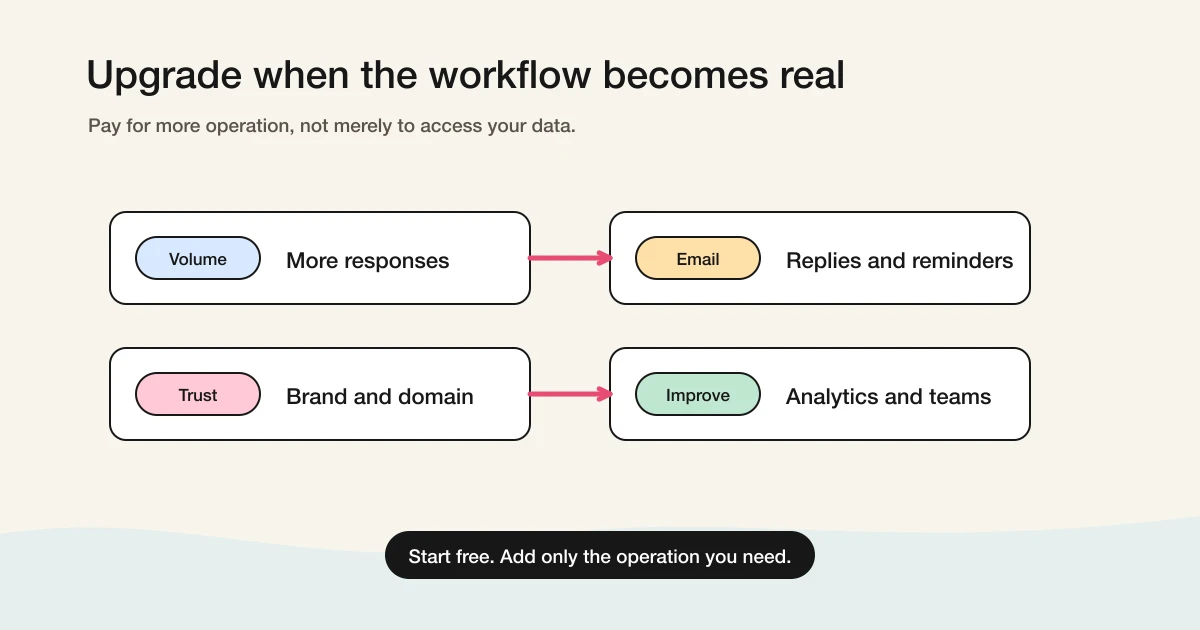
That usually happens in four situations.
First, you hit response or usage limits. A free plan may be fine for a test but risky for a launch campaign or webinar with unpredictable volume.
Second, you need email operations: auto-replies, reminders, conditional follow-ups, or scheduled messages.
Third, you need branding or trust: custom colors, logos, sender names, custom domains, or removal of product branding.
Fourth, you need analytics or team workflows: completion rates, traffic sources, drop-off analysis, free-text analysis, cross-form comparisons, permissions, or audit logs.
The right question is not "Can I avoid paying forever?" It is: "Can I start for free without losing access to my data, then upgrade only when the workflow is worth automating?"
Checklist Before You Choose
Use this checklist before choosing a free AI form builder:
[ ] How many forms can I create for free?
[ ] How many responses can I collect for free?
[ ] Can I view all responses?
[ ] Can I export CSV, Excel, or Google Sheets data?
[ ] Does AI create a real draft form or only field suggestions?
[ ] Can I edit the generated form through chat?
[ ] Are auto-replies, reminders, and notifications free or paid?
[ ] Can I remove branding if needed?
[ ] Can I search, tag, or update response statuses?
[ ] Does the upgrade reason match my actual workflow?
If a tool only passes the "AI can generate a form" test, keep comparing. The better free plan is the one that still works after submissions arrive.
FAQ
What is the best free form builder?
For simple collection, Google Forms is still the baseline. For broad free usage, Tally is one of the strongest options. For practical business forms, check Fillout and Jotform. For polished conversational forms, check Typeform. If you want free forms and responses plus response search, exports, status, and MCP-based operations, compare FORMLOVA.
What is the best free form generator?
If you mean a tool that generates fields from a prompt, compare Jotform AI Form Generator, Fillout AI Form Builder, Google Forms with Gemini availability, and FORMLOVA's chat-based form creation. If you mean a generator that can also handle responses after launch, check response access, export, status, and follow-up features before choosing.
What is the best free AI form builder?
It depends on the job. Google Forms is best for simple free collection. Tally is strong for generous free form creation. Fillout is strong for practical business forms. Jotform is strong for AI-assisted creation and a large ecosystem. Typeform is strong for polished respondent experience. FORMLOVA is strongest when you want free forms and responses plus chat-based operations through MCP.
Can Google Forms create forms with AI for free?
Google Forms is a strong free form builder. Gemini-assisted creation exists, but availability depends on account type, plan, and rollout. Check Google's official Help and Workspace Updates pages before assuming the feature is available in your environment.
Which free form builder has unlimited responses?
Tally presents a generous free plan with broad usage under fair-use expectations. FORMLOVA keeps forms and responses unlimited on every plan. Always check current pricing pages because fair-use terms, email limits, branding rules, and advanced features can differ.
Is an AI form builder different from a normal form builder?
Yes, but the important difference is not only generation. A normal form builder lets you manually create fields. An AI form builder can draft a form from a prompt. A stronger AI form system can also help edit the form, inspect responses, export data, and run post-submission operations.
What does FORMLOVA include on the Free plan?
FORMLOVA includes unlimited forms and responses, full response viewing, response search, status management, CSV / Excel export, basic analytics, and chat-based form creation and review. Paid plans add custom email operations, reminders, advanced analytics, CRM and Google Sheets integrations, branding, team management, and paid event support.
References
- Google Workspace Updates: Form creation with Gemini and more now available in more languages
- Google Docs Editors Help: Create a form with Gemini in Google Forms
- Jotform AI Form Generator
- Jotform Pricing
- Tally Pricing
- Tally MCP Server
- Fillout Pricing
- Fillout AI Form Builder
- Typeform Pricing
Disclosure and Verification
The text was revised on October 15, 2026. This round checked Google’s native closing controls and 500,000-response/1 GB limits, plus the distinction between Jotform Starter monthly submissions and total storage. The May/June source checks and search data below are historical. This is not a full recheck of every AI entitlement or paid price.
This article is for people comparing free form builders, free form generators, and free AI form builders. I work on FORMLOVA, so I include FORMLOVA in the comparison. I rechecked official pages from Google, Jotform, Tally, Fillout, and Typeform on June 18, 2026, including Google Forms Gemini help, Jotform AI Form Generator, Jotform Pricing, Tally Pricing, Tally MCP Server, Fillout Pricing, Fillout AI Form Builder, and Typeform Pricing. On June 26, 2026, I updated the title, meta description, and opening answer based on Search Console query wording; I did not add new external pricing or plan claims. Free limits, AI features, and pricing can change, so confirm the latest details on official pages before choosing.