
Reduce automated abuse at the entrance, then classify unwanted sales proposals after submission. A notice or CAPTCHA does not reliably identify the meaning of a human-written pitch. First protect your ability to find genuine inquiries.
Last updated: October 15, 2026
You put a contact form on your site so customers, leads, partners, or applicants could reach you.
Then the inbox changed.
Instead of real questions, you started receiving sales pitches, SEO offers, recruiters, outsourcing proposals, and generic "partnership" messages. The real inquiry, if there is one, gets buried in noise.
That is the contact form spam problem.
This guide covers two layers:
- How to make unwanted sales messages harder to send.
- How to sort what still gets through, without deleting real inquiries by mistake.
The second layer matters because no front-end defense is perfect.
For the broader contact-form operating model, start with the Contact Form Operations Guide. This article focuses on the contact-form spam and sales-pitch problem: reducing it before submission, then sorting what still arrives.
For the broader post-publish AI operations layer, use the MCP form service guide.
If your current stack is Google Forms, start with Google Forms Spam Prevention for settings such as email collection, one-response limits, validation, and closing old forms.
Quick Answer: Stop Contact Form Spam in Two Layers
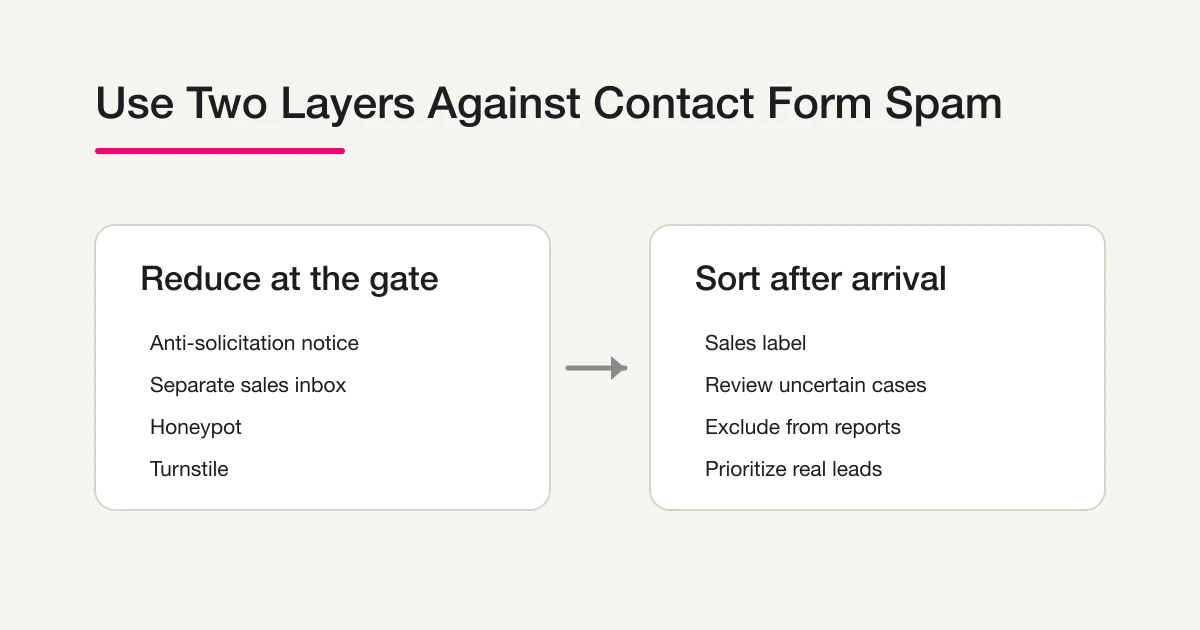
If you searched for "form spam," "contact form spam," or "contact form to email builder spam," the practical answer is not one setting. Use a two-layer system: reduce junk before submission, then sort what still arrives.
| Layer | Goal | Examples |
|---|---|---|
| Reduce at the gate | Make low-quality or automated submissions harder | Anti-solicitation notice, separate sales route, honeypot, reCAPTCHA, Turnstile, consent checkbox |
| Sort after arrival | Keep real inquiries visible even when spam gets through | Sales labels, manual review of uncertain cases, report exclusion, workflow filters |
If your form only gets a few messages a month, the first layer may be enough.
If your team receives enough sales pitches that reporting, notifications, or lead handling becomes unreliable, you need the second layer too.
If the issue is WordPress-specific, especially Contact Form 7 Turnstile, use the Contact Form 7 Spam Defense guide. This page stays focused on the broader contact-form and form-to-email spam workflow.
If Your Form-to-Email Builder Is Getting Spam
Many simple contact-form-to-email builders send every valid submission directly to the inbox. That makes the spam problem look like an email problem, even though the weak point is usually the form workflow.
Start with the front door:
- Put a short anti-solicitation notice next to the form.
- Add a bot layer such as Turnstile or reCAPTCHA.
- Use a honeypot only if your builder also checks the field and rejects the relevant submissions; hidden-field support alone is insufficient.
- Route sales or vendor proposals to a lower-priority path.
Then fix the inbox layer. Do not rely on email spam filters alone. They can hide real inquiries, and they do not clean up form analytics. Label sales pitches, keep suspicious messages reviewable, and exclude junk from reports after submission.
Why Sales Pitches Reach Contact Forms
Contact form spam exists because sending through forms has become operationally easy.
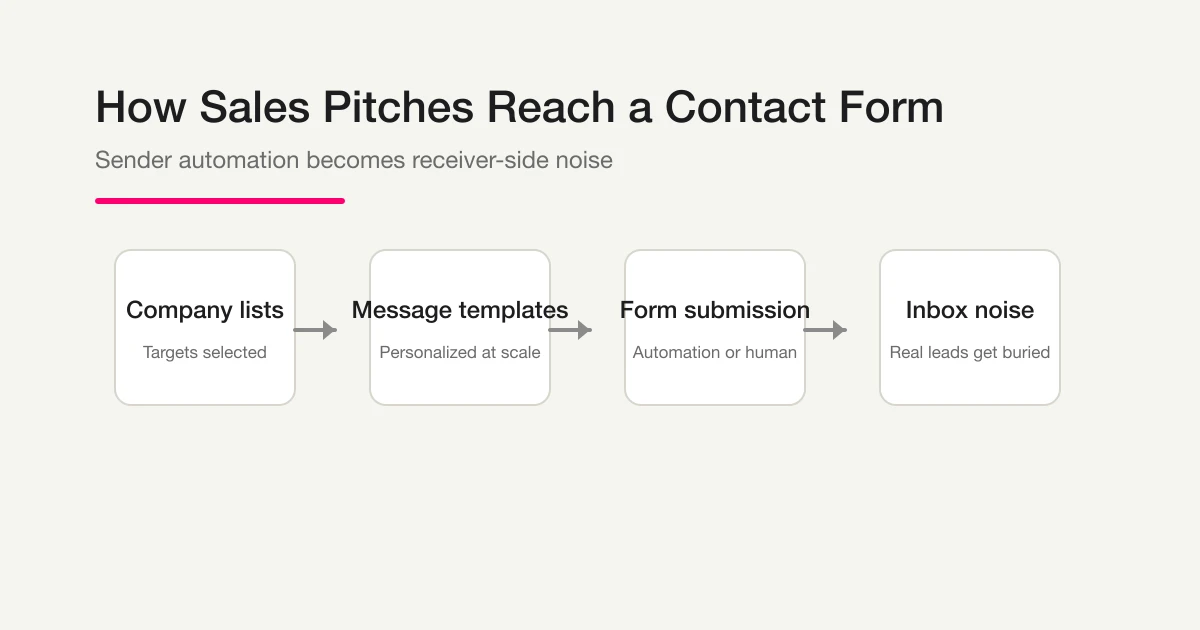
Some senders use company databases, templates, and automation. Some use human contractors. Some use tools that read a form, infer required fields, and submit a pitch at scale. The sender sees a low-cost outreach channel. The receiver sees operational noise.
That asymmetry is the heart of the problem.
There is also a category mismatch.
A contact form says "contact us." The sender interprets that as "I can contact you." Your team intended it for customer inquiries, not cold outreach.
That is why a clear policy helps.
Defense 1: Add an Anti-Solicitation Notice
This is the cheapest useful step.
Put a short notice immediately above or below the form, not only in the footer.
Copy-paste template:
This form is for product and service inquiries only.
Sales pitches, recruitment outreach, and unsolicited proposals
will not receive a response.
Firmer version:
This form is intended for prospective and current customers.
Sales, marketing, recruitment, and partnership outreach are not
accepted through this form and will not be answered.
This will not stop every sender. But it filters out senders that respect your policy, and it gives your team a clear basis for ignoring unsolicited messages.
In FORMLOVA, you can add this by asking:
Add an anti-solicitation notice above the contact form.
Defense 2: Separate Sales Outreach from Real Inquiries
If sales outreach is unavoidable, give it a separate route.
For example:
- Contact us
- Sales, vendor, or partnership proposals
Some senders will choose the sales route. That keeps your real contact form cleaner.
The sales route does not need to be treated as a high-priority inbox. Many teams review it occasionally. The point is to stop unsolicited messages from mixing with real customer requests.
In FORMLOVA, you can create two forms for free. The Free plan sends a six-hour digest of new responses across the owner's forms to the owner's account email; it does not use form-specific notification recipients. Separate per-form recipients and response-by-response notifications require Standard or above. Verify actual receipt before relying on the route. Response notifications do not consume the email quota. For that paid notification setup, the request could be:
Create one form for customer inquiries and another for sales proposals.
Send customer inquiries to support@ and sales proposals to vendor-inbox@.
Defense 3: Use a Honeypot Field
A honeypot is a hidden field that humans do not see.
Basic bots often fill every field they find in the markup. If a hidden field is filled, the submission is probably automated.
Honeypots are useful because they do not interrupt real users. They are also limited. They do not stop human senders, and they may not stop more careful automation.
Use them as a cheap filter, not as the whole strategy.
Hidden fields and a working honeypot are different. Adding a hidden field in FORMLOVA does not by itself inspect its value and reject submissions. Check that the chosen service implements the rejection step as well. For implementation checks, accessibility risks, autofill false positives, and when to move to CAPTCHA, read the Contact Form Honeypot Guide.
Defense 4: Use reCAPTCHA or Cloudflare Turnstile
Google reCAPTCHA v3 and Cloudflare Turnstile are common bot-protection layers.
Google's reCAPTCHA v3 documentation explains that it returns a score for requests without interrupting users, and that site owners should choose actions based on risk. Cloudflare's Turnstile documentation describes embedding a widget and says server-side validation with Siteverify is mandatory.
These tools are useful.
But they are not magic.
They are designed to reduce automated abuse. They do not stop a real person typing a sales message into your form. If you still receive sales pitches after adding CAPTCHA-class protection, human or assisted-human sending is a likely reason.
FORMLOVA supports Cloudflare Turnstile, but its display and whether verification rejects a submission depend on the operating configuration. An observation-only configuration is not the same as blocking abuse. Test normal submission and record capture on the published form before distribution, and check sales-message classification separately.
If you are choosing between a honeypot, reCAPTCHA, Turnstile, and hCaptcha, use the honeypot vs reCAPTCHA comparison. This article stays focused on the broader sales-spam and response-sorting workflow.
Defense 5: Add a Non-Sales Confirmation Checkbox
Some teams add a required checkbox:
I confirm that this is not a sales or promotional inquiry.
It can help a little, mostly as a psychological barrier. It also makes your policy explicit at the moment of submission.
Do not overestimate it.
Senders can tick the box anyway. Automation that understands form labels can also treat it as just another required field. Use the checkbox as part of the system, not as the system.
Legal and Operational Notes
Keep records of repeated submissions, timestamps, message content, and the notice displayed on your site. The submission channel alone does not establish whether an individual message is lawful. For a specific legal decision, use the relevant official guidance and qualified advice. A no-solicitation notice explains your form’s purpose; it is not a guarantee of legal protection.
Why Front-End Defenses Are Not Enough
The five defenses above reduce unwanted submissions. They do not eliminate them.
There are three reasons:
- Human senders pass CAPTCHA and honeypots.
- Assisted automation can read field labels and fill required fields.
- Some senders ignore anti-solicitation notices.
So the operational question becomes: what happens when the message arrives anyway?
If you manually read every response, you lose time.
If you skip triage, your reports become wrong. Ten "inquiries" might actually be two real inquiries and eight sales pitches. Conversion rate, cost per inquiry, and channel quality all become distorted.
This is where post-submission sorting matters.
What Not to Do
Do not make the form hostile to real users just because sales pitches are annoying.
Avoid long warning blocks, aggressive legal language, excessive required fields, or multiple challenge layers stacked together. A real customer with a real question should not feel like they are being punished before they can contact you.
Also avoid silently deleting everything that looks like sales. A short message from a real buyer can sometimes look promotional. A partnership inquiry can be relevant. A recruiter may be noise for one company and a valid contact for another. The safer pattern is to label, filter, and review uncertain cases.
Your goal is not to make the form impossible to submit. Your goal is to keep the useful messages visible.
Sort After Arrival Instead of Blocking Everything
The tempting idea is to block anything that looks like sales.
FORMLOVA does not take that approach by default.
The cost of dropping one real inquiry is higher than the cost of letting one sales pitch remain visible. So FORMLOVA labels responses instead of deleting them.
The labels are:
legitimate
sales
suspicious
The practical workflow is:
- Real inquiries stay visible.
- Sales-labeled responses can be excluded from reports.
- Suspicious responses can be reviewed manually.
- Manual corrections stay under human control.
This keeps the system useful without turning AI into a silent gatekeeper.
How FORMLOVA Handles Contact Form Spam
FORMLOVA provides sales-message classification, response search, and response-status management from Free. Classification runs asynchronously and can be pending or wrong. Keep the original response available, inspect the label, and use the review controls rather than treating the label as proof that a message should be deleted.
A hidden field is not automatically a working honeypot. A visible Turnstile widget is not proof of server-side verification. Check the actual public route instead of assuming every defense in this article is always active.
Test collection, classification, search, and status review first. Custom replies and detailed analytics require Standard or above. External notifications or CRM workflows need their own authentication, permissions, condition checks, and delivery verification.
Test classification without losing a real inquiry
Separate entry defenses from classification after submission. Build a contact form with Product inquiry and Sales proposal categories, then submit a fictional genuine inquiry and a fictional sales pitch. Classification can be wrong; do not make deletion or rejection depend only on the label.
Suggested request; not an executed result:
Draft a contact form with name, email, category (Product inquiry, Support, Sales proposal, Other), and message. Show the fields and sales-detection settings before publication. Keep classification reviewable by a person; do not configure automatic deletion or external notifications.
After a reviewed test publication, check that both submissions are saved, inspect classification, and find the genuine inquiry. Review pending or wrong labels, update the chosen response status, and fetch it again. Creation, response review, sales classification, and status management are a Free-plan test. Custom replies and detailed analytics require Standard or above.
Try this inquiry review on Free
Separate entry defenses from classification after submission. Build a contact form with Product inquiry and Sales proposal categories, then submit a fictional genuine inquiry and a fictional sales pitch. Classification can be wrong; do not make deletion or rejection depend only on the label.
Sign up free to draft inquiry triage
After registration and email verification, connect a supported AI client and use the request above to draft the form. Review it before test publication. AI-client access and fees follow that provider’s terms.
Official Sources Checked
Checked on June 26, 2026.
- Consumer Affairs Agency: Act on Regulation of Specified Electronic Mail
- Google for Developers: reCAPTCHA v3
- Cloudflare Docs: Turnstile client-side rendering
FAQ
What is the first thing I should do to reduce contact form spam?
Add an anti-solicitation notice next to the form and enable a bot-protection layer such as reCAPTCHA or Turnstile. Then add a honeypot and separate sales proposals from real inquiries if volume stays high.
Why do sales emails still arrive after CAPTCHA?
CAPTCHA-class tools reduce automated abuse. They do not stop a human sender, a contractor, or a careful assisted workflow from submitting the form.
Should I block sales messages completely?
Be careful. Blocking is convenient, but false positives can cost real business. Labeling and filtering are safer than silent deletion.
Can I do these defenses on WordPress or another form tool?
Yes. Anti-solicitation notices, reCAPTCHA, Turnstile, honeypots, and checkboxes are portable. The harder part is post-submission classification and reporting cleanup.
Summary
Start with the concrete form and checks above. Review the draft, publish a test, and inspect saved responses before deciding whether to migrate or automate. Keep the current tool if it meets the need. Add paid features for a named operational requirement, and verify setup and delivery rather than treating a suggested request as a completed workflow.
Disclosure and Verification
Disclosure: I work on FORMLOVA. Most of this guide describes defenses that work on almost any form service. The FORMLOVA section explains how we handle the remaining messages after they arrive. Legal notes are general operational context, not legal advice. Official sources for the legal and bot-protection sections were checked on June 26, 2026. The June 26 update used the 2026-06-23 Search Console 90-day export to strengthen form spam, contact form spam, and form-to-email builder intent.
Related Articles
- Contact Form Response Management Guide -- Owners, Status, Sales Spam, and Follow-Up
- Contact Form Template -- Fields, Privacy Notice, Auto-Reply, and Routing Structure
- FORMLOVA Form Automation Guide -- Auto-Replies, Routing, Sheets Sync, and MCP Operations
- Contact Form 7 Spam Defense -- Turnstile, reCAPTCHA, Akismet, and Sales-Pitch Sorting
- Google Forms Spam Prevention -- Reduce Junk Responses, Duplicates, and Sales Pitches
- Honeypot vs reCAPTCHA for Contact Forms -- Turnstile, hCaptcha, and Sorting
- Contact Form Honeypot Guide -- Reduce Form Spam Without CAPTCHA