
Last updated: October 15, 2026
I built sales email detection to organize review and reporting without discarding genuine enquiries. Responses are classified after saving, and people can correct the result. The story about eight sales pitches out of ten below is a historical personal experience, not a statistic for every contact form.
The initial three-label model now has four labels: legitimate, sales, suspicious and junk. The feature supports all plans for new responses to enabled non-paid forms; paid forms are excluded. Turning it on does not establish qualified-lead counts or conversion performance.
New eligible forms default to detection enabled. They need at least one supported free-text input; selection-only forms and paid forms are excluded. Inspect the actual setting, and disable it if inappropriate. Older forms retain their settings; undecided eligible older forms can require a choice before publishing. The published checklist should disclose classification and the processing of responses by an external AI service.
The short version
FORMLOVA built sales email detection because the value of a form is decided after submission.
A form does not end when a respondent clicks submit. The response still has to reach the right person, feed the right report, trigger the right workflow, and become the basis for a decision. If sales pitches are mixed into that stream, the downstream decisions become less trustworthy.
| Problem | What happens | FORMLOVA's approach |
|---|---|---|
| Sales pitches bury real inquiries | Operators spend time finding the responses that matter | Label each response |
| Ad reporting includes pitches | CVR and CPA become misleading | Exclude sales-labeled responses from analysis |
| Notifications are full of noise | Teams stop trusting the alert channel | Use labels in workflow conditions |
| AI false positives are risky | A real inquiry could be hidden | Keep uncertain cases legitimate and allow manual overrides |
The goal is not to delete sales emails.
The goal is to protect real inquiries by making sales noise visible and separable.
The day 8 out of 10 were sales pitches
The moment that made this feature feel unavoidable came from a client workflow.
I opened a contact form response list to prepare a weekly ad report. There were ten responses. Eight were sales pitches: SEO consulting, ad management, recruiting, outsourced production, and other vendor proposals. They were not broken spam strings. They were polite messages written by people or systems that sounded like people.
From the form owner's perspective, though, most of them were not inquiries.
The work was obvious. Read each response. Decide whether it is a real inquiry, a sales pitch, or something unclear. Remove the sales pitches. Calculate performance from the two remaining responses. Put the cleaned number in the report.
Simple work can still be expensive when it repeats every week.
If I reviewed carefully, it took time. If I reviewed roughly, the numbers lied. Neither path felt like good form operations. That was the point where I stopped seeing this as a manual cleanup task and started seeing it as a product problem.
Manual filtering looks like work outside the form
Sales email cleanup often appears to happen outside the form service.
Someone reviews the response list. Someone deletes rows from a spreadsheet. Someone removes pitches before preparing a marketing report. Someone ignores Slack notifications because too many of them are vendor outreach.
But if the form is the front door to the workflow, the meaning of each response is not outside the form. It is part of the form's output.
A response is not just text. It has intent. It may be a real buyer inquiry, a support request, a recruiting message, a partnership note, or a sales pitch. If the form service passes all of those downstream as the same object, every next step becomes duller.
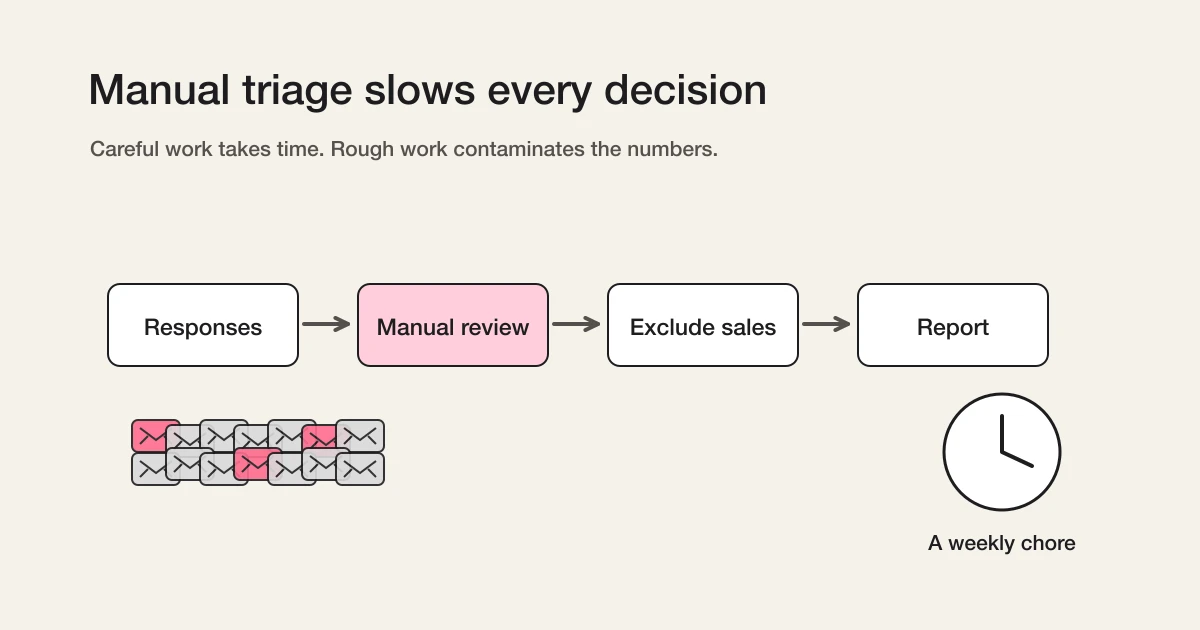
In marketing, this directly affects reporting. If ten form submissions include eight sales pitches, a campaign may look healthier than it really is. In operations, it affects response time. When the inbox is noisy, real inquiries wait longer. In team workflows, it affects trust. A notification channel that keeps sending low-value noise eventually gets ignored.
So this is not only a spam problem.
It is an operations trust problem.
Why classify instead of block
When people hear "sales email detection", the first instinct is often blocking.
CAPTCHA, Turnstile, honeypots, sales-disallowed text, and consent checks all help. They reduce obvious bot traffic and deter some outbound operators. I recommend those tactics in Contact Form Sales Pitch Defense.
But front-door defenses have limits.
Human-written pitches can pass through them. So can messages generated or adapted to fit the page context. A contact form that is too strict can also create the failure mode I care about most: a real inquiry gets treated as unwanted and disappears.
The most expensive mistake is not receiving one extra sales pitch.
The most expensive mistake is losing one legitimate inquiry.
That may be a buyer, a partner, a candidate, a support request, or a person who is still deciding whether to trust the company. The contact form is often the first place where that person reaches out. Closing the door too aggressively protects the inbox but risks the relationship.
That is why FORMLOVA classifies after submission.
Receive the response. Understand its intent. Separate it in analytics, exports, and workflows. Keep uncertain cases reviewable. This order is safer for real operations.
The core design principle is when in doubt, legitimate
The hardest product decision was not which model to call.
It was which direction the system should lean when the answer is unclear.
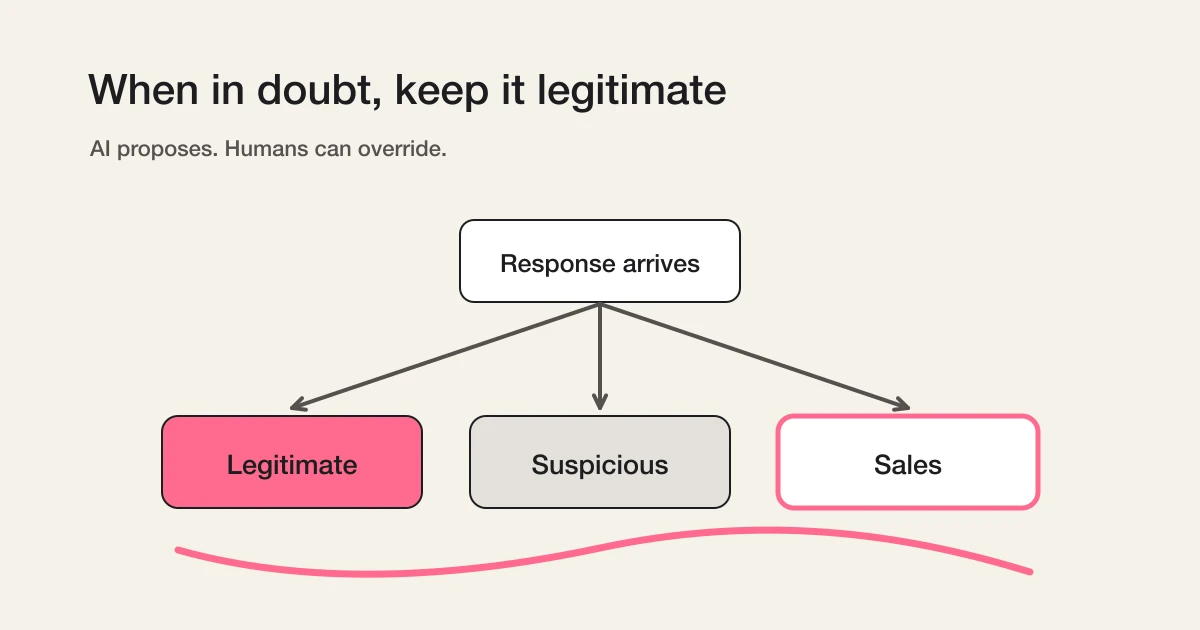
FORMLOVA leans toward legitimate. If a response contains language that might be commercial but could still match the purpose of the form, it should not be immediately treated as sales. If it mixes sales-like language with a possible real inquiry, it can become suspicious for review.
"I would like to discuss a partnership with your service" can be a sales pitch. It can also be a real partnership inquiry. "We can introduce your product to our clients" may be vendor outreach, or it may be a channel opportunity. If the system labels every ambiguous business message as sales, it may look precise and still be wrong for the business.
So the internal posture is conservative:
AI proposes. Humans decide.
The model gives the first label. The operator can override it. A manual correction is treated as the final human decision for that response.
Without that separation, AI classification feels like a black box that might hide the wrong thing.
Check whether the approach fits your own intake
The following is a proposed trial request, not a result measured for this article. Use a test form before changing an existing live form.
Create a private contact-form test draft with enquiry type and message. Use hypothetical genuine enquiries, clear pitches, ambiguous partnerships and unrelated posts to build a human-review checklist and expected-label table. Present this as a test plan, not measured classification output. Do not publish, submit or change actual responses. Leave ownership for unclassified and misclassified records as an explicit open item.
Check the output before proceeding:
- Is purpose considered instead of rejecting every message containing sales-like words?
- Does the plan review unclassified/suspicious as well as samples of excluded sales/junk?
- Are hypothetical examples, model suggestions and human-confirmed judgements separate?
Try reviewable classification rather than deletion
Free supports the draft and eligible form settings. Testing saved-response classification requires actual responses after publishing; preview alone cannot measure it.
Create a free classification test draft
Create an account, verify your email, connect FORMLOVA to a supported AI chat, then paste the proposed request above. Review the saved draft before publishing.
The current four labels and the value of uncertainty
The initial explanation used legitimate, sales and suspicious. The current system adds junk for meaningless, link-only and unrelated submissions.
| Label | Role | Human review |
|---|---|---|
| legitimate | Fits the form purpose | Normal response process; not proof of a qualified lead |
| sales | Pitches and solicitation | Exclusion candidate; sample for false positives |
| suspicious | Ambiguous or mixed context | Read the content |
| junk | Unrelated, meaningless or link-only content | Exclusion candidate; sample for mistakes |
Unclassified includes pending or failed processing. Sales exclusion removes sales and junk but retains suspicious and unclassified. That remainder is not automatically genuine enquiries or qualified leads.
Retaining uncertain messages and checking excluded labels are both necessary. Confidence scores do not guarantee correctness.
Guardrails against over-trusting AI
Sales email detection uses AI, but the product is intentionally not built around blind trust.
Several guardrails follow from that principle:
- Classification runs after the response is saved, so a classification delay does not break form submission.
- The feature is enabled per form, not forced across every form.
- Eligible new forms default to enabled and can be disabled; eligible older undecided forms may require a choice before publishing.
- Manual label corrections are not silently overwritten by later automatic runs.
- Selection-only forms are excluded from classification.
- Paid forms using Stripe Connect are excluded because a pitch that requires payment is an unlikely path.
The question is not only "can AI classify this?" The better question is "what happens when the classification is late, missing, or wrong?" FORMLOVA keeps submission reliable, manual control available, and uncertain responses visible.
Why it is available on all plans
I did not want sales email detection to become a premium privilege.
Small teams need it too. In fact, they may need it more. If one person handles every inquiry, eight irrelevant messages inside ten submissions can consume the attention budget for the whole day. A small team cannot always absorb that kind of review tax.
Sales email detection is not an advanced analytics luxury. It is part of finding the real response.
Server-side classification does create cost for FORMLOVA. I still think this belongs in the baseline product. Creating and publishing a form is only the first half of the job. The second half is operating the responses that arrive.
FORMLOVA is not trying to be just a place where fields are arranged.
It is trying to make the work after submission quieter.
Why this matters more with MCP
Inspect labels and scope read-only before downstream actions. MCP email displays are masked; do not manually join them to raw addresses or use them as recipients. Use authorized full exports or supported response-recipient/server-side integration paths. A prompt alone does not establish recurring execution; inspect the automation actually saved.
Sales email detection is useful in the dashboard.
Its larger value appears when the label becomes part of MCP-driven operations.
You can ask:
Analyze this month's inquiries, excluding detected sales emails.
Show me only suspicious responses so I can review them.
This response is not sales. Mark it as legitimate.
Those are not just display features. They require response data, labels, analytics, manual correction, and workflow behavior to live in the same operational surface.
The same pattern can later extend beyond sales detection. Inside legitimate responses, there are more intents: evaluation, pricing, support, partnership, recruiting, feedback. Once a response has meaning, the next action can become much more precise.
In an MCP client, FORMLOVA can sit next to other services. That makes routing natural:
- Send evaluation inquiries to Slack.
- Send support requests to a helpdesk.
- Send partnership messages to a specific owner.
- Exclude sales pitches from analytics.
I wrote more about that broader product thesis in Why Form Operations Need an MCP Layer.
Sales email detection is the first small example of a larger idea: forms should not only collect data. They should help interpret the data and pass it to the right next step.
This does not replace front-door prevention
Classification does not make prevention unnecessary.
Sales-disallowed copy, separate sales contact paths, Turnstile, honeypots, and consent checks can all reduce volume. If a pitch never arrives, no one has to classify it. Use those controls where they fit.
But some messages will still arrive.
Human-written outreach adapts to the page. It uses natural language. It may look close enough to a real inquiry that blocking it at the door becomes risky.
That is why prevention and classification belong together.
Reduce what you can at the entrance. Classify what still arrives. Exclude sales from analytics and notifications. Review the uncertain middle. This layered approach is more realistic than hoping one gate can solve the entire problem.
Decisions to make before enabling it
Before turning the feature on, decide how your team wants to use the labels.
First, decide who reviews suspicious.
Choose review frequency by volume and response deadlines. Review suspicious/unclassified records and sample excluded sales/junk; genuine enquiries may be misclassified outside the ambiguous group too.
Second, decide how analytics should treat sales emails.
Sometimes total submission count matters. Sometimes real inquiry count matters more. Campaign reporting, channel performance, and sales follow-up usually need the sales-labeled responses excluded. Operational capacity planning may need both numbers.
Third, decide your manual correction policy.
Partnership inquiries, media requests, agency proposals, recruiting vendors, and reseller messages can sit on different sides of the line depending on your business. FORMLOVA gives the first label. Your team can define the boundary.
That is the right relationship between AI and operations.
The system should reduce the work, not remove the team's judgment.
Common concerns
Will AI mark real inquiries as sales?
It can happen, so uncertain cases are biased toward legitimate or suspicious, not aggressively toward sales. Operators can manually correct labels, and manual corrections are not meant to be silently overwritten by automation.
Does this completely stop sales pitches?
No. This is not a blocking feature. It classifies responses after they arrive. Use front-door prevention to reduce volume, then classification for the messages that still get through.
Can the label be used in analytics?
Yes. Sales-labeled responses can be excluded from analysis and response views. The setup details are in Sales Email Detection Guide.
Why not classify every legitimate inquiry by intent already?
That is the next direction. Evaluation, pricing, support, partnership, recruiting, and feedback are all useful categories. The first problem to solve was sales noise because it directly pollutes review and reporting.
Related Workflows You Can Use
Sales email detection matters most when it changes the next route. Inquiry Auto-reply + Escalation keeps legitimate inquiries moving while low-value submissions are separated from the main response path.
For day-to-day cleanup, combine it with Inquiry Owner Assignment and Sales Pitch Filtering Workflow. That keeps AI classification tied to a visible operating decision rather than a hidden label.
Closing
Start with the proposed test plan above and assign review ownership. The personal experience is historical; this rewrite did not remeasure accuracy or conversion outcomes.
A contact form is not just a set of fields.
It is the first operational surface between a person and an organization. When sales pitches mix into that surface, review, response, analysis, notification, and reporting all become heavier.
The goal of FORMLOVA's sales email detection is to remove that weight without hiding real inquiries.
That is why it classifies instead of blocks.
That is why uncertain cases stay legitimate or reviewable.
That is why manual correction matters.
AI proposes. Humans decide. The form carries that decision into the next workflow.
For practical setup, read Sales Email Detection Guide. For prevention tactics before the response arrives, read Contact Form Sales Pitch Defense.
Related articles:
- Sales Email Detection Guide -- enabling labels, review, analytics exclusion, and workflows
- Contact Form Sales Pitch Defense -- front-door prevention tactics for contact forms
- AI Now Detects Sales Emails in Your Forms -- release announcement
- Contact Form Operations Guide -- the parent guide for missed follow-up, routing, and sales-pitch handling
- MCP Form Service Guide -- the broader post-publish operations layer
- Why Form Operations Need an MCP Layer -- the broader MCP operations thesis
Disclosure and Verification
This article is part of the FORMLOVA product blog. The author is the developer of FORMLOVA. Product facts, pricing, limits, and comparison claims should be checked against the current FORMLOVA spec, plan definitions, and relevant primary sources before publication or major updates. For privacy, hiring, legal, medical, or financial workflows, follow your organization's policies and specialist review.
