
Last updated: April 28, 2026
This is the release note for FORMLOVA's sales email detection. For the broader contact-form operating model, see the Contact Form Operations Guide. For the broader post-publish operations layer, see the MCP form service guide. For setup details, see Sales Email Detection Guide. For the product rationale, see Why FORMLOVA Built Sales Email Detection. For front-door prevention tactics, see Contact Form Sales Pitch Defense.
FORMLOVA now classifies sales pitches in form responses with AI.
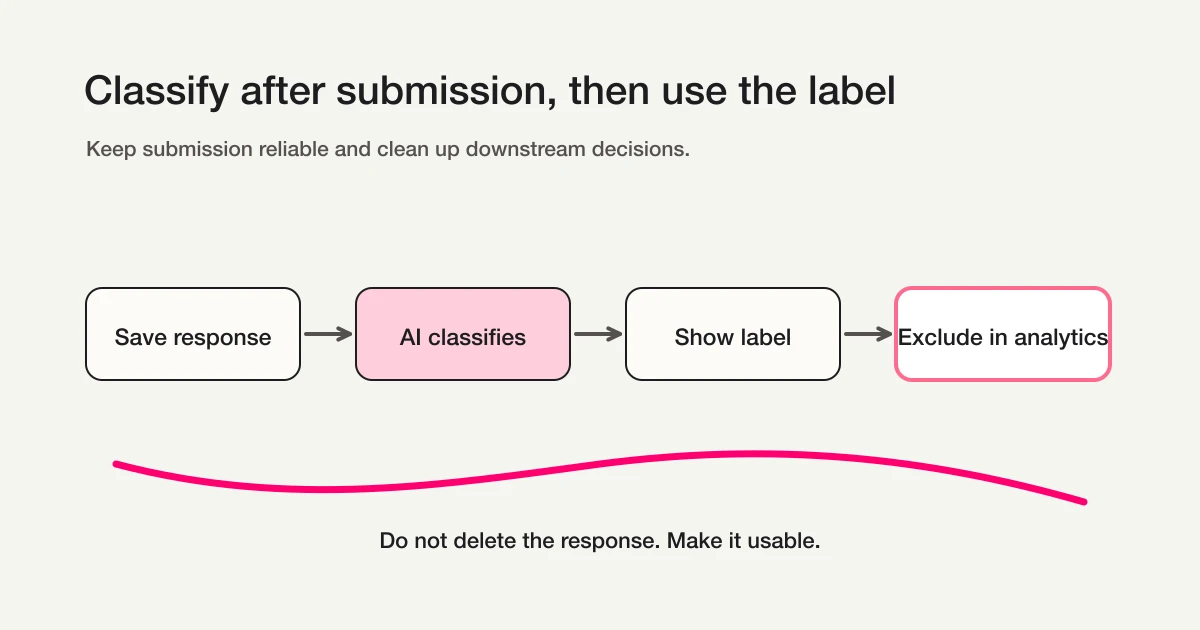
Each response can be labeled as legitimate, sales, or suspicious. The response is not deleted. The label becomes operational metadata that can be used in the dashboard, analytics, exports, notifications, and MCP-based response workflows.
Sales email detection is available on every plan, with no extra charge.
What changed
This update adds a classification layer to the work that happens after a form response arrives.
Until now, when a contact form received sales pitches, the cleanup usually happened by hand. Someone reviewed the response list. Someone removed sales rows before calculating campaign CVR. Someone ignored noisy notifications. Each task is small, but repeated cleanup is still expensive.
With this release, FORMLOVA handles the first pass of that triage.
The new capabilities are:
| Capability | What it does |
|---|---|
| AI response classification | Labels new responses as legitimate, sales, or suspicious |
| Dashboard review | Makes sales and suspicious responses easier to find |
| Analytics exclusion | Lets you analyze responses while excluding sales-labeled rows |
| Export control | Makes it easier to include or exclude sales responses depending on the task |
| Manual correction | Lets operators fix the label when AI gets it wrong |
| Workflow conditions | Lets classification become part of notification and routing logic |
The important detail is that FORMLOVA does not silently delete sales emails.
A form response can be valuable even when it is ambiguous. The product should reduce sales noise without hiding real inquiries. That is why this feature classifies instead of blocks.
The three labels
Sales email detection uses three labels.
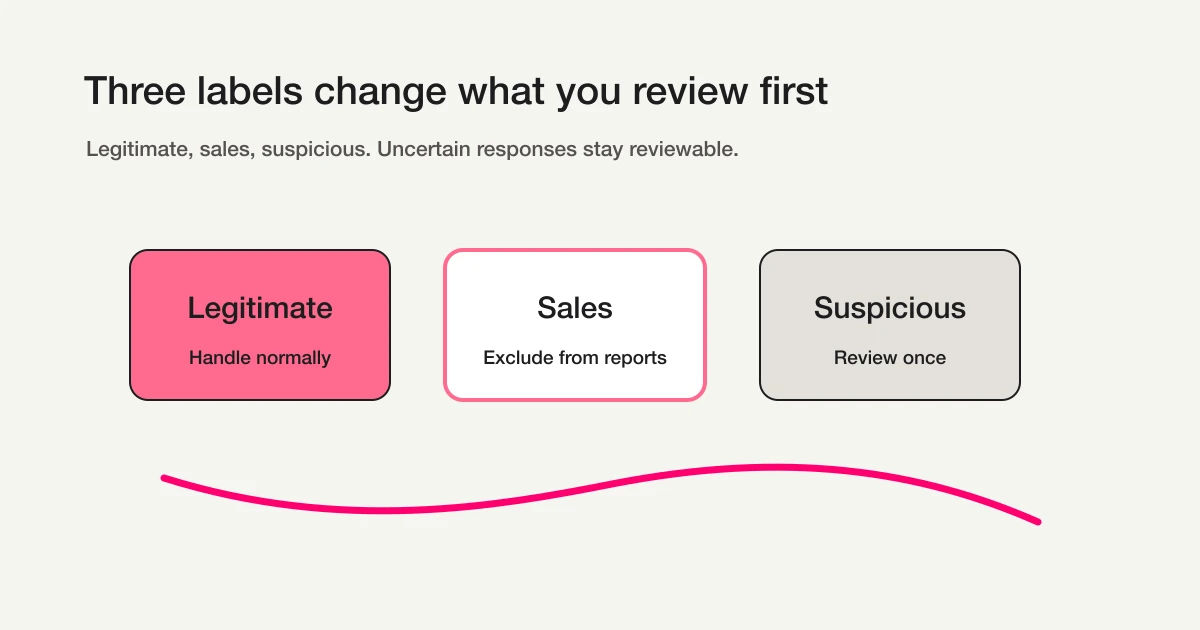
| Label | Meaning | Operational use |
|---|---|---|
legitimate | The response matches the purpose of the form | Handle normally |
sales | The respondent is promoting their own product, service, or offer | Exclude from analytics, exports, or notifications when appropriate |
suspicious | The response may be sales, but the context is not clear enough | Review manually |
A binary sales-or-not-sales label would be simpler, but less useful.
Some B2B responses are ambiguous. "I would like to discuss a partnership" may be a vendor pitch. It may also be a real partnership inquiry. FORMLOVA keeps that middle ground reviewable instead of forcing an aggressive decision.
AI gives the first label. Humans can correct it. The design rationale is covered in Why FORMLOVA Built Sales Email Detection.
Plans and eligible forms
Sales email detection is available across all FORMLOVA plans.
| Item | Detail |
|---|---|
| Plans | Free / Standard / Premium |
| Extra charge | None |
| Best fit | Forms with text input fields |
| Common use cases | Contact forms, lead forms, recruiting forms, consultation forms |
| Excluded | Paid forms using Stripe Connect |
The feature is most useful on forms where respondents can write free text or submit contact details. That is where sales pitches enter.
Selection-only surveys usually need it less. Paid forms using Stripe Connect are excluded because a sales pitch that requires payment is an unlikely path, and classification would add complexity where the value is low.
Where to use it first
Start with public contact forms.
The best first candidates are company contact pages, product inquiry forms, lead forms, free consultation forms, recruiting inquiry forms, and landing pages connected to paid ads. These forms are exposed to people who do not already know you, which also means they are exposed to outbound sales teams.
Internal surveys, closed participant feedback forms, and paid event registrations are lower priority. They may still receive low-quality responses, but they are less likely to receive open-ended sales pitches.
Use this rule of thumb:
| Form condition | Recommendation |
|---|---|
| Anyone on the web can submit it | Enable detection |
| It has free-text fields | Consider enabling |
| It feeds campaign reporting | Enable detection |
| It triggers Slack or email notifications | Consider enabling |
| It is selection-only | Lower priority |
| It requires payment | Usually unnecessary |
The feature is configured per form. You do not need to enable it everywhere at once. Start with the forms where sales pitches regularly appear, then expand if the labels prove useful.
How to enable it
When you publish a form with text input fields, FORMLOVA asks whether sales email detection should be enabled.
In chat, you can say:
Enable sales email detection.
You can also turn it on for an existing form:
Turn on sales email detection for my contact form.
Classification applies to new responses after the feature is enabled. Existing responses are not automatically reprocessed.
For dashboard screenshots, label review, analytics exclusion, CSV handling, and manual correction, read Sales Email Detection Guide.
Exclude sales emails from analytics
The most immediate value appears in reporting.
If a contact form receives ten submissions and eight are sales pitches, the real inquiry count is two. Using all ten in campaign CVR or CPA calculations distorts the decision.
With FORMLOVA, you can ask:
Analyze this month's inquiries, excluding sales emails.
Calculate CVR without sales emails.
FORMLOVA excludes sales-labeled responses from the calculation. Legitimate and unclassified responses remain. Whether to include suspicious responses depends on your team's policy.
The goal is not to erase sales emails. The goal is to make reporting match the decision you are trying to make.
After enabling the feature, it helps to compare two numbers.
The first number is total submissions. That tells you how much activity the form received. The second number is submissions excluding sales emails. That tells you how many responses were closer to real inquiries.
If a form receives 30 submissions and 18 are sales pitches, the surface-level number is 30. The operational number may be 12. For campaign CVR, CPA, and follow-up prioritization, the second number is often the one that matters. For measuring raw exposure or form activity, the first number can still be useful.
Sales email detection does not declare one number universally correct. It makes the distinction visible so the team can choose the number that matches the decision.
Manual correction is supported
AI labels are not final judgments.
If a real inquiry is marked as sales, change it to legitimate. If a sales pitch is marked as legitimate, change it to sales. If the response is unclear, leave it as suspicious until someone reviews it.
Manual corrections are respected. The system is designed so a human correction is not silently overwritten by later automatic classification.
This matters because response classification affects real work. Teams need automation that reduces review time without taking away judgment.
Why this is not a blocker
Sales email prevention still matters.
Sales-disallowed copy, separate sales contact paths, Turnstile, reCAPTCHA, honeypots, and consent checks can all reduce volume. Use them where they fit.
But human-written sales pitches still get through. They can be adapted to the page and written in natural language. Blocking too aggressively risks catching real inquiries as collateral damage.
FORMLOVA separates the two jobs:
Reduce what you can before submission. Classify what still arrives after submission.
For prevention patterns, read Contact Form Sales Pitch Defense. This release handles the second layer.
MCP usage
Sales email detection becomes especially useful when responses are handled through MCP.
You can ask:
Show inquiry trends this month, excluding sales emails.
List only suspicious responses.
This response is not sales. Mark it legitimate.
Once labels exist, chat-based analysis and response management become cleaner. FORMLOVA is not only helping you create a form. It is helping you operate the responses that arrive.
The broader idea is explained in Why Form Operations Need an MCP Layer.
Why this release matters
This update is small on the surface: one response label.
But it points to a larger direction for FORMLOVA. Creating a form is only the start. After publishing, teams still need to read responses, filter noise, identify high-intent inquiries, notify the right person, report performance, mark work as handled, and trigger the next action.
Sales email detection is the first classification feature in that post-submission workflow.
Today it separates sales pitches from real inquiries. Later, the same pattern can extend to intent classification: evaluation, pricing, support, partnership, recruiting, and feedback. Once responses are categorized by meaning, the form becomes more than an input screen. It becomes the first routing point for the workflow behind it.
That is why this release is not only a spam-control feature. It is a step toward treating form responses as operational data.
FAQ
Are sales-labeled responses deleted?
No. The label is metadata. The response remains stored and can be reviewed or corrected.
Can I use it on existing forms?
Yes. Turn it on from the dashboard or chat. It applies to new responses after activation.
Should every form use it?
It is most useful for contact, lead, recruiting, and consultation forms with text input. Selection-only surveys and paid event forms usually need it less.
What if AI gets a label wrong?
Correct it manually. FORMLOVA is designed around the principle that AI proposes and humans decide.
Does it cost extra?
No. Sales email detection is available on all plans at no extra charge.
Summary
FORMLOVA can now classify sales emails in form responses.
Instead of deleting messages, it labels responses as legitimate, sales, or suspicious. That keeps real inquiries visible while making sales noise easier to exclude from analytics, exports, notifications, and MCP workflows.
Start with a contact form where sales pitches regularly appear. For the full setup walkthrough, read Sales Email Detection Guide.
Related articles:
- Sales Email Detection Guide -- setup, labels, analytics exclusion, and workflows
- Why FORMLOVA Built Sales Email Detection -- why classification is safer than blocking
- Contact Form Sales Pitch Defense -- front-door prevention tactics
- Contact Form Operations Guide -- the parent guide for missed follow-up, routing, and sales-pitch handling
- MCP Form Service Guide -- the broader post-publish operations layer
- Why Form Operations Need an MCP Layer -- operating responses after classification
Disclosure and Verification
This article is part of the FORMLOVA product blog. The author is the developer of FORMLOVA. Product facts, pricing, limits, and comparison claims should be checked against the current FORMLOVA spec, plan definitions, and relevant primary sources before publication or major updates. For privacy, hiring, legal, medical, or financial workflows, follow your organization's policies and specialist review.