
An AI form builder helps draft questions and copy; MCP connects a supported AI client to operations in another service. These overlap. Compare whether you need only drafting or also publication, saved-response review, and updates for the same job.
Last updated: October 15, 2026
If you searched for an "MCP form builder" or "MCP form builders," you are probably past the generic AI-generator question.
You do not only want an assistant to suggest fields.
You want to know which form product an AI client can actually operate through MCP, what the assistant can safely do after the form is created, and whether "MCP support" means more than a prompt-to-form shortcut.
That distinction matters because MCP has reached the form category.
The official Typeform MCP documents form creation, editing and publication as well as automations, contacts, and response analytics. Compare the required operation, plan, and permissions.
So the useful question is no longer "does a form builder mention MCP?"
It is: does the MCP surface reach the real work after launch?
Most people searching for an "AI form builder" start with a simpler problem.
They need a contact form quickly, a webinar registration form, a customer survey, a hiring intake form, or a waitlist. They want ChatGPT or Claude to create the first version instead of starting from a blank page.
AI form generation is useful, but it is not the whole job.
After a form is published, responses arrive. Sales pitches mix with real inquiries. Registrants need emails and reminders. Candidates need status updates. Leads need routing. Teams need analytics and workflow handoffs.
At that point, the question changes: do you need an AI form builder, a creation-focused MCP form builder, or an MCP form service that reaches post-publish operations?
The short answer is: if you only need a quick draft, an AI form builder may be enough. If you want the assistant to create, inspect, revise, publish, read submissions, prepare follow-up, analyze responses, or coordinate workflows, evaluate the depth of the MCP form builder or MCP form service.
The broader MCP article cluster is organized in MCP Form Service Guide. If you are comparing form services more broadly, start from the Form Services Comparison Hub.
This page is not a free-tool ranking. If pricing and free limits are the main question, start with Best Free AI Form Builders. This page focuses on the category distinction: AI generation, MCP form building, and operations after publishing.
If You Searched for MCP Form Builder
Here is the direct answer.
An MCP form builder is a form product whose real form-building surface can be reached by an MCP-compatible AI client such as ChatGPT, Claude, Cursor, Claude Code, or another agent environment.
That can mean different levels of capability:
| Level | What the assistant can do | Typical limitation |
|---|---|---|
| AI form generator | Suggest fields, labels, options, and copy | The user still copies the plan into a product |
| MCP form builder | Create or edit real forms through an MCP server | Often strongest before publish |
| MCP form service | Create forms and continue into submissions, email, analytics, status, approvals, and workflows | Requires stronger permission and review design |
For a one-off survey, creation may be enough.
For a contact form, event registration, hiring intake, lead capture form, or customer survey that keeps creating work after submission, the post-publish layer matters more than the initial draft.
That is where FORMLOVA positions itself: not only as a form generator, but as a form operations service that can be reached from MCP clients.
The Short Answer
An AI form builder helps generate the first version of a form from a prompt.
An MCP form builder lets AI clients such as ChatGPT, Claude, Cursor, or other MCP-capable tools connect to a real form system and build or edit the form there.
An MCP form service goes further: it can operate forms, responses, emails, analytics, permissions, and workflows after launch.
They sound similar because both involve AI and forms, but they solve different parts of the work.
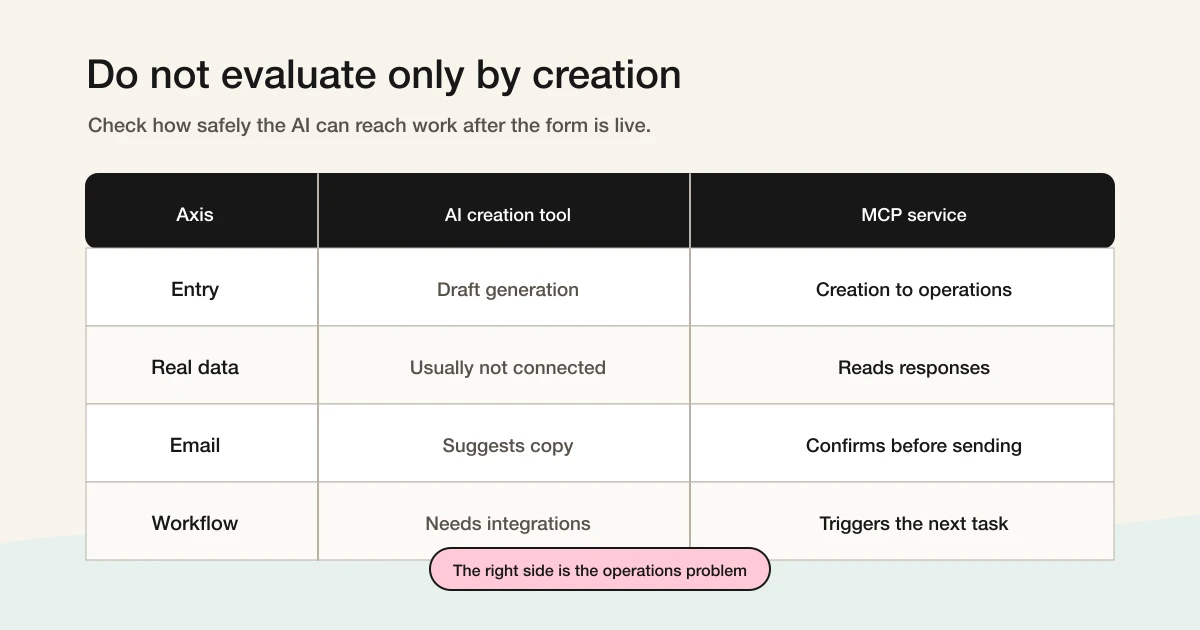
| Question | AI form builder | MCP form builder / service |
|---|---|---|
| Main job | Generate a form draft | Operate the form workflow |
| Strongest moment | Before publishing | Before and after publishing |
| Typical request | "Create a webinar registration form" | "Show real registrations, exclude low-quality entries, and set reminders" |
| Surface area | Fields, labels, options, copy | Forms, responses, email, analytics, notifications, workflows |
| Evaluation criteria | Is the draft good and fast? | Can the AI safely reach real data and actions? |
| Best for | One-off surveys and simple collection | Contact, hiring, events, lead capture, ongoing operations |
If you are collecting lunch preferences from a small internal team, form generation may be enough. If you are running a webinar, the form is only the entry point. You need confirmation emails, reminders, attendee lists, follow-up, and reporting. In that situation, creation is not the hard part. Operations are.
FORMLOVA has prompt-to-form creation, but the main bet is MCP-based form operations.
What an AI Form Builder Does Well
An AI form builder turns a natural-language prompt into a draft form.
Typical prompts include contact forms, webinar registration forms, hiring intake forms, customer satisfaction surveys, and waitlists.
The AI can suggest fields, labels, options, required fields, validation rules, intro copy, and a completion message. That is useful because the first hard part of making a form is often deciding what to ask.
For simple forms, this may be all you need.
If you are running a small internal poll, the operational surface is tiny. A prompt-generated form, a public link, and a response list may be enough.
The limitation appears when the form has to keep working after it is live.
AI can draft a contact form. It does not automatically decide how to separate real inquiries from sales pitches. It can draft a webinar form. It does not automatically run the reminder sequence. It can draft a hiring form. It does not automatically manage candidate status.
That is the gap between creation and operations.
ChatGPT or Claude Form Creation Has Two Layers
When people say they want to create a form with ChatGPT or Claude, they may mean two different things: content generation or product operation. Content generation means the AI suggests fields, choices, intro text, consent copy, and confirmation messages. Product operation means the AI creates the form in a real service, edits fields, shows a preview, reads responses, checks email settings, updates status, or starts a workflow.
If the AI only returns text, the user still has to copy the result into a separate form builder. That is still useful, but the AI is not operating the form service.
With MCP, the AI client can call tools exposed by the form service: create a draft, add fields, fetch responses, or prepare an email workflow, depending on what the service exposes and what the user approves. The question is not only whether the AI can write a good form, but whether it can safely reach the product surface where the real work happens.
FORMLOVA's one-shot creation flow is described in How to Create a Form with ChatGPT or Claude. But the larger product direction is post-publish operations: response review, sales pitch classification, email, analytics, and workflows through MCP.
What an MCP Form Service Is
MCP stands for Model Context Protocol.
The official MCP documentation describes it as a standard way for AI applications to connect to external systems, including data sources, tools, and workflows. For a form service, that means the AI client can use real product capabilities through a shared protocol.
An MCP form service can expose operations such as:
- List forms
- Create a form
- Edit fields
- Preview before publishing
- Fetch responses
- Filter or classify responses
- Update response status
- Configure auto-reply emails
- Set reminder emails
- Run response analysis
- Generate reports
- Create workflows
- Manage team permissions
That is different from text generation. If an AI only suggests form copy, MCP is not required. MCP matters when the AI client needs to reach real data and perform real actions.
OpenAI's MCP documentation for the Agents SDK discusses integration choices, hosted MCP tools, approvals, tool filtering, and related patterns. Those details are important for form products because form operations can affect real people and real records: a response may contain personal data, an email may reach a customer, and a published-form change can affect live campaigns.
So when you evaluate an MCP-enabled form service, ask what it exposes, how write actions are controlled, whether approvals exist, whether users can visually confirm results, and whether permissions match the way your team works.
MCP Support Has Depth
"Supports MCP" is not a single level of capability.
At the shallow end, a service may let AI create a form or fetch a few responses. At the deeper end, it maps the form lifecycle into safe AI-operable tools: creation, preview, publishing, response review, classification, email, analytics, notifications, workflows, and team operations.
| MCP depth | What it can do | What to watch |
|---|---|---|
| Creation only | Create forms and fields | Post-publish work remains manual |
| Read access | Fetch responses and exports | The next action may still be outside the system |
| Operations | Classification, email, analytics, notifications, workflows | Requires permissions, approvals, and clear UI confirmation |
| Cross-service workflows | Combine with CRM, Slack, Notion, Sheets, or other MCP servers | You must also check downstream permissions and data boundaries |
Claude's official MCP article makes a useful point for product builders: tool design should be grouped around user intent, not merely around raw API endpoints.
That applies strongly to forms.
Users do not want to "call the list responses endpoint." They want to see real inquiries without sales pitches, remind attendees, route qualified leads, or understand why a campaign produced low-quality responses.
The quality of an MCP form service depends on whether it exposes those work units in a way an AI agent can use safely.
The June 18, 2026 Reality: MCP Is A Depth Question
Official MCP support exists across several form services. Typeform currently documents creation, editing, publication, automations, contacts, and response analytics. Jotform documents form and submission operations; Tally documents creation and work with submission data.
Choose by the supported task, authentication, plan, permissions, and the saved state you can verify. Tool count alone does not establish reliability, workflow coverage, or better results.
MCP Form Builder Comparison: The Operational Checklist
When a page says "MCP form builder," check the verbs.
The most useful comparison is not the label. It is the actual work the assistant can perform, and where the human can review it.
| Capability | Why it matters | What to ask |
|---|---|---|
| Create and edit forms | Removes the blank page and lets the user iterate through chat | Can the assistant produce a real draft, not just field suggestions? |
| Preview and review | Prevents uncontrolled publishing | Can the user inspect the form before it is public? |
| Read submissions | Moves the assistant into post-publish work | Can it fetch real responses with the right account permissions? |
| Analyze and filter responses | Makes the form useful after collection | Can it separate useful responses from noise, sales pitches, or low-quality entries? |
| Email and notification operations | Affects real people | Are risky actions prepared for human approval rather than sent silently? |
| Workflow handoff | Prevents the form from becoming an isolated inbox | Can the result move to Slack, Sheets, CRM, Notion, or another system with clear boundaries? |
For FORMLOVA, the highest-value MCP tasks are not "make a nice form."
They sound more like:
Show real inquiries from this week and exclude sales pitches.
Prepare a reminder for unconfirmed webinar registrants, but do not send it yet.
Summarize responses by intent and keep uncertain cases for review.
That is why this article treats "MCP form builder" as the entry query, but "MCP form operations" as the durable category.
Use Cases: When Each Is Enough
The right choice depends on what the form starts.
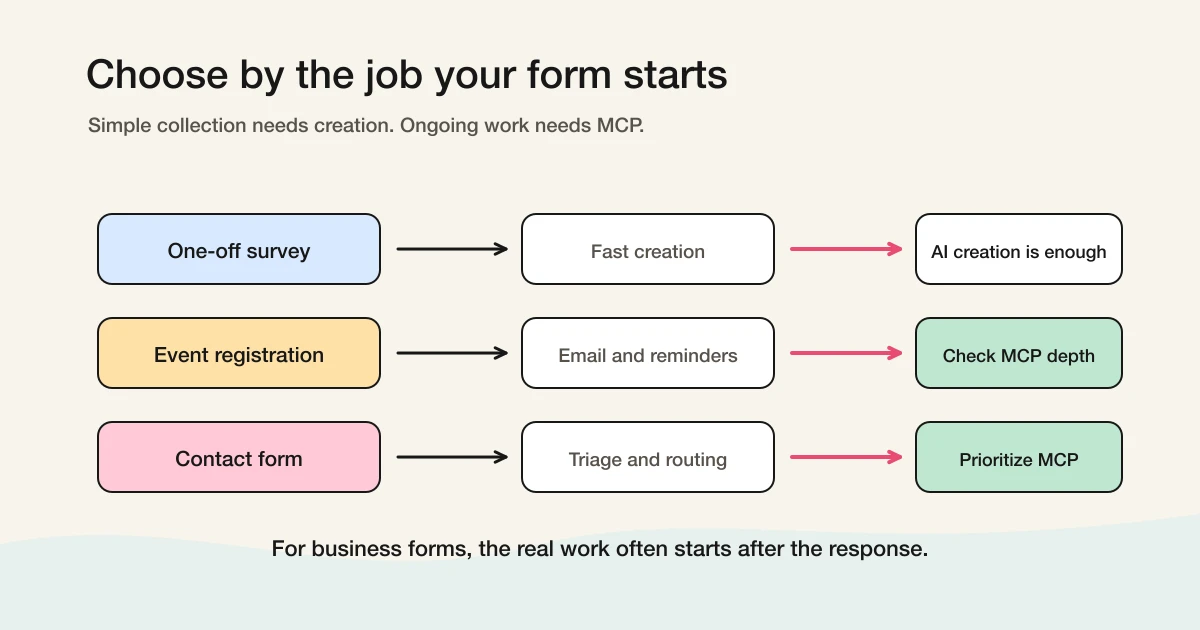
One-off surveys
For small internal surveys, quick polls, and one-time feedback collection, an AI form builder may be enough. The job is simple: create the form, share the link, read the answers. Optimize for speed, respondent clarity, and price.
Webinar and event registration
Event forms rarely end at signup. You need confirmation emails, reminders, cancellation handling, attendee lists, post-event follow-up, and sometimes lead routing. This is a good case for checking MCP depth: can the AI client see registrations, prepare reminders, help with follow-up, and ask for confirmation before risky actions?
Contact forms
Contact forms are operational by nature. Real inquiries arrive alongside sales pitches, agency outreach, recruiting messages, and spam. A form builder can create the page, but it does not solve triage.
FORMLOVA treats sales pitch detection and response status as part of form operations. See How to Use Sales Email Detection and Why We Built Sales Email Detection for that product direction.
Hiring and lead capture
Hiring and lead forms are measured after submission. Candidates need status, recruiters need notifications, and qualified leads need routing. For these forms, evaluate response analysis, status, routing, and downstream workflows, not just form generation.
Checklist for Evaluating an AI Form Builder
If you are comparing AI form builders, check more than whether the product says "AI." The generated structure should fit the use case, consent and personal data fields should be editable, preview should be available before publishing, and templates should work alongside AI generation. Most importantly, check whether the product continues into response management or stops at creation.
Do not publish AI-generated forms without review. AI can produce plausible structures, but it does not automatically know your legal context, team process, notification rules, or downstream workflow.
Checklist for Evaluating an MCP Form Builder or Service
If you are comparing MCP-enabled form builders or form services, check these points:
| Check | Why it matters |
|---|---|
| Is the MCP server official? | Authentication, updates, and security responsibility are clearer |
| Does it cover responses, not just creation? | Post-publish work is where the operational value appears |
| Are write actions controlled? | Email sending, publishing, and status changes need guardrails |
| Are approvals and permissions available? | Humans should confirm risky operations and teams need scoped access |
| Are tools grouped around work units? | Raw API mirrors are harder for agents to use well |
| Can results be reviewed visually? | Forms, responses, and analytics often need UI confirmation |
Tool count matters only after the tool design is meaningful. FORMLOVA currently has 174 MCP tools across 24 categories because the product surface includes form creation, response management, email, analytics, classification, workflows, and team operations. The number is not the main point; matching real work is.
Where FORMLOVA Fits
FORMLOVA includes an AI-assisted path for creating forms. You can ask for a contact form, webinar registration form, or similar form and move toward a draft and preview. But FORMLOVA is not being built as only an AI form builder.
The product thesis is that the form is the beginning of an operational workflow. A response arrives, gets classified, triggers a notification or email, changes status, appears in a report, or moves to another system.
That is why FORMLOVA is built around MCP form operations.
As of October 1, 2026, FORMLOVA's MCP server is designed around 174 tools in 24 categories. The Standard plan is 1,480 JPY per month. The pricing model is intentionally low because most AI reasoning cost sits with the user's MCP client rather than being resold as a heavy server-side AI bundle.
The differentiator is not the tool count by itself. As Jotform, Typeform, Tally, and Weavely add official MCP surfaces, the durable question is whether the service helps operate the work after the form is live.
The first-party lesson from building FORMLOVA is that form creation is rarely the painful part for long. The painful parts are mixed sales pitches, unclear response status, email actions that need human review, and follow-up decisions that drift into spreadsheets or chat threads. That is why FORMLOVA centers the MCP layer on response state and post-submit operations, not only on generating a nice-looking form draft.
If you only want the cheapest possible one-off survey, there are many options. If you want a highly visual form design studio or deep survey research analytics, other products may be the better fit.
FORMLOVA is for teams that want form creation and post-publish form operations to be reachable from AI clients through MCP.
Compare generated text with persistent form operations
Decide whether generated questions are enough or whether you need saved forms and responses. Follow the same inquiry from drafting to publication and response search to see the connection scope you need.
Suggested request; not an executed result:
I need an inquiry form with name, email, inquiry category, and message. Save a draft and show the form ID and preview. Publish only after review. Once test responses arrive, search only this form, confirm a response ID, mark that response in progress, and fetch it again.
Distinguish suggested questions, a saved draft, a published URL, and persisted responses. A preview submission does not prove response storage. Creation, search, status management, and CSV export can be tested on Free. CSV contains form fields and submission time without internal ID or status columns; custom replies and detailed analytics require Standard or above. Check the external AI client’s terms too.
Try this MCP workflow on Free
Decide whether generated questions are enough or whether you need saved forms and responses. Follow the same inquiry from drafting to publication and response search to see the connection scope you need.
Sign up free to draft MCP inquiry
After registration and email verification, connect a supported AI client and use the request above to draft the form. Review it before test publication. AI-client access and fees follow that provider’s terms.
When an AI Form Builder Is Enough
An AI form builder may be enough when response volume is small, the form is one-time, reminders are unnecessary, responses can be inspected manually, team status does not matter, and downstream workflow risk is low. In that case, prioritize speed, clarity, and cost. You do not need to force MCP into a simple collection problem.
When to Choose an MCP Form Service
Consider an MCP form service when responses trigger email, events require reminders, contact forms receive sales pitches, responses need routing, hiring or lead workflows start from the form, multiple people need status visibility, or AI clients need real response data. In these cases, form creation is the entrance. The business value is in what happens next.
For a deeper explanation of FORMLOVA's MCP direction, read MCP Form Service: What "MCP Form" Means Beyond AI Form Creation.
Common Misconceptions
Does an AI form builder make MCP unnecessary?
Sometimes, yes. For simple one-off forms, AI generation may be all you need. For response management, email, analytics, routing, or workflows, MCP addresses a different problem.
Is every MCP-enabled form service the same?
No. One service may expose only creation tools, while another covers responses, email, analytics, workflows, and permissions. Evaluate depth, not the label.
What is an MCP form builder?
An MCP form builder is a form tool that an MCP-compatible AI client can operate directly. At minimum, that usually means creating or editing real forms through an MCP server. The stronger version also lets the AI client inspect submissions, prepare analysis, and help with post-submit operations.
Which form builders currently document MCP support?
The official Typeform MCP documents form creation, editing and publication as well as automations, contacts, and response analytics. Compare the required operation, plan, and permissions.
Is it dangerous for AI to send emails or change live forms?
It can be. That is why approvals, permissions, and visual review matter. AI should prepare the action; a human should confirm risky steps.
Is FORMLOVA an AI form builder?
FORMLOVA includes AI-assisted creation, but it is being built as an MCP form operations service: creation, responses, sales pitch classification, email, analytics, workflows, and team operations.
Should I choose based on price only?
For simple free forms, Google Forms or Tally may be strong options. FORMLOVA is a better fit when you want low-cost form operations with MCP support. For broader category comparison, read the Form Services Comparison Hub.
Related Workflows You Can Use
If this article is the evaluation layer, the concrete operating layer starts with Slack Notification + Sheets Log. It turns new form responses into a shared Slack signal and a durable sheet record, which is the minimum post-submit loop many AI form-builder workflows are missing.
For teams that treat submissions as revenue or knowledge records, pair it with Response to HubSpot Contact or Response to Notion Database. Those routes keep the form from becoming an isolated collection surface after the AI has finished drafting it.
Conclusion
Start with the concrete form and checks above. Review the draft, publish a test, and inspect saved responses before deciding whether to migrate or automate. Keep the current tool if it meets the need. Add paid features for a named operational requirement, and verify setup and delivery rather than treating a suggested request as a completed workflow.
Sources
- Model Context Protocol: What is MCP?
- Model Context Protocol: Tools
- OpenAI API: MCP and Connectors
- OpenAI Agents SDK: Model context protocol
- Claude: Building agents that reach production systems with MCP
- Jotform MCP Server
- Typeform MCP server
- Tally MCP Server
- Weavely.ai MCP Server
- MCP Form Service Guide
- How to Create a Form with ChatGPT or Claude
- MCP Form Service: What "MCP Form" Means Beyond AI Form Creation
- Form Services Comparison Hub
Disclosure and Verification
The text was revised on October 15, 2026. The Japanese companion’s October 8 source table and the earlier June 18 record below describe different source-check rounds. This revision rechecked the current Typeform MCP scope and FORMLOVA’s implementation boundaries; it did not execute every competitor operation or delivery flow.
This article explains the difference between an AI form builder, an MCP form builder, and an MCP form service. I am the developer of FORMLOVA, so the FORMLOVA positioning is written from that perspective. MCP explanations were checked against the Model Context Protocol documentation, the MCP tools specification, the OpenAI MCP and Connectors documentation, the OpenAI Agents SDK MCP documentation, and Claude's article, Building agents that reach production systems with MCP. Official MCP information for Jotform, Typeform, Tally, and Weavely was rechecked on June 18, 2026.