
An MCP form service connects a supported AI client to operations such as saving a form, publishing it, and retrieving responses. Separate generated questions from operations on persistent data, then decide which post-publication tasks you need.
Last updated: October 15, 2026
If you searched "MCP form", the short answer is this: an MCP form is not just a form generated by AI. It is a form system that an AI client can reach through MCP, so the assistant can help create forms, read submissions, analyze responses, and prepare the next operational action.
If your exact phrase was "MCP form builder," the same distinction matters: building fields is useful, but the real test is whether the MCP surface can operate responses, notifications, analytics, and workflow handoffs after publishing.
An MCP form service is a form product that can be operated from AI clients such as ChatGPT, Claude, Cursor, or other MCP-compatible tools.
But MCP support should not stop at "the AI can create a form."
Form creation is the entrance. The heavier work begins after publishing: reading responses, excluding sales pitches, reviewing uncertain replies, calculating CVR, exporting data, notifying the right person, sending follow-up emails, and updating response status.
FORMLOVA is built for that second half.
The goal is to let AI agents work with form operations safely, not merely draft fields.
The broader MCP article cluster is organized in the parent guide, MCP Form Service Guide. This article focuses on the architecture idea behind that cluster: treating form operations as an MCP layer.
If your question is specifically whether there is a Google Forms MCP server for form operations, use the Google Forms MCP and alternatives guide.
So this page is not a directory of every MCP-enabled form product. It assumes Jotform, Tally, Typeform, Weavely, and other tools are moving into the MCP category, then explains where FORMLOVA tries to be different.
If you searched "MCP form", here is the answer
There are three different things people often mean by "MCP form":
| Meaning | What it usually does | Where FORMLOVA focuses |
|---|---|---|
| AI form creation | Creates a draft form from a prompt | Useful, but only the entrance |
| MCP form builder | Lets an AI client create or edit forms through an MCP server | Important for setup and iteration |
| MCP form operations | Lets an AI client work with submissions, labels, analytics, notifications, and workflow handoffs | FORMLOVA's main thesis |
The distinction matters because a form is rarely finished when it is published.
If the form collects inquiries, applicants, webinar registrations, NPS responses, support requests, or sales leads, the valuable work happens after the first response arrives. The assistant needs to understand which responses matter, what should be excluded, when a human should review, and which downstream action should wait for approval.
That is why FORMLOVA uses "MCP form service" to mean an operations layer, not just a prompt-to-form editor.
The short version
The value of an MCP form service is not that it can generate a form. The value is that it can reach the work behind the form.
AI-assisted form creation is already becoming common. Ask for a contact form, and a usable draft can appear quickly. That is helpful, but the form's real value appears when responses arrive.
| Lens | Creation-only MCP | Operations-level MCP |
|---|---|---|
| Main value | Drafting form fields | Response review, classification, analytics, notifications, workflows |
| Where it helps | Before publish | Before and after publish |
| What AI handles | Fields, copy, design | Responses, labels, status, analysis, next actions |
| Human review | Publish preview | Publish checks and operational decisions |
| Failure risk | The form draft is slightly wrong | Misclassification, wrong reports, unsafe notifications, bad workflow actions |
FORMLOVA is built for the right side.
The shorter product-thesis version of this idea is Most Form Tools Stop at Creation.
A form is not just an input screen. It is often the first signal from a customer, applicant, participant, reader, or user. The value of the form depends on how that signal is interpreted and routed.
Now That Official MCP Exists, The Question Is Operations
As of June 18, 2026, MCP support in forms is not unique to FORMLOVA.
The official Typeform MCP documents form creation, editing and publication as well as automations, contacts, and response analytics. Compare the required operation, plan, and permissions.
That makes FORMLOVA's comparison sharper.
"We support MCP" is not enough.
The useful question is how far the MCP surface reaches after the form is live: responses, classification, status, email, analytics, notifications, workflows, permissions, and reviewable state.
Because MCP can let an AI client reach real systems, the operational question is also a security question. The right service needs scoped access, clear consent, visible previews, logs, and human approval for actions that affect customers or downstream tools.
This is not a tool-count contest. A contact form needs "show only unhandled real inquiries excluding sales pitches." An event form needs "prepare a reminder for unconfirmed attendees and let me review it." A recruiting form needs "summarize candidates by role and keep uncertain cases for a person." The important question is whether the AI client can move that post-submit work forward without hiding risk from the human operator.
FORMLOVA is being built for that post-publish operations layer.
MCP support has depth
MCP is an open standard that connects AI applications to external systems: data, tools, and workflows. In the form domain, that can mean creating a form, editing fields, reading responses, running analysis, or triggering a workflow from an AI chat.
But not all MCP support is equally deep.
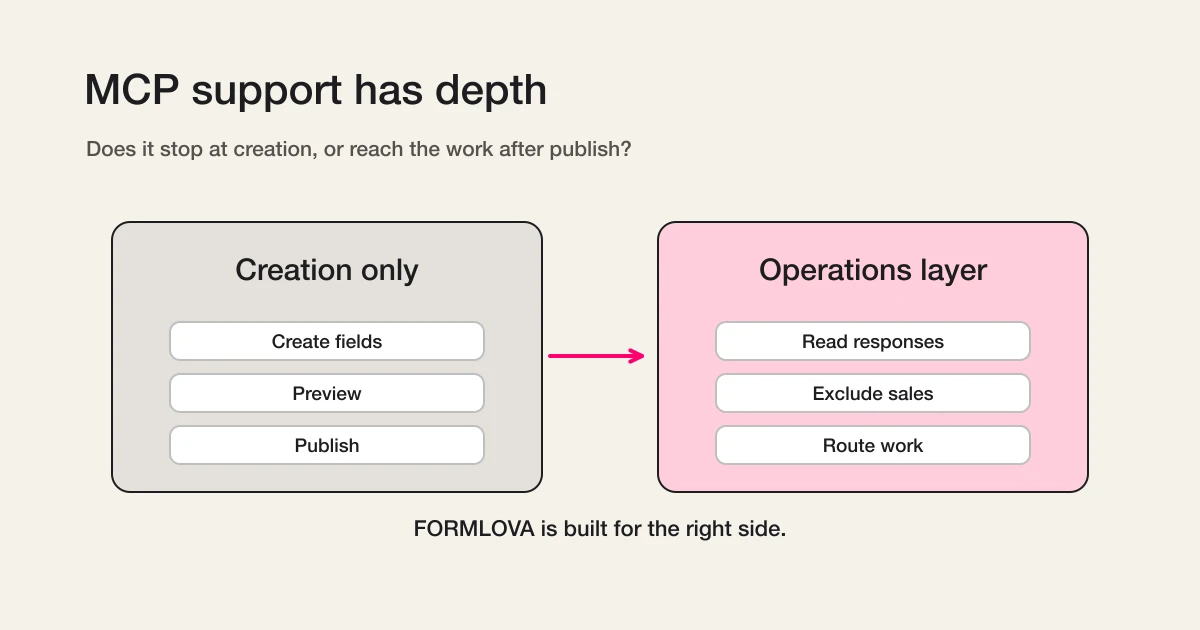
The shallow version is form creation.
The AI creates fields, writes the title, drafts the description, and prepares a form for preview. That is useful. It helps users get past the blank page.
The deeper version reaches the work after publishing.
Responses arrive. Sales pitches get mixed in. Some replies need human review. Reminders need to go out before an event. Campaign reports need sales pitches excluded. Notifications need conditions. Follow-up workflows need to run.
Only then does the form become real business work.
FORMLOVA is designed for that deeper layer: not only creating the form, but interpreting responses and moving them into the next task.
Verify MCP operations against saved responses
Evaluate the work rather than the tool count: draft a contact form, submit fictional inquiries after publication, find a saved response, and change its status. This tests whether chat reaches persistent state beyond generated text.
Suggested request; not an executed result:
Draft an inquiry form with name, email, inquiry category, and message. Show the saved form ID and preview, and wait for publication approval. After test submissions, find responses in this form, confirm one response ID before marking it in progress, then fetch it again. Export a CSV of the whole form.
A draft preview does not verify response persistence: publish a reviewed test form first. CSV includes form fields and submission time, without internal response-ID or status columns; do not assume a chat filter limits a full-form export. Test these core operations on Free. Detailed analytics, custom replies, and Sheets sync require Standard or above; bulk campaigns and team operations require Premium or above.
Try this saved-response workflow on Free
Evaluate the work rather than the tool count: draft a contact form, submit fictional inquiries after publication, find a saved response, and change its status. This tests whether chat reaches persistent state beyond generated text.
Sign up free to draft saved-response workflow
After registration and email verification, connect a supported AI client and use the request above to draft the form. Review it before test publication. AI-client access and fees follow that provider’s terms.
What Claude's MCP article makes clear
Claude's April 22, 2026 article on production agents and MCP describes three ways agents connect to systems: direct API calls, CLIs, and MCP. The important point is that production agents need a common layer that can reach real cloud systems with authentication, discovery, and useful semantics.
Several design patterns in that article map directly to FORMLOVA:
| MCP design pattern | What it means for FORMLOVA |
|---|---|
| Remote MCP servers | The same form system can be reached from Claude, ChatGPT, Cursor, and other clients |
| Group tools around intent | Do not expose rows only; expose work such as "analyze without sales emails" |
| Rich semantics | Return previews, response lists, labels, and analytics in forms people can verify |
| Skills plus MCP | Tools need procedural knowledge: when to ask, when to exclude sales, when to stop for approval |
This is close to how I already think about FORMLOVA.
Wrapping a form API with MCP is not enough. Form operations include judgment: what should be checked before publish, when a user should confirm an action, which responses belong in analysis, and which labels should route to which workflow.
Expose form operations as intent
MCP tools should be shaped around what the user is trying to accomplish, not only around raw API endpoints.
Fetching responses is useful, but it is rarely the final job. The user wants the next decision.
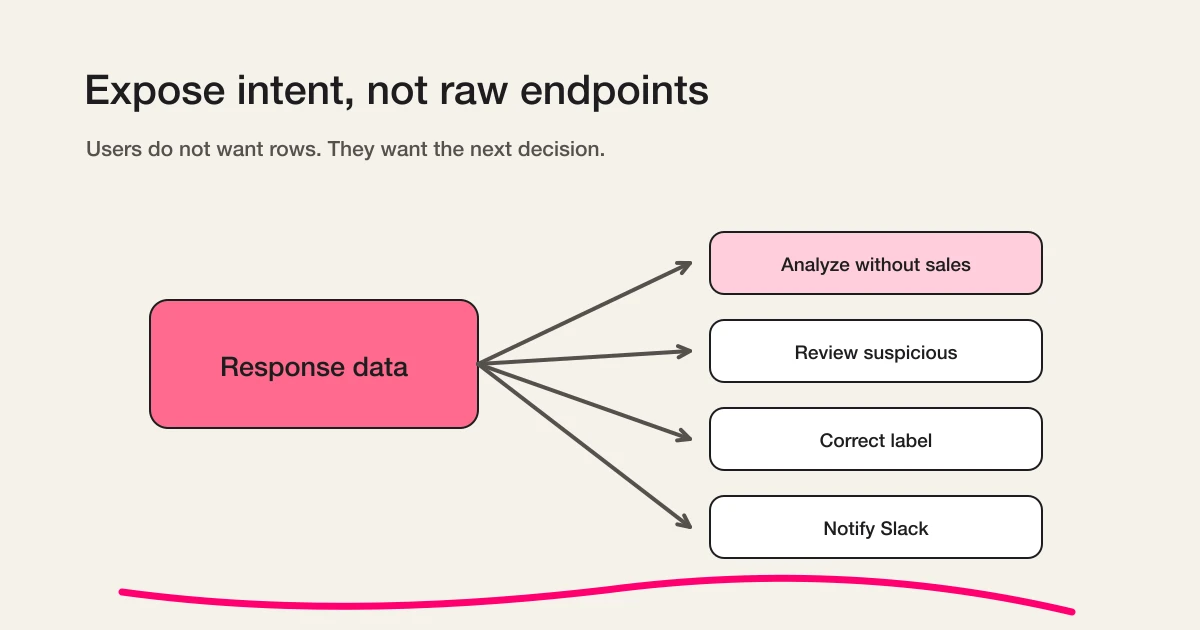
In real usage, requests sound like this:
Show this month's CVR excluding sales emails.
List only responses that need human review.
This response is not sales. Mark it as legitimate.
Notify Slack only for evaluation-stage inquiries.
Those are not raw data operations.
They require the system to read response data, understand its meaning, filter it, and move it toward the next action.
FORMLOVA treats those intents as the real unit of work. Sales email detection is a simple example. The feature does not only attach a label. It makes the label usable in analytics, notifications, exports, workflows, and chat-based correction.
When the user asks to analyze without sales emails, sales-labeled responses can be excluded. When the user corrects a label, that human decision is preserved.
The product is not only moving data. It is carrying meaning into the next step.
Form creation is not enough for production agents
AI-assisted form creation will keep getting easier.
Suggesting fields, writing options, improving labels, generating descriptions, and adjusting design will become normal capabilities. That is good. But it is not the whole job.
After publishing, every form creates operational work:
- Find the real inquiries
- Exclude sales pitches from analytics
- Send uncertain responses to a human reviewer
- Update response status
- Send auto-replies and reminders
- Analyze response trends
- Route selected responses to another service
Historically, humans did this by clicking through dashboards, spreadsheets, and notification tools.
FORMLOVA is designed so AI agents can help with that work while still leaving important decisions to humans. Publishing, sending, deleting, and external handoffs should not happen silently. The agent can prepare the work, but the person should approve meaningful changes.
Conversation and human confirmation are not opposites.
The agent prepares. The human decides. FORMLOVA records that decision and carries it into the next operational step.
Rich semantics matter in form work
MCP is not valuable only because it calls tools.
It is also valuable because a tool result can carry semantics the user can inspect. Claude's article points to richer interfaces such as MCP Apps and elicitation. That direction matters a lot for forms.
Form work is hard to trust as plain text only.
Before publishing, users need to see a preview. When responses arrive, they need tables, labels, timestamps, status, and enough context to decide what matters. Analytics are easier to verify as charts or distributions. Classification is easier to trust when labels and scores are visible and editable.
So the right interface is not chat-only, and it is not dashboard-only.
The conversation moves the work forward. The visual surface lets the user verify it. The product should keep both in the same operational flow.
That is why FORMLOVA treats response lists, labels, previews, and analytics as part of the MCP experience rather than separate back-office screens.
Skills and MCP are complementary for form operations
MCP gives an AI agent access to external tools and data.
But access alone does not finish the work.
The agent also needs procedural knowledge: what order to follow, where to ask for confirmation, which numbers to exclude, and which actions are risky. Claude's article frames MCP and Skills as complementary, and that maps cleanly to form operations.
FORMLOVA's MCP server can create forms, publish them, read responses, run analysis, correct classifications, and configure workflows.
But a good assistant also needs to know how form operations should proceed.
For an inquiry form, what should be checked before publish? If there is free text, should sales email detection be suggested? When analyzing campaign performance, should sales-labeled responses be excluded? If a response is being sent to an external system, should the user confirm first?
These are not just UX details. They are the difference between a tool catalog and an operational assistant.
FORMLOVA's goal is not to expose more buttons. It is to expose a better way to run the form workflow.
Sales email classification is a small example
Sales email detection shows the architecture in a small, concrete shape.
Most spam prevention starts at the entrance. That is useful for bots. Human-written sales pitches are different. SEO pitches, ad agency outreach, recruiting offers, and production-service proposals can be written naturally into real forms. CAPTCHA does not solve that.
But aggressive blocking creates a different risk: losing real inquiries before anyone sees them.
FORMLOVA treats this as a classification problem, not a blocking problem.
Receive the response. Classify its meaning. Keep real inquiries safe. Exclude sales from analytics when needed. Send suspicious cases to review. Let humans correct mistakes. Preserve manual corrections.
That is not only spam handling. It is form operations.
The release note is FORMLOVA Releases AI Sales Email Detection, the setup guide is Sales Email Detection Guide, and the product rationale is Why FORMLOVA Built Sales Email Detection.
Value grows across MCP servers
MCP becomes more useful when multiple servers can be used from the same client.
FORMLOVA does not need to build every downstream integration itself. If an AI client can use FORMLOVA's MCP server and another service's MCP server, it can help move data across systems with user confirmation.
Future workflows can look like this:
- Add evaluation inquiries to HubSpot
- Export webinar attendees to Google Sheets
- Notify Slack only for suspicious responses
- Send support requests to a helpdesk
- Analyze response trends and draft the next email
The important part is that FORMLOVA should send meaningful response data, not just raw rows.
If a response is only a row, the next system receives data without context. If the response is labeled as sales, suspicious, evaluation, support, or partnership, the next action becomes much easier to choose.
That is where an MCP form service becomes more than a form editor.
FORMLOVA is a form operations MCP layer
FORMLOVA creates forms.
But that is not the whole product.
The larger product is a form operations layer for MCP.
Create the form. Review before publishing. Read responses. Exclude sales. Send uncertain replies to humans. Analyze trends. Notify the right person. Send emails. Hand selected data to another service. Stop for confirmation when the action matters.
That sequence is the work.
AI form creation will become common. The durable difference is what happens after the form is live: how responses are interpreted, which judgments remain human, and how the right signals move into the next workflow.
That is the layer FORMLOVA is building.
For the category-level comparison, read MCP Form Builder vs AI Form Builder. For a practical first workflow, read Create a Form from One Prompt. For the operational example, read Sales Email Detection Guide.
Related articles:
- MCP Form Service Guide -- the parent page for FORMLOVA's MCP article cluster
- MCP Form Builder vs AI Form Builder -- why creation is not enough
- Create a Form from One Prompt -- draft and preview from a single instruction
- Most Form Tools Stop at Creation -- the See, Route, Act model after publish
- Sales Email Detection Guide -- setup, labels, and analytics exclusion
- SaaS Is Moving from Chosen to Called -- the macro split between built-in AI and MCP-open software
- Buying Has Moved Into the Conversation -- why forms still remain in agentic commerce
Related Workflows You Can Use
The clearest example of a form-ops MCP layer is Slack Notification + Sheets Log: one response becomes a team notification and a structured record without a human copying fields between tools.
For cross-service operations, pair it with Response to HubSpot Contact or Response to Notion Database. Those recipes show why FORMLOVA's MCP surface matters after form creation, when the response has to move into another system.
Sources
- Model Context Protocol: What is MCP?
- Claude: Building agents that reach production systems with MCP
- Jotform MCP Server
- Typeform MCP server
- Tally MCP Server
- Weavely.ai MCP Server
Disclosure and Verification
Earlier source-check record: This article explains MCP form services from a form operations perspective. I checked the official Model Context Protocol documentation, Claude's official article Building agents that reach production systems with MCP, and official form-product MCP documentation from Jotform, Typeform, Tally, and Weavely on June 18, 2026.
This article is part of the FORMLOVA product blog. The author is the developer of FORMLOVA. Product facts, pricing, limits, and comparison claims should be checked against the current FORMLOVA spec, plan definitions, and relevant primary sources before publication or major updates. For privacy, hiring, legal, medical, or financial workflows, follow your organization's policies and specialist review.