

Last updated: June 26, 2026
Should a contact form include a privacy consent checkbox?
Many teams are unsure.
Is "I agree to the handling of personal information" enough? Is a privacy policy link enough? How specific should the purpose of use be? Should a resource request form, hiring form, and event registration form use the same wording?
Long privacy copy is not automatically safer.
The goal is for the respondent to understand why they are sending personal information, how it will be used, and where they can read the full policy.
This guide covers practical privacy consent wording for contact forms, Google Forms privacy policy placement, Microsoft Forms checkbox-style consent, policy-link placement, purpose-of-use language, third-party sharing cautions, spam-prevention boundaries, and FORMLOVA setup prompts.
If you need the full contact form structure first, read the Contact Form Template Guide. This article focuses only on privacy and consent wording.
Quick Answer: Say What the Data Is Used For Before Asking for Consent
A simple form footer can look like this:
We will use the personal information you submit to respond to your inquiry and contact you when needed.
Please review our Privacy Policy before submitting.

[ ] I agree to the Privacy Policy
A shorter version:
We use your personal information to respond to this inquiry.
Please submit after agreeing to the Privacy Policy.

[ ] I agree and submit
The important part is not the checkbox label alone.
The respondent should be able to understand what they are agreeing to.
Japan's Personal Information Protection Commission explains in its FAQ that a purpose of use should be specific enough for the person to generally and reasonably understand how their information will be used. In practice, "for business purposes" is usually too broad for a form footer.
For a contact form, wording like "to respond to your inquiry," "to verify details," and "to contact you when needed" is clearer.
Where to Put a Privacy Policy in Google Forms or Microsoft Forms
Many searches for "Google Forms privacy policy" are not really about a hidden advanced setting. They are about where respondents should see the purpose of use, the policy URL, and the consent checkbox.
Official Google Forms help documents several building blocks that matter here: form descriptions, question descriptions, required questions, confirmation messages, email collection, response management, Sheets export, and CSV download.
For a privacy consent flow, separate those jobs:
| Placement | What to show | Why it matters |
|---|---|---|
| Form description | What the form is for and why data is collected | Sets context before fields |
| Near personal-data fields | Why email, phone, company, or role is requested | Helps required fields feel justified |
| Required checkbox before submit | Privacy policy consent and personal-data handling acknowledgement | Makes the consent action explicit |
| Confirmation message after submit | What happens next and who to contact | Reduces uncertainty after submission |
A simple Google Forms version can look like this:
We use your name, email address, and message to respond to this inquiry and contact you when needed.
For details, review our Privacy Policy:
https://example.com/privacy

[ ] I agree to the handling of my personal information and the Privacy Policy
If you use a Google Forms checkbox question for consent, make it required. Use the question description to include the purpose and privacy policy URL.
Email collection needs extra care.
Google Forms help explains options for collecting respondent email addresses and sending respondents a copy of their response. If you collect email addresses, the form should make clear whether the email will be used only for the response, also for resource delivery, or also for sales or marketing follow-up.
Responses can also be reviewed in Forms, sent to Sheets, or downloaded as CSV. That means consent wording is not only a pre-submit copy problem. Decide who can access the responses, where exports go, how long records are kept, and how deletion or correction requests are handled.
For Google Forms spam, duplicate responses, login-required settings, and response validation, read the Google Forms Spam Prevention Guide. This article stays focused on privacy consent and policy placement.
For Microsoft Forms, the pattern is similar.
Official Microsoft Forms help explains that a form can have a title and description, then questions such as Choice, Text, Rating, or Date. It also explains response collection settings such as who can respond. There is not a separate "privacy policy link" setting that solves consent by itself.
Use three visible pieces:
| Microsoft Forms placement | What to put there |
|---|---|
| Form title or description | The purpose of the form and a short data-use notice |
| Required Choice question | A checkbox-style consent action, such as "I agree to the Privacy Policy" |
| Question text or description | The privacy policy URL and the specific purpose of use |
If your exact search is "Microsoft Forms checkbox consent privacy policy link," start with wording like this:
We use your name, email address, company, and message to respond to this inquiry.
Privacy Policy: https://example.com/privacy

[ ] I agree to the Privacy Policy and the handling of my personal information
If your Microsoft Forms UI shows the consent item as a required choice rather than a literal checkbox, keep the same principle: the respondent should see the purpose, the policy link, and the consent action before submitting.
Is a Consent Checkbox Always Required?
It is not safe to say that every contact form always requires a checkbox in every jurisdiction and situation.
Under Japan's APPI framework, businesses handling personal information must specify the purpose of use and notify or publicly announce it unless it has already been publicly announced. In practice, teams often maintain a privacy policy and add a short purpose-of-use notice near the form.
A clear checkbox is often useful when:
the form collects personal information
the form may lead to sales follow-up
the form receives resumes or hiring documents
third-party sharing or joint use may be involved
newsletter or marketing consent is included
But the checkbox is not a magic shield.
If the surrounding wording is vague, the respondent still does not know what they agreed to. Start by making the purpose and policy link understandable.
Wording Examples by Form Type
Use these as starting points and adapt them to your own policy.
General Contact Form
We will use the personal information you provide to respond to your inquiry and contact you when needed.
For details, please review our Privacy Policy.

[ ] I agree to the Privacy Policy
This keeps the purpose narrow: responding to the inquiry.
Resource Request Form
We will use the personal information you provide to send the requested resource, provide service information, and respond to related inquiries.
For details, please review our Privacy Policy.

[ ] I agree to the handling of my personal information
If you plan to send sales follow-up after the resource, say so. Do not say only "to send the resource" and then use the data for a broader ongoing sales program without appropriate notice or consent.
Event or Webinar Registration Form
We will use the personal information you provide for event registration, event-related notices, and follow-up communication after the event.
For details, please review our Privacy Policy.

[ ] I agree to the Privacy Policy and register
Events often involve attendance instructions, reminders, and post-event messages. The wording should match the actual communication flow.
Hiring Application Form
We will use your personal information and application documents for recruitment screening, selection-related communication, and hiring procedures.
For details, please review our applicant privacy notice.

[ ] I agree to the handling of my personal information and apply
Hiring forms often collect more sensitive and detailed information than a general contact form.
If you receive resumes, work history, portfolios, interview notes, or reference materials, a dedicated applicant privacy notice is easier to read than a generic form footer.
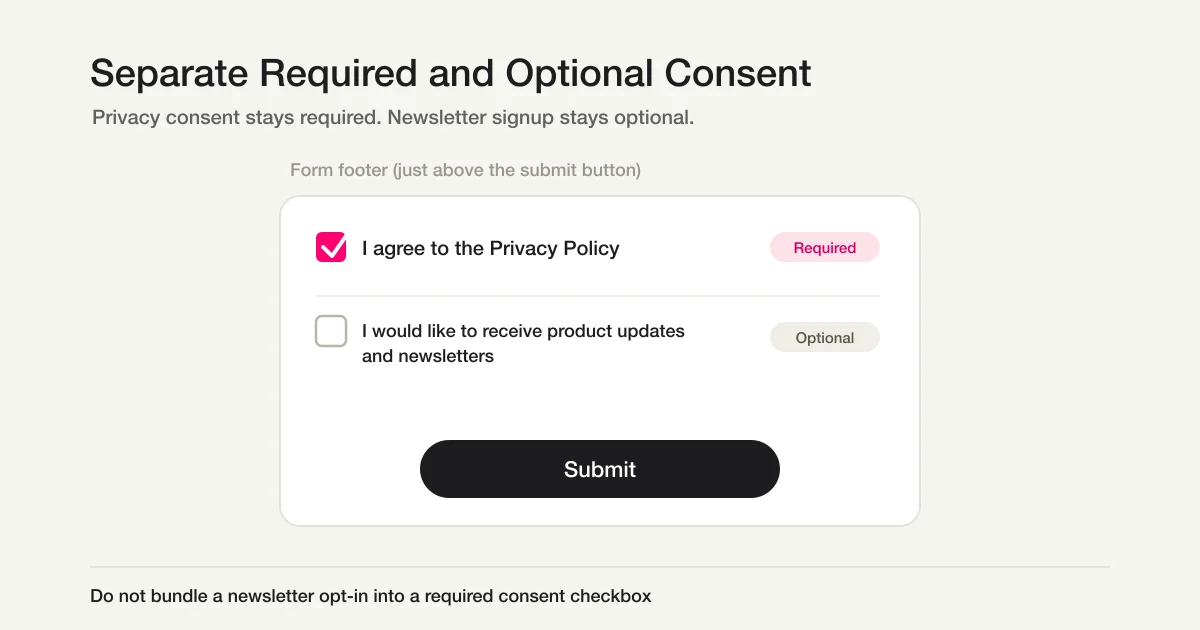
Separate Newsletter Consent
Contact handling and newsletter registration are different purposes.
Separate them.
[ ] I agree to the Privacy Policy
[ ] I would like to receive product updates and newsletters
The second checkbox should usually be optional.
Making a marketing subscription mandatory just to send an inquiry can reduce trust.
Purpose-of-Use Checklist
Before publishing the form, check:
Does the purpose match the form?
Can the respondent reasonably understand how the data will be used?
Are separate purposes mixed into one vague sentence?
Is third-party sharing or joint use explained when relevant?
Is the privacy policy link visible near the form?
Japan's official guidance explains that if third-party provision is planned, the purpose of use should identify that fact. It also explains that providing personal data to a third party generally requires prior consent, subject to exceptions and specific frameworks.
Examples that may need more than a generic sentence include:
sharing inquiry data with an external partner
joint use with group companies
transferring personal data to a foreign service provider
collecting sensitive or applicant information
These cases depend on your business, data flow, contracts, and jurisdiction. Ask your legal team or a qualified professional when they apply.
Consent Is Not a Spam Filter
Privacy consent and spam prevention often sit near each other in the form footer.
They do different jobs.
| Element | Main role | What it helps with |
|---|---|---|
| Privacy consent | Explains purpose, policy, and respondent acknowledgement | Unclear consent |
| reCAPTCHA / Turnstile / hCaptcha | Reduces automated bot-like submissions | Some automated abuse |
| Honeypot field | Quietly catches simple bots | Bots that fill hidden fields |
| Sales-spam copy | Discourages some unsolicited pitches | Some human sales submissions |
| Response classification/status | Separates valid, spam, sales, and pending responses after submission | Follow-up misses and reporting noise |
A consent checkbox does not stop bots or sales messages.
CAPTCHA does not explain why personal information is collected.
Keep those responsibilities separate. Use Contact Form CAPTCHA Comparison and Contact Form Honeypot Guide for entry-side bot controls. Use Contact Form Spam Defense when the real issue is unsolicited sales messages or spam classification after submission.
This article owns the respondent-facing privacy explanation: why the information is collected, how it will be used, and where the full policy lives.
Consent Checkbox Error Messages
If the checkbox is required, the error message should be clear too.
Weak:
Required.
Better:
Review the Privacy Policy and select the consent checkbox before submitting.
Another option:
Agree to the handling of personal information before submitting.
As explained in the Form Error Message Guide, the error should tell the respondent how to fix the problem, not blame them.
Build Consent Wording in FORMLOVA
In FORMLOVA, you can include privacy consent wording as part of the form design conversation.
For a contact form, you can ask:
Create a contact form.
Fields: name, email, company, and message.
At the bottom, explain that personal information is used to respond to the inquiry and contact the sender when needed.
Add a required Privacy Policy consent checkbox.
For a resource request:
Create a resource request form.
The purpose of use is resource delivery, service information, and inquiry handling.
Separate newsletter opt-in as an optional checkbox.
If you are still deciding what personal information to collect, read the Form Field Examples Guide. Consent wording should be designed together with the fields themselves.
For post-submit operations, do not stop at the checkbox. Use response statuses like "new," "in progress," "waiting," and "closed" so personal-data-bearing inquiries do not sit unattended. The strategy article is Form Response Status Management, and the operational walkthrough is View, Filter, and Update Response Status with FORMLOVA.
Post-Submit Responsibility Belongs in the Consent Plan
Privacy consent is not finished when the respondent checks the box.
Before publishing the form, decide:
Who reviews the response?
Who replies?
How quickly should they reply?
Where is the response stored?
Will it be exported to Sheets or CSV?
How are records deleted when no longer needed?
Are spam and sales submissions excluded from reporting?
How can respondents ask for correction or deletion?
You do not need to put all of that in the checkbox label.
But the confirmation message and auto-reply should tell respondents what happens next.
We received your inquiry.
Our team will review it and usually respond within two business days.
For personal-information handling, please review our Privacy Policy.
Pair this with the Form Thank You Page Guide and Form Auto-Reply Email Setup Guide. For forms that collect personal information, a clear receipt message, expected response timing, and contact path reduce anxiety after submission.
Common Mistakes
Writing Only "I Agree"
That may be short, but it is unclear.
Place the purpose of use and privacy policy link near the checkbox.
Making the Purpose Too Broad
"For our services" or "for business operations" may not help the respondent understand what will happen.
Use the form's real purpose: inquiry response, resource delivery, event notices, hiring screening, and so on.
Combining Separate Purposes
Inquiry handling and newsletter subscription are different.
Separate required consent from optional marketing consent.
Linking to an Outdated Privacy Policy
The form footer and the policy must match the actual operation.
Review purpose of use, third-party sharing, joint use, contact routes, retention, and service providers regularly.
Summary
Privacy consent wording for contact forms should be understandable before it is lengthy.
Start with the purpose of use, a visible privacy policy link, a clear consent checkbox, and a helpful unchecked-state error message.
Then adapt the wording for resource requests, events, hiring, and marketing opt-ins.
When you build a form in FORMLOVA, design the privacy wording together with the fields, spam-prevention boundary, and follow-up flow. The checkbox is not separate from the form experience. It is part of the trust the form needs to earn. For the post-submit message that explains what happens next, also use the Form Thank You Page Guide.
Disclosure and Verification
- Verified on: June 18, 2026. Updated on June 26, 2026 for Microsoft Forms checkbox consent and privacy-policy-link query wording.
- Main official sources checked:
- Personal Information Protection Commission: APPI Guidelines, General Rules
- Japan Government Public Relations: Personal Information Protection Act basics
- Google Docs Editors Help: Edit your form
- Google Docs Editors Help: Choose a type of question for your form
- Google Docs Editors Help: View & manage form responses
- Google Docs Editors Help: Publish & share your form with responders
- Microsoft Support: Create a form with Microsoft Forms
- Microsoft Support: Send a form and collect responses
- Personal Information Protection Commission: opt-out third-party provision filing
- Keyword evidence:
.tmp/formlova-keyword-article-queue-2026-06-17.csvflaggedgoogle フォーム プライバシーポリシーas a P0 security_consent opportunity with volume 70, so the topic was absorbed into this existing 052 canonical instead of creating a separate internal article. - Search Console evidence:
.tmp/search-console-performance-90d-2026-06-23-untapped.jsonshowed 83 impressions / average position 15.3 for this URL, led bymicrosoft forms checkbox consent privacy policy link. - FORMLOVA implementation checked:
lib/form/url-form-extractor.tsfor consent text extraction,lib/form/validation.tsfor required validation, and public form field design context. - Note: This article is general form-design guidance, not legal advice. If third-party sharing, joint use, foreign transfers, sensitive personal information, hiring data, or regulated data is involved, consult your legal team or a qualified professional.
Related Articles
- Form Creation Guide -- Choose Templates, Fields, and Workflows
- ChatGPT Form Builder Guide -- Create a Private Draft Form From One Short Prompt
- Form Auto-Reply Email Examples -- Templates for Contact Forms, Downloads, Webinars, and Applications
- View, Filter, and Update Response Status with FORMLOVA
- Export Responses to CSV or Sync Them to Google Sheets with FORMLOVA
- Webinar Registration Management: Signup, Reminders, Attendee Lists, and Follow-Up
- Google Forms Spam Prevention: Reduce Junk Responses, Duplicates, and Sales Messages
- Contact Form CAPTCHA Comparison: reCAPTCHA, Turnstile, hCaptcha, and Honeypots
- Contact Form Spam Defense: Reduce Sales Pitches and Junk Submissions