
Last updated: June 26, 2026
The page after a form submission is not just a polite ending.
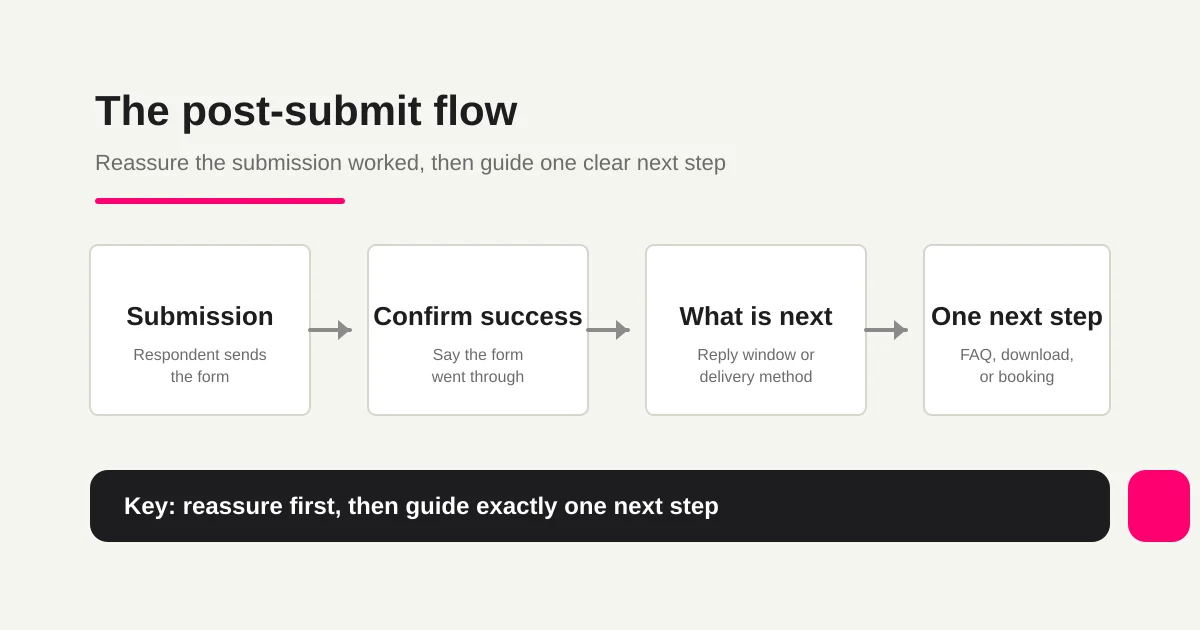
It confirms that the submission worked. It tells the respondent what happens next. It gives the team a clean place to route follow-up, downloads, booking steps, or conversion tracking.
When that screen is vague, people leave with small doubts.
Was the message submitted? Will anyone reply? Should they check email? Is the booking confirmed, or only requested?
This guide covers the difference between an inline confirmation screen and a dedicated thank-you page, practical message examples, next actions, analytics cautions, and how to set up the flow in FORMLOVA.
If you want the broader form optimization context first, read the Form Conversion Optimization Guide. This article focuses only on the post-submit experience.
Quick Answer: Google Form Thank-You Page or Confirmation Message?
If your search is "Google Form thank you page," the first thing to know is that Google Forms has a confirmation message, not a full custom thank-you page builder with its own URL and layout.
Use the Google Forms confirmation message when you need a short success note:
Your response has been recorded.
We will review it and reply within two business days.
Use a dedicated thank-you page when you need a branded URL, conversion tracking, a download button, booking steps, related content, or a richer post-submit layout.
Quick Answer: Write a Clear Thank-You Message, Then Choose One Next Step
A useful post-submit page usually needs five pieces:
1. Confirmation that the submission succeeded
2. What will happen to the submitted information
3. What happens next
4. One action the respondent can take now
5. A support route if something looks wrong
A minimal contact form message can be:
Your message has been sent.
Thank you for contacting us.
We will review your inquiry and usually reply within two business days.
If you do not receive a confirmation email, please check your spam folder.
For a resource download, the message changes:
Your request has been received.
We will send the download link to the email address you entered.
If the email does not arrive, please check the address and your spam folder.
For an event registration:
Thank you for registering.
We will send the event details by email.
Please join from the link in the email a few minutes before the event starts.
The important part is not the word "thanks."
The important part is reducing uncertainty.
If You Searched for a Contact Form Thank-You Message
A contact form thank-you message should be short, specific, and operational.
Do not stop at:
Thank you.
That is polite, but it does not answer the respondent's real question.
Use this structure instead:
Your message has been sent.
Thank you for contacting us.
We usually reply within two business days.
If your request is urgent, please use the support address below.
If the contact form also sends an email, mention it carefully:
Your inquiry has been received.
We sent a confirmation email to the address you entered.
If it does not arrive within a few minutes, please check your spam folder or confirm that the address was entered correctly.
This page owns the on-screen message. If you need reusable email templates for the message sent to the respondent, use the Form Auto-Reply Email Examples Guide.
If You Searched for a Google Forms Thank-You Page
Google Forms has a confirmation message, not a full custom thank-you page builder.
Google's official Forms help says you can customize the message people get after they submit a form from Settings, under Presentation, by editing the confirmation message.
That is enough for simple forms when you only need to say:
Your response has been recorded.
We will review it and reply within two business days.
But a separate thank-you page is different. It gives you a dedicated URL for a richer next step: booking link, download link, campaign tracking, related content, or ad conversion measurement.
So the practical split is:
| Need | Google Forms confirmation message | Dedicated thank-you page |
|---|---|---|
| Show a short success message | Good fit | Also possible |
| Add a simple next-step URL | Possible as message text | Cleaner and more branded |
| Use a separate conversion URL | Weak fit | Strong fit |
| Control design and layout | Limited | Strong fit |
| Show conditional post-submit content | Limited in native Google Forms | Better handled by another form service or custom flow |
If your search intent is "Google Form thank you message," start with the confirmation message. If your search intent is "Google Form thank you page," check whether you actually need a separate URL and tracking surface.
Confirmation Screen vs Dedicated Thank-You Page
There are two common post-submit patterns.
| Pattern | What it does | Best for |
|---|---|---|
| Confirmation screen | Shows a short message inside the form flow | Contact forms, internal forms, simple intake |
| Thank-you page | Redirects to a separate URL after submission | Ads, lead forms, bookings, events, resource downloads |
Google Forms lets form owners customize the confirmation message respondents see after submitting a form. For simple cases, that may be enough. It is still not the same as a separate page with its own URL, layout, and tracking setup.
A dedicated thank-you page is more useful when you need:
conversion tracking for paid ads
a download or booking link
related content after submission
different URLs for different form goals
analysis of post-submit behavior
A confirmation screen says, "your submission worked."
A thank-you page says, "your submission worked, and the next step is here."
That distinction keeps the page useful without turning every confirmation state into a full landing page.
Message Examples by Form Type
Here are practical starting points you can adapt.
Contact Form
For contact forms, include the reply window and whether a confirmation email will arrive.
Your inquiry has been received.
We will review your message and usually reply within two business days.
If you do not receive a confirmation email, the email address may have been entered incorrectly.
For urgent requests, please contact the support address below.
"We will reply soon" is too vague. Give a clear expectation.
Resource Request Form
For downloads, explain how the file or URL will be delivered.
Thank you for requesting the resource.
We sent the download link to the email address you entered.
If the email does not arrive, please check your spam folder.
You can also read the related case studies below.
This is a natural place to link one related case study or one consultation page. Do not overload it. The respondent asked for the resource first.
Booking or Consultation Form
For bookings, say whether the request is confirmed or still pending.
Your preferred appointment time has been received.
This does not confirm the booking yet.
We will check availability and send the confirmed time by email.
Do not use "booking confirmed" unless the booking is actually confirmed.
That single distinction prevents a lot of confusion.
Event or Webinar Registration
For events, include the attendance method and reminder flow.
Thank you for registering.
We will send the event link and details by email.
We will also send a reminder before the event.
If you can no longer attend, please contact us using the address in the email.
The clearer this page is, the fewer operational questions your team receives later.
Do Not Reuse the Same Copy for the Confirmation Email
The thank-you page and the confirmation email are related, but they are not the same surface.
| Surface | Job | Include |
|---|---|---|
| Completion screen or thank-you page | Reassure immediately | Confirmation, next step, one action |
| Registration confirmation email | Create a record the respondent can return to | Submitted details, response timing, change or cancellation method, support route |
Keep the page short. Right after submission, the respondent mostly wants to know whether the form went through and what happens next.
The email can carry more operational detail: a searchable subject, what was received, when the team will reply, and how to change the request. For that copy model, use the Form Auto-Reply Email Setup Guide.
Pick One Next Action
A thank-you page can contain many links.
That does not mean it should.
Choose one primary next action.
| Form type | Primary next action |
|---|---|
| Contact | Reply window, FAQ, urgent support route |
| Resource request | Download, case study, consultation booking |
| Webinar | Calendar add, event link, related resource |
| Hiring | Selection flow, required documents, contact route |
| Survey | Shared results, next survey, reward delivery |
If you ask the respondent to download a file, book a demo, follow social channels, subscribe to a newsletter, and read three articles at once, none of those actions feels important.
Ask one question:
What is the most natural next step for this person right now?
Build the page around that.
Conversion Tracking Cautions
Thank-you pages are often used for analytics and advertising conversion tracking.
That is useful, but it can create bad data if the setup is loose.
First, avoid duplicate conversions. If a conversion fires every time a thank-you page is refreshed, your numbers may inflate. Depending on your stack, use a successful submission event, submission ID, deduplication logic, or a narrowly scoped URL.
Second, avoid sending every form to the same thank-you URL.
If contact, resource download, booking, and hiring forms all use one URL, it becomes hard to know which conversion actually happened.
Google Analytics describes measuring lead form submissions as meaningful events and narrowing measurement to the specific form you care about. Google Tag Manager's form submission trigger documentation also recommends filtering triggers to the conditions where you expect the submission to happen.
Before publishing tracking, decide:
which form submission is the conversion
whether only successful submissions are counted
how duplicate conversions are avoided
If you also need to reduce failed attempts before submission, read the Form Error Message Guide.
Build the Post-Submit Flow in FORMLOVA
FORMLOVA supports post-submit messages for forms.
It also has a richer thank-you configuration model that can include text, images, buttons, links, videos, dividers, conditional messages, and redirects. The exact setup should follow the purpose of the form.
For a contact form, you can ask:
Create the post-submit screen for this contact form.
Confirm that the message was sent, say that we usually reply within two business days, mention confirmation email troubleshooting, and add one FAQ button.
For a resource form:
Create a thank-you page for this resource request form.
Explain that the download link will be sent by email and add one link to related case studies.
The useful part is keeping the form, the confirmation message, the auto-reply, and the response workflow connected.
If you also send a confirmation email, pair this page with the Form Auto-Reply Email Setup Guide. The page reassures the respondent immediately; the email gives them a record they can return to.
If the form also needs privacy consent wording before submission, use the Contact Form Privacy Consent Wording Guide. For the broader post-submit system of notification, owner, status, and follow-up, read Post-Submit Workflow.
Common Mistakes
Ending With Only "Thank You"
"Thank you" is polite, but it does not answer the respondent's practical questions.
Add reply timing, delivery method, booking status, or support details.
Saying Something Is Confirmed When It Is Not
This matters for bookings, quotes, applications, and hiring.
"Received" and "confirmed" are different states. Use the state that matches your real operation.
Adding Too Many Calls to Action
The thank-you page is not a second landing page.
One primary next step is easier for respondents and cleaner for measurement.
Optimizing Only for Tracking
Tracking matters.
But a confusing redirect, slow page, or unclear confirmation message harms the experience you are trying to measure. Start with reassurance, then add measurement carefully.
Summary
A form thank-you page is small, but it connects respondent trust, next action, team operations, and conversion tracking.
Start with confirmation, reply or delivery expectations, and one next action.
Then adapt the page to the form type: contact, download, booking, event, hiring, or survey.
When you create a form in FORMLOVA, do not stop at the input fields. Decide what the respondent should see after submission. That last screen is part of the form experience.
Disclosure and Verification
- Verified on: June 18, 2026. Updated on June 26, 2026 for Google Form thank-you page query wording after rechecking official Google Forms confirmation-message help.
- Main official sources checked:
- FORMLOVA implementation checked:
lib/form/types.tsandapp/form-render/[slug]/components/FormCompletionView.tsxfor thank-you configuration, block rendering, and redirect behavior. - Search Console evidence:
.tmp/search-console-performance-90d-2026-06-23-untapped.jsonshowed 48 impressions / average position 16.4 for this URL, led bygoogle form thank you page,google forms thank you page, andthank you form. - Note: Analytics tags, ad conversions, consent management, and deduplication depend on your own site and account settings. This article is practical guidance, not account-specific implementation advice.
Related Articles
- Form Creation Guide -- Choose Templates, Fields, and Workflows
- Form Error Message Examples -- Validation Copy That Helps Users Finish
- Contact Form Privacy Consent Wording -- Checkbox, Purpose, and Examples
- ChatGPT Form Builder Guide -- Create a Private Draft Form From One Short Prompt
- Form Auto-Reply Email Examples -- Templates for Contact Forms, Downloads, Webinars, and Applications
- View, Filter, and Update Response Status with FORMLOVA