

Last updated: May 14, 2026
Forms get long because teams add fields that are common, not fields the post-submit workflow actually needs. Required phone numbers nobody uses, long-text questions that slow submission, addresses asked far too early -- each drops completion rates.
Anyone searching "form field examples" wants a list and a framework. Should phone be required? Should company name be required? Should address come in the first form? How many long-answer questions are too many? Should a booking form collect three preferred times?
This guide gives you that framework. If you are still choosing the form type, start with the Form Creation Guide. If you already know the form type, use this guide to tighten the field list before publishing.
Quick Answer: Sort Every Field into Required, Optional, or Ask Later
Sort candidate fields into three groups before naming them.
| Group | Decision rule | Examples |
|---|---|---|
| Required | The team cannot receive, route, confirm, or act without it | Name, email, inquiry category, preferred date, role applied for |
| Optional | Helpful for faster decisions, but submission still works without it | Company, phone, notes, event intent, timeline |
| Ask later | Too heavy upfront; can be collected after reply or confirmation | Detailed address, billing data, long requirements, extra documents |
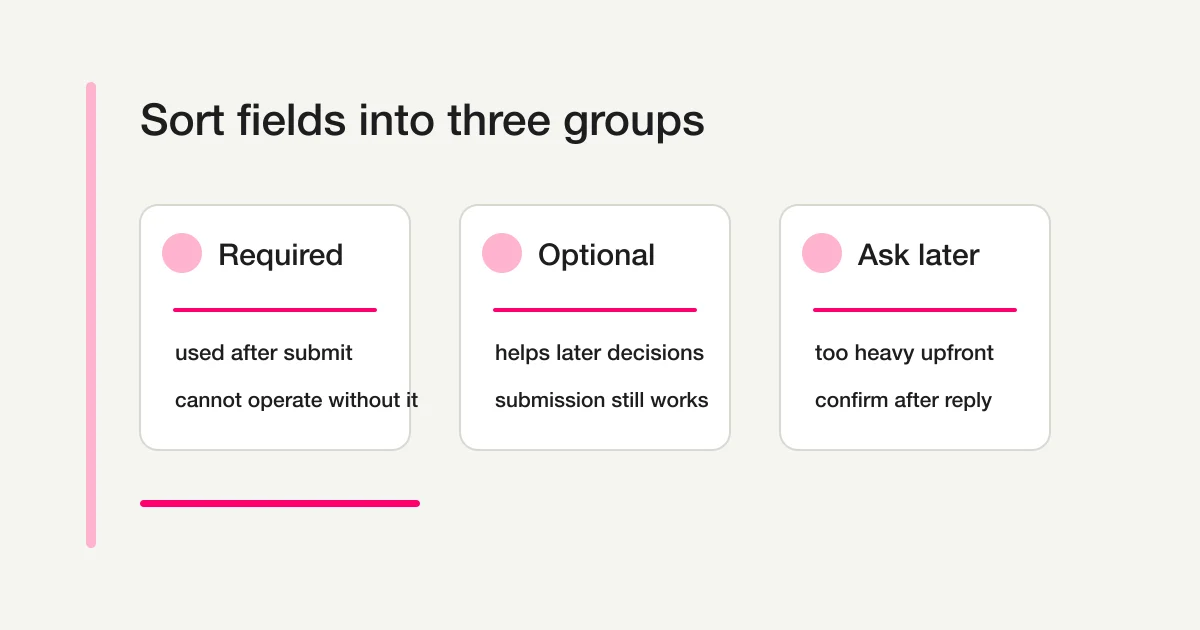
The W3C Design System recommends asking only what is strictly necessary. "Can be required" is not "should be required." Required should mean "the workflow cannot run without this," not "the business would like to know this." Email is required on most contact forms because the team needs to reply; inquiry category may be required when it routes the request; phone can stay optional when the team replies by email; preferred time is required on a booking request. The same field changes value by use case.
Form Field Examples by Use Case
A starting point, not a rulebook.
| Form type | Usually required | Often optional | Ask later |
|---|---|---|---|
| Contact | Name, email, category, message, consent | Company, phone, department, urgency | Requirements, address, quote details, attachments |
| Registration | Name, email, target, consent | Company, intent, pre-event question, phone | Detailed profile, billing, extra files |
| Booking | Name, email, service, two preferred times, contact method | Phone, notes, third preferred time | Address, payment, deep intake |
| Lead capture | Name, email, requested resource, consent | Company, role, size, timeline | Budget, requirements, meeting time |
| Job application | Name, email, role, experience summary, consent | Portfolio URL, contact preference, interview slot | Sensitive details, stage-specific documents |
| Survey | Main questions, response context, anon/named choice | Segment, open comments, follow-up consent | Contact details unless follow-up is requested |
| Event registration | Name, email, attendee count, format, consent | Company, purpose, questions, accessibility notes | Post-event survey, consultation |
A field earns its place when it supports the next action: reply context for a reply, time preferences for scheduling, qualification data for sales follow-up.
The Same Field Means Different Things in Different Forms
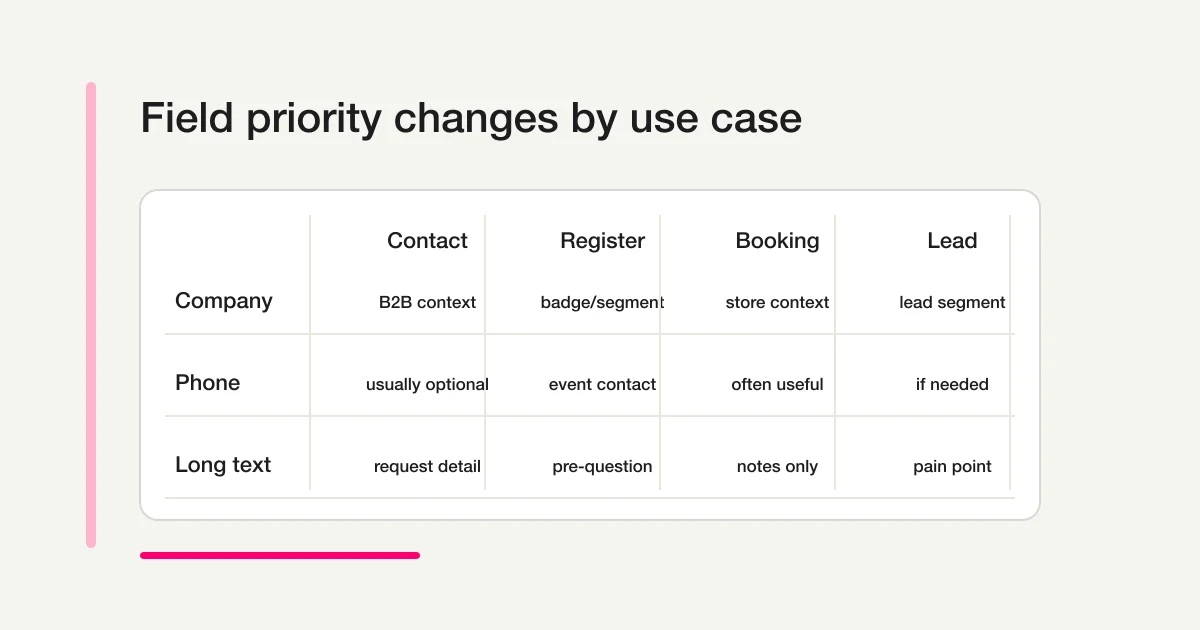
Company name helps on B2B contact forms, lead capture, and event badges; a job application cares more about role and experience than the current employer. Phone number adds friction on a basic contact form but earns its place on a booking form where same-day changes happen. Long text is powerful but expensive: a contact form needs a message, a survey needs the reason behind a rating, yet required long-answer fields make registration, booking, and event forms feel heavy. Judge fields by use case, respondent burden, and the post-submission work -- not in isolation.
Field Type Reference (All 29 Types)
FORMLOVA supports 13 basic, 13 extended, and 3 layout field types. Picking the wrong type makes analytics and automation harder later.
Basic field types (13)
| Type | Use cases | Notes |
|---|---|---|
| Short text | Name, company, subject, role | Past ~50 characters, switch to long text |
| Long text (textarea) | Message, rating reason | One or two per form; required long-text raises drop-off |
| Number | Attendee count, budget, headcount | Mobile shows numeric keyboard |
| Single choice (radio) | Attendance format, contact method | Best with 2-5 options |
| Multiple choice (checkbox) | Interests, requested resources | Split if options are many |
| Dropdown | Industry, department, region, category | Best with 6+ options. Required if used for routing |
| Date | Preferred date, event date | Range restrictions supported |
| Datetime | Meeting slot, delivery time | Watch time zones |
| Time | Preferred time range, opening hours | Pair with a date field; standardize increments |
| Reply, auto-reply target | Required for almost every form | |
| Phone | Same-day contact, urgent updates | Required only for phone follow-up. Adapt regional formats |
| URL | Portfolio, reference site | Accept missing protocol |
| File upload | Resume, reference image, quote request | Paid plans only. Communicate accepted formats up front |
Extended field types (13)
| Type | Use cases | Notes |
|---|---|---|
| Matrix | Rate several items on the same scale | Heavy past 3 x 3 |
| Signature | Acknowledgment, hiring, contracts, medical intake | Legal effect varies by jurisdiction |
| Address | Shipping, in-person visits, invitations | Avoid requiring full address upfront |
| Rating scale (stars) | Product or service rating | One scale only (1-5 or 1-7) |
| NPS (0-10) | Loyalty, recommendation intent | Define promoter and detractor consistently |
| Linear scale | Custom scale (e.g., 0-100) | Mobile drag interactions |
| Slider | Price tolerance, urgency, priority | Default value influences results |
| Opinion scale | Emoji-labeled scale | Label wording changes perception |
| Ranking | Priority order, preferences | Five items or fewer |
| Picture choice | Product, design, request type | Confirm image sizes and alt text |
| Yes/No | Pre-screening, eligibility | Use only when no middle ground |
| Country | International shipping, global support | Decide whether to set a default |
| Legal consent | Terms, privacy notice | Pair with explicit purpose copy |
Layout fields and display options
| Type | Use cases | Notes |
|---|---|---|
| Statement | Section headers, notices, instructions | No response. Split long blocks |
| Section break | Visual separator | Coordinate with multi-page form mode |
| Hidden field | UTM, user_id, spam_label, referrer | Invisible to respondents. Workflow capture |
| Hide label | Show input only | Use aria-label for screen readers |
| Hide optional badge | Reduce UI clutter | Keep the label and help text |
Four field-type principles
- Anything you analyze becomes a choice field. Industry, department, preferred date, category, rating, and NPS belong in dropdowns, radios, checkboxes, sliders, or NPS components. Plain text breaks analysis through spelling variants.
- Input burden and answer quality are a tradeoff. Long text gives depth but costs respondents and triagers time. One or two long-text fields per form is plenty.
- Extended types shine in surveys and applications. NPS, linear scale, matrix, picture choice, and signature fit surveys, applications, and contracts; they are overkill on a contact form.
- Hidden fields are for the workflow, not the respondent. UTM, referrer, user ID, and spam_label belong here (see the Workflow Implementation View below).
Contact Form Fields
For reply and routing:
Name
Email address
Inquiry category
Message
Data-use consent
Add company on B2B forms; skip it on consumer support. Make category a choice field (Product question / Pricing / Implementation consultation / Support / Partnership / Other) so responses route automatically. Require phone only when the workflow needs phone follow-up, urgent response, in-person service, or scheduling. The Contact Form Template covers privacy notices and response timing.
Registration Form Fields
Registration confirms intent to move to the next step:
Name
Email address
Registration target
Registration option or format
Confirmation email address
Change or cancellation instructions
Data-use consent
One form covering every registration type gets messy. Webinars, events, applications, resource requests, and consultations need different shapes -- see the Registration Guide, Webinar Registration Guide, and Event Registration Guide.
Reservation and Booking Form Fields
Time and confirmation state are the core:
Name
Email address
Phone number or urgent contact method
Service or appointment type
First preferred date
First preferred time range
Second preferred date
Second preferred time range
Meeting method
Notes
Cancellation or rescheduling agreement
Use structured date and range fields rather than free-text preferred times. If customers need live slot selection with instant confirmation, use a scheduler; if the team reviews requests before confirming, a form fits. The Reservation Guide explains the split.
Lead Capture and Resource Request Fields
Lead capture stays shorter than sales intake. For resource delivery only:
Name
Email address
Requested resource
Data-use consent
If sales follow-up matters, add company, role, company size, timeline, current problem, and consultation interest as optional fields. Do not turn every download into a sales interview -- someone who just wants the document abandons forms requiring budget, phone, timeline, and meeting availability. The Lead Capture Guide separates delivery from follow-up.
Job Application Form Fields
For hiring, stay disciplined:
Name
Email address
Role applied for
Experience summary
Resume or portfolio submission method
Portfolio URL
Preferred contact method
Data-use consent
Ask only job-relevant information at the first stage. Sensitive details and stage-specific documents come later. The Job Application Guide covers the full sequence and questions to avoid.
Survey Form Fields
Balance structured answers and open feedback:
Response context
Main rating or choice questions
Reason behind the rating
Improvement request
Future interest
Follow-up consent
Email only if follow-up is requested
Use choice fields for satisfaction, use case, event type, role, or segment; reserve long text for the reason or example. For anonymous surveys, skip name and email unless the respondent opts into follow-up. The Survey Guide covers question design and analysis.
Five Questions for Deciding Required Fields
When you are unsure whether a field should be required, ask five questions:
- Can we reply without it?
- Can we route or classify the response without it?
- Can we keep the promise made by the form without it?
- Can the respondent understand why we need it?
- Can we ask for it later?
If the answer to question 5 is yes, the field probably does not belong in the first form. It is the fastest way to shorten a form without breaking operations.
Choose the Right Field Type
Field type matters as much as field name.
| What you need | Recommended field | Why |
|---|---|---|
| Name | Short text | Flexible |
| Email field | Validation and mobile input | |
| Phone | Telephone field | Mobile keyboard; adapt format by region |
| Date | Date field | Sorting and scheduling; match the regional display format |
| Time range | Choice | Reduces inconsistent answers |
| Category | Choice | Better routing |
| Multiple interests | Checkboxes | Resources or topics |
| One answer only | Radio buttons | Format or contact method |
| Details | Long text | Use sparingly |
| Recommendation score (0-10) | NPS | Standard scoring and analysis |
| Satisfaction (1-5 / 1-7) | Star rating or linear scale | Familiar scales |
| Priority or urgency | Slider | Intuitive numeric input |
| Consent | Legal consent or signature | Explicit purpose and acknowledgement |
| Visual selection | Picture choice | Design or product comparison |
| Country | Country select | Removes regional variants |
| UTM, user_id, campaign tag | Hidden field | Silent capture |
| File submission | File upload | Communicate formats and size up front |
MDN explains that HTML validation features (required, input types, patterns) help users catch errors before submission, but client-side validation is never a complete substitute for server-side validation. Use email fields for email, date fields for dates, choices for categories, and long text only when prose is truly needed.
Labels, Help Text, and Required Indicators
W3C WAI recommends labels that identify each control's purpose. Keep them short and specific.
- Weak:
Info/Details/Request/Other - Better:
Inquiry details/Requested resource/First preferred date/Number of attendees/Role applied for
Use help text only when it prevents mistakes.
Phone number: Used only for same-day booking changes.
Company: Required only for business inquiries.
First preferred date: Your booking is not confirmed yet.
Message: Briefly describe the current issue.
Help text is not policy text. If the explanation is long, move it to a linked policy, confirmation email, or separate page. Error patterns are in the Form Error Message Guide; plan error copy at field-design time, not after launch.
Accessibility-First Field Design
Labels, help text, and error states decide most of a form's accessibility. Build them in at design time.
Label and placeholder
| Element | Role | Keep it? |
|---|---|---|
| Label | What this field is | Always. If hide_label is on, set aria-label instead |
| Placeholder | Example input | Helper only. Do not put required info here |
| Description (help text) | How to answer | Only when needed. Keep short |
aria-describedby | Programmatic help-text link | Improves screen-reader flow |
W3C WAI recommends associating labels with <label> so the relationship is programmatic. Placeholders alone disappear while typing, and color-only indicators fail contrast guidance.
WCAG 2.2 and Error Suggestion
WCAG 2.2 expects clear error identification (which field is wrong) and error suggestion (how to fix it).
- Use a "Required" badge instead of decorating the label with
*(FORMLOVA accepts custom badge text viarequiredBadgeText). - Place error copy near the field with a specific reason ("Enter an email address. Example: name@example.com").
- Pair a red border with descriptive text. Do not rely on color alone.
Extended field-type a11y
Hidden fields, signature, file upload, NPS, slider, and matrix all need extra care.
| Field type | Accessibility note |
|---|---|
| Hidden field | Invisible. Keep un-focusable. Workflow capture only |
| Signature | Drawing is hard for screen-reader users. Pair with a legal consent option |
| File upload | Show formats and size limits up front. Specific error copy ("PDF up to 10 MB") |
| Statement | Informational, not decorative. Use role="note" |
| NPS (0-10) | Associate the legend with inputs via aria-labelledby |
| Slider | Keyboard arrows must work; mobile tap targets 44px+ |
| Matrix | Above 3 x 3, split into multiple linear scales |
Accessibility is not only for people with disabilities -- it helps everyone on phones, non-native English speakers, and admins working late.
Workflow Implementation View -- Fields Are Data Pipes
Decide fields with the post-submit workflow in mind so automation gets simpler.
Hidden fields
| Field | Captures | Used for |
|---|---|---|
utm_source, utm_medium, utm_campaign | Acquisition source | Campaign-level CVR analysis |
referrer | Previous page | On-site navigation analysis |
user_id | Logged-in respondent ID | Customers vs prospects |
form_version | Form revision | A/B variant comparison |
client_timezone | Browser time zone | Avoid scheduling drift |
FORMLOVA reads URL query parameters directly into hidden fields. UTM capture is the cheapest way to see which channels drive quality responses.
Conditional logic implements "ask later" cleanly
When the first form must stay short but follow-up details are needed, combine conditional logic with post-submit workflows:
First form: name, email, requested service, consent
Post-submit workflow:
  - Send auto-reply
  - 24 hours later, send a follow-up form for detailed intake
  - Respondent fills it in when ready
This preserves first-form CVR while still capturing what the team needs. The Form Automation Guide covers the full sequence.
Free-text fields and sales-pitch handling
Forms with free text attract sales pitches. FORMLOVA classifies responses as legitimate, sales, or suspicious. Three field-design moves reduce noise: add "Sales or partnership" as a category, place help text near long-text inputs ("For sales proposals, please email partnerships@example.com"), and use a hidden spam_label so workflows can exclude sales from analytics. See the Spam Guide, CAPTCHA Comparison, and Honeypot Guide.
Dynamic choices, with care
Dependent dropdowns are possible with conditional logic and field visibility, but they raise cognitive load, get harder to maintain over time, and leave partial data behind when respondents drop mid-branch. Start with static choices and add branches only when measurement shows they are worth it.
Mobile Review
Forms that feel short on desktop often feel long on mobile. Test the live form on a phone before publishing: can the respondent grasp the form in the first screen, are there too many required fields, does email input open the right keyboard, does phone input open a numeric-friendly keyboard, are choice labels too long, are long-answer fields necessary, and is the error state clear?
Microsoft Forms docs recommend previewing on desktop and mobile. FORMLOVA forms should pass a mobile review before launch too.
Create a Form from Field Examples in FORMLOVA
You do not need a perfect field list. Describe the use case and workflow.
Create a contact form.
Required fields: name, email, inquiry category, message, and data-use consent.
Make company and phone optional.
We want to route responses by inquiry category.
For a booking request:
Create a free consultation booking request form.
The booking is not confirmed on submission.
Required fields: name, email, phone, topic, first preferred date and time range, second preferred date and time range.
Make notes optional.
For a resource request:
Create a resource download form. Keep the first form short.
Required fields: name, email, requested resource, and data-use consent.
Make company, company size, timeline, and consultation interest optional.
After the draft appears, check that required fields are actually used after submission, each optional field justifies itself, heavy details moved to a later step, long-text fields are sparse, choices replaced vague free text, labels stand alone, and the form submits comfortably on a phone. Then move on to Auto-Reply Examples, Response Status, and CSV / Sheets Export.
Field-to-Article Handoff Map
| Field decision | Section in this article | Read next |
|---|---|---|
| Contact category, required vs optional | Contact | Contact Form Template |
| Registration, reservation, lead capture | Use case sections | Registration, Reservation, Lead Capture |
| Job application fields | Job Application | Job Application Guide |
| Survey questions, NPS, matrix | Field Type Reference + Survey | Survey, NPS Template |
| Labels, help text, error copy | Labels + Accessibility | Error Message Guide |
| Consent text | Each use case | Privacy Consent Guide |
| Input format and server-side validation | Choose the Right Field Type | Publish Review |
| Hidden fields, conditional logic | Workflow Implementation View | Form Automation Guide |
| Sales-pitch handling | Workflow Implementation View | Spam, CAPTCHA |
| Auto-reply recipient | Use case + Choose the Right Field Type | Auto-Reply Setup |
| Response management | Five Questions | Response Status, CSV / Sheets |
| Slack notifications | Workflow Implementation View | Slack Notifications |
Use this table right after field design so the form stays a workflow entry point.
Common Mistakes
- Copying the whole template. Remove fields the team will not use.
- Requiring phone "just in case." Without a phone follow-up workflow, phone stays optional.
- Over-relying on free text. Use choices for category, requested resource, attendance format, and preferred time range.
- Vague consent. "I agree" alone is not enough. Separate purposes (replies, marketing, event follow-up, hiring).
- Designing fields without knowing who reads them. Decide whether sales, support, hiring, marketing, or events owns the data first.
- Forcing text where a choice would help. Industry, timeline, and company size in plain text break analysis -- move them to dropdowns.
- Skipping hidden fields. UTM, referrer, and user_id should not be typed. Capture silently and analyze later.
Official References
- W3C Design System: Forms
- W3C WAI: Labeling Controls
- MDN: Client-side form validation
- MDN: HTML forms
- Google Docs Editors Help: Edit your form
- Microsoft Support: Create a form with Microsoft Forms
FAQ
How many required fields should a form have?
No fixed number. Every required field must be needed for the next action. Contact forms typically require name, email, category, message, and consent; booking forms add preferred-time fields; resource requests stay much shorter.
Should phone number be required?
Only when the workflow needs same-day changes, urgent response, booking confirmation, or phone follow-up. For most contact forms, resource requests, and surveys, optional.
Should company name be required?
Yes for B2B contact, lead capture, and business events; no for consumer forms, anonymous surveys, and general feedback. Ask whether the team cannot operate without it.
How many long-text fields should a form include?
Use long text sparingly. One message or one "reason" field is usually enough. Use choices for categories, resources, event format, and time ranges so responses sort cleanly.
What should a consent field say?
State the purpose: reply, resource delivery, booking, event, or application. Separate operational consent from marketing consent when purposes differ. See the Privacy Consent Guide for wording and legal context.
How do I choose between extended and hidden fields?
Extended fields capture "I want to evaluate this"; hidden fields capture "the respondent should not have to type this." NPS is a single 0-10 question; star ratings (1-5 or 1-7) are quick satisfaction signals; linear scales handle custom ranges; matrix fields rate several items on one scale (split above 3 x 3); picture choice helps visual comparison. Hidden fields cover UTM, referrer, user_id, form_version, and client timezone, unlocking acquisition analytics, customer recognition, and A/B comparison without lengthening the form. See the Survey Guide, NPS Template, and Form Automation Guide.
Does the signature field have legal effect?
It records drawn input as a sign of consent, but legal weight depends on contract type and jurisdiction. For high-stakes contracts, pair it with the legal consent field or use an external e-signature service. Always offer an alternative for users who cannot use drawing input.
Can the same field be reused across forms?
FORMLOVA stores fields per form. Templates can be saved and applied to a new form, but values do not flow between forms automatically. When the workflow asks different questions over time, use email or user_id as a key and chain follow-up forms with auto-reply and conditional logic.
Disclosure and Verification
The author works on FORMLOVA, so the workflow examples use FORMLOVA. Guidance from the W3C Design System, W3C WAI, WCAG 2.2, MDN, Google Forms, and Microsoft Forms was checked on May 13, 2026 and folded into this 29-field-type reference. Treat this as product and form-design guidance, not legal advice for privacy, hiring, healthcare, finance, or regulated workflows.
Related Articles
- Form Creation Guide -- Choose Templates, Fields, and Workflows
- Form Conversion Optimization Guide -- Reduce Form Abandonment
- NPS Form Template -- CSAT, Score Calculation, and Follow-Up Workflow
- Form Thank You Page Guide -- Confirmation Messages, Next Steps, and Tracking
- Form Error Message Examples -- Validation Copy That Helps Users Finish
- Contact Form Privacy Consent Wording -- Checkbox, Purpose, and Examples