
Last updated: October 15, 2026
Response status should define the next action and distinguish finished work from remaining work. It is separate from notification, reading, replying and payment. FORMLOVA supports four response values: new, in_progress, resolved and spam. Do not assume arbitrary statuses such as awaiting approval or booking confirmed can be added.
Separate status from business stages
| FORMLOVA status | Use | Check next |
|---|---|---|
| new | Received, work not started | Identify content and owner |
| in_progress | Work has started | Record next action and due time |
| resolved | Required work finished | Record what was completed |
| spam | Outside normal response handling | Human review and exclusion checks |
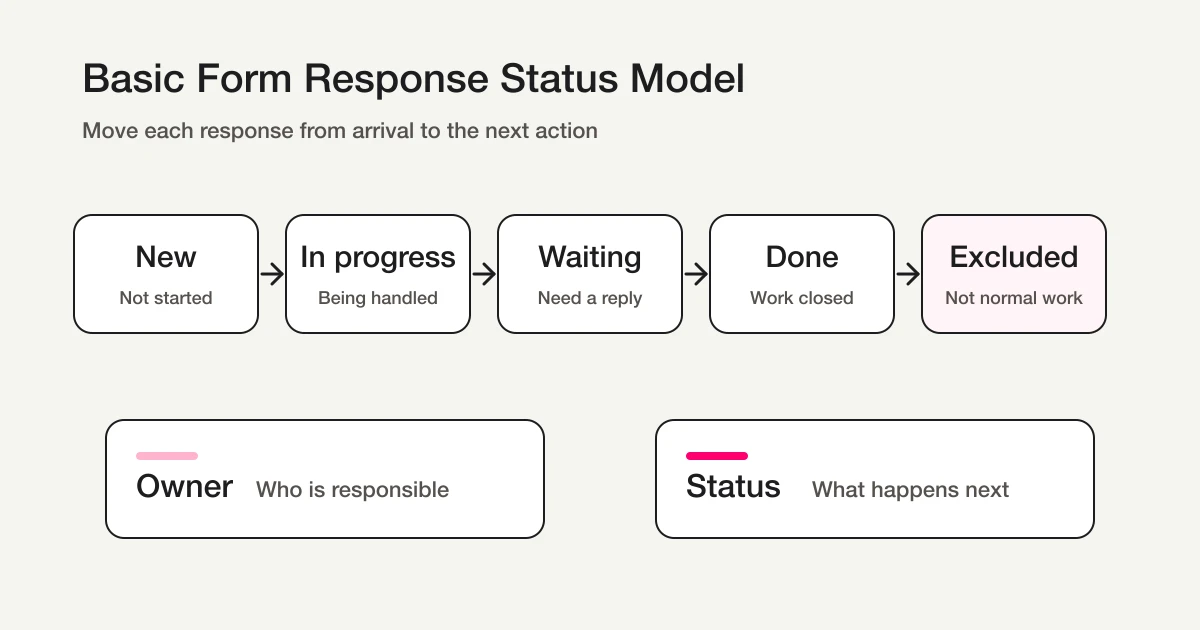
Ownership, awaiting a reply, attendance, payment and shipping are separate information. Use retained tags/notes or an external ledger. A status change does not send a reply, issue a refund or establish attendance.
Start free with the intake and decision criteria
Do not begin by changing live responses. Draft the intake and decide what evidence moves a response forward.
Define state with one inquiry
This is a proposed trial, not an operation or result measured for this rewrite. Use a private test draft first.
Create a private inquiry form with name, email, category and message. Produce decision criteria for new → in_progress → resolved and checks before spam exclusion. Keep owner/due-time notes separate without deleting existing tags or notes. Label any invented response as hypothetical. Do not publish, send or update existing responses.
Before proceeding, check:
- Is notification distinct from completed handling?
- Does the process identify actual records and retrieve them again after updating?
- Are awaiting-reply/ownership separate from the status enum, with a usable mobile/desktop intake?
Design the next response action for free
Free includes drafts, response search, four-status management and CSV/Excel export. Custom replies and email routing require Standard or above.
Register, verify your email, connect a supported AI client, and paste the proposed request above. Check the saved draft before publishing. AI-client account and usage requirements apply separately.
Update actual responses in order
- Confirm the form, period and condition, then retrieve records.
- Inspect the content and actual target; separate duplicates or matching names.
- Move only the confirmed target to in_progress when work starts.
- Retrieve again to check the count, status and retained notes/tags.
- Use resolved only after the required work is complete.
A proposed update request:
Move only the confirmed response targets to in_progress. Preserve existing notes and tags, then retrieve them again to confirm saved status and count. Do not reply or change other responses.
MCP email/phone displays are masked. Do not infer raw addresses or perform manual email joins. Use authorized exports or supported response-recipient operations.
Historical verification and current boundaries
The original Japanese counterpart recorded twelve names, two matching responses where party size was three, a two-response status update, and a summary of twelve total/ten new/two in progress/four in seven days. This is a historical record, not rerun for this rewrite. It does not establish that current personal information is always returned unmasked.
Two responses are not necessarily two participants. Keep response-record counts separate from party-size values.
The original model below illustrates business stages in an external ledger; FORMLOVA itself has the four statuses above.
If you remain in Google Forms and Sheets
Google Forms supports response viewing, Sheets and export. An external handling ledger can start with:
status owner due_date last_updated_at next_action note management_url
That external status column may use new/in-progress/awaiting-reply/completed/excluded as business categories. It does not create five FORMLOVA enum values or automatically add those columns to a FORMLOVA export. Share only authorized management links.
Keep notification, classification and replies separate
A Slack post, sent email or owner name alone does not prove resolution. Free response notifications are a six-hour owner digest, outside outgoing-mail quota; per-form destinations and email actions have separate conditions.
Classification is also separate from status. Current labels are legitimate, sales, suspicious and junk. Sales exclusion removes sales/junk and keeps suspicious/unclassified. Changing status to spam does not establish that every analysis excludes it, and a filtered remainder is not automatically qualified leads.
Daily and weekly review
Review age of new work, stalled in-progress records, missing ownership and mistakes among excluded records. Match frequency to reply deadlines; weekly review is not universally sufficient.
Check owner gaps in the actual ledger or retained note/tag convention. Do not assume a dedicated FORMLOVA owner column automatically detects every missing assignment.
Questions and decision
Can I add awaiting reply? Keep it in tags/notes or an external ledger; response status has four values.
Is status in the CSV? Basic output contains form fields and submission time. Retain a separate handling record rather than assuming status/response-ID columns.
Where do I start? Define review, update and verification for one enquiry. Try the private intake above before adding notifications or paid operations.
Related Guides and References
- View, Filter, and Update Response Status with FORMLOVA
- Google Forms + Sheets + Apps Script Operations
- Contact Form Operations Guide
- Inquiry Management From a Contact Form
- How to Send Form Responses to Slack
- How to Set Up Form Auto-Reply Emails
- Inquiry Owner Assignment
- Unhandled Response Reminder
- AI Response Report
- Google Docs Editors Help: View & manage form responses
- [Google Apps Script: FormResponse.getEditResponseUrl()](https://developers.google.com/apps-script/reference/forms/form-response#getEditResponseUrl()
- FormMailer Help Center: Response data status settings
- FormMailer: Response aggregation and management features
Disclosure and Verification
This is written by FORMLOVA's developer. Status, export, masking, notifications and plans were checked against current code/specification on October 15, 2026. Historical records are retained as such; new requests are proposed examples.