
Last updated: June 18, 2026
If you search for a ChatGPT form builder or a Claude form builder, you probably want more than a list of suggested fields.
ChatGPT and Claude can easily suggest questions for a contact form, webinar registration form, hiring form, or customer survey. They can write labels, helper text, and a confirmation message.
But that is only the first part of the job.
Where does the form actually live? Can you preview it before publishing? Can you edit the fields through the same conversation? Can you configure an auto-reply email? Can you manage responses after people start submitting?
This guide shows how to create a real form draft with FORMLOVA from ChatGPT, Claude, or another MCP-compatible AI client.
The broader MCP-based form operations model is organized in the parent guide, MCP Form Service Guide. This article focuses on the first creation step: turning a short natural-language prompt into a private draft form.
The first prompt can be very short:
Create a webinar signup form
With FORMLOVA, that prompt can become a private draft form, a preview you can review, follow-up edits, and then the next operational steps such as auto-reply email, publish review, response management, notifications, analytics, and workflows.
Quick Answer: How to Create a Form in ChatGPT or Claude
There are two practical ways to start.
The prompt-only route is asking ChatGPT or Claude to design the form on paper:
Create a webinar signup form with the fields I should ask.
That gives you a useful field plan, but it does not create the live form.
The connected route is asking ChatGPT or Claude to work with FORMLOVA through MCP:
Create a webinar signup form in FORMLOVA and return the private preview URL.
That second route is the one this article focuses on. The AI client does not only write suggestions. It passes the request to FORMLOVA, creates a private draft, returns the preview, and can continue into review, email setup, response checks, analytics, and workflows.
Use the prompt-only route when you only need ideas.
Use the FORMLOVA route when you want a real draft and a place for the responses to live.
ChatGPT Form Builder Entry
In ChatGPT, there are two search intents behind "ChatGPT form builder."
One is a generic prompt:
Create a contact form for a small consulting business.
ChatGPT can propose the title, fields, helper text, and success message. You then copy that plan into a form service.
The other is a connected app or custom MCP setup where ChatGPT can use approved external tools. In that setup, FORMLOVA is the form service. ChatGPT starts the form, returns the private draft preview, and then stays useful after publishing because it can help inspect responses, prepare emails, and run operational checks.
For the ChatGPT-specific connection path, use How to Use FORMLOVA with ChatGPT. Keep this page for the shared "one prompt to draft and preview" workflow.
Claude Form Builder Entry
The same split applies to "Claude form builder."
You can ask Claude to produce a form plan:
Create a hiring application form for a part-time operations role.
That is useful for structure and copy.
If you connect Claude to FORMLOVA through the supported MCP route for your Claude environment, the instruction can become a real form draft instead of only a written plan. Claude can help you revise the preview, prepare the publish review, and later ask about responses, notifications, email, and analytics.
For exact Claude setup steps, use the Claude Desktop FORMLOVA Guide or the Claude Code FORMLOVA Guide. This article stays focused on what to ask after the connection exists.
The Key Difference: Field Ideas vs a Real Draft Form
There are two different ways to "create a form with ChatGPT" or "create a form with Claude."
The first is asking the AI to generate field ideas.
The second is using an AI client connected to a form service so it can create an actual draft form.
| What you need | ChatGPT or Claude by itself | FORMLOVA connected through MCP |
|---|---|---|
| Field suggestions | Yes | Yes |
| Form copy | Yes | Yes |
| Actual form draft | Requires copying into another tool | Created from chat |
| Preview | In another form service | Returned after draft creation |
| Field edits | Edits the written plan | Edits the real draft form |
| Auto-reply email | Can draft copy | Can continue into setup |
| Response review | Requires pasted data | Can fetch and analyze responses |
| Post-publish operations | Requires other tools | Emails, status, notifications, analytics, workflows |
ChatGPT or Claude alone is useful for planning.
FORMLOVA is useful when you want the planning step to become a real form workflow.
That difference matters because a form is not just a text artifact. It has fields, required settings, privacy text, a success screen, email settings, response data, and operational follow-up.
Choose the Setup Guide for Your AI Client
If you want FORMLOVA to create the actual draft form, the first setup step depends on the AI client you use.
For ChatGPT, start with How to Use FORMLOVA with ChatGPT. It covers developer-mode custom app setup, OAuth, the FORMLOVA MCP server URL, first prompts, and post-publish operations from ChatGPT.
For Claude Desktop, start with the Claude Desktop FORMLOVA Guide. It covers connector setup, OAuth, first prompts, and review after draft creation.
For Claude Code, use the Claude Code FORMLOVA Guide. It explains how to add the MCP server from the terminal and use FORMLOVA from a working-directory workflow.
For Cursor, read the Cursor MCP Server Setup Guide for FORMLOVA. It covers IDE MCP configuration, .cursor/mcp.json, Slack/FORMLOVA boundaries, draft creation, preview, and post-publish checks alongside development work.
This article explains the shared workflow: a short prompt becomes a private draft and preview. Use the client-specific guide when you need the exact connection steps.
Before You Start, Decide the Form Intent
You do not need a complete specification to start.
You only need to know the intent.
For example:
Create a webinar signup form
Create a contact form
Create a hiring application form
Create a demo request form
Create a customer feedback survey
That is enough for the first draft.
Trying to specify everything upfront often slows people down. The event date may not be final. The attendee options may change. The privacy wording may need approval. The auto-reply email may not be written yet.
That is normal.
The goal of the first step is not to create the final form. The goal is to remove the blank page and get to a draft you can react to.
Step 1: Start With One Short Prompt
The first prompt can be simple.
For this guide, use:
Create a webinar signup form
From that prompt, an AI client has enough context to infer a reasonable starting structure.
A webinar registration form often needs:
- name
- email address
- company
- job title or department
- session preference
- pre-event questions
- consent or privacy acknowledgement
The first draft does not need to include every item perfectly.
If it includes phone number and you do not need it, you can replace it. If it misses company name, you can add it. If the session preference should be "live attendance" vs "recording only," you can adjust it after previewing the form.
The important thing is getting from blank page to editable draft quickly.
Step 2: Review the Private Draft and Preview
FORMLOVA should not publish the form immediately.
It first creates a private draft.
That is important. AI-assisted creation should not mean uncontrolled publishing. A form can collect personal information. A public URL can spread. A wrong field or missing consent checkbox can create real operational problems.
The safer workflow is:
- create a private draft
- open the preview
- edit the fields
- review settings
- publish only after confirmation
On the first pass, check only three things:
[ ] Is the form still private?
[ ] Can I open the preview?
[ ] Is the overall direction close to the form I need?
Do not over-review the first draft.
At this point, you are not trying to finalize every word. You are checking whether the form has the right shape. The title should make sense. The field order should be close. The obvious required fields should be present. Nothing sensitive or unnecessary should be included by accident.
The preview changes the work. Instead of designing a form in your head, you are editing something visible.
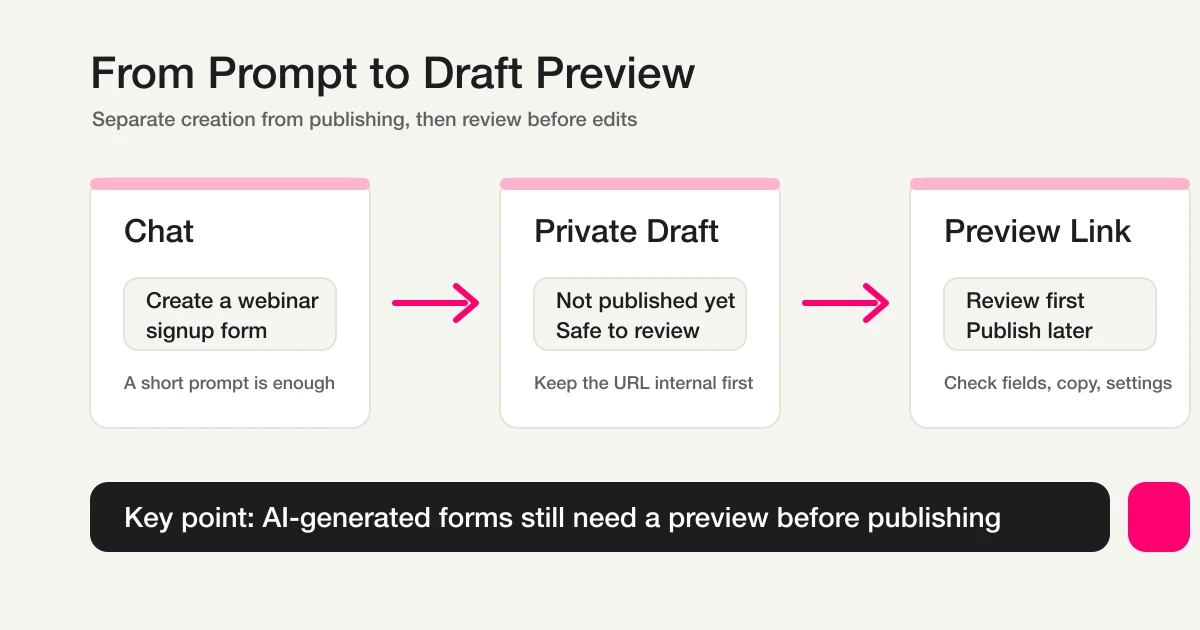
Separating creation from publishing lets you review the AI-generated draft before editing or launching it.
Step 3: Edit Fields Through Conversation
After opening the preview, tell FORMLOVA what to change.
For a webinar signup form, common edits look like this:
Replace phone number with company name
Add department and job title
Change attendee count to live attendance or recording preference
Rename notes to pre-event questions
Add a privacy consent checkbox
Make name, email, company, and attendance preference required
These instructions can stay short.
Once the draft exists, the conversation changes from "create a form from scratch" to "edit this form."
That is a much easier mental model.
In a traditional form builder, you would open a dashboard, find the field editor, remove a field, add another field, edit labels, change required settings, reorder items, and preview again. That works, but it can be slow for people who do not live inside form builder dashboards.
With FORMLOVA, you can describe the change directly.
You still need review. AI operations should not remove human judgment. But the mechanical editing step becomes lighter.
Step 4: Think About Auto-Reply Email Early
Many people who want a ChatGPT form builder actually need more than the form.
They also need the email that goes out after submission.
For a webinar registration form, the auto-reply might say:
Subject: Thanks for registering for the webinar

Body:
Thanks for registering.
Here are the date, access link, and notes for the session.
We will send a reminder before the event.
For a contact form, the auto-reply might say:
Subject: We received your inquiry

Body:
Thank you for contacting us.
Our team will review your message and get back to you.
We usually reply within 1-2 business days.
ChatGPT and Claude are good at drafting this copy.
But email copy is not the same as email setup. The form service still needs to know which form the email belongs to, when it should send, which recipient field to use, what sender identity to use, and whether the message should be tested before publishing.
With FORMLOVA, the form creation flow can continue into email setup.
For example:
Create an auto-reply email for this form
Make the tone more professional
Add a placeholder for the webinar access link
Let me test the email before publishing
This is where form creation starts becoming form operations.
The setup flow is covered in How to Set Up Form Auto-Reply Emails, and reusable copy is covered in Form Auto-Reply Email Examples.
Step 5: Review Before Publishing
The faster AI makes form creation, the more important pre-publish review becomes.
Fast drafting is not the same as safe publishing.
Before publishing, check:
[ ] Does the title match the use case?
[ ] Are the required fields correct?
[ ] Are you asking for unnecessary personal data?
[ ] Is the privacy or consent wording included when needed?
[ ] Does the success screen make sense?
[ ] Is the auto-reply email correct?
[ ] Is the response notification recipient correct?
[ ] Have you sent a test response?
This matters for contact forms, hiring forms, demo request forms, and webinar registration forms. These often include names, email addresses, company information, role details, and sometimes sensitive free-text answers.
FORMLOVA is designed to move from draft to review to publishing step by step.
For the full checklist, read Review a Form Before Publishing.
Prompt Examples You Can Reuse
Here are practical prompt examples for a ChatGPT form builder or Claude form builder workflow.
Create the First Draft
Create a webinar signup form
Create a contact form
Create a demo request form
Create a hiring application form
Create a customer satisfaction survey
Add Requirements
This is for B2B leads, so add company and job title
Let respondents choose live attendance or recording only
Add a privacy consent checkbox at the end
Make email address required
Make the free-text question optional
Improve Copy
Make the form description more professional
Shorten the form title
Rewrite the questions in a clearer business tone
Add a success message that says a reminder will be sent before the event
Review Before Publishing
List the things I should check before publishing this form
Check whether this form asks for unnecessary personal information
Prepare a test submission checklist
Continue Into Operations
Create an auto-reply email for this form
Set up a reminder email for the day before the webinar
Show me only unanswered responses
Exclude sales pitches from the analysis
Summarize this month's registration trend
You do not need to paste all of these into the first prompt.
Start short. Review the draft. Add the next instruction.
Use-Case Starting Prompts
Different forms need different starting prompts.
If you want to choose the right form structure by use case first, the Form Creation Guide organizes the reading path for contact forms, demo requests, hiring applications, surveys, and event registration.
| Use case | Starting prompt | Common fields to add |
|---|---|---|
| Webinar registration | Create a webinar signup form | company, attendance preference, pre-event question, consent |
| Contact form | Create a contact form | inquiry type, urgency, company, department |
| Demo request | Create a demo request form | company size, timeline, pain point, preferred contact method |
| Hiring application | Create a hiring application form | role, resume link, portfolio, availability |
| Customer survey | Create a customer feedback survey | rating, reason, improvement request, renewal intent |
For a one-time internal survey, simple form creation may be enough.
For contact, demo request, hiring, or webinar workflows, the response usually starts more work. That is where email, routing, status, analytics, and workflow tools become important.
That distinction is why I separate an AI form builder from an MCP form service. The concept is explained in detail in MCP Form Builder vs AI Form Builder.
How to Evaluate ChatGPT and Claude Form Builder Tools
ChatGPT-based and Claude-based form creation are becoming real categories.
Jotform, for example, has an official ChatGPT app page that describes creating forms from prompts, editing them, changing design, and analyzing submissions inside ChatGPT.
That means "ChatGPT form builder" and "Claude form builder" are no longer empty keywords. They are early search intents around a practical question: can the assistant move beyond text and operate the form workflow?
When evaluating tools, do not only ask whether they can generate a form.
Ask:
[ ] Can it create an actual private draft?
[ ] Can I preview before publishing?
[ ] Can I add, remove, and reorder fields through chat?
[ ] Can I configure auto-reply emails?
[ ] Can the AI client inspect response data?
[ ] Can it classify spam or sales pitches?
[ ] Can it schedule reminders and run analysis?
[ ] Does it work outside ChatGPT, such as Claude or Cursor?
[ ] Are important write actions protected by review or confirmation?
FORMLOVA's angle is that form creation should not be the stopping point.
FORMLOVA exposes 151 MCP tools across 24 categories so AI clients can work with form creation, response management, emails, analytics, workflows, and team operations.
If all you need is a quick field list, many tools can help.
If you want the form workflow after submission to stay connected to your AI client, you need to evaluate the operations layer.
FAQ
Can I use ChatGPT as a form builder?
Yes, but there are two meanings. ChatGPT can act as a prompt-only form planner by suggesting fields, labels, descriptions, and email copy. To create a real form, publish it, and collect responses, ChatGPT needs to work with a form service such as FORMLOVA through a connected app or MCP setup.
How do I create a form in ChatGPT?
Start with a short prompt like "Create a webinar signup form." If ChatGPT is not connected to FORMLOVA, use the answer as a field plan and copy it into your form service. If ChatGPT is connected to FORMLOVA, ask it to create the form in FORMLOVA and return the private preview URL. Then review the preview, edit fields, run the publish checklist, and continue into response management.
Can I use Claude as a form builder?
Yes. Claude can draft field ideas and form copy on its own. With FORMLOVA connected through the appropriate MCP route for your Claude environment, Claude can also help create a real private draft, revise it, and continue into review, responses, email, analytics, and workflows.
How do I create a form in Claude?
Use the same first prompt: "Create a contact form" or "Create a hiring application form." If Claude is only being used as a writing assistant, copy the plan into a form service. If Claude is connected to FORMLOVA, ask it to create the draft in FORMLOVA and show the preview URL. For connection details, use the Claude Desktop or Claude Code setup guide linked above.
How detailed should the first prompt be?
It can be short. "Create a webinar signup form" or "Create a contact form" is enough for the first draft. After previewing the form, add more specific instructions.
Should I publish an AI-generated form immediately?
No. Treat the AI output as a draft. Review required fields, privacy wording, success screen, auto-reply email, response notifications, and a test submission before publishing.
What happens after the form is created?
That is where FORMLOVA should be evaluated differently from a simple AI form generator. After publishing, the same connected workflow can continue into response search, status management, exports, auto-reply email, reminder email, notification setup, analytics, and workflow handoff.
How is FORMLOVA different from Google Forms or Tally?
Google Forms and Tally are strong for simple free form creation and response collection. FORMLOVA focuses on the workflow after creation: auto-replies, reminders, response status, sales-message classification, analytics, and MCP-based form operations. If the free-plan question is the main issue, compare free form builder and free form generator options. For a broader comparison, read How FORMLOVA Compares to Major Form Services.
References
- Jotform ChatGPT App
- Model Context Protocol: What is MCP?
- OpenAI Help Center: Apps in ChatGPT
- OpenAI Help Center: Developer mode and MCP apps in ChatGPT
- Claude Help Center: Get started with custom connectors using remote MCP
- Claude Help Center: When to use desktop and web connectors
Disclosure and Verification
This guide is for people who want to create forms with ChatGPT or Claude. I work on FORMLOVA, so this article uses FORMLOVA as the example. For the MCP background and AI-client wording, I checked the official Model Context Protocol documentation, OpenAI Help Center pages for ChatGPT apps and MCP developer mode, and Claude Help Center pages for remote MCP connectors and desktop/web connector choices on June 18, 2026. I also checked Jotform's official ChatGPT app page as an example of the broader "ChatGPT form builder" category. AI-client availability, UI labels, and plan boundaries can change, so check the current official docs before depending on a production setup.
Related Articles
- MCP Form Service Guide -- From AI Creation to Form Operations
- Form Creation Guide -- Choose Templates, Fields, and Workflows
- Create and Publish a Webinar Registration Form with FORMLOVA
- Most Form Tools Stop at Creation -- FORMLOVA Starts After Publish
- MCP Form Service: What "MCP Form" Means Beyond AI Form Creation
- MCP Form Builder vs AI Form Builder -- Creation, Responses, and Operations