
Design a survey around one decision, using comparable choices, optional reasons, and contact details only when needed. An anonymity checkbox does not make collected identities or identifiable answers anonymous.
Last updated: July 17, 2026
When people search for how to design a survey, they are usually looking for more than a list of question types.
The hard part is deciding what you want to learn and what you will do with the answers. If that decision is vague, a survey can collect plenty of responses and still produce data that is difficult to compare, summarize, or act on.
This guide covers the planning decisions to make before writing questions, the main question formats, good and bad examples, ready-to-use templates, and the design choices that make later aggregation easier. For the hands-on steps in FORMLOVA, including building the survey and organizing responses, see the Survey Form Guide.
Quick Answer: Design Backward from the Decision You Need to Make
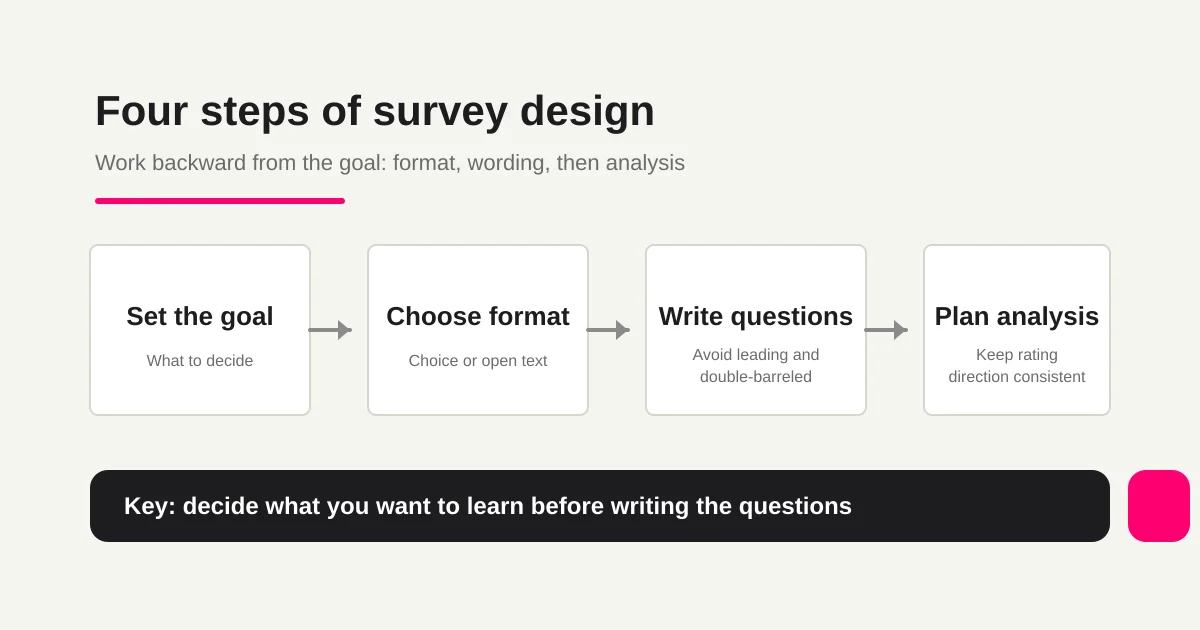
Do not start by writing the first question. Start by deciding what you need to decide after the responses arrive.
| Decision you need to make | Useful question format | Why it works |
|---|---|---|
| See the overall satisfaction trend | Rating scale, such as five points | Easy to aggregate and compare over time |
| Understand why people gave that rating | One or two optional open-text questions | Captures context that a number cannot show |
| Measure which option is most common | Single choice | Keeps the categories mutually exclusive |
| Find several relevant factors | Multiple choice | Lets respondents select more than one cause |
| Compare results by respondent group | Fixed-choice demographic or usage question | Makes segmentation consistent |
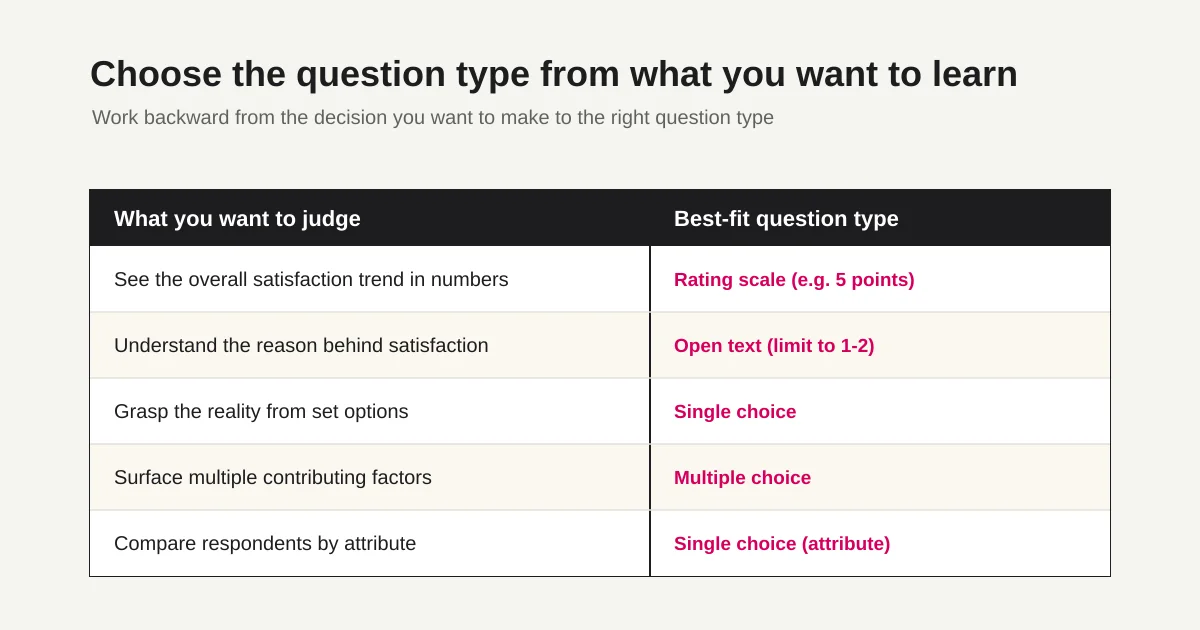
The table is not a universal rule. It is a starting point for connecting the decision to the data needed to make it.
Three Things to Decide Before You Write Questions
Write down these three items first:
1. Goal -- What do you want to learn?
2. Audience -- Who should answer?
3. Post-response action -- What will you do after aggregation?
The goal should fit in one sentence, such as “identify improvements for the next webinar” or “track customer satisfaction over time.” A goal like “hear some opinions” is too broad and usually creates a survey with too many unrelated questions.
The audience changes what you can reasonably ask. Existing customers may understand product terms, while first-time visitors may need more context. Decide whether you want anonymous feedback or named responses that allow individual follow-up.
The post-response action determines whether you need contact information. If you only need an aggregate view, collect as little personal information as possible. If someone with a low rating needs a follow-up, explain why an optional contact field is being requested and how it will be used.
Choosing Single Choice, Multiple Choice, Open Text, and Rating Scales
The four common formats have different jobs.
| Format | Good for | Watch out for |
|---|---|---|
| Single choice | Usage status, categories, one primary reason | Avoid overlapping options; add “Other” when needed |
| Multiple choice | Features used, problems, interests | State a maximum or ask for priorities separately |
| Rating scale | Satisfaction, likelihood to recommend, understanding | Keep the direction consistent: is 1 low or high? |
| Open text | Reasons, examples, improvement ideas | Keep it optional where possible and limit the count |
Use fixed-choice questions to see the pattern and open text to understand the reason. Mixing those roles in every question increases both respondent effort and analysis effort.
If you use a rating scale, label its direction clearly and use the same direction throughout the survey. A survey becomes difficult to answer when one question treats 5 as positive and another treats 1 as positive.
For a demographic question, decide why it belongs in the survey and how people can decline. The guide to asking about gender in surveys covers the decision to ask, optional wording and choices, and the treatment of nonresponse.
Good and Bad Survey Question Examples
Even the right format can produce weak data if the wording is biased or ambiguous.
| Problem | Weak example | Better example | Why |
|---|---|---|---|
| Leading question | “What do you think of our popular new feature?” | “What is your honest impression of the new feature?” | The first version suggests the expected answer |
| Double-barreled question | “Are you satisfied with the speed and helpfulness of support?” | Ask about speed and helpfulness as two questions | One answer cannot show which issue the respondent means |
| Excessive open text | Five or more required “Tell us your thoughts” fields | One optional improvement question after a choice question | Long blank fields increase abandonment and are harder to analyze |
Avoid double negatives as well. “Were you not dissatisfied with support?” makes the meaning of “yes” and “no” unnecessarily hard to follow. “How satisfied were you with support?” is clearer.
Ready-to-Use Survey Templates
These examples can be copied into a draft and adapted to your audience.
Customer satisfaction survey
Which service or plan did you use?
How satisfied were you overall? (5-point scale)
Which reason best explains your rating?
What worked especially well? (Optional)
What should we improve? (Optional)
Would you use the service again?
May we contact you about your response? (Optional email address)
Event feedback survey
Which event did you attend?
What was your main reason for attending?
How satisfied were you with the content? (5-point scale)
How clear were the materials and facilitation? (5-point scale)
Would you attend another event?
What did you like? (Optional)
What should we improve? (Optional)
Internal survey
Which department are you in?
How well do you understand the topic? (5-point scale)
Which problems are you facing? (Multiple choice)
If one problem stands out, please describe it. (Optional)
What support would help you most?
Do not include names or identifying details in comments.
An anonymity checkbox does not remove identities already collected. For anonymous feedback, review fields, metadata, rare attributes, comments, and access; separate named follow-up if needed.
Make the Survey Easy to Aggregate
Use open text for reasons and concrete examples, not as a default after every question. A practical starting point is no more than two open-text questions in one survey.
Keep answer options at the same level of abstraction. For example, “price, ease of use, support, vague anxiety” mixes concrete product factors with an unclear feeling. Replace it with options such as “price, ease of use, support, and feature coverage.”
Any field you plan to compare later should be fixed-choice from the beginning: customer type, number of visits, usage period, or event attendance count. Reclassifying free text after the fact takes time and creates spelling variations that break aggregation.
Test question design for the next session topic
Limit the survey to choosing the next session: session attended, satisfaction, preferred topic, and an optional comment. Do not request contact details for an anonymous survey.
Suggested request; this is not an executed configuration or result:
Draft an anonymous survey for choosing the next study-session topic. Include session attended, satisfaction (Very dissatisfied, Somewhat dissatisfied, Neutral, Somewhat satisfied, Very satisfied), topic (Basics, Practice, Cases, Other), and an optional comment. Do not request name or email; show the mobile preview before publication.
Submit fictional choices and check required settings, the neutral option, basic distributions, and CSV columns. A few test answers do not represent the audience. Test creation, search, basic analytics, and CSV on Free; detailed text analysis requires Standard or above.
Start with this form on Free
Draft the fields above and test fictional saved responses, search, status review, and CSV. Evaluate uploads, custom replies, and detailed analysis under their separate plan requirements.
Create a free account and test this intake
After registration and email verification, connect a supported AI client and use the request above. Review the draft before test publication. AI-client access and fees follow its provider’s terms.
Build the Survey in FORMLOVA
In FORMLOVA, you can paste the template into chat and ask for a draft:
Create a survey for seminar attendees. Include overall satisfaction, attendance purpose, content clarity, what worked well, and what should improve. Make contact information optional.
After the draft is created, review it with three checks:
Does each question format match the decision it supports?
Are any questions leading or double-barreled?
Are open-text questions limited to the places where reasons matter?
You can request a focused change in chat, such as:
Make attendance purpose a single-choice question with information gathering, comparison, implementation planning, and Other.
Once responses arrive, FORMLOVA can help you search responses, manage status, and export CSV, Excel, or JSON. Start with FORMLOVA for free when you want to connect a survey template to real collection and analysis.
FAQ
How many questions should a survey have?
Use the minimum number needed for the decision. As a practical starting point, make the core survey answerable in a few minutes and move optional detail to the end. The right count depends on the audience and topic, but removing one unnecessary required question usually helps more than adding another explanation.
Should survey responses be anonymous?
Use anonymity when people may hold back because their identity is visible. If individual follow-up is necessary, separate the optional contact field from the survey answers and explain the purpose clearly.
For the actual Google Forms controls and the check for re-identification through free text or rare attributes, use the Google Forms anonymous response setup guide.
How can I improve the response rate?
Keep the opening clear, reduce required fields, state the expected time, and send the survey when the experience is still recent. A short survey with a specific goal is easier to complete than a broad survey with many optional topics.
How can I check for leading questions before publishing?
Read each question without the surrounding context and ask whether it suggests a preferred answer. Remove praise, blame, or assumptions from the wording and test the survey with someone who was not involved in writing it.
Should I use a five-point or ten-point rating scale?
Five points are usually easier to answer and compare. Use ten points when you need finer distinctions and the audience can apply the scale consistently. In either case, label the endpoints and keep the direction consistent.
References
- Google Docs Editors Help: Choose a question type (checked July 17, 2026)
- Google Docs Editors Help: Create and edit a form (checked July 17, 2026)
What to Read Next
- Survey Form Guide -- Build, Aggregate, and Organize Open-Text Responses
- Form Creation Guide -- Choose Templates, Fields, and Workflows
Start free with FORMLOVA | View the FORMLOVA setup guide
Disclosure and Verification
This article was written after checking the Google official help pages listed above on July 17, 2026. The author is a FORMLOVA developer. Product screens and service conditions can change, so confirm current details in the official documentation and FORMLOVA product pages.
Before comparing survey answers by age, set a reference date and a consistent answer format. The guide to asking for age in surveys explains numeric ages versus age bands, boundaries without gaps or overlaps, and separate reporting of nonresponse.