
Last updated: June 17, 2026
Reliable contact-form operations need an acknowledgement, a response deadline, an owner, a status, an exclusion policy, and a review routine. Begin by making one inquiry traceable from submission to the next responsible person.
The form exists. Messages arrive. Some are real inquiries, some are support issues, some are recruiting or partnership requests, and some are cold sales pitches. Someone reads the inbox, someone mentally marks a message as "handled," and someone else later asks whether the team replied.
A contact form is not just a set of fields on a website. It is an intake system. If that system does not include acknowledgement, triage, routing, ownership, response status, spam and sales-pitch separation, and review, the team still depends on memory and inbox habits.
This guide defines contact form response management as making sure legitimate inquiries are seen, assigned, advanced, answered, recorded, and improved without being buried under noise. It also maps FORMLOVA's contact form articles into a reading order.
If you have not designed the form yet, start with the Contact Form Template. If you are choosing across form types, start with the broader FORMLOVA Form Creation Guide.
The Short Answer: Contact Form Response Management Has Six Layers
The first step is not adding more tools.
First decide which operational layers your form needs.
In practice, contact form response management breaks into six layers.
| Layer | What it decides | What breaks without it | Start here |
|---|---|---|---|
| 1. Field design | What you ask and which category choices exist | Missing context, long forms, manual triage | Contact Form Template |
| 2. Acknowledgement | What the sender receives after submission | Uncertainty, duplicate follow-up, reply pressure | How to Set Up Form Auto-Reply Emails / examples |
| 3. Response management | How the team tracks new, in-progress, waiting, closed, and excluded responses | Missed replies, duplicated work, unclear owner | Form Response Status Management |
| 4. Routing | Who should receive which inquiry | Everyone gets notified, wrong owner, slow response | Set Up Inquiry Auto-Routing |
| 5. Noise separation | How sales pitches, spam, and uncertain cases are handled | Real inquiries disappear inside noise | Contact Form Spam Guide |
| 6. Review and improvement | How data moves into CSV, Sheets, and weekly review | No trend data, dirty reports, no learning loop | Export Responses to CSV or Sync Them to Google Sheets / Google Forms CSV export |
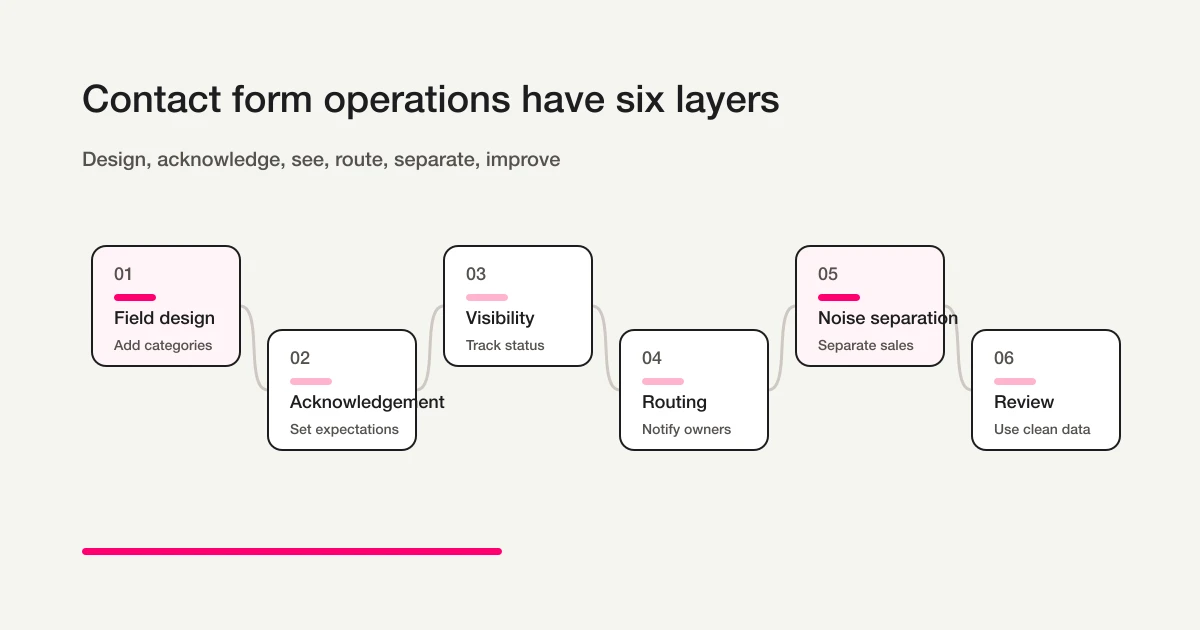
You do not need all six layers on day one. For a new site, field design, auto-reply, and response status may be enough. Add routing when volume grows, classification when sales pitches become a problem, and exports when multiple people need reporting data.
Reading Order for the Contact Form Cluster
This article is the hub. Use the table below to choose the next article.
| Situation | Read this | Why |
|---|---|---|
| You are creating the contact form | Contact Form Template | Decide fields, categories, notice text, and auto-reply basics |
| You receive quote or pricing requests through the form | Quote Request Form Guide | Collect budget and scope, set a reply deadline, and notify the owner |
| You onboard new clients after the first inquiry | Client Intake Form Guide | Gather goals, budget, and files, then run the kickoff workflow |
| You handle support and service requests, not only general inquiries | Customer Service Request Form Guide | Design intake fields, routing, urgency, and status tracking |
| You need to design response status | Form Response Status Management | Define new, in progress, waiting, closed, and excluded |
| You are evaluating inquiry management systems or spreadsheets | Inquiry Management From a Contact Form | Decide the minimum status and owner model before choosing a tool |
| You need a spreadsheet template first | Inquiry Tracking Spreadsheet Template | Copy the columns, statuses, owners, and first-response deadline fields |
| You want inquiry management with Office 365 or Teams | Inquiry Management with Office 365 and Teams | Split work across Microsoft Forms, Lists, Teams, Outlook, Power Automate, and FORMLOVA |
| You are afraid of missed follow-up | Contact Form Operations: See, Route, Act | Run visibility, routing, and action in a daily workflow |
| You need to notify different owners | Set Up Inquiry Auto-Routing | Design category-based and conditional routing |
| You need an acknowledgement email | How to Set Up Form Auto-Reply Emails / Form Auto-Reply Email Examples | Set the email up and write clear receipt copy |
| You need status tracking | View, Filter, and Update Response Status | Manage new, in-progress, waiting, and closed responses |
| You receive too many sales pitches | Contact Form Spam Guide | Reduce noise before submission and classify what gets through |
| You want sales-email classification | Sales Email Detection Guide | Enable labels, review results, and exclude sales pitches from analytics |
| You need reporting data | Export Responses to CSV or Sync Them to Google Sheets / Google Forms CSV export | Move responses into the team's reporting workflow |
| You want the broader automation model | FORMLOVA Form Automation Guide | Connect auto-replies, routing, Sheets, reminders, and analytics |
This order matters. If you sync every response before separating sales pitches, the spreadsheet becomes noisy. If you route by category before category names make sense to respondents, the wrong people get notified.
To explain the sender’s task, the contact form message writing guide shows how to state a purpose, add relevant context, and ask a clear question.
1. Field Design: Routing Starts Before the First Submission
Contact form operations begin while you are still designing fields.
The most important field is often the inquiry category.
Without a category, every response must be read manually before the owner is clear. That does not scale when support, sales, billing, hiring, partnerships, press, and vendor pitches all enter the same inbox.
A practical starting form looks like this:
Name
Email address
Company
Inquiry category
Message
Data-use notice or consent
Category examples:
Product or service question
Pricing or estimate
Implementation consultation
Support
Press or partnership
Hiring
Sales proposal
Other
Whether to include "Sales proposal" is a strategic choice. If your form receives many cold pitches, I usually recommend either giving them a clear category or explicitly stating that proposals are not accepted through the main form.
Do not overbuild the category list. Five to eight choices are usually enough. Use respondent language, not internal department language: "Support," "Press or partnership," and "Pricing or estimate" are clearer than internal team labels.
W3C WAI's form label guidance emphasizes labels and instructions for user input. MDN's form validation guide explains constraints such as required fields and email validation. The operational lesson is simple: add fields the respondent can understand and the team will actually use.
2. Acknowledgement: Auto-Replies Should Set Expectations
The purpose of an auto-reply is not to sound formal.
The purpose is to reduce uncertainty.
After submitting a contact form, the sender wants to know three things:
Did it arrive?
When should I expect a response?
What should I do if it is urgent?
A good auto-reply can be short:
Thank you for contacting us.
We received your message and usually respond within two business days.
If this is urgent, please contact support@example.com.
That is enough for many teams. For a general contact form, receipt, timing, and an escalation path matter more than a long company introduction.
In FORMLOVA, custom auto-replies are available on Standard and above. Free includes form creation, response collection, response search, status management, and CSV/Excel export. Standard is JPY 1,480 per month, Premium is JPY 3,980 per month. Monthly quota-counted email limits are 100 on Free, 1,000 on Standard, and 10,000 on Premium. Free response notifications use a six-hour digest and do not consume that quota; 100 is not a response limit.
For ready-to-adapt examples, use Form Auto-Reply Email Examples.
3. Response Management: Missed Replies Are a State Problem
FORMLOVA response status accepts four values: new, in_progress, resolved, and spam. Record waiting, provisional/confirmed attendance, and responsibility separately in notes, tags while preserving existing tags, form fields, or the agreed operations record. These are not arbitrary status values or a dedicated owner column.
The most damaging contact form failure is a real inquiry that receives no response. That is usually a state problem, not only a human attention problem.
Inbox-only workflows create predictable issues:
- one person reads a message and everyone else loses the "new" signal
- a team cannot tell whether a reply has actually been sent
- sales pitches make legitimate inquiries harder to notice
- handoff becomes unclear when someone is out
- reporting depends on memory instead of status
At minimum, a contact form needs response states.
new
in_progress
resolved
spam
Keep the list short. The point is not to create a complex ticketing system. The point is to give the team a shared language for ownership, waiting, completion, and no-action cases.
Do not merge owner and status into one idea.
The owner is who should handle the response. The status is what stage the response is in. An inquiry can have an owner and still be new. It can be in progress and still have no clear owner. Those are different problems.
| Response | Owner in operations record | Business detail in notes, etc. | What it means |
|---|---|---|---|
| Pricing question | Sales | New | Owner is known, but no reply has started |
| Job application | Hiring | Waiting | Internal or applicant follow-up is pending |
| Support issue | Support | In progress | Someone is investigating or drafting a reply |
| Sales pitch | None | No action needed | Exclude from normal response and analytics |
The broader status design is covered in Form Response Status Management. FORMLOVA's response list and status filters are covered in View, Filter, and Update Response Status. The daily operating model is explained in Contact Form Operations: See, Route, Act, which separates visibility, routing, and action.
4. Routing: Separate Categories From Conditions
Routing fails when teams treat the category as the whole rule.
A category is what the respondent selects.
A condition is what the operation uses.
A message categorized as "Pricing" may still be a vendor pitch. A message categorized as "Support" may be too vague to route automatically. A "Partnership" message may be valuable or irrelevant. Category alone is not enough.
Useful routing combines category, classification, status, and sometimes message content. When the notification target is Slack, the implementation and the follow-up design that prevents missed responses are covered in How to Send Form Responses to Slack -- Google Forms, Apps Script, and Follow-Up Design.
Example:
A new response arrives
Category is "Pricing or estimate" or "Implementation consultation"
It is not classified as a sales pitch
Status is New
Notify sales@example.com
Support example:
A new response arrives
Category is "Support"
Message includes "login", "error", "billing", or "invoice"
Notify support@example.com
Start simple. One owner per category is enough in the beginning. As volume grows, add message conditions, priority flags, sales-pitch classification, and response status.
For the setup, see Set Up Inquiry Auto-Routing With FORMLOVA Workflows. For the broader automation map, see the FORMLOVA Form Automation Guide.
5. Noise Separation: Reduce at the Door, Classify After Arrival
Sales pitches and spam are part of contact form operations. The mistake is expecting one front-door defense to eliminate them.
Front-door defenses are still useful. You can add sales-proposal copy, separate sales and general inquiry paths, honeypots, Cloudflare Turnstile, Google reCAPTCHA, and consent checkboxes. Google's reCAPTCHA v3 documentation describes a score-based approach that can assess interactions without interrupting the user flow. Cloudflare's Turnstile documentation describes an alternative challenge system for bot protection.
But these tools do not stop every human-entered pitch. A person can open the form and submit a sales message manually. Modern automation can also read page structure and fill fields more intelligently than older bots.
So the practical model has two parts:
Reduce noise before submission
Classify what still arrives
Front-door tactics are covered in Contact Form Spam Guide. Post-submission classification is covered in Sales Email Detection Guide. Product thinking is in Why FORMLOVA Built Sales Email Detection.
The core risk is not that sales pitches exist. The core risk is that real inquiries are buried inside them. Build a sorting layer, not only a wall.
6. Review and Improvement: Keep Data Clean Enough to Use
Contact form operations should produce learning.
Which categories are increasing? How long does first response take? What share of submissions are sales pitches? Which team is overloaded? Are support questions rising after a release? Did a campaign produce legitimate inquiries or mostly vendor noise?
You do not need a complex analytics stack at first. Start with these metrics:
| Metric | Why it matters |
|---|---|
| Total submissions | Measures intake volume |
| Legitimate inquiries | Removes sales-pitch noise from the count |
| Sales-pitch share | Shows how much noise the form receives |
| Submissions by category | Shows which team receives the work |
| New or overdue responses | Detects missed follow-up |
| Time to first response | Measures sender experience |
| Time to close | Finds stalled work |
The biggest reporting mistake is counting every submission as a conversion. If ten submissions include eight sales pitches, you have two useful inquiries, not ten.
FORMLOVA supports CSV/Excel export and Google Sheets sync. Use CSV for one-time review and Sheets for ongoing response data. Native Sheets sync writes submission time and form fields; it does not automatically add or update response status, owner, or sales-classification columns. Keep those operational details in a separately maintained record or explicitly managed columns. The workflow is covered in Export Responses to CSV or Sync Them to Google Sheets.
What to Automate and What Humans Should Review
Contact form operations should not automate every decision. Automate repeatable, low-risk work. Keep context-heavy, trust-sensitive, and exception-heavy work in human review.
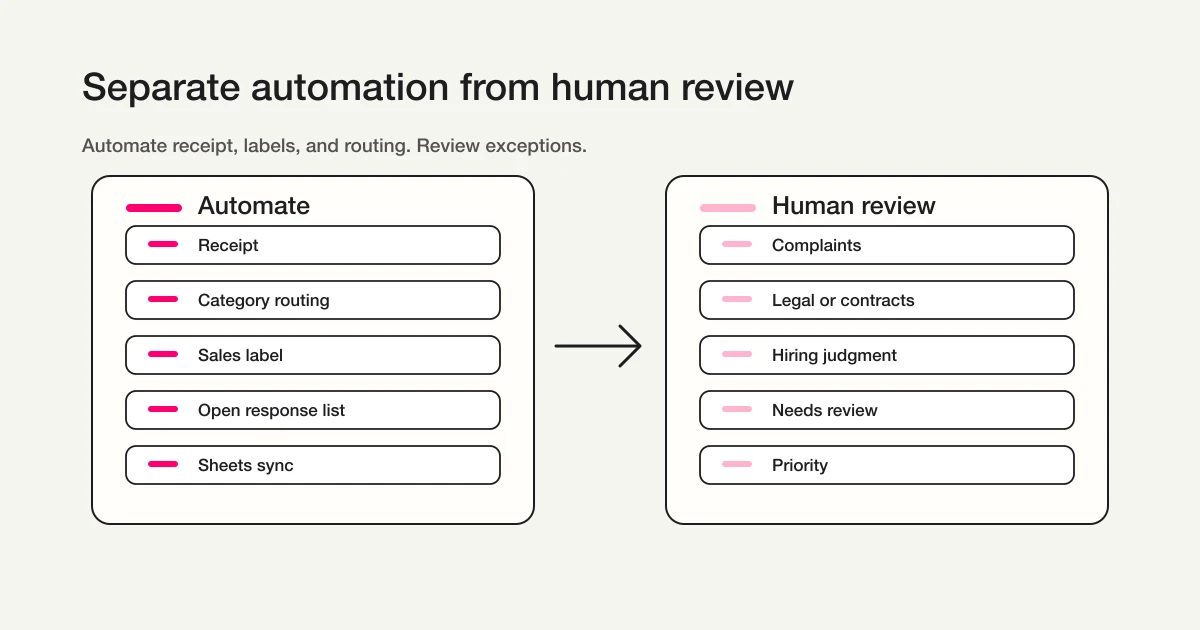
| Good candidates for automation | Keep human review |
|---|---|
| Send receipt emails | Sensitive individual replies |
| Notify owners by category | Complaints, cancellations, legal, or reputational risk |
| Label likely sales pitches | Final decision on ambiguous inquiries |
| List overdue responses | Priority and escalation judgment |
| Sync clean data to Sheets | Strategy based on the numbers |
| Generate weekly summaries | Deciding which form changes to make |
Automatically deleting anything labeled "sales pitch" is risky. A partnership request, press inquiry, or enterprise procurement message may look like a pitch at first glance. A safer pattern is to label messages, exclude sales from analytics, and let a human decide what to ignore or archive.
Trace one implementation inquiry to completion
A count of unhandled inquiries does not identify the next action. Set a first-reply deadline, define the basic in-progress state and record any waiting reason in notes, and keep the responsible person in the team’s agreed record. Review ownership and response status together each week.
The following is a suggested trial prompt. It is not a record of an executed trial or a verified outcome.
Create a contact form for implementation inquiries.
Include name, company, email, category, and message.
Require only name, email, and message.
The completion message should say that the team will review the request within two business days.
After publishing, submit a test and check that it can be found by category. Confirm the response ID before each status update, update records individually, and retrieve them again. Review uncertain sales-like messages before excluding them. Do not copy masked MCP email values into recipient fields.
Try intake with a traceable response status
Creation, publication, search, and status updates are available on Free. Add custom acknowledgement and conditional emails on Standard or higher.
Sign up free to draft an inquiry form
After signing up and verifying your email, connect FORMLOVA to a supported AI client and use the prompt above to create a draft. AI-client access and costs follow that provider’s terms.
A Practical FORMLOVA Setup Flow
If you are setting this up in FORMLOVA, use this order.
- Build the form from the Contact Form Template: name, email, company, inquiry category, message, and data-use notice.
- Add an auto-reply that confirms receipt and gives a response timeframe.
- Use Form Response Status Management to define the four supported response values and keep waiting reasons or no-action details in notes or the operations record.
- Use response status to filter real responses and update their state.
- Add category-based routing for support, sales, hiring, press, or partnership inquiries.
- Add contact form spam defenses and sales email detection so noise is separated after arrival.
- Use CSV/Sheets export for weekly review.
The first prompt can stay short:
Create a contact form with name, email, company, inquiry category, message, and data-use consent.
Use these categories: product question, pricing or estimate, implementation consultation, support, press or partnership, hiring, sales proposal, and other.
Then add the auto-reply:
Add an auto-reply email.
Say: Thank you for contacting us. We received your message and usually respond within two business days.
Then add routing:
Notify support@example.com when the category is Support.
Notify sales@example.com when the category is Pricing or estimate or Implementation consultation.
Label likely sales pitches so they can be excluded from analytics.
That is enough for a first operating model. Start with acknowledgement, visibility, routing, and noise separation. Improve after real submissions arrive.
Weekly Checklist
Contact form operations work best when the team reviews them on a simple weekly rhythm:
Are any New responses overdue?
Are any In progress responses stuck?
Did the sales-pitch share increase?
Are some categories overloaded?
Did response time exceed the promise in the auto-reply?
Does the auto-reply still match reality?
Are owner notifications too noisy?
Are there fields people rarely complete?
Each answer points to an improvement. Overdue responses indicate a status or ownership problem. Too many "Other" submissions means the category list is unclear. Rarely completed fields should become optional or be removed.
Related Workflows You Can Use
For contact form operations, start with Inquiry Auto-reply + Escalation. It combines the initial reply with an owner handoff in one workflow.
If ownership is the main issue, use Inquiry Owner Assignment. If many submissions are sales pitches or out-of-scope messages, Sales Pitch Filtering Workflow helps the team see the responses that actually need action.
FAQ
What should teams set up first?
Start with inquiry category, auto-reply, and response status. Without those three, routing is manual, senders are uncertain, and missed follow-up is hard to detect.
Can contact form spam and sales pitches be stopped completely?
Not reliably. reCAPTCHA, Turnstile, honeypots, "no sales" copy, and separate sales paths help, but human-entered pitches still get through. Reduce noise before submission and classify what still arrives.
Should inquiry category be required?
Usually yes. Category supports routing, reporting, and ownership. Keep the list short and use respondent-friendly wording.
Are auto-replies available on the free plan?
FORMLOVA's Free plan includes form creation, response collection, response search, status management, and CSV/Excel export. Custom auto-replies, conditional email, and workflow email actions are available on Standard and above.
Should contact form responses sync to Google Sheets?
Use CSV for one-time review. Use Sheets for a continuing table of submission time and form fields. Owner, response status, and classification-based metrics require a separately maintained record or explicit additional processing; native response sync does not populate them.
Can AI handle all contact form replies?
I would not recommend that. AI and automation are useful for acknowledgement, classification, routing, labels, and summaries. Human review should remain for complaints, legal questions, cancellations, hiring, contracts, and ambiguous high-value inquiries.
Summary
Contact form operations should be designed as a workflow, not as an inbox afterthought.
The practical layers are field design, acknowledgement, visibility, routing, noise separation, and review. Start with category, auto-reply, and status. Add routing when ownership becomes unclear. Add sales-pitch classification when legitimate inquiries get buried. Add exports and weekly review when the team needs operating data.
A contact form is not finished when it is published. It is finished when the team can see what arrived, route it to the right owner, answer it, separate noise, and learn from the pattern.
Disclosure and Verification
This is a parent guide for teams that need to manage contact form responses after the form goes live. I work on FORMLOVA, so the implementation examples use FORMLOVA directly. I checked official guidance from W3C WAI, MDN, Google reCAPTCHA v3, and Cloudflare Turnstile on May 13, 2026. Treat this as product and operations guidance, not legal advice.
Related Articles
-
Repair Request Form Template: Write a Clear Request and Design the Intake
-
Contact Form 7 Spam Defense -- Turnstile, reCAPTCHA, Akismet
-
Google Forms Spam Prevention -- Reduce Junk, Duplicates, and Sales Pitches