Last updated: July 1, 2026
Should you use workflow templates or manually manage appointment scheduling and SMS follow-up after a form submission?
Use workflow templates when the next step is predictable, consent is clear, and the message does not require judgment. Keep manual follow-up when the next step affects appointment availability, pricing, eligibility, refunds, complaints, sensitive context, or personalized negotiation.
That is the short answer. The rest of the workflow should make the response visible, owned, and trackable before it sends another message.
Creating a form is usually not the hard part. The hard part starts after someone submits it.
Was the response saved? Did the respondent get the right confirmation? Did the team get notified? Who owns the next action? Is the response new, in progress, done, excluded, or waiting for follow-up? Should the data go to a spreadsheet, CRM, calendar, email sequence, or report?
If those questions are handled in separate tools with no shared state, the form becomes fragile. A thank-you page says one thing. An auto-reply says another. A Slack message gets ignored. A spreadsheet row exists, but nobody knows whether the response was handled.
While building FORMLOVA, I have come back to the same product lesson many times:
A form submission is not the finish line. It is the first event in an operational workflow.
This guide explains what a post-submit workflow is, when to use workflow templates, when to keep appointment scheduling or SMS follow-up manual, how automated workflows handle email follow-up after form submission, where workflow automation platforms fit, and where FORMLOVA's chat/MCP operating layer fits.
If the current problem is unhandled responses rather than form creation, start free with FORMLOVA and test response status, reminders, and workflow recipes on one live form. If you want to run the workflow from Claude, ChatGPT, or Cursor, use the FORMLOVA setup guide.
Answer First: Templates or Manual Follow-Up?
Use a workflow template when the next step is predictable, consent is clear, and the message does not require judgment. Keep manual control when the next step affects appointment availability, pricing, eligibility, refunds, complaints, sensitive context, or personalized negotiation.
That is the practical answer to the high-intent question:
Should I use workflow templates or manually manage appointment scheduling
and SMS follow-up blasts after a form submission?
Use templates to make the next review visible and repeatable. Do not use templates to hide a decision that still needs a person.
| Post-submit step | Template is safe when | Manual review is safer when |
|---|---|---|
| Email follow-up | It is a receipt, reminder, resource delivery, or missing-information prompt | The reply decides price, eligibility, complaint handling, or a custom sales response |
| SMS follow-up | The respondent opted in and expects a short operational reminder | Consent is unclear, the message is promotional, or tone matters |
| Appointment scheduling | Every respondent can receive the same booking link | Staff must check capacity, location, price, service type, or custom constraints |
| Internal escalation | The rule is simple: unhandled, low score, urgent keyword, or category match | Priority, qualification, exception handling, or final resolution needs judgment |
The safest first automation is often internal, not external: notify the owner, show the response state, and make unresolved work visible before sending another message to the respondent.
The Short Answer
A post-submit workflow is the repeatable path a response follows after the submit button is pressed.
In plain language, post-submission means everything that happens after the form is sent. Form submission follow-ups are the later actions that keep the promise alive: a confirmation email, a staff check, an SMS reminder, an appointment scheduling step, a status change, or a report entry.
At minimum, it should answer six questions.
| Question | Workflow layer | Common failure |
|---|---|---|
| Was the response recorded? | Submission record | Email, Slack, or CRM fails and the original data is hard to recover |
| Did the respondent get acknowledged? | Thank-you page / confirmation email | The sender does not know what happens next |
| Did the team get alerted? | Notification | Everyone gets every alert, so nobody owns it |
| Who owns the next action? | Owner / routing | A real lead or inquiry sits unhandled |
| What is the current state? | Response status | The team cannot tell new, active, done, and excluded responses apart |
| What happens next? | Follow-up / sync / report | Data is exported, but no action follows |
The order matters.
Do not start by wiring every app together. Start by making the response visible, acknowledged, owned, and trackable.
Then add automation where the rule is stable enough to repeat.
A Post-Submit Workflow Is Not Just a Thank-You Page
The thank-you page is important.
It tells the respondent that the submission went through. It can explain response time, next steps, resource access, event details, or what to do if a confirmation email does not arrive.
But the thank-you page is only the respondent-facing surface.
The workflow behind it may still be unresolved:
Submission saved
Confirmation email sent
Internal owner assigned
Slack or email alert sent
Response status set to New
Sales pitch or spam classification applied
Google Sheets or CRM sync completed
Follow-up scheduled
Report updated
If the thank-you page says "we will respond within two business days," the internal workflow has to make that promise operational.
The public message and the private workflow should match.
That is why the thank-you page guide and the post-submit workflow guide are separate. The thank-you page handles what the submitter sees. The post-submit workflow handles what the product and team do next.
For the respondent-facing side, use Form Thank-You Page Guide. For the workflow model, stay here.
The Minimum Workflow Model
You can model the first version with five states.
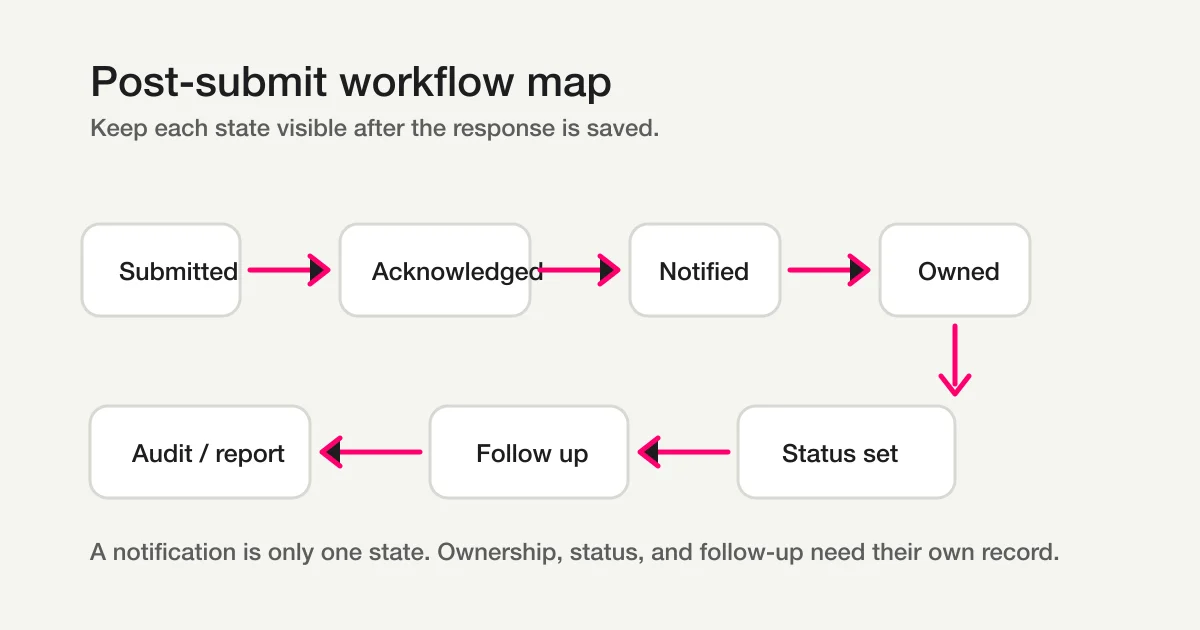
| State | Meaning | Example |
|---|---|---|
| Submitted | The response exists as a record | A contact inquiry is saved |
| Acknowledged | The respondent has received an immediate signal | Thank-you page, auto-reply, response receipt |
| Notified | The team or system has been alerted | Slack, email, task, CRM note |
| Owned | A person or workflow is responsible for the next step | Assigned to sales, support, recruiting, or event ops |
| Advanced | The response moves forward or exits normal work | In progress, done, excluded, followed up |
This is not a complex automation architecture.
It is a way to keep separate facts separate.
A response can be submitted but not acknowledged. A Slack notification can be sent while no owner exists. An owner can be assigned while the status is still New. A response can be Done for the team but still waiting for an external follow-up.
When those states collapse into one boolean, the workflow becomes hard to debug.
Where AI Workflow Fits
An AI workflow should not mean "let AI handle every form submission."
It should mean that the post-submit workflow has clear steps where AI can assist without taking ownership away from the product or the team.
| Step | Useful AI task | What should remain controlled |
|---|---|---|
| Classification | Suggest inquiry type, urgency, sales pitch, low-score reason, or spam class | Final labels, exclusion rules, audit history |
| Notification | Draft a concise summary and recommend the likely owner | Actual owner, permission, routing rule |
| Reply | Draft a response or follow-up checklist | Human approval, quota, unsubscribe and privacy checks |
| Status | Suggest new, in progress, waiting, done, or excluded | Status definition, change history, rollback |
| Reporting | Summarize open work, risks, and recurring themes | Source data, exclusions, business decision |
n8n, Power Automate, HubSpot, and Zapier all show the same broader market direction: a form submission is often a trigger for a workflow, not the end of the job.
FORMLOVA's position is narrower and more operational. AI can summarize, classify, draft, and route, but the product still needs permissions, status, logs, and confirmation boundaries. That is the difference between an AI-sounding workflow and a workflow the team can actually trust.
For the broader automation map, read the FORMLOVA Form Automation Guide. For AI-generated summaries, use AI Response Report.
Follow-Up, SMS, Scheduling, and Templates
Automated workflows handle email follow-up after form submission best when the rule is stable and the message does not pretend a human decision already happened.
A good follow-up workflow separates four choices.
| Follow-up decision | Automate with a template when | Keep manual control when |
|---|---|---|
| Email follow-up | The next message is predictable, such as a receipt, reminder, or missing-information request | The reply depends on negotiation, tone, eligibility, or sensitive context |
| Staff review | The workflow only needs to surface unhandled responses or overdue work | Someone must judge priority, qualification, refund, complaint, or exception handling |
| SMS follow-up | The respondent clearly opted in and the message is short, time-sensitive, and expected | Consent is unclear, the message is promotional, or the content needs personal judgment |
| Appointment scheduling | The form can safely send a booking link, availability prompt, or reminder | A staff member must confirm capacity, location, pricing, or custom constraints first |
This is the difference between workflow templates and manual handling. A template is useful for the part of the process you can describe in advance. Manual appointment scheduling or personal SMS follow-up still belongs in the workflow, but it should usually appear as a review step, not an invisible automatic action.
For the first follow-up layer, Unhandled Response Reminder is safer than sending every respondent another message. It starts by finding responses that have not moved. If you need awareness and a durable record together, Slack Notification + Sheets Log is the lighter template.
Workflow Templates vs Manual Follow-Up
If you are deciding between workflow templates and manual handling after a submission, start with the risk of being wrong.
Use a workflow template when the next step is predictable, consent is clear, and the message does not claim that a human has already reviewed the submission. Keep manual control when the next step affects eligibility, pricing, scheduling exceptions, refunds, complaints, or anything that needs judgment.
| Scenario after submission | Use a template for | Keep manual for |
|---|---|---|
| Appointment request | Receipt, booking-link suggestion, missing-information reminder | Confirming custom availability, location, capacity, or price |
| SMS follow-up | Short opt-in reminder or time-sensitive notice | Promotional messages, unclear consent, sensitive context, or personal negotiation |
| Email follow-up | Receipt, reminder, resource delivery, next-step checklist | Complex sales reply, support escalation, refund answer, or complaint response |
| Internal review | Unhandled-response alert, owner assignment, overdue reminder | Deciding priority, qualification, exception handling, or final resolution |
The safest first step is usually internal automation, not external messaging. Find the responses that are still New, summarize what changed, notify the owner, and let the person decide whether the respondent should receive an email, SMS, or scheduling link.
That is the practical answer to "should I use workflow templates or manually manage appointment scheduling and SMS follow-up blasts after a form submission?" Use templates to make the next review visible and repeatable. Do not use them to hide a decision that still needs a person.
Appointment Scheduling After Submission
Appointment scheduling is often treated as a calendar problem, but the workflow starts earlier.
The form should collect enough context to decide whether the respondent can receive a booking link immediately:
- requested service or meeting type
- preferred date or time window
- location or time zone
- urgency
- consent for email or SMS follow-up
- notes that may require manual review
If every respondent can book the same type of slot, the post-submit workflow can send a link automatically. If the team must check eligibility, staff capacity, language, price, or custom requirements first, the better workflow is:
Submission
-> acknowledgement
-> owner notification
-> manual review
-> approved booking link or personal scheduling reply
-> status update
This keeps the respondent informed without pretending that the appointment is confirmed before the team has actually checked it.
SMS Follow-Up Needs an Explicit Stop Condition
SMS follow-up is useful only when it is expected and easy to stop.
Before adding SMS to a form submission workflow, define four things:
| Requirement | Why it matters |
|---|---|
| Opt-in source | The team must know where SMS consent came from |
| Message purpose | A reminder, confirmation, or operational update is different from promotion |
| Stop condition | The sequence should stop when the response is handled, canceled, or excluded |
| Owner visibility | Staff should see what was sent and why |
Without those boundaries, SMS follow-up becomes noisy and hard to audit. With those boundaries, it becomes one small part of the workflow state.
FORMLOVA's preferred starting point is still response ownership. Once the owner and status are visible, adding the right reminder becomes much less risky.
Notification Is Not Ownership
One of the most common post-submit mistakes is treating a notification as ownership.
Posting a response to Slack does not mean someone will handle it.
Sending an internal email does not mean the right person saw it.
Writing a row to a spreadsheet does not mean the response has a status.
Notification is an awareness layer. Ownership is an accountability layer.
For a small team, a Slack channel may be enough at first. But if the same channel receives every inquiry, sales pitch, test response, webinar registration, and support message, the signal decays.
A better workflow separates the steps:
New response arrives
Classify or filter the response
Notify the relevant destination
Assign an owner or leave it in a shared queue
Track status until the next action is done
If you need the Slack-specific implementation path, read How to Send Form Responses to Slack. This article focuses on the broader workflow around that alert.
Auto-Replies Are Workflow State, Not Only Copy
Confirmation emails are easy to treat as copywriting.
They are more than that.
An auto-reply answers an operational question for the respondent:
Was my submission received?
What happens next?
When should I expect a reply?
Where should I go if something changes?
That means the email has to match the workflow.
If the workflow is "request received, human approval required," the email should not say "your booking is confirmed." If a webinar join link will be sent later, the confirmation email should not imply that the respondent already has everything they need. If replies are not monitored, the email should not say "reply to this message."
The failure is not always deliverability. Sometimes the email arrives, but promises the wrong state.
For setup and debugging, use Why Form Auto-Reply Emails Do Not Arrive. For reusable email examples, use Form Auto-Reply Email Examples.
Status Turns the Response Into Work
Once the respondent is acknowledged and the team is notified, the response still needs a state.
I usually start with:
New
In progress
Waiting
Done
Excluded
New means nobody has started. In progress means someone is working. Waiting means the team or respondent is blocked on the next input. Done means the required action is complete. Excluded means the response is a sales pitch, spam, duplicate, test entry, or out-of-scope message that should stay visible but not pollute normal work.
While building FORMLOVA, I learned to add Excluded earlier than expected.
Real forms collect noise. If that noise stays in New, the backlog looks worse than it is. If it is marked Done, reporting becomes dishonest. Excluded keeps the original response available without pretending it was normal work.
The deeper model is covered in Form Response Status Management.
Where Workflow Automation Platforms Fit
The English market already has mature workflow language around submissions.
Zapier frames submission automation around routing, confirmations, notifications, filtering, qualification, record keeping, and next-step workflows. FormAssembly describes workflows that move from form submission through routing, approvals, integrations, and completion. Cognito Forms describes workflow automation with actions that can trigger notifications, assign tasks, and update statuses. Form.io frames actions as configurable middleware that executes during submission events.
These are useful categories.
They show that the post-submit layer is not a small afterthought. It is where business process begins.
Automation platforms are strong when the workflow mainly connects systems:
Form submission -> CRM
Form submission -> Slack
Form submission -> approval route
Form submission -> document generation
Form submission -> task management
FORMLOVA should not pretend that every workflow belongs inside one form product.
If your main problem is connecting ten apps across a company process, a broad automation platform may be the right center.
The question is different when the workflow is still deeply tied to the form response itself:
Which responses are real?
Which ones are sales pitches?
Who owns this response?
Which status should it move to?
Should this respondent receive a confirmation, reminder, or follow-up?
Which responses should be included in reports?
Those questions are not only "send data to another app." They are product-state questions.
Where FORMLOVA Fits
FORMLOVA is built for the operational layer around forms.
The dashboard remains useful. Tables, charts, logs, billing, preview review, and visual inspection are easier to scan in a UI.
But many cross-step operations are easier to express as intent:
Show me new pricing inquiries that are not sales pitches.
Send a reminder to webinar registrants who have not confirmed,
but show me the count before sending.
Mark these test submissions as excluded and keep them out of the weekly report.
That is the chat/MCP angle.
The model or client can express intent. FORMLOVA still owns the typed tools, product state, validation, permissions, plan limits, audit logs, and confirmation gates.
This distinction matters.
The useful boundary is not "chat replaces the dashboard." It is:
Chat/MCP: operate across steps
Dashboard: inspect state clearly
Product rules: enforce safety and consistency
For the broader product guide, read FORMLOVA Form Automation Guide. For MCP positioning, read What Is an MCP Form Service?.
To try this on a real post-submit workflow, start free with FORMLOVA. To check the MCP flow before connecting an AI client, view the MCP demo.
A Practical Design Checklist
Before publishing a form that matters, define the post-submit workflow.
| Layer | Question |
|---|---|
| Record | Where is the original response saved? |
| Acknowledgement | What does the respondent see immediately? |
| Is a confirmation email needed, and what state does it promise? | |
| Notification | Who needs to know now, and what should be filtered out? |
| Ownership | Who handles the next action? |
| Status | What states can the response move through? |
| Data handoff | Does Sheets, CSV, CRM, or another system need a copy? |
| Follow-up | What happens later, and what stops the sequence? |
| Reporting | Which responses count, and which are excluded? |
| Safety | Which actions require review before execution? |
Do not automate every row on day one.
Start with the first broken handoff. For many teams, that is either auto-reply, Slack notification, owner assignment, or status tracking.
Then make the next step explicit.
Example: Contact Form
A contact form usually starts simple.
Submission
-> thank-you page
-> auto-reply
-> classify sales pitch or real inquiry
-> notify the right owner
-> set status
-> follow up
-> exclude noise from reporting
The key is not the form template. The key is preventing missed replies.
For the contact-form-specific model, read Contact Form Response Management.
Example: Webinar Registration
A webinar form has a different workflow.
Registration
-> confirmation email
-> attendee list
-> reminder
-> attendance or no-show status
-> recording or survey
-> sales or resource follow-up
The risk is not only missing the form response. The risk is losing attendee state across the registration form, webinar platform, email tool, and spreadsheet.
For that use case, read Webinar Registration Management.
Example: Google Forms and Sheets
Google Forms plus Sheets can be a good starting point.
The moment the Sheet begins to hold owner, status, notification conditions, email templates, trigger errors, and reporting logic, it has become more than an export table. It has become a small operations system.
That is not automatically wrong.
It just needs to be an explicit choice.
If you are working in that stack, read Google Forms + Sheets + Apps Script Operations.
Related Workflows You Can Use
For a first post-submit workflow, use Unhandled Response Reminder. It catches responses that have not moved to the next action yet.
If the team needs summaries, AI Response Report turns response content into an internal report. If awareness and records should happen together, Slack Notification + Sheets Log is the simplest operational route.
FAQ
Is a post-submit workflow the same as form automation?
Not exactly. Form automation is broader. It can include creation, field logic, integrations, reminders, reports, and MCP operations. A post-submit workflow is the specific lifecycle after a response is submitted.
Do I need Zapier or another automation platform?
Use a broad automation platform when the workflow mainly connects several external systems. Use a form operations layer when the workflow depends on response status, ownership, filtering, respondent email, reporting, and safe actions tied closely to the form itself.
Is Slack notification enough for response management?
Sometimes, for a small team and low volume. Once missed replies, duplicate handling, sales pitches, owners, or reporting matter, keep notification separate from response status.
Should every form have an auto-reply?
Not every form needs one. If the respondent expects a reply, event detail, resource, booking update, or application status, an auto-reply usually reduces uncertainty. If the form is purely internal or low-risk, a clear thank-you page may be enough.
Can this be handled from AI chat?
Some parts can. Cross-step operations such as filtering responses, updating status, drafting replies, preparing reminders, and requesting reports can work well through chat/MCP. Inspection-heavy work such as scanning a table, reviewing charts, or checking visual form design still benefits from a dashboard.
Summary
A form submission is the beginning of the workflow, not the end.
The minimum post-submit model is simple:
Record the response.
Acknowledge the respondent.
Notify the right place.
Assign ownership.
Track status.
Follow up or exclude.
If you only collect rows, the team still has to invent the workflow manually.
If you define the workflow, the form becomes an operating surface.
Start with the part that is already causing confusion. For many teams, that is the confirmation email, the Slack notification, the owner, or the status model.
Then connect the next step deliberately.
Start free with FORMLOVA | Open the setup guide | View the MCP demo
Disclosure and Verification
- Zapier: Submission Process Automation (checked May 13, 2026)
- n8n Docs: Form Trigger node (checked June 17, 2026)
- Microsoft Learn: Common ways to use a form in a flow (checked June 17, 2026)
- HubSpot Knowledge Base: Use automations with forms (checked June 17, 2026)
- Zapier Forms (checked June 17, 2026)
- FormAssembly: Automate Workflows (checked May 13, 2026)
- Cognito Forms: Workflow Automation (checked May 13, 2026)
- Form.io: Form Actions as Configurable Middleware (checked May 13, 2026)
I wrote this as the developer of FORMLOVA, based on the product decisions behind FORMLOVA's response status, auto-reply, notification, analytics, report, and MCP workflows.