
Decide eligibility, repeat-entry rules, data use, and winner contact before building a campaign form. Email or browser controls differ from verifying one real person’s eligibility. Shipping details can wait until selection.
Last updated: July 17, 2026
If you reuse a normal registration-form template for a giveaway or contest, important decisions are often left until after the form is live.
A campaign entry form has three additional concerns: can one person enter more times than intended, how will you explain the use of personal information for the campaign, and how will you contact winners without sending the wrong message to every entrant?
This guide covers the fields, duplicate-entry controls, privacy-purpose wording, winner communication, and operating schedule. For the broader map of form types, start with the Form Creation Guide.
Quick Answer: Decide These Three Things First
| Decision | What to define | Useful setting |
|---|---|---|
| Duplicate-entry policy | How many entries one person may submit | One per email, one per browser, or no limit |
| Purpose of personal-data use | Whether the data is limited to the contest and drawing | Entry rules and consent copy |
| Winner communication | Who will be contacted and by when | Tags, filters, and individual or batch email |
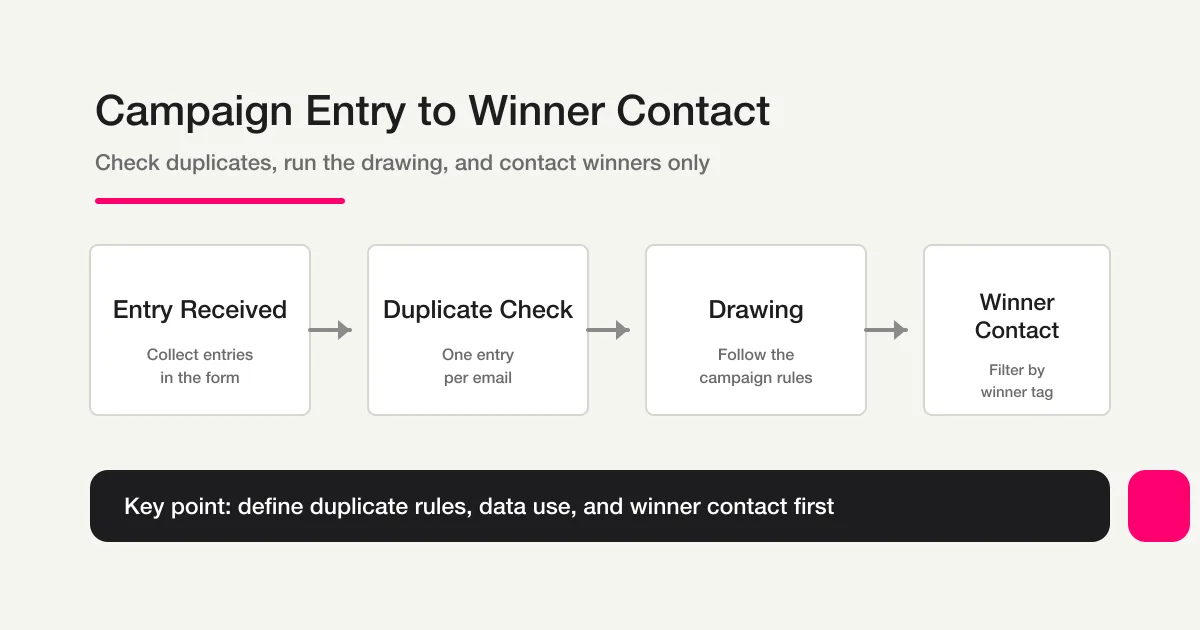
The operating flow is simple when it is decided in advance:
Entry received -> Duplicate check -> Drawing -> Winner contact
If these decisions are postponed, the form may need to be rebuilt after entries have already arrived.
Required Fields by Campaign Pattern
The right fields depend on the campaign.
| Campaign pattern | Required fields | Optional fields | Watch out for |
|---|---|---|---|
| Giveaway or prize draw | Name, email, agreement to the entry rules | Phone, shipping address | Ask for a shipping address later if only winners need it |
| Social campaign | Name or nickname, email, social account name, confirmation checkbox | Post URL | Treat follow or post confirmation as self-reporting unless you have a separate verification process |
| Campaign plus document request | Name, company, email, separate agreement to each purpose | Department, phone | Keep campaign consent and document-request consent as separate checkboxes |
Do not ask for more personal information than the prize or operation requires. Extra required fields increase the entry barrier and reduce the number of completed entries.
Prevent Duplicate Entries
FORMLOVA lets you choose the duplicate-entry policy for each form.
| Method | How it works | Suitable for |
|---|---|---|
| Email restriction | Accept only one entry from the same email address | One-entry giveaways and campaigns with a clear participant identity |
| Browser restriction | Accept only one entry from the same browser | Lightweight campaigns that want to minimize email collection |
| No restriction | Accept repeated entries | Campaigns that intentionally allow multiple entries during a period |
Email restriction is stronger for valuable prizes. Browser restrictions can be bypassed by changing browsers or using private browsing, so do not treat them as a perfect identity check.
You can ask FORMLOVA in chat:
Limit this campaign entry form to one entry per email address.
If multiple entries are intentionally allowed, state that rule in the entry terms and decide how repeated entries will be handled during the drawing. Duplicate prevention is available on the free plan.
When you want to test the fields and duplicate policy with real submissions, start with FORMLOVA for free.
State the Purpose of Personal-Data Use
For a campaign entry form, make it clear how the submitted information will be used. A practical example is:
We will use the personal information you provide only to conduct this campaign, contact selected winners, and deliver prizes.
If the same form also requests a document or subscribes someone to a newsletter, use separate checkboxes for those purposes. Combining everything into one consent sentence can lead to the feeling that entering a campaign automatically opted someone into marketing email.
The Contact Form Privacy Consent Guide covers shorter consent examples and the relationship with a privacy policy. This article focuses on limiting the purpose to the campaign, drawing, winner contact, and prize delivery.
This is a practical design guide, not legal advice. Confirm the final entry rules and consent wording for your own organization and campaign.
Contact Winners with a Defined Schedule
Make the winner state visible in the response data before the notification day. In FORMLOVA, you can tag selected entries:
Add the “Winner” tag to these five entries and the “Not selected” tag to the rest.
Then filter the response list:
Show only entries with the “Winner” tag.
And send only to that filtered group:
Send the winner notification email only to people with the “Winner” tag.
Bulk delivery to a filtered group requires Premium or above. Preview the recipient count and message before sending so that a winner email is not accidentally sent to every entrant. If non-winners will not receive individual messages, state “only selected winners will be contacted” in the entry rules.
Set the entry deadline, drawing date, winner-contact deadline, and shipping or participation date before publishing. Writing those dates into the rules gives the operations team a clear schedule and gives entrants a predictable expectation.
Social Media Campaigns: What to Check
For a follow-and-post campaign, the form will generally collect a self-report:
Social account name
Checkbox confirming that the participant followed or posted as required
Post URL (optional)
FORMLOVA does not automatically verify an external social account's follow state. Keep the checkbox as a self-report and perform a manual check before the drawing. Making the post URL optional keeps the entry barrier lower while leaving a useful clue for later review.
Tell entrants in advance how the campaign will be checked. If a missing URL invalidates an entry, make that rule clear instead of surprising people after the draw.
Test entry fields and repeat submissions before winner contact
Start with contact details and entry terms, collecting shipping details after selection. An email-based duplicate control does not prove one real person has entered only once.
Suggested request; this is not an executed configuration or result:
Draft a giveaway entry form requiring name, email, chosen prize, and entry-terms acknowledgment. Future-marketing permission is optional and unchecked. Do not collect address or phone. Configure email-based duplicate prevention; leave the deadline for operator review. Do not draw winners or send winner messages.
Test repeated submissions with the same fictional email and another address. Check the actual control against the terms. Select winners through your documented process or another tool; read existing tags and notes before appending results for confirmed response IDs. Intake, duplicate controls, search, and CSV are Free. Custom acknowledgments require Standard or above; bulk winner campaigns require Premium or above.
Start with this form on Free
Draft the fields above and test fictional saved responses, search, status review, and CSV. Evaluate uploads, custom replies, and detailed analysis under their separate plan requirements.
Create a free account and test this intake
After registration and email verification, connect a supported AI client and use the request above. Review the draft before test publication. AI-client access and fees follow its provider’s terms.
Build the Campaign Form in FORMLOVA
Email/cookie duplicate prevention rejects a repeated submission before saving. A rejected attempt does not become a saved response or receive a duplicate flag in the response list.
Use this order:
1. Choose fields for the campaign pattern.
2. Choose email restriction, browser restriction, or no restriction.
3. State that personal information is used for the campaign purposes described.
4. Configure the entry confirmation email.
5. Check saved entry counts; in a controlled test, confirm that resubmitting the same fictional email is rejected and does not increase the saved count.
6. Tag and filter winners after the drawing.
7. Contact winners and export the participant list as CSV or Excel.
On the Standard plan and above, you can customize the confirmation email. Telling entrants when winners will be contacted reduces support questions. The monthly email limits are 100 on Free, 1,000 on Standard, and 10,000 on Premium.
For a high-volume campaign, combine response logging with Slack and Google Sheets using the official Slack and Sheets logging workflow. Response data can also be exported for a separate drawing process.
FAQ
How many entries should one person be allowed?
For a giveaway or prize draw, one entry per person is the usual starting point, implemented as one entry per email address. If the campaign intentionally allows one entry per post or per day, state that rule and choose no restriction.
Can I contact only the winners?
Yes. State that only selected winners will be contacted, then filter by the Winner tag before sending. This makes the rule understandable to entrants and keeps the operation focused.
Can the entry period be controlled by the form?
Yes. Set an acceptance deadline so the form closes automatically. If the campaign has a capacity limit, use a response limit so entries close when the capacity is reached.
Can FORMLOVA verify an Instagram follow automatically?
FORMLOVA does not automatically verify an external social follow state. Collect a confirmation checkbox and review the account manually before the drawing.
Does FORMLOVA run the random drawing itself?
The response list can be exported as CSV or Excel for a separate drawing process. After the result is decided, use tags to mark winners and filter them for communication.
References
- Personal Information Protection Commission: General Guidelines and Q&A (checked July 17, 2026; operational reference only)
Related Articles
- Form Creation Guide -- Choose Templates, Fields, and Workflows
- ChatGPT Form Builder and Claude Form Builder Guide -- Create a Private Draft From One Prompt
- Form Auto-Reply and Confirmation Email Examples -- Templates for Contact Forms, Downloads, Webinars, and Applications
- View, Filter, and Update Response Status with FORMLOVA
- Export Google Forms Responses to CSV or Sync Form Data to Google Sheets
- Webinar Registration Management: Signup, Reminders, Attendee Lists, and Follow-Up
- Turn Site Design Hearings into Forms -- Auto-generate Figma Wireframes from Responses
- How to Build a Job Application Form with FORMLOVA -- Fields, Auto-Replies, and Candidate Status
- Survey Form Guide -- Design Questions, Collect Responses, and Turn Results Into Follow-Up
- Lead Capture Form Guide -- Build a Resource Download Form That Sales Can Actually Use
Disclosure and Verification
This article was written after checking the cited privacy guidance on July 17, 2026. The author is a FORMLOVA developer. The final entry rules, consent wording, and campaign schedule should be reviewed against the organization’s own requirements before publication.