

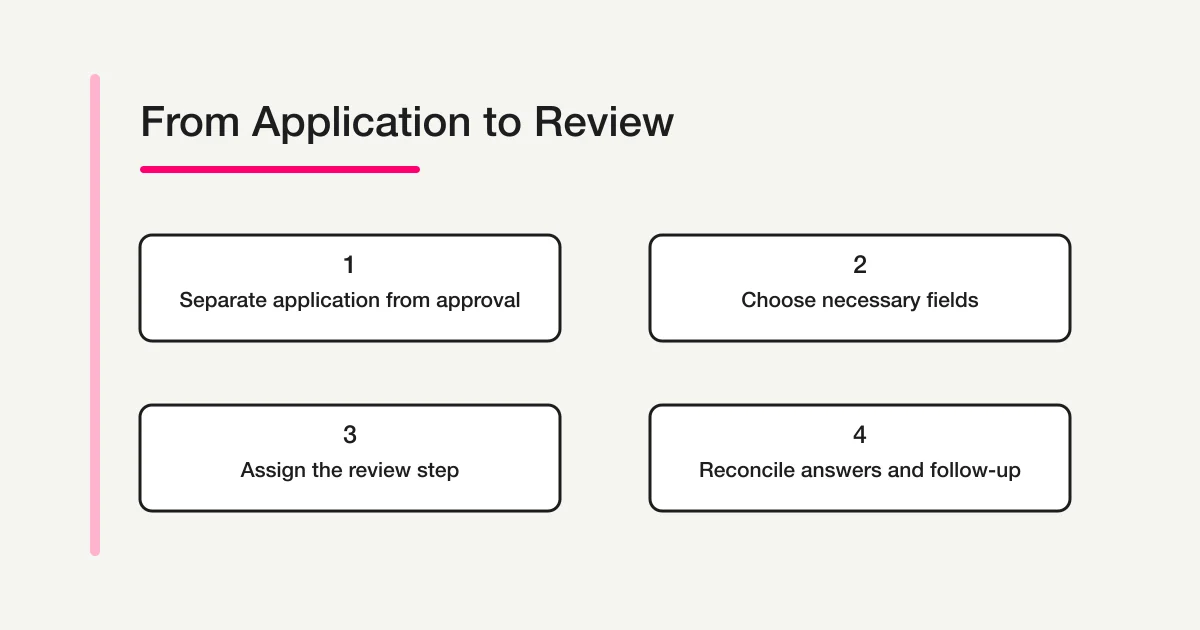
Start by separating receiving an application from confirming membership. A submitted form tells you that an application arrived. It does not automatically mean the person has been approved, paid dues, received a member number, or completed every step. Choose only the fields needed for review and follow-up, then decide who checks each response and what the applicant hears next.
This guide uses a fictional local book club to show how to plan a membership application form. For general registration-form planning, see FORMLOVA's registration form guide. An event RSVP or newsletter signup has a different purpose, so label the audience and process clearly.
Map the application and decision stages
Before writing questions, outline what applicants and organizers need to know at each stage.
| Stage | Tell the applicant | Organizer check |
|---|---|---|
| Before submission | Who can apply, what information is needed, and when a reply is expected | Does each question support the stated process? |
| Receipt | The application arrived and what happens next | Has it reached the person responsible for review? |
| Review | How to respond to a request for clarification | Are required details missing or eligibility questions unresolved? |
| Decision | How and when the result will be communicated | Who records the decision and sends the message? |
If the club has membership criteria or limited capacity, explain that the team will review applications before confirming a place. Keep an immediate receipt message separate from a later acceptance or decline. If dues are collected in another step, say so; do not imply that submitting the form means payment or membership is complete.
Choose fields for the next action
For each field, ask what decision or message it supports. Here is a fictional book-club example; adapt it to the organization's actual process.
| Field | Example setting | Why it may be useful |
|---|---|---|
| Name or preferred name | Required | Identify the application and address a reply |
| Email address | Required | Send receipt, follow-up, or decision |
| Preferred meeting format | Required | Review the applicant's choice among formats the club offers |
| Preferred start period | Required | Plan a first invitation or check capacity |
| How did you hear about us? | Optional | Understand the source of interest without blocking an application |
| Question for the organizers | Optional | Collect a question while avoiding unnecessary sensitive details |
Do not add a home address, phone number, birth date, employer, or photograph simply because the field might be useful someday. First decide whether it is necessary for the application or contact process, who will use it, and when. If identity or age matters, specify what needs to be checked and at what stage before asking for supporting information.
Explain the purpose for collecting personal information where applicants can read it before submitting. The Japanese Personal Information Protection Commission's General Rules Guidelines describe notification or publication of purposes of use, among other requirements. The details depend on the organization and its handling of information; a short consent sentence should not be presented as a universal legal solution. Check the organization's actual policy and circumstances.
Write each question so it can be reviewed
Before building the form, connect every question to a decision or follow-up task. This makes it easier to remove questions that are interesting but do not help the application move forward.
| Planning question | Example answer for the book club | Form design consequence |
|---|---|---|
| What must the organizer know to contact the applicant? | A valid email address | Make it required and tell the applicant what messages will arrive there |
| What choice affects the next invitation? | Online or in-person meeting | Use the actual formats the club can support |
| What information can wait until acceptance? | Mailing address for a physical welcome package | Ask later, if the club truly needs it |
| What can remain unanswered without delaying review? | How the applicant found the club | Make it optional and keep the form moving |
This table is a planning aid, not a universal set of membership fields. A volunteer society that sends printed materials may need a mailing address after acceptance. A group that meets entirely online may not. Keep the timing visible: if an item is needed only after a positive decision, collecting it from every applicant at the first step may add friction without helping the initial review.
Use concrete labels rather than internal shorthand. “Preferred start period” is easier to answer when its options say “November” and “December” than when they use cohort codes understood only by organizers. Add a short explanation when a choice has a limit, such as “Select the format you can attend most often.” Avoid combining two independent facts into one question; asking for both preferred format and availability in one response makes it hard to interpret either answer.
If a question uses free text, state what kind of answer is useful and what not to include. For example, “Question for the organizers” can invite a short logistics question without encouraging applicants to submit medical or financial details. If an answer is likely to need sensitive information, consider whether the first application form is the right channel at all.
Keep required and optional questions distinct
Making every useful question required can discourage applicants or collect details unrelated to the decision. For each proposed field, write down what the organizer cannot do if it is blank. Make a question required only when the application process needs the answer.
For example, a name, contact email, and preferred start period may be needed to receive and review an application. A referral source or open-ended question may be optional if the application can proceed without it. If you offer “Other,” decide separately whether the explanation box is required. Preview the form and confirm that optional questions can actually be skipped.
Do not bundle a required processing notice with an optional newsletter choice. Those selections can have different purposes. If you ask people to opt into ongoing announcements, say what they are choosing and how the organization will use that choice. The form should match the organization's real communication practice.
Assign the follow-up work
“Someone will review the responses” is not an operating plan. Decide who checks new applications, how often, who asks for clarification, who makes the membership decision, and who sends the result. Also define a backup for the primary reviewer and a way to spot duplicate applications.
An immediate message can tell applicants:
- Their application was received, and whether that means membership is confirmed.
- When and how the team expects to send the next update.
- Where to ask if the message does not arrive.
- How to correct information they submitted.
Keep the confirmation screen and any email consistent. If you plan to send a custom automatic email, check whether that capability is included in the product's current plan. Do not imply that an automated receipt also reviews the application or sends an approval decision.
Read the wording from the applicant's point of view. “We received your application” confirms receipt. “Welcome as a member” communicates an outcome. If the organization still needs to check eligibility or capacity, avoid the second statement until that decision is made. Name the expected next step instead of promising a date the volunteer team cannot reliably meet.
Set a review rhythm the team can maintain. For example, an organizer might check new responses on Tuesday and Friday, then mark each case as waiting for review, clarification requested, decision ready, or closed. These are example labels, not a required product workflow. Keep the number of states small enough that volunteers apply them consistently, and define what causes an item to move to the next state. If another person takes over, a short note such as “waiting for the applicant's preferred start period” is more actionable than “follow up.”
When an application is incomplete, decide whether to pause it, ask one focused question, or close it after a stated period. Tell the applicant how to reply and how long the team expects to wait before moving on. Avoid asking them to resend information through an unrelated public channel. A clear correction path reduces duplicate entries and helps the reviewer preserve one coherent application record.
Reconcile a small application queue
The table below is a fictional example of three submissions and their next action. It is not applicant data or a measured product result.
| Reference | Preferred start | Format | Next action |
|---|---|---|---|
| A-01 | November | In person | Check capacity and send the decision |
| A-02 | December | Online | Confirm the available online date |
| A-03 | Blank | In person | Check whether the missing answer blocks review |
The reference codes are organizer-created examples. Do not encode an email address or other personal detail in a shared reference number. Restrict access to any response export according to the club's process. Here, A-03 prompts the team to review whether the start-period question should be required and whether a missing answer is visible. Do not silently fill in the applicant's choice; ask them if needed.
Before opening the form to applicants, run through a short test checklist with a separate test entry:
- Submit a complete example and confirm that every answer appears under the intended question.
- Leave each optional field blank once and check that the form can still be submitted.
- Test a missing required answer and read the validation message.
- Check the confirmation text on a phone as well as a computer.
- Confirm that a test response is distinguishable from a real application in the review list or export.
- Assign a reviewer to the test case, then remove or label it according to the team's procedure before launch.
Do not use a real applicant's information to test the form. Check the longest field label, all answer choices, and the last item on the page. If a question is hard to understand on a small screen, shorten its wording without removing the decision it supports. If the team expects applications in multiple languages, prepare and review the translated questions before sharing the link; do not assume respondents will see a translated version automatically.
Count received applications separately from completed follow-up. If ten applications arrived and seven applicants received a decision, three cases still need action. Search, status tracking, and CSV/Excel export can help compare submissions with the team's follow-up record when those functions fit the workflow. Decide where exported files are stored and who can open them.
Draft a book-club application form in FORMLOVA
Once the fields are chosen, review the questions together with the post-submission process. The prompt below is an example for drafting a new, unpublished form in FORMLOVA. It does not ask the product to approve members or collect dues.
Draft an unpublished membership application form for a local book club. Required questions: name or preferred name, email address, preferred meeting format (in person or online), and preferred start period. Add optional questions for how the applicant heard about the club and a question for the organizers. At the beginning, state who the club is for and that submission means an application was received, not that membership is confirmed. At the end, explain that the information is used to review the application and send a decision by email. Do not collect dues, approve membership, or send email; create a draft only.
Draft the application questions and receipt guidance
FORMLOVA's free plan includes form creation and publishing, response collection, basic analytics, response search, and CSV/Excel export. Start by organizing the fields and the message applicants will see.
Sign up free to draft a membership application form
After registering and verifying your email, connect a supported AI client and use the prompt above. AI service features, terms, and costs are separate.
Before publishing, inspect the saved draft: required and optional settings, the receipt-versus-approval wording, and the expected follow-up should all match the club's process. Test which questions can be left blank and read the confirmation message. Check the current plan before promising features such as custom automatic replies or reminders. If you export responses to a spreadsheet, choose its storage location and access permissions.
This example creates a separate application form. It does not update an existing member database, charge dues, decide eligibility, or manage an ongoing member directory. If the organization needs those capabilities, plan the system responsible for them and the information that must be handed off from the form.
Frequently asked questions
Should a membership form ask for an address or phone number?
Only when the information supports the organization's actual application or contact process. A possible future use is not enough by itself. A group that sends no physical mail may not need a home address; the right fields depend on how it operates.
Does submitting the form complete membership?
Not when the form is only an intake step. The organization may still need to review eligibility, confirm capacity, collect dues, or send a member number. Explain the steps before submission and in the receipt message.
Can the receipt and approval emails be the same?
Separating them helps avoid implying a decision before review. The receipt confirms arrival; a later message communicates the outcome after the organization has made it.
Can membership and newsletter signup share one form?
They can appear together only if the fields and choices make their separate purposes clear. Decide whether ongoing messages are optional and how the organization will use that preference. For a form focused on collecting newsletter subscribers, see FORMLOVA's separate newsletter signup form guide.
Focus on the information needed for the next decision, then make the handoff visible to both applicants and organizers. For general question planning, see FORMLOVA's form-creation guide.
Disclosure and Verification
Written by the FORMLOVA team. The official privacy guidance was checked on October 26, 2026. The book-club fields and application queue are fictional teaching examples. No real membership application or live FORMLOVA workflow was tested. This article does not provide a legal compliance determination; requirements depend on the organization's circumstances.