
Last updated: October 15, 2026
A newsletter signup form should identify the sender, content, expected frequency and stop route before asking for an email address. Subscribers should complete any confirmation step shown. Operators need to preserve the stated permission and carry unsubscribe decisions into every later audience selection.
Start with the promise and the consent fields, then test the sending system separately. A submitted form is not proof of confirmed opt-in, inbox delivery or permission for unrelated marketing.
The short answer for subscribers and operators
| Role | Before signup | At signup | After signup |
|---|---|---|---|
| Subscriber | Check sender, subject matter, expected frequency, and opt-out route | Use the official form and provide only relevant details | Confirm completion, keep the first message, and unsubscribe when needed |
| Operator | Explain sender, purpose, content, frequency, and opt-out route | Separate newsletter permission from another request and preserve a record | Deduplicate, exclude opted-out addresses, test, and monitor each send |
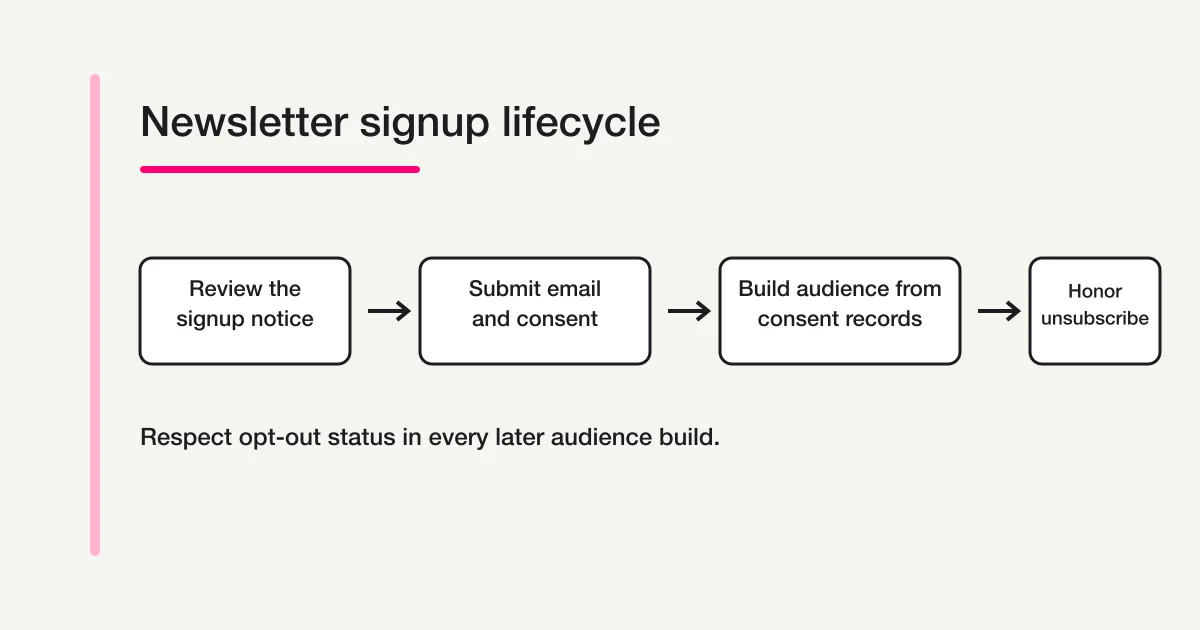
Subscriber count is not enough to judge this journey. The more useful question is whether a person made an informed choice and can reverse it without friction.
Step 1: Check the sender, content, and unsubscribe route
Before typing your email address, identify the organization that will send the newsletter. A familiar logo is not sufficient on its own. Check the site name, sender or company name, privacy notice, and the domain in the browser. If you arrived through a social advertisement, a shortened link, or a forwarded message, see whether the same signup page can be reached from the organization's official site.
Read what the newsletter promises. “Updates” can cover many different messages. A useful notice says whether you will receive new articles, product changes, events, offers, research, or another identifiable category. It should also give a reasonable expectation such as weekly, monthly, or occasional. A frequency is not a delivery guarantee, but it helps you decide whether this is appropriate for your inbox.
Look for an unsubscribe route before you subscribe. It may be an unsubscribe link in every email, a preference page, or a named contact route. If no way to stop the newsletter is visible or explained, pausing is reasonable. Do not enter a password into a newsletter form, and question requests for a home address, date of birth, or other details when no purpose is explained.
The same checks help when a newsletter signup is bundled with a prize entry, product download, event registration, or account creation. Ask which part is necessary for the requested service and which part authorizes ongoing marketing. A single submit button can represent several actions, so the nearby explanation matters.
Step 2: Enter the necessary details and verify completion
Most newsletter forms need an email address. A name, company, role, location, or topic preference can be optional. Provide optional data only when its use is clear and useful to you. If the form presents separate choices for service notices and marketing, select the choices that match what you actually want.
After submitting, read the completion screen instead of closing the tab immediately. Some publishers complete the subscription on form submission. Others send a confirmation message and require you to select a link. In the second case, the subscription may remain incomplete until that confirmation happens. This practice is often called confirmed or double opt-in, but the label matters less than the instruction shown to the reader.
If the message does not arrive, check the address you entered, spam or promotions folders, and any mailbox filtering. Search for the publisher's name rather than repeatedly submitting the form. Multiple submissions can create confusing records even when the system eventually deduplicates them. If the completion screen says that a message was sent, wait for the stated period before contacting the operator.
Keep the first confirmed message until you understand the sender name and unsubscribe route. Months later, the visible From name may be easier to recognize than the original website. A transparent welcome message should help you answer, “Why am I receiving this?” without requiring a search through old browsing history.
Step 3: Build a signup form with a clear promise and consent choice
For an operator, the work begins before choosing form colors or adding fields. Define the promise made to the subscriber. At minimum, the area around the signup action should identify:
- the newsletter name and responsible sender;
- the main kinds of content;
- an expected frequency, or a clear statement that delivery is occasional;
- the information collected and its purpose;
- the operator's privacy policy;
- how the reader can stop future newsletter messages.
Make the email address required. Treat every additional field as a decision. A first name may support a meaningful greeting. Topic preferences may support distinct newsletters. A company name might be relevant to a professional publication. If a field is collected only because another form included it, remove it until there is a documented use.
Do not hide the newsletter permission inside an unrelated sentence. When someone requests a document, registers for an event, submits an inquiry, or creates an account, that immediate request and an ongoing promotional newsletter are different reader expectations. Give them labels that express those differences. For example, “Send the requested event details” describes the immediate transaction, while “Receive our monthly product and event newsletter” describes recurring communication.
Separating choices also creates a more useful record. The operator can distinguish someone who asked for a receipt or download from someone who chose future marketing. It avoids treating possession of an email address as proof of every possible sending purpose. For a deeper treatment of policy links and checkbox language, see the privacy consent guide for forms.
Japanese operators should review the applicable Japanese rules rather than copying a foreign template. The Consumer Affairs Agency's joint guidance on Japan's Act on Regulation of Transmission of Specified Electronic Mail describes an opt-in principle for advertising and promotional email, records that demonstrate consent, sender and refusal disclosures, and a prohibition on later promotional sends after a refusal notice. Its guidance for electronic commerce also illustrates whether a consent or refusal notice is easy for a consumer to recognize.
Those rules have scopes and exceptions that depend on the sender, recipient, message purpose, and transaction. A requested operational message is not automatically identical to a continuing promotional newsletter. This article provides general product and operational information, not legal advice. For a real campaign, compare your facts with current authority guidance and obtain qualified advice where the classification is uncertain.
Step 4: Connect the consent record, unsubscribe, suppression, and test send
Once the form is published, retain enough context to understand the signup later. An address alone does not show what the person saw. Useful operational data can include the signup timestamp, source page, newsletter or topic selected, the consent wording or version that was displayed, and the method used to complete the signup. When wording changes, retain the effective date and version rather than silently applying the new sentence to historical records.
Before sending, normalize and validate addresses, remove duplicates, and exclude addresses that previously opted out. An unsubscribe action must affect the next audience selection, not merely hide the subscriber from one screen. If the same address appears in another imported list, the shared suppression decision should still prevent an unintended send.
Each continuing newsletter should present a recognizable sender and an easy-to-find unsubscribe link. Test the link from a real received message. Confirm that it reaches the intended page, does not ask for unnecessary credentials, records the choice, and removes the address from the next newsletter audience. A broken or decorative footer link is not an unsubscribe process.
The List-Unsubscribe email header can also let compatible inbox providers display an unsubscribe control in their interface. Resend's current documentation explains the URL-based header and the RFC 8058 one-click companion header for applicable bulk sending. A header complements the visible footer link and the operator's own suppression logic; it does not replace a clear signup notice or erase the need to honor the person's request.
In FORMLOVA, Free supports an email field, explicit consent fields, publishing and response collection. Configure the operator’s privacy-policy URL and check the resulting required privacy consent. Store source and wording version as deliberately defined fields or a controlled version record; these are not all automatic export metadata. Account email verification for the form owner does not automatically create subscriber double opt-in.
Bulk campaigns and mailing-list import require Premium or above. The campaign audience pipeline validates and normalizes addresses, removes duplicates and applies FORMLOVA suppression before sealing a recipient snapshot. Custom receipt emails require Standard or above. Use the supported audience tools; MCP displays mask email and phone, so do not build recipient lists by copying displayed addresses.
For continuing messages covered by the product's unsubscribe policy, FORMLOVA adds a visible unsubscribe link and List-Unsubscribe headers. An unsubscribe action creates a suppression record, and subsequent covered sends check that state. Transactional account messages have a different product boundary because stopping them could prevent the user from completing an account operation. Operators still need to classify their own content correctly; the software cannot determine the legal purpose of a misleadingly labeled message.
Use this test sequence before importing or sending to a larger audience:
- Subscribe with an address you control and inspect the completion screen.
- Confirm that the response record includes the address, time, source, and intended consent state.
- Send a test message and inspect the From name, subject, body, and visible unsubscribe link.
- Unsubscribe from the received message and confirm that the address is excluded from a new audience.
- Repeat the signup view on a narrow mobile screen and verify that the promise and choices remain readable.
Keep the stages distinct in your status language. A form submission is not proof that a confirmation email arrived. An email provider accepting an API request is not proof of final inbox delivery. A campaign status should separate accepted, sent, failed, suppressed, and not-yet-sent recipients when the system exposes those states. Begin with a controlled set of addresses and review failures before expanding.
Draft the signup promise before testing delivery
This is a proposed trial, not an operation or result measured for this rewrite. Use a private test draft first.
Create a private draft for a monthly B2B product newsletter. Require email; make name optional. Clearly name the sender, monthly content and unsubscribe route. Add an explicit newsletter choice separate from privacy consent, and record wording version NL-v1 as a defined field. Do not publish, import contacts, send mail or claim double opt-in is configured.
Before proceeding, check:
- Read the notice on phone and desktop without opening unrelated pages.
- Check that declining marketing is not treated as agreeing, and that source/version are actually stored as designed.
- Free checks the form. Test confirmation, Premium campaign suppression and unsubscribe with addresses you control only after separately configuring those paths.
Try the newsletter fields before choosing a sending plan
Create and inspect the signup form on Free. Bulk sending, mailing lists and sequences require Premium or above; no send is part of this draft trial.
Register free and draft the newsletter signup
Register, verify your email, connect a supported AI client, and paste the proposed request above. Check the saved draft before publishing. AI-client account and usage requirements apply separately.
A practical newsletter signup field list
| Field | Typical requirement | Design question |
|---|---|---|
| Email address | Required | Is the format error understandable and does the operator normalize it safely? |
| Name | Optional | Will it be used in a meaningful greeting or operation? |
| Topic preference | Optional | Can the sending system actually honor the selected categories? |
| Newsletter consent | Clearly presented for the use case | Is it separate from an event, download, terms, or account action? |
| Privacy consent | Configured for the operator's policy | Does the link point to the operator's real policy and open correctly? |
Avoid adding a required phone number merely as a future sales option. Avoid a long free-text question that is unrelated to newsletter delivery. If regional choice affects language or event notices, explain why it is useful and offer only the level of detail needed.
For a standalone newsletter, a single email field plus a clear notice may be enough. For several distinct publications, topic preferences can reduce ambiguity. However, never show preferences that your audience pipeline cannot enforce. A checkbox creates an expectation; the database and sending filters must preserve it.
If you are adding newsletter permission to a broader application, begin with the parent guide to choosing a form type, then review the registration form guide for the immediate post-submit operation. The first requested confirmation and a continuing newsletter have different roles. Use the form auto-reply setup guide for the receipt message itself. Use the post-download follow-up email guide only when you need the separate sequence after a requested resource; this page does not prescribe that copy or timing.
Common mistakes and how to correct them
Treating any collected email as a newsletter subscriber
An address may have been collected for an order, account, support request, event, receipt, or download. Preserve the purpose attached to that collection. Add a distinct newsletter choice when recurring promotional content is not inherent in the immediate request.
Writing “I agree” without naming the communication
A generic agreement can refer to terms, privacy processing, event rules, or email marketing. Name the newsletter, sender, content category, and expected pattern close to the action. A person should not have to open several unrelated pages to discover that the checkbox authorizes recurring messages.
Deleting an opted-out address and losing the refusal record
If deletion makes the system forget the stop decision, importing the address later can cause another send. Use suppression or an equivalent do-not-send state that is checked across the relevant audience sources. Limit access because an unsubscribe record still relates to an identifiable address.
Testing only the form, not the received email
A successful form submission does not test the footer, headers, sender identity, or opt-out destination. Complete the full round trip: signup, record, message, unsubscribe, and a new audience build.
Promising inbox placement or a fixed conversion lift
Consent clarity and list hygiene are sound operational practices, but they do not guarantee inbox placement, opens, clicks, or sales. Mailbox filtering, address quality, sender configuration, content, and recipient behavior all affect outcomes. Measure your own flow without presenting an unverified universal improvement figure.
Frequently asked questions
Do I need to provide my name to subscribe to a newsletter?
Not always. If the publisher does not need a name for a stated operation or meaningful personalization, an email-only form can be enough. Treat optional fields as optional and review why each item is requested.
Does a missing confirmation email mean the signup failed?
It depends on the form. A confirmed opt-in flow may remain incomplete until you select the confirmation link. Another form may finish immediately on submission. Read the completion screen, check spam and address spelling, and then contact the operator instead of submitting repeatedly.
Can an operator automatically add everyone who downloads a resource?
The resource request and ongoing marketing should be explained separately so the person can understand the choice. The legal classification depends on the jurisdiction and facts. Review applicable authority guidance and qualified advice rather than assuming that a download request permits every later newsletter.
Can I send again by moving an unsubscribed address to another list?
Changing a list label does not erase the recipient's stop decision. Apply suppression across every relevant audience source. A future resubscription should rely on a clear action by that person and a corresponding record, not an operator's manual list change.
Is double opt-in always required?
Requirements differ by jurisdiction and context. A confirmation step can help verify control of the address and make the signup event easier to recognize, but this article does not claim that one technical pattern is universally mandatory or sufficient. Review the rules that apply to your sender, recipients, and message purpose.
Is an unsubscribe link enough by itself?
No. The link must work, the resulting choice must reach the audience-selection process, and future sends must respect it. The signup notice, sender identity, consent record, visible link, email headers, suppression data, and sending filters form one operating chain.
What to do next
Keep the consent wording version with the collection record, and review a fresh audience after a controlled unsubscribe test. Signup, confirmed permission and delivery are separate checkpoints.
Disclosure and Verification
This article was reviewed on September 4, 2026 against the Consumer Affairs Agency's overview of Japan's specified electronic mail rules, its guidance on recognizable consent and refusal displays for electronic commerce email advertising, Resend's official List-Unsubscribe implementation guidance, and the current FORMLOVA specification, public-form implementation, campaign audience code, and unsubscribe code. This is general operational information, not legal advice. The author develops FORMLOVA.
Start by drafting a newsletter signup form on Free. Verify the promise and saved fields first, then configure and test the paid sending and unsubscribe path separately.