Last updated: October 15, 2026
FORMLOVA’s LINE integration records activity on the LINE links it issues, so an operator can review which invitation someone opened and decide a next step. Tap memory, segment extraction, and approval-gated LINE delivery require Premium. This is not a read receipt, an entire friend-list tracker, or proof that an application was completed.
What This Update Adds
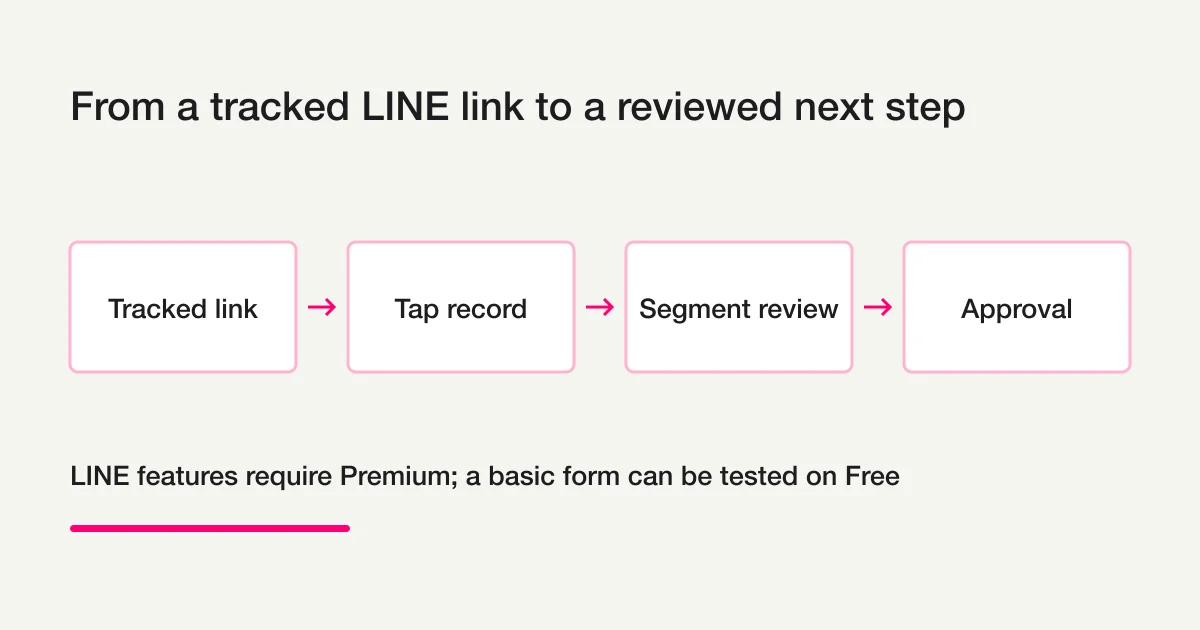
Place a FORMLOVA-issued LINE link in a new message or an appropriate rich-menu URL button. A supported tap can be recorded against that target. Where the same LINE identity is attached to a form response, the operator can compare the recorded tap with the response evidence.
| Evidence | What it means | What it does not prove |
|---|---|---|
| Recorded tap | The tracked link was opened through the capture flow | Read receipt or message delivery |
| Identity-linked response | A saved response is associated with that LINE identity | Every normal-URL response belongs to the same person |
| Prepared segment | A server-side audience was selected under stated criteria | Everyone selected is currently sendable |
| Approved job | The dashboard review and approval steps were completed | Every recipient received or read the message |
For broader operations, see the form automation guide and MCP form service guide. This update stays with tracked LINE links and reviewed next messages.
Follow the Link, Record, Review, and Approval Sequence
Create and review the form first. On a suitable Premium connection, issue the LINE capture link, then put that link in a controlled test message. Confirm that the intended target records a tap before adding it to a real invitation.
Review the target, period, matching conditions, and exclusions. Prepare a message only after those facts are known. Actual delivery requires dashboard checks of the sending account, sendable audience, copy, quota estimate, and test result, followed by approval. A chat request alone does not complete delivery.
Treat Unconfirmed Responses as Candidates, Not Proof
Comparison works within the identities actually recorded and linked on the server. Ordinary form URLs, responses without a LINE identity, and applications received through another system cannot automatically be matched to every tap. A LINE display name is not a reliable identity key. Do not join masked contact data by guesswork or ask the AI to assemble a list of raw LINE IDs.
A person whose linked response is not found is a candidate for review, not necessarily a proven non-respondent. Check the actual form, tap period, response linkage, exclusions, and sendable count. A reminder can acknowledge that the person may already have completed the action elsewhere. Confirm the real deadline before using it in copy.
First Prepare the Form on Free
Free registration can be used to prepare the underlying form; LINE functionality itself requires Premium. This suggested request does not configure LINE or send a message:
Draft an attendance form with name, email, session, and
Attending / Not attending / Undecided.
Do not configure LINE or delivery.
First show the fields, required settings, data-use wording,
and thank-you page before a reviewed test publication.
Check the plan and connection conditions before adding LINE later.
After review, publish a test and send fictional answers. Check that the responses persist and can be found by session. A draft preview does not save responses. This verifies the form, not LINE taps or identity linkage.
Prepare your attendance form on Free
Use the fields above to verify saved responses and search. LINE tap memory and approval-gated messaging require Premium and a checked connection.
Create a free account and prepare this form
After registration and email verification, connect a supported AI client and use the request above. Review before test publication. AI-client terms and fees are separate.
Check the Connection Before Using a Real Audience
LINE Login and Messaging API channels must be under the same LINE Developers provider for the same user’s IDs to align across those channels. Confirm the operator controls the connection and the captured test account. Test the issued link, response linkage where used, and actual delivery to that intended test account separately.
A captured person is not automatically a sendable person. The dashboard checks the sendable audience before approval, and API or quota failures can still occur. Inspect job results and do not call a prepared or partially delivered job complete.
LINE pricing, message allowances, and counting follow the LINE Official Account’s region and plan. Review current remaining allowance and the displayed estimate. They are separate from FORMLOVA’s email quotas and plan.
Preserve Existing LINE Operations Deliberately
The basic link-capture flow does not require replacing the existing inbound webhook. A button’s destination can still conflict with another tool. If L-Step or another service manages a postback button, leave it intact and start with a URL in a new test message.
A separately enabled LINE delivery-operations mode has additional webhook forwarding, stop handling, and exclusion-sync requirements. The basic tap flow is not evidence that all existing LINE delivery and opt-outs were automatically integrated. Have the connection owner check the current setup and actual tests.
What This Feature Does Not Promise
It does not recover clicks on old ordinary URLs or links that never went through FORMLOVA. It does not identify every person who ignored an invitation. It does not give individual read receipts or guarantee message arrival. It is not a replacement for an entire LINE CRM, customer-service bot, or existing marketing system.
Only recorded evidence should drive the next action. Publishing a tracked link today does not reconstruct past engagement.
Where It Fits
Tracked links can help an operator review activity around class attendance, event invitations, surveys, and other forms with a next action. Start with a small controlled case, then decide whether the actual evidence supports wider use.
The event follow-up, unhandled-response review, and survey follow-up recipes are reusable chat requests. They do not replace the Premium LINE connection or start continuous monitoring simply by being opened.
Next Steps
Build and verify the normal form first. If LINE is needed, review Premium access, the connection, and operator-controlled test evidence. Only then prepare an audience and message for dashboard review. Keep a draft, approval, attempted delivery, and confirmed result separate.
Official Sources
- LINE user profile information
- LINE user IDs and provider boundaries
- Messaging API pricing
- Messaging API reference
Disclosure and Verification
This is the English counterpart of FORMLOVA’s existing LINE update, categorized as concept to match that original. I work on FORMLOVA. The translation and operational limits were checked against the current product specification, plan definition, LINE segmentation implementation, and official LINE sources on October 15, 2026. The examples are proposed tests, not delivery or conversion results. This new English article and its planned assets are not yet published.