Office Cleaning Checklist: Template and Completed Example
A cleaning checklist should record the location, specific task, frequency or planned date, responsible person, task status, and recording date. Include a reason and follow-up contact for unfinished work so that an empty box does not become the only explanation of what happened.
Start with the copyable table below and adapt it to routine cleaning in a general office. It organizes work methods and responsibilities that your workplace has already agreed. It does not establish sanitation standards for food premises, healthcare facilities, or specialist equipment, and it does not provide instructions for using cleaning chemicals.
Copyable office cleaning checklist
Copy this outline into a document or spreadsheet. Keep the planned date separate from the actual completion date. For recurring work, identify both the frequency and the particular date or period covered by each record. A monthly grid can work, provided that the meaning of each task and status remains easy to find alongside it.
Area covered:
Recording period:
Existing work instructions and contact for questions:
Person or contact point reviewing the records:

Location | Specific task | Frequency/planned date | Responsible person
Status | Actual completion date | Recorded by
Reason or note | Follow-up contact | Review date

Status options:
- Completed: the task described in this row was performed.
- Not done: the planned task has not been performed; give a reason and next contact.
- Not applicable: the task is outside the agreed conditions for this occasion; explain why.
- Blank: no status has been recorded. Do not treat it as completed or not applicable.

Follow-up record:
Review date | Reviewed by | What was confirmed | Next action
Use only the identifying information that the workplace needs. A department or staff code may be sufficient for an internal record; a full name and personal contact details are not automatically necessary. Decide who can view the records before inviting people to submit them.
If one sheet becomes too crowded, split it by area. Reception, meeting rooms, and shared spaces can have separate tables while using the same status definitions. A missing mark should not mean “not done” on one sheet and “not applicable” on another. Keep the legend visible wherever the table will be used.
Define a location, task, and frequency for each row
“Clean the meeting room” leaves several questions unanswered. Does it cover the table, floor, equipment, or all of them? Write an observable task with a location, such as “Meeting room A: wipe the tabletop using the existing instructions” or “Shared space: empty the designated collection bin.”
A sample cleaning plan from the Tokyo Metropolitan Institute of Public Health provides fields for tasks and frequencies by location. The useful idea here is that structure, not a recommendation to copy the sample's particular frequencies into every office.
Choose frequency from your actual usage and existing plan. A task scheduled for a particular weekday, one required after use, and one performed after a designated contact requests it have different triggers. Record those conditions explicitly. Do not turn every row into a daily task simply because the template has a column for every day.
One check should also have a clear scope. If a row combines table and floor cleaning, decide whether both must be finished before the row can be marked completed. Alternatively, give each task its own row. The second approach makes a partly finished room easier to describe without inventing a percentage.
Keep specialist work methods in the appropriate existing instructions. The checklist can name that document or the contact who can answer questions. It should not become an improvised chemical procedure or substitute for the facility's requirements. Where responsibility is unclear, clarify it before adding another recurring task.
Completed example: meeting room and shared space
This is a fictional office example. The tasks, dates, staff codes, and circumstances are editorial illustrations, not records of actual cleaning or measured improvements. The schedule is also fictional and does not recommend the same frequency for other offices.
| Location and task | Planned occasion | Responsible person | Status | Completion date and recorder | Reason or note | Follow-up |
|---|---|---|---|---|---|---|
| Meeting room A: wipe the tabletop using the existing instructions | After use, November 9 | Staff A | Completed | November 9; recorded by A | The specified tabletop task was finished | None |
| Meeting room A: clean the specified floor area | Before closing, November 9 | Staff A | Not done | No completion date; recorded by A | A meeting continued through the planned cleaning time | Contact office administration; review room availability on November 10 in the morning |
| Shared space: empty the designated collection bin | Before closing on a day when it is used | Staff B | Not applicable | No completion date; recorded by B | The designated bin was not used that day | Check the schedule on its next day of use |
The second row separates the date of recording from the date of completing the task. Writing down an unfinished task on November 9 does not mean it was performed then. The next step is to confirm access to the room and discuss a new time. Naming a contact does not, by itself, assign the next cleaning shift.
The third row relies on an agreed condition: the task applies on days when that particular bin is used. It is not permission to label scheduled work “not applicable” because a person was busy. If the condition is uncertain, ask the designated contact rather than choosing a convenient status.
Keep the example narrow when adapting it. Start with the tasks your team actually performs and the areas it can identify consistently. Adding an extensive list of possible surfaces can create obligations or confusion that were never part of the original plan.
Separate completed, not done, and not applicable
A tick is useful only when its meaning is shared. Text labels are often easier to interpret than an unexplained mixture of ticks, crosses, and dashes. If your workplace prefers symbols, show the definition at the top of the sheet and use it consistently.
“Completed” means that the task written in that row was performed. It should not silently mean that someone inspected the work, approved its quality, or checked every other task in the room. If a separate review is required, give that review its own record and responsible contact.
“Not done” means that planned work remains unfinished. A short explanation such as “room still occupied,” “required supplies unavailable,” or “waiting for the designated contact” helps the next person understand what needs attention. The purpose is to make the next decision possible, not to write a lengthy account blaming an individual.
“Not applicable” means that the occasion falls outside conditions agreed for that task. Record the relevant condition. If use of a room or bin changes, its schedule may need to change as well. Keep that decision separate from the person recording today's status.
A blank remains unrecorded information. It could mean the task is still ahead, a record has not been submitted, or someone missed a field. Do not automatically count blanks as unfinished work, and do not calculate a completion rate using only the rows that happen to contain answers. First establish what the missing records represent.
Give unfinished work a follow-up contact and review date
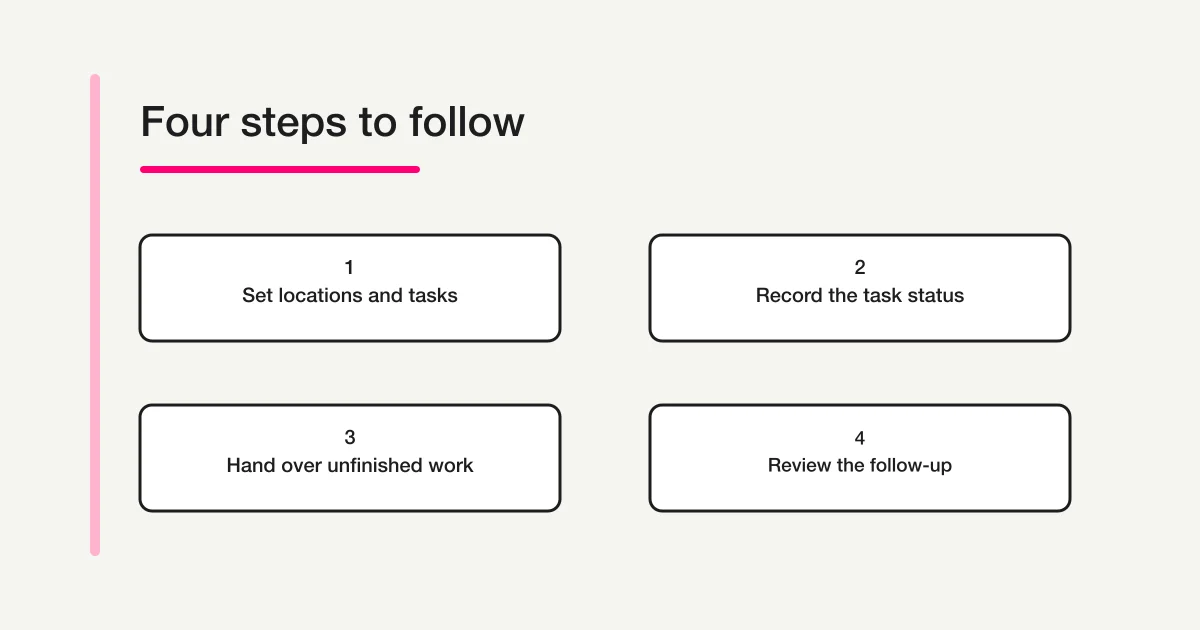
Recording unfinished work does not hand it over. Add the contact who should check the situation, the question that remains open, and the date for that check. Distinguish a request to review the situation from an accepted assignment to perform the cleaning.
For the fictional floor task, the note could say: “Office administration to check meeting room availability on November 10 in the morning; cleaning time and responsible person to be agreed after that check.” The review date is not necessarily a promised completion date.
After the review, add what was confirmed and the next action. Preserve the earlier record showing why the original task was unfinished. If work takes place later, record the actual date rather than making it appear to have been completed on the original planned day. A correction should make the sequence clearer.
For a change of responsibility, the internal work request template can help separate the task, requested deadline, and recipient's confirmation. For a reflection on the whole working day, use the daily report format. A cleaning checklist should not absorb every topic that belongs in those broader records.
Draft a FORMLOVA form for cleaning records
When several areas submit records, choose a consistent unit for each response: one location, one task, and one planned date. This makes an unfinished task identifiable without asking the reader to interpret a whole-room summary. The form creation guide covers the overall design, while the form field examples guide helps with labels and answer choices.
After connecting FORMLOVA to a supported AI chat client, you can use this request to draft a form:
Create an unpublished draft form for routine cleaning records in a general office. Each response should cover one location, one task, and one planned date. Separate the area, task description, planned date, staff code, status, actual completion date, recorder, reason for not done or not applicable, follow-up contact, and review date. Use Completed, Not done, and Not applicable as the status choices. Explain that an unfinished task has no actual completion date. Keep the completion date, follow-up contact, and review date optional where they are not applicable. Do not ask for unnecessary personal information or photo attachments. Do not publish the form, send notifications, assign work, perform cleaning, or make completion judgments on anyone's behalf.
This is a sample request, not a claim about an actual generated form. Review the draft against the three fictional rows. Check that someone can describe unfinished work without inventing a completion date, explain why a task is not applicable, and identify a follow-up contact when one is needed.
Avoid making every field mandatory. The planned date and actual completion date serve different purposes. If the draft requires a completion date even for unfinished work, adjust that requirement before publishing. Review explanatory text as well as field names; a clear label cannot fix an instruction that asks someone to record something that never happened.
Draft a cleaning record form with room for unfinished work
FORMLOVA's Free plan includes form creation and publication, response collection, response search, basic analytics, and CSV/Excel exports. Start by reviewing an unpublished draft with consistent fields for task status and reasons.
Sign up free to draft a cleaning record form
Sign up, verify your email, then connect FORMLOVA to a supported AI chat client and try the request above. Check the AI provider's requirements and any separate costs.
A submitted response confirms that a record was received. It does not prove that cleaning occurred, that someone inspected the area, or that its quality was approved. This example uses text and choice fields without photo attachments, automatic notifications, or reminders. Review any later operational additions against your needs and the current plan conditions.
Review a small set of records before expanding
Try the wording with one area before listing every task on every floor. Look for concrete points of confusion: a task name that leaves its boundaries unclear, a missing place to explain unfinished work, or a date field whose purpose people interpret differently. Adjust those items before widening the scope.
A finished template is not evidence that missed records have decreased. Check the actual records after use and describe only what you observed. If some tasks remain hard to classify, clarify their conditions with the designated contact rather than adding more status choices for every unusual situation.
Record the date when you change a task or frequency and the period covered by the new version. Keep records against the old plan distinguishable from records against the new one. Also decide which copy is authoritative if paper, spreadsheets, and form responses coexist. A transcribed record should retain the original recording date separately from the transcription date.
Frequently asked questions
Can I use the same template on paper or in Excel?
Yes. Choose the format that people can use at the location and decide where the shared authoritative record will be kept. Preserve the meaning of each status when transferring information. A blank on paper should not become “completed” simply because the spreadsheet requires an answer.
Does every task need a daily check?
Use the frequency agreed for the location, task, and actual use of the area. The fictional example is not a universal cleaning standard. If the required frequency is unclear, consult the facility's designated contact and existing instructions before entering a schedule.
Can I change an unfinished task to completed later?
Record the actual completion date and recorder, keeping the original planned date and reason for delay visible. Do not make late work look as though it happened on time. If a separate inspection is needed, record that inspection separately from the person reporting the work.
Disclosure and Verification
I develop FORMLOVA. On November 8, 2026, I checked the current plan definition and form creation and response collection specifications, together with the Tokyo public-health agency's sample cleaning plan. The template, fictional example, sample request, and diagram are original editorial suggestions. This article does not report actual cleaning or measured improvements. Adapt it to the facility's designated forms and contact procedures; specialist sanitation standards, chemical-use instructions, and legal judgments are outside its scope.