
Last updated: October 28, 2026
MCP Events is an extension that lets an MCP server tell an AI app, "something just happened." With it, an outside event can set the AI in motion before anyone says a word. The specification is still a draft, though. After looking into it, I decided FORMLOVA will hold off for now, because most of the "act when something happens" machinery already exists in FORMLOVA as workflows.
I build FORMLOVA, a form service whose front door is MCP. This was not someone else's problem, so I read the proposal itself and sorted out what I found. I had a feeling it would be useful to others building services on MCP, so I am sharing it here.
MCP Events delivers outside events to AI apps
MCP (Model Context Protocol) is a shared standard for connecting AI apps to outside services. MCP Events is an extension that adds a missing piece: a way for the server to deliver events to the AI app.
The usual example is a failed test run or build on GitHub. The failure reaches the AI app as an event, and the AI starts investigating without anyone asking.
It is not an official specification yet. An MCP working group is designing it, and it was filed as the proposal SEP-3415 on October 5, 2026. The proposal is still marked Draft, and its contents keep changing. The reference implementation in an official SDK, which the proposal needs before formal review, does not exist yet either. The working group itself was renamed from "Triggers and Events" to "Tasks and Events" on October 16.
In fact, the receivers moved first. OpenAI announced support in ChatGPT on September 29, before the proposal was filed. In October, two tools for building AI apps, Vercel's AI SDK and Mastra, added experimental support.
The official MCP roadmap also lists server-initiated notifications as a priority area. The goal is that when long-running work finishes, AI apps do not have to keep checking back.
Until now, MCP only answered when asked
Until now, MCP worked one way: the AI app asked and the server answered. For an AI to learn that a test failed, it had to keep checking, or someone had to build a separate watcher outside MCP.
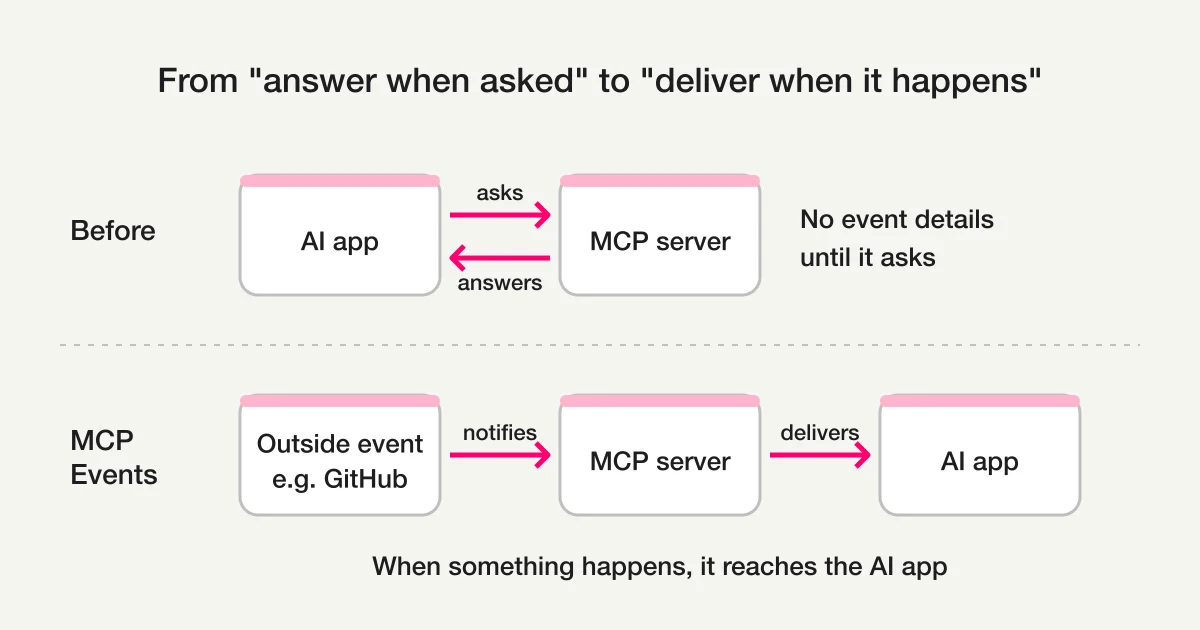
MCP does have notifications. They just fall short:
- They only say "something changed." They carry no details about what happened, and you cannot set conditions on what to watch for
- They arrive only while connected. Anything that happens during a disconnect is lost
- If you miss something, you cannot tell that you missed it
I read MCP Events as an attempt to close all three gaps at once.
How it works: list, subscribe, receive
The flow is simple. It is run by a component inside the AI app, not by the model itself, and the model only sees the events that arrive.
- The AI app calls
events/listto see which event types a server offers. Each type defines a name, the conditions you can set when subscribing (which repository to watch, for example), the shape of the payload (the contents each event carries), and the delivery methods it supports - It subscribes by naming a type and its conditions. Which events to subscribe to can be left to the AI's judgment
- Every event carries an ID for the occurrence, its type, a timestamp, and the payload. Some types also carry a marker of how far you have read (each type decides whether to include it), which lets you catch up on what you missed after a disconnect
There are three delivery methods, and none of them covers the others.
| Method | How it works | Where it fits | Downside |
|---|---|---|---|
| Polling | The AI app checks for new events at a set interval | Works almost anywhere | Delayed by the interval. Asks even when nothing happened |
| Push (stream) | A connection stays open and events arrive the moment they happen | AI running on your own computer, for example | The server holds a connection per subscription |
| Webhook | The server automatically sends events to a URL the AI app provides | AI apps with a public web address, such as ChatGPT | The receiver needs a publicly reachable URL |
Only webhook delivery has an expiration. The AI app renews the subscription before it expires and unsubscribes when it no longer needs the events. It can also ask for no expiration.
Webhooks also come with safety rules, such as confirming that the receiver actually wants the deliveries before sending anything, signing every delivery (a mark that reveals tampering), and keeping each delivery to about 0.25 MB. The most important one is not to trust the payload, and to treat it as carefully as a tool result.
Today, ChatGPT is the everyday AI app that can receive these events. It accepts webhook delivery only, in Work chats (ChatGPT's chats for work) on the web and in the desktop app with "Cloud" selected, and in dots, ChatGPT's always-on AI agents. It is available on all plans (dots are limited to certain plans) and works with servers that support the 2026-07-28 revision of MCP. As of October 28, I could not confirm official support in Claude.
How is this different from an ordinary webhook?
My honest first reaction was, "How is this different from a webhook?" Looking only at what arrives, an MCP Events webhook delivery is almost identical to an ordinary one. The weaknesses remain too: deliveries can arrive twice, arrive out of order, or get lost while the receiver is down.
The difference lies before and after delivery.
| Aspect | Ordinary webhook | MCP Events |
|---|---|---|
| Who subscribes | A developer, in a dashboard or similar | The AI app, while it is running |
| How you learn what is available | Read each provider's documentation | Fetch a list in a standard format |
| Delivery | Sends to a set URL only | Webhook, push stream, or polling |
| Subscription lifetime | Lasts until someone deletes it | With webhooks, expires unless renewed |
| Signatures and receiver checks | Different for every provider | Shared rules |
| What acts on the event | Fixed logic a person wrote | An AI that reads the payload and decides |
I based this table on Hookdeck's explainer and checked it against the proposal.
The last row matters most, I think. In ChatGPT, the event arrives in the chat where you subscribed, so the AI does not have to start from a blank slate every time. Note that the specification leaves it to the AI app whether an event is added to the conversation or starts a new run.
That said, MCP Events is not a replacement for webhooks.
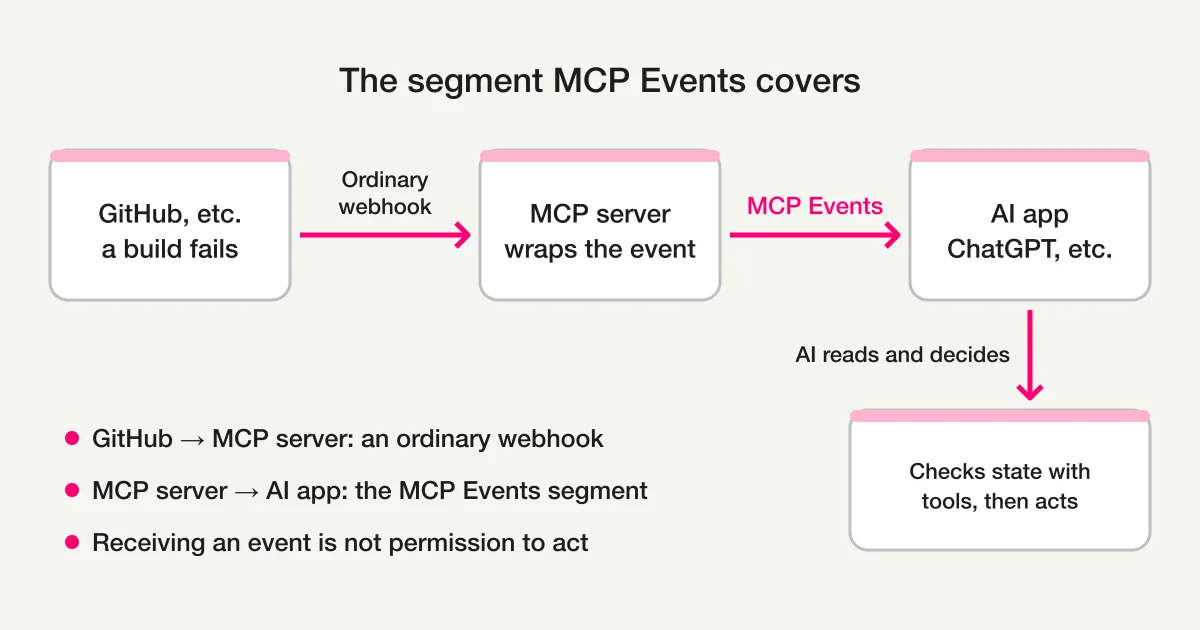
GitHub still reaches the MCP server through an ordinary webhook. MCP Events covers the next leg, from the MCP server to the AI app. If fixed automation is all you need, running it on an ordinary webhook is simpler.
The proposal is firm on one more point: receiving an event is not permission to do anything. When the AI reacts by calling a tool, the usual authorization checks still apply. The proposal also recommends checking the real, current state through tools rather than trusting the payload.
Applying it to FORMLOVA: most of it was already there
Here is how it played out for my own product.
FORMLOVA currently offers 174 MCP tools across 24 categories, and version 2.7, released on August 1, 2026, added support for the 2026-07-28 revision of MCP. But of the prerequisites for receiving MCP Events in ChatGPT, that revision is the only one in place. The event machinery itself, a place to list and subscribe to events and a way to send them out, does not exist yet.
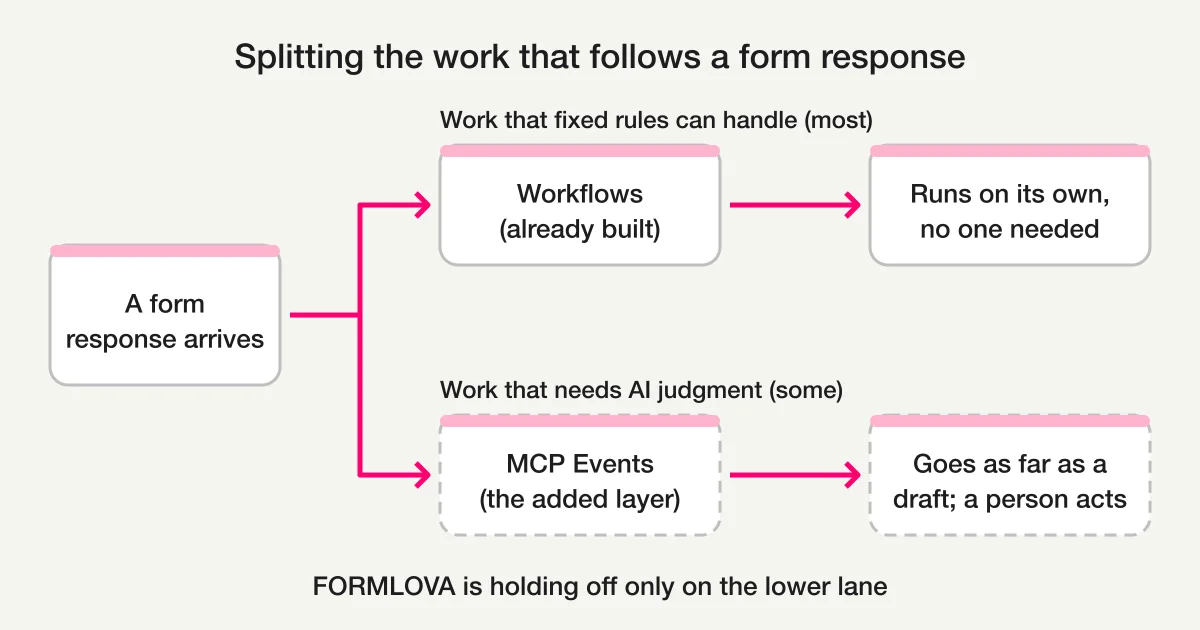
At first I pictured this: a new response arrives, the AI wakes up, sorts it, and drafts a reply. But when I reread the specs of my own tools, the "act when something happens" part was already there.
A FORMLOVA workflow defines three things: the event, the conditions, and the actions.
| What you define | What FORMLOVA workflows offer |
|---|---|
| Triggering event | A new response, or response classification finishing (when the sales-email check is done) |
| Conditions | Ten comparisons such as "equals," "contains," and "is not empty," stacked up to 20 (the workflow runs when all of them match) |
| Actions | Email to a fixed address, changes to publishing, capacity, or deadline, and outbound webhooks. Up to 20, run in order |
Webhook actions and publishing, capacity, and deadline changes are available on the Free plan. Email actions require Standard or higher. There are also smart notifications for response milestones and for approaching capacity or deadlines (Standard or higher).
All of this is available as MCP tools, so it can be set up entirely in conversation. A workflow runs on rules a person set once, with no confirmation on each run. If fixed rules cover the job, there is no need to wake an AI at all.
When an AI acts on its own judgment, FORMLOVA handles it differently. Irreversible operations, such as sending email or deleting data, do not run without a confirmation token, a short-lived pass issued by the server that expires after five minutes. Sending email also requires reviewing the content in a browser.
So most of what MCP Events aims for, acting when something happens, was already running in FORMLOVA. I was excited reading a new specification, and the answer turned out to be inside my own product. I had to laugh a little.
You can try rule-based automation in conversation today. Note that registrations close automatically once the form reaches its capacity, with no workflow needed. A workflow adds the next action when something happens. The request below is an example to try; it was not run for this article.
Create an event registration form as an unpublished draft with a capacity of 30. Create a workflow that notifies a registered destination (webhook) when a new registration arrives, and leave it disabled. Show me the trigger, conditions, and actions in a table. Do not publish the form or enable the workflow.
Before moving on, check:
- The saved form is an unpublished draft with a capacity of 30
- The workflow's trigger is "new response," its action is "webhook," and it is still disabled. Before enabling it, register the destination URL with a subscription to workflow notifications
For handling the waitlist after the event fills up, see the official workflow Event Capacity + Waitlist.
Build a registration form that follows fixed rules, in conversation
A workflow that notifies outside systems when a registration arrives works on the Free plan. Adding an email action requires Standard or higher.
Register free and build the form and workflow
Register, verify your email, connect a supported AI client, and paste the request above to create the draft. Check the trigger, conditions, actions, and destination before enabling it. AI-client account and usage requirements apply separately.
The decision: holding off for now
What MCP Events would add to FORMLOVA is only the work that needs AI judgment: telling from the wording whether an inquiry is angry, writing a different reply for each response, or checking customer records before acting.
With that in mind, I decided to hold off for now, for four reasons.
- Most work after a form submission follows fixed rules. Anything you can write as "when a response arrives, do this" is covered by today's workflows. If you only need to catch responses containing words like "urgent," a "contains" condition is enough. For reviewing them in chat and alerting the owner, there is also the official workflow Urgent Inquiry Keyword Alert
- Even when the AI wakes up, it can only get as far as a draft. Replies and bulk emails require the user's confirmation, so little work can be finished while nobody is around
- Forms are an easy entry point for hijacking. Anyone can write into a public form, so you have to assume someone will plant "ignore previous instructions" in a response field
- The specification is still a draft. Building now likely means rebuilding for the final version. And today, the only receiver in everyday use is ChatGPT
There is also the question of cost. FORMLOVA is designed not to call AI models on its servers, apart from a few exceptions such as sales-email detection, so AI costs are carried by the user's AI app. With MCP Events, too, the AI app decides whether to run the model when an event arrives, so it does not conflict with that design. But the cost still lands on the user's side. ChatGPT has a setting that batches several events into a single run, but 100 responses still mean the AI reads and judges 100 responses' worth. I do not think there is enough of that work yet to justify asking for it.
Holding off does not mean never. I will revisit the decision if any of these happens:
- The proposal is accepted and an official SDK ships a reference implementation
- Claude or another everyday AI app besides ChatGPT can receive events
- Users ask for specific post-submission work where they want the AI to make the call
Before adopting a new spec, take stock of your own product
Every time a new specification appears, it is tempting to think, "We need to support this too." The biggest lesson for me this time was that taking stock of what your product already has matters more.
For services with work that fixed rules cannot handle, MCP Events could become a strong tool. To see how much of that work you have, try counting these three things:
- Of the work you do after an event, how many tasks cannot be written as fixed rules?
- After the AI wakes up, are there operations it may finish without a person's confirmation?
- Can outsiders freely write the content that arrives (public forms, email, chat)?
If the first count is high, the second exists, and you can defend against the third, it is worth experimenting early. If the first is close to zero, your existing automation may be enough.
For how MCP reaches beyond form creation into operations, see MCP Form: Form Builder vs Form Operations. For where to draw the line on what AI handles, see Workflow-Based vs Autonomous AI Agents. For how to present many tools to an AI, read MCP Context Cost and Progressive Tool Discovery, and for post-submission automation as a whole, start with the form automation guide. To read the MCP articles in order, begin with the MCP Form Service Guide.
Sources
- OpenAI: DevDay 2026 recap
- OpenAI: MCP Events (what ChatGPT supports)
- SEP-3415: Events Extension (GitHub)
- Model Context Protocol: Roadmap
- Model Context Protocol: Tasks and Events Working Group charter
- Hookdeck: What Are MCP Events and How Do They Work?
- AI SDK: MCP Events
- azukiazusa: Receiving MCP Server Events via Webhooks with AI SDK's MCP Events Support
- Mastra: Introducing MCP Events in Mastra
- FORMLOVA for AI
- FORMLOVA changelog
Disclosure and Verification
- I am the developer of FORMLOVA. I wrote this article from primary sources as of October 28, 2026. The MCP Events details are based on the SEP-3415 text last updated on October 27 (status: Draft), OpenAI's MCP Events guide, and the official MCP roadmap and working group charter.
- MCP Events is not an official specification. Names, delivery methods, and receiver support may change.
- FORMLOVA's tool count, workflows, smart notifications, confirmation tokens, and plan requirements were checked against FORMLOVA's specification and tool definitions on the same date.
- The request in this article is an example to try. It was not run or measured for this article.