A useful daily report records what you worked on, what changed, what comes next, and where you need help. Keep each entry specific enough for a teammate or manager to understand without a follow-up conversation. Leave out fields that nobody uses.
This guide gives you a copy-ready daily report format, examples for different kinds of work, and a simple way to decide between a form and a spreadsheet. A daily report is a communication record. By itself, it does not assign work, approve a result, measure performance, or replace your team's project and personnel processes.
Start with the reader's next question
Before adding fields, decide who reads the report and what they need to know after reading it. A team lead may need to spot a blocked task. A colleague taking over work may need the latest status and the next action. A manager may need a concise view of progress across a team. If no one can name a decision or action that a field supports, consider removing that field.
The goal is not to record every minute. It is to make relevant work visible and make a handoff easier. A list such as “email, meeting, spreadsheet” records activity but leaves the reader guessing about the result. A more useful entry says what the work concerned and what changed.
For example:
| Activity-only note | More useful report entry |
|---|---|
| Updated the customer list | Updated the contact details for the three accounts assigned to me; one address still needs confirmation from the account owner. |
| Had a meeting | Reviewed the launch checklist with the design team; the revised banner copy is ready for review. |
| Worked on the spreadsheet | Reconciled the latest shipment entries; two rows are waiting for receipts before I can close them. |
These examples describe fictional work. They do not claim a measured productivity improvement. Their purpose is to show how a report can distinguish the task from its result and any open question.
Daily report format you can copy
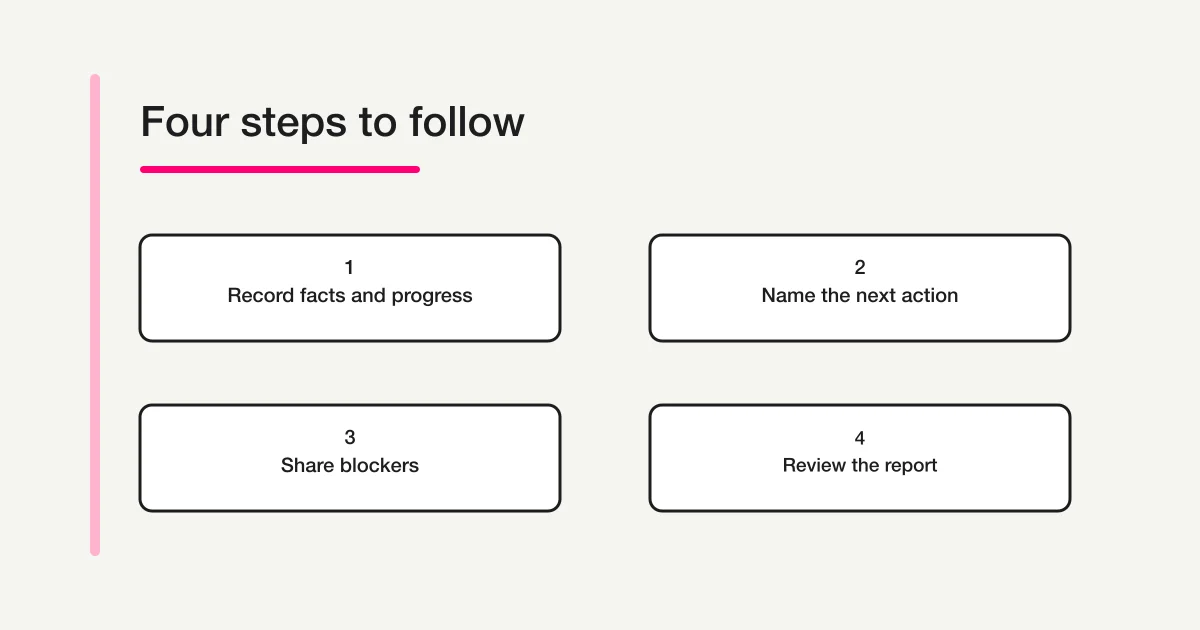
Start with these fields, then adapt them to your team's actual handoff:
| Field | What to write | Example |
|---|---|---|
| Report date | The date the work was done | October 31 |
| Name or team | Who is reporting | A name, team, or role appropriate to your process |
| Main task | The work item or customer matter | Prepare the revised event registration page |
| Work completed | The concrete action taken | Updated the date, location, and accessibility details |
| Result or current status | What is now true | Draft is ready for the event owner to review |
| Next action | The next specific step | Event owner checks venue wording |
| Owner and due date | Who will take that next step and by when, if known | Event owner; November 2 |
| Blocker or help needed | What is preventing progress, or “None” | Waiting for the confirmed room capacity |
| Link or reference | Where the reader can inspect the relevant work | Link to the draft or shared work item |
Copy-ready template
Daily report
Date:
Name / team:

1. Main task:
   Work completed:
   Result / current status:
   Next action:
   Owner / due date (if known):
   Blocker or help needed:
   Link / reference:

2. Main task:
   Work completed:
   Result / current status:
   Next action:
   Owner / due date (if known):
   Blocker or help needed:
   Link / reference:

Other note:
If a person has no blocker, “None” is easier to interpret than a blank cell. If the next step is not known yet, say that. A report should show uncertainty rather than encourage someone to invent a deadline or a promise.
For a short update, remove the second task section and the optional link. For work that changes hands, retain the next action, owner, and reference. A longer field list is not automatically more complete; it can make the important detail harder to find.
Example: an office or sales team
Suppose a team member is preparing a quote after a customer conversation. The report should make clear what was requested, what work is finished, and what still depends on another person.
| Field | Example entry |
|---|---|
| Main task | Prepare a revised quote for the Northside branch |
| Work completed | Confirmed the requested quantities against the notes from the call and updated the draft quote |
| Result or current status | The draft is ready; delivery timing is not confirmed |
| Next action | Operations checks the delivery estimate before the quote is sent |
| Owner and due date | Operations coordinator; date to be agreed after the supplier reply |
| Blocker or help needed | Waiting for the supplier's current lead time |
| Link or reference | Link to the draft quote in the team's approved shared location |
The report does not say that a quote was sent or that delivery was promised. It gives the next reader a clear handoff. If the team tracks customer commitments in a CRM, keep that system as the authoritative record and link to it according to your access rules.
Example: field work or service visits
For field work, a report can help the next person understand which location was visited, what was done, and what remains. Ask only for location or customer details that your organization is allowed to collect and that the reader needs. Avoid adding sensitive personal information to a broadly shared report.
| Field | Example entry |
|---|---|
| Main task | Inspect the north entrance at the community center |
| Work completed | Checked the door closer and photographed the visible damage for the maintenance record |
| Result or current status | The closer is still catching; the entrance remains usable, but repair is needed |
| Next action | Facilities coordinator arranges an inspection by a qualified technician |
| Owner and due date | Facilities coordinator; confirm timing with the site manager |
| Blocker or help needed | No repair slot has been confirmed |
| Link or reference | Work order reference in the maintenance system |
Use your workplace's established procedure for safety issues, incidents, or urgent hazards. A daily report is not an emergency channel. If a situation needs immediate action, contact the responsible person through the designated route first, then document it as your policy requires.
Make the format fit the work
Not every report needs the same emphasis. Keep a small shared core so reports are comparable, then add only the fields that help with a particular handoff.
| Work context | Useful emphasis | Fields to consider only when needed |
|---|---|---|
| Sales or account support | Customer matter, completed follow-up, next contact | Account reference, customer-approved contact date |
| Office operations | Process or document changed, remaining check | Record link, reviewer or receiving team |
| Field service | Site, task completed, current condition, follow-up | Work order, approved photo, safety escalation reference |
| Creative or project work | Deliverable, review state, decision needed | Version link, reviewer, decision date |
| Shift handoff | Current state, pending work, next responsible person | Equipment status, open issue, handoff confirmation |
These are prompts, not mandatory fields or industry standards. Your existing confidentiality, records-retention, safety, and access rules still apply. If a report includes personal or customer information, limit collection and visibility to what the task requires.
Write outcomes and blockers plainly
Use a few simple distinctions to make entries easier to read:
- Separate action from outcome. “Called the supplier” is an action. “Supplier confirmed the part is available; delivery date remains pending” describes what changed.
- Separate fact from interpretation. If a customer has not replied, write that. Avoid turning silence into an assumed decision.
- Name the next action. “Follow up” is vague. “Mina checks the revised draft with the venue by Monday” tells the reader who acts and what to check, if that owner and date are actually known.
- Describe the blocker and the needed help. “Blocked” alone does not tell anyone what is missing. State the dependency and the person or decision needed, without assigning responsibility that has not been agreed.
- Keep progress proportionate. Use statuses your team understands, such as “not started,” “in progress,” “ready for review,” or “waiting for information.” Do not invent percentages that cannot be checked.
If a task is still open, preserve the connection to its earlier report or work item. Repeating a task without identifying what changed can make the update look like new work. A stable task name or approved system link is usually clearer than copying a long history into every daily entry.
Form or spreadsheet: choose based on the handoff
A spreadsheet can work well when a small team already edits a shared table, needs to see several days side by side, and has clear rules for who can change each row. It may be a practical choice when one coordinator reviews all entries and the team is comfortable with the existing access controls.
A form can help when each person should submit a consistent entry without editing other reports. It can keep the questions in a fixed order and give the coordinator a searchable response record. A form is especially useful when reports arrive from several people or locations and the same fields need to be collected each time.
Neither format automatically resolves ownership, prioritization, approval, or follow-up. Decide where task status remains authoritative, who reads new responses, and how urgent items are escalated. If the team already uses a work-management or service system for these jobs, connect the report to that process instead of building a competing tracker.
For guidance on choosing fields and making questions clear, see the Form Field Examples Guide. For the broader sequence of choosing a form's purpose, drafting it, and checking responses, read the Form Creation Guide.
Collect daily reports with FORMLOVA
If your team wants a consistent report intake, you can draft an unpublished FORMLOVA form for the shared fields: date, name or team, task, work completed, current status, next action, and blocker. Start with sample entries. Check that a coordinator can understand the resulting responses before sharing the form.
You might begin with this prompt in a supported AI chat connected to FORMLOVA:
Draft an unpublished daily work report form for a small operations team. Ask for report date, name or team, main task, work completed, current status, next action, owner and due date if known, blocker or help needed, and an optional link to the relevant work item. Tell the respondent not to include sensitive personal information unless required by company policy. Use a fictional maintenance update to demonstrate the questions. Make clear that submitting a report does not assign work, approve a result, or replace the team's official task and incident processes. Do not publish or send an email.
Collect daily updates in a consistent format
FORMLOVA's Free plan includes form creation and publishing, response collection, search, basic analysis, and CSV/Excel export. Start with an unpublished draft and review a sample response before your team uses it.
Register free to draft a daily report form
After registering and confirming your email, connect FORMLOVA to a supported AI chat and try the prompt above. Check your AI client's connection support, access requirements, subscription, and any separate charges with that provider.
FORMLOVA collects and lets you review submitted responses. It does not automatically assign the next action, remind an owner, approve work, track time, evaluate employee performance, or replace a project or HR system. Keep those steps in the process your organization has designated.
Check the report before sharing it
Try the format with a few fictional or approved sample entries and read the results as the recipient would. The questions may seem obvious to the person writing them, but the saved response needs to make sense to someone who was not there.
| Check | What to confirm |
|---|---|
| One entry per report | The date and reporting person are clear |
| Work and result | A reader can tell what was done and what changed |
| Next step | The next action is specific; an owner or date is included only when known |
| Blocker | A blank response is distinguishable from “None” or “Not applicable” |
| Reference | The link opens for its intended audience and follows access rules |
| Mobile use | Questions and long answers remain readable on a phone |
| Privacy | The form does not ask for details the reader does not need |
| Handoff | Urgent issues have a separate route and responsible contact |
Ask someone unfamiliar with the draft to complete a sample report. If they cannot tell what belongs in “result” versus “next action,” rename or explain those fields before launch. If nobody uses a field while reviewing the sample, consider removing it.
Common questions
What should a daily report include?
Start with the report date, person or team, main task, work completed, result or current status, next action, and blocker or help needed. Add an owner, due date, and reference link when they help the next person act. The right fields depend on the work and the people who read the report.
How long should a daily report be?
Long enough to explain the work and its handoff, but no longer than the reader needs. A short report with a concrete result is more useful than a detailed list of every activity. If the work needs a full incident record, customer history, or project update, link to the designated source rather than duplicating it all in the daily report.
Should employees report hours worked?
Only if the organization's approved process requires that information. A daily work report and a timekeeping record have different purposes. Do not use a daily report as a substitute for the system or policy that governs working hours, attendance, or overtime.
Is a daily report a performance evaluation?
No. A report can record work and open questions, but it does not establish a fair performance measure by itself. Evaluation needs a separate, clearly explained process with appropriate context and safeguards.
Can I use a daily report template in Excel?
Yes. A spreadsheet may suit a team that needs a shared table and already has clear access and editing rules. A form may suit repeated submissions from different people. Choose the format that fits the handoff and the system where the authoritative task status is maintained.
What should I write when there was no progress?
State the current status and why it has not changed, if known. For example: “No update today; waiting for the venue to confirm the room capacity. I will check again after the reply.” Include a next action only when it has actually been agreed.
How do I report a blocker?
Name the missing information, decision, or dependency and explain what would allow work to continue. If the issue is urgent or involves safety, use the designated escalation channel instead of relying on the daily report to notify someone in time.
Disclosure and Verification
This guide was written on October 31, 2026. Before publication, the template, examples, and FORMLOVA Free plan capabilities described here were checked. Examples are fictional illustrations, not workplace records or universal employment, attendance, or performance standards. Follow your organization’s official policies and systems for timekeeping, approvals, safety records, and personnel decisions.
Build a report people can act on
Begin with the reader, then keep the format focused on work completed, the result, the next action, and any blocker. Add context only when it helps someone review, continue, or escalate the work. A copy-ready template is a starting point; your team's actual process determines who reads it and what happens next.