Work Handover Document: Template and Completed Example
A work handover document should explain the purpose of the work, when it happens, the steps to follow, where the current records live, what remains open, and whom to contact when a decision is needed. Go beyond a list of task names: the next person should be able to find the right material and understand the next action.
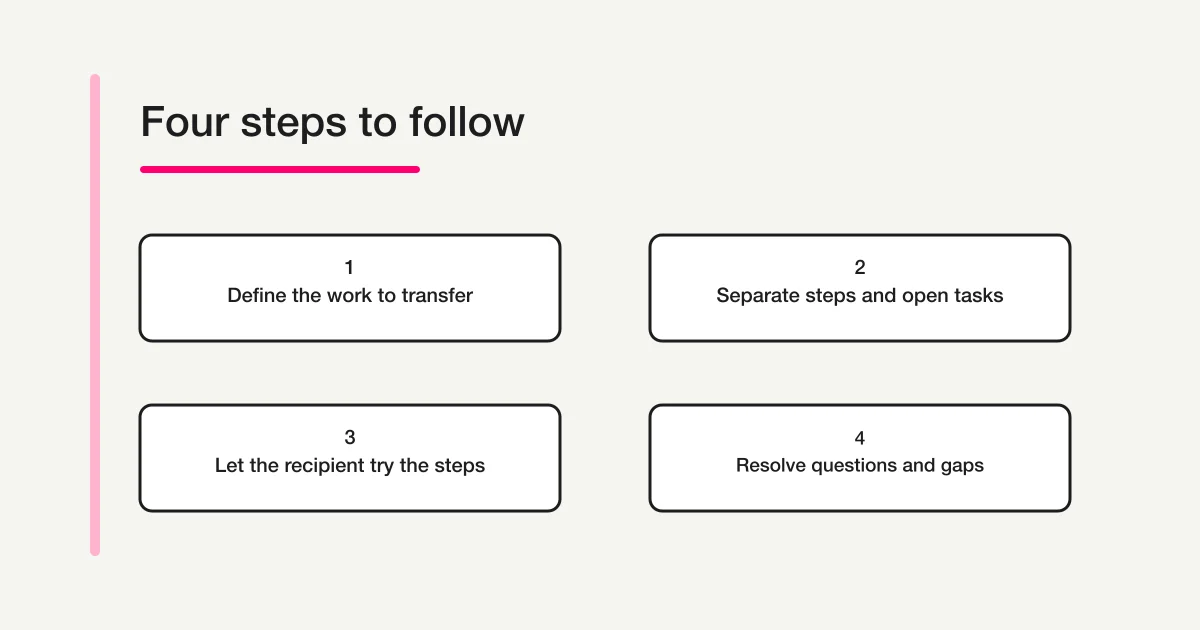
Start with one recurring task and use the template below. Review the unclear parts with the recipient, then check what they can actually follow without the previous owner's explanation. Writing the document and completing the handover are separate stages.
Separate the procedure from the current situation
A recurring procedure and a one-time open item need different treatment. “Update the monthly equipment register” describes work that will continue. “The meeting-room contact has not confirmed the new owner this month” describes the current situation. If both are buried in the same paragraph, next month's reader may not know which information still applies.
Keep the usual steps together and give open items their own rows. Each open item needs a next action, an owner and, where relevant, a deadline. When a response arrives, update that item without rewriting the whole procedure.
If a current operating manual already exists, link to its authoritative location instead of copying every page into a second document. Add the context the new owner needs: where to start, which sections matter, known exceptions and the state of work at the switch. Check that the recipient can open the linked material. A document existing in a shared location does not establish that everyone has permission to use it.
A daily report format serves a different purpose: reporting what happened or what is in progress during a day. This guide focuses on the information another person needs to continue the work when its owner changes.
The fields to include in a handover document
Use a consistent set of headings for each task. For a role with several responsibilities, create a short overview listing task names and the next deadlines, then point to the detailed notes. One large page covering unrelated work can make the urgent item harder to find.
| Field | What to record | What the recipient should check |
|---|---|---|
| Identity | Task name, outgoing and incoming owner, update date and planned switch date | Which task and version the notes describe |
| Purpose and finish point | Why the work happens and what counts as one completed cycle | How to recognize the expected result |
| Timing | Frequency, deadline and next scheduled action | When to act next |
| Procedure | Ordered steps, checks and exceptions | What to do and where judgment is needed |
| Records and locations | Authoritative files, reference material and update destinations | Whether the correct material can be opened |
| Current status | Completed work, open items and outstanding confirmations | Where the incoming person takes over |
| Contacts | Responsible roles, communication routes and decision owners | What to escalate rather than decide alone |
| Verification | Explanation date, practice completed, questions and remaining gaps | What the recipient has actually checked |
Adapt these headings to an existing company form when one is required. Replace terms such as “the usual file” with a recognizable file name and approved location. Include a person's role where useful, so the contact can still be found after another staff change.
Keep the amount of personal information proportionate to the task. An internal role and agreed contact channel may be sufficient; collecting a personal phone number merely because the template has a space for one is unnecessary.
Copy-ready work handover template
The following is an editorial starting point. Paste it into a document or spreadsheet, or use the same sections when collecting handover information through a form. Remove fields that do not help the recipient continue this particular work.
Task name:
Outgoing owner / incoming owner:
Last updated / planned ownership switch:
1. Purpose and the finish point for one cycle
2. Frequency, deadline and next action date
3. Ordered steps and checks at each stage
4. Authoritative records, approved locations and update targets
5. Current status: completed / open / awaiting confirmation
6. Next action, deadline and owner for each open item
7. Exception contacts and decision owners
8. What was explained or tried, and questions still open
Do not include passwords, secret keys or authentication codes.
Number the procedure in the order someone performs it. Record separate open cases as separate rows rather than inserting them between recurring steps. If an item is due before the handover meeting, agree on who will handle it now. Putting a future switch date on the document does not automatically assign responsibility for everything that happens before it.
Where a deadline depends on a calendar or another team's response, name that dependency. Do not invent a universal rule such as “always complete this by the last working day” if the organization has not established it. The useful detail is the rule that applies to this task and where to confirm it.
Completed example: updating an internal equipment register
This is a fictional example created to demonstrate the writing approach. The roles, dates and procedure are editorial choices, not evidence of an actual handover or a management standard that every organization should adopt.
| Field | Fictional entry |
|---|---|
| Task and purpose | Update the internal equipment register each month so confirmed location and responsible-role changes appear in the authoritative record |
| Owners | Administration owner A to administration owner B; planned switch on November 20 |
| Timing | Monthly; next cycle aims to organize departmental confirmations by November 25 |
| Procedure | Open the authoritative register, ask each department about changes, list differences, refer uncertain entries to the responsible reviewer, then apply confirmed updates under the agreed process |
| Records | The approved internal location named “Equipment management / authoritative register”; confirm its exact name and location with the recipient |
| Current status | A location change in the sales department is confirmed; the responsible contact for the meeting room is awaiting confirmation |
| Next action | Owner A will contact the meeting-room representative on November 18; if no answer arrives, pass the outstanding question and contact route to owner B |
| Decision boundary | Conflicting entries go to the equipment-management owner; do not update the authoritative register by guessing |
| Recipient check | Owner B opens the material and uses a fictional change to practice identifying a difference; any real update follows the designated process |
The work being transferred here is a recurring register update. The physical transfer or loan of an item is a different task. If the need is to collect a borrower, item and expected return date, use the separate equipment loan request form guide.
Notice the difference between “waiting for confirmation” and a usable open item. The latter identifies the question, whom it was sent to, and what should happen after an answer. Agree on the next step if there is no response, so the incoming owner does not have to invent an escalation route under time pressure.
The example also leaves the real update behind a decision boundary. Practicing with a fictional change can reveal gaps in the notes without implying that the new owner is already authorized to alter a live record.
Turn vague instructions into checks someone can follow
The recipient may not share the writer's background knowledge. Keep sentences short, but add detail where a new person would otherwise have to guess. A shorter document is not necessarily an easier document to use.
| Vague note | Make the note testable |
|---|---|
| Process it by month end | Identify the period, recipient, actual deadline and any applicable calendar rule |
| It is in the shared folder | Name the authoritative material and approved location, and record whether access was checked |
| Contact someone if it is wrong | Define the check, the role to contact and the agreed communication route |
| Ask the previous owner | Agree on the support contact and the scope of support after the switch |
| Everything is finished | State what was checked, through which point, and which items remain open |
Some instructions have an uncertain history. Do not turn an unverified explanation into a confident fact. Write “reason for this condition is unconfirmed” or “confirm this exception with the process owner,” then identify the person who can resolve it. Check remembered instructions against the current process and records.
For a long task, ask the recipient to follow the first few steps using material they are allowed to see. Separate reading the notes, discussing them and reproducing a step. A nod during a meeting does not establish that the person can locate the correct file or recognize the next decision point.
Start with a check that does not change real data. Sending a message, publishing an update, changing an account or editing an authoritative record can affect other people. Follow the organization's designated authorization and review process for those actions rather than treating the practice exercise as permission.
Record file locations without collecting secrets
A handover document can name the service, the needed role, the access-request contact and the current access-check status. It should not become a collection point for passwords, API keys, private keys or authentication codes. Arrange access through the organization's approved process.
For example, replace a field called “administrator password” with “service used,” “required access,” “request contact” and “access confirmed or still pending.” If the necessary access has not been decided, record that gap. The recipient should not broaden permissions simply to make a link work.
Likewise, a broken link does not justify sharing someone's personal account. Ask the designated owner to resolve the location or access issue. Changes to file ownership, audience and editing responsibility are separate from copying the document's text into handover notes.
Collect consistent handover information with FORMLOVA
When several people need to supply handover information, a form can give them the same set of fields. Separate purpose, procedure, timing, open items and contacts so the recipient can spot what is missing. The form creation guide explains the broader setup process.
After connecting FORMLOVA to a supported AI chat, you can use a request such as:
Create an unpublished draft form for collecting work handover information. Separate the task name, purpose, frequency and deadlines, procedure, record locations, current status, next action and owner for each open item, decision contacts and recipient questions. Explain that respondents must not enter passwords, authentication codes or unnecessary personal information. Do not add attachments, publish the form, send emails or change permissions.
This is a suggested request, not the result of a completed business transfer. Review the draft against the guide to form fields and input types. Enter a fictional task and check that an outstanding item and its next deadline remain distinguishable from the recurring procedure.
Draft an intake form for procedures and open handover items
FORMLOVA's Free plan includes form creation and publishing, response collection and search, basic analytics, and CSV or Excel export. Start by checking the handover fields in an unpublished draft.
Sign up free to draft a work handover intake form
After registration, verify your email, connect FORMLOVA to a supported AI chat, and try the request above. Check that AI client's conditions and any separate costs with its provider.
A submission is an intake step. People still need to check the procedure, prepare the right access, assign open items and decide when the handover is complete. Automatic reminders and file attachments are outside the free scope described here. This example does not demonstrate or promise an automated approval or access-transfer process.
Keep questions and update dates after the handover
After sharing the notes, collect the recipient's questions, who will answer them and the expected follow-up. Once a question is resolved, decide whether the answer changes the recurring procedure or applies only to one case. Update the relevant section instead of leaving a correction in a separate conversation that the next reader cannot find.
Record the update date and the person or role that checked the change. Agree on a support contact after ownership switches; do not assume the previous owner will remain available indefinitely. Unresolved items should stay visible with an owner, rather than disappearing when a document is marked “sent.”
Frequently asked questions
Should the handover be a document, spreadsheet or form?
A document suits a detailed procedure, a spreadsheet can help compare recurring fields, and a form can collect consistent information from several contributors. Decide where the authoritative information will live and which place should be updated, so copies do not quietly diverge.
What if there is too much work to document before the switch?
Agree on priorities with the responsible people. Start with the next deadlines and the work whose interruption would have an impact. Identify the undocumented scope and the planned follow-up; an empty section should not be read as a decision that no handover is needed.
Is sending the file enough to call the handover complete?
Sending, receiving, reviewing, arranging access and assigning open items are separate stages. Agree on the completion conditions within the organization and keep a record of what the recipient checked. A form response alone does not establish acceptance of every responsibility listed in it.
Disclosure and Verification
I develop FORMLOVA. I checked the current plan definitions and form-creation and response-collection specifications on November 4, 2026. The template, fictional example, suggested request and diagram are original editorial material. Producing this article did not transfer an actual job, share an account or change permissions. Use the organization's required forms and information-management and handover procedures where they apply.