Meeting Minutes Template: Fields and Completed Example
Meeting minutes should identify the meeting, its participants and agenda, then separate what was decided, what remains unresolved, and who will do what by when. A useful record lets someone who missed the meeting distinguish an agreement from a proposal without reconstructing every comment.
Use the template below for an ordinary internal recurring meeting. Start with one agenda item and place the discussion, decision, open issue and next action in separate fields. The completed example shows how the same format works when some details are still waiting for confirmation.
Separate the discussion from the decision
Meetings mix suggestions, questions, opinions and confirmed facts. Writing them down in chronological order can make an idea sound like an agreement. Put the options and reasons under discussion. Put the agreed outcome, its conditions and its scope under decisions.
For example, “We could accept registrations through a form” is a proposal. “We agreed to use a form for the next internal briefing” is a decision only if that agreement was actually confirmed. The record should not expand a limited trial into a permanent company-wide change.
Keep enough context to explain why the decision was made. A short account of the options, relevant constraints and remaining uncertainty can be more useful than a long sequence of remarks. Include speakers or roles when they are needed to understand the record, following the organization's recording practices.
A daily report format answers a different question: what happened during a day and what work is in progress. Meeting minutes explain what a particular group discussed and where its decisions stood when the meeting ended.
The core fields to include
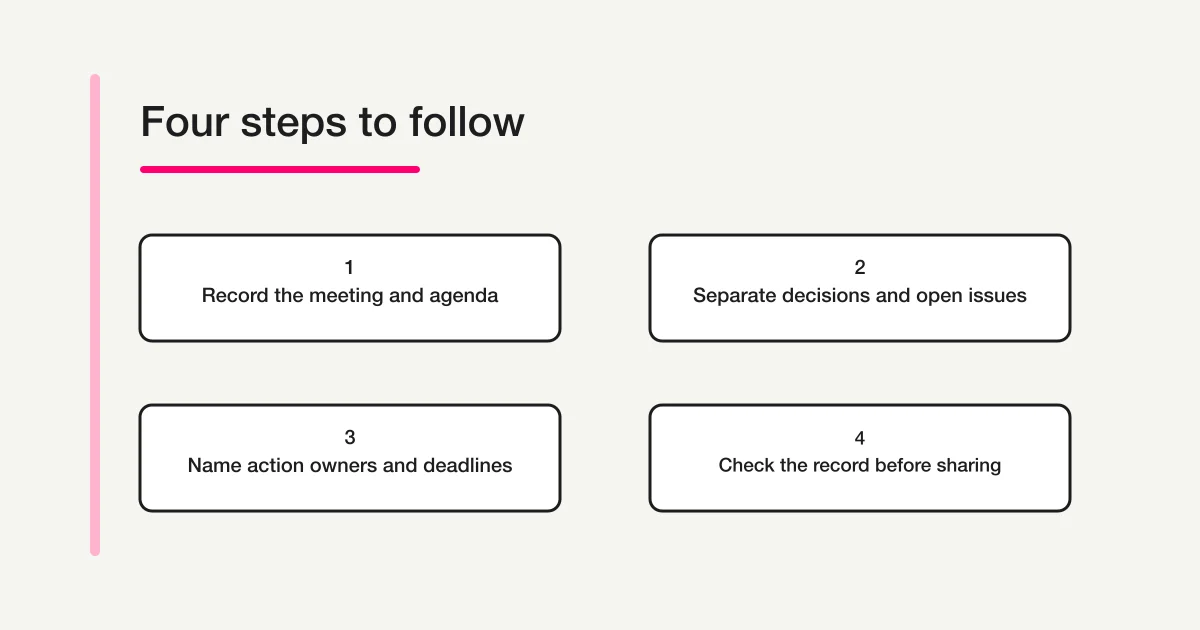
Fill in the meeting details and agenda before the session where possible. Capture the main points during the meeting, then check the decisions and actions with the relevant people. If your organization has a required format, fit these distinctions into that format rather than maintaining a competing record.
| Field | What to write | What to check |
|---|---|---|
| Meeting identity | Name, date, time, location or meeting method | Can readers identify the right meeting? |
| Participants and record | Participants or relevant roles, note-taker and update date | Who can clarify the content? |
| Agenda and purpose | Topic and the question to resolve this time | Is the scope clear? |
| Discussion | Main options, reasons and confirmed facts | Can readers follow the basis for the decision? |
| Decisions | Agreed outcome, conditions and scope | Are proposals or predictions being mistaken for agreement? |
| Open issues | Unresolved point, missing information and contact | What must be checked before proceeding? |
| Next actions | Task, owner, deadline and reporting destination | Can the next person act without guessing? |
| Review and sharing | Intended readers, review status, corrections and next meeting | Which version should people use? |
Record “no decision reached” when that is the outcome. An empty decision field can mean either no agreement or a missed note. If an owner or deadline is unknown, say so and record who will seek clarification. Completing every box is less important than describing the real state accurately.
Copy-ready meeting minutes template
Copy the following into a document or spreadsheet. Repeat the agenda block for each topic. For a Word-based starting point, Microsoft's meeting minutes templates are another option. The format and completed example here are original editorial suggestions.
Meeting name:
Date, time and meeting method:
Participants and relevant roles:
Note-taker / update date:

Agenda item:
Question to confirm or decide:
Discussion (options, reasons and confirmed facts):
Decision (outcome, conditions and scope):
Open issues (unresolved point, missing information, contact):
Next action:
- Task:
- Owner:
- Deadline:
- Reporting destination / completion check:

Intended readers / content-review status:
Corrections and update history:
Next meeting / information needed before it:
Keep decisions and actions separate even in a short meeting. Agreeing to use a registration form does not mean the form has been drafted, checked or published. A person responsible for the next action needs to know which stage they are taking on.
Remove fields that do not serve the meeting. A stable participant list might be referenced from an existing team record. An open issue carried over from the previous meeting can point to its original entry. Decide where the authoritative record lives so copied versions do not develop different answers to the same question.
Completed example: preparing an internal briefing
The following is a fictional example created to demonstrate the format. The dates, roles, conditions and outcomes are editorial examples, not records of an actual meeting or evidence of a product's results.
| Field | Fictional entry |
|---|---|
| Meeting identity | Internal briefing preparation meeting, November 10, online |
| Participants and record | Administration representative A, briefing coordinator B and communications representative C. A takes the notes |
| Agenda and purpose | Confirm how people will register for the next briefing and what information the announcement needs |
| Discussion | Email requests do not consistently identify the preferred session. The group considers using a session-choice field. Room capacity has not yet been confirmed |
| Decision | Use an internal registration form for the next briefing, with the preferred session offered as a choice |
| Open issue | Capacity and the registration closing date remain undecided. B will check with the room coordinator. Do not prepare the announcement using unconfirmed figures |
| Next action | A will prepare an unpublished field draft by November 12 and ask B to check it |
| Separate action | C will prepare the announcement after capacity and the closing date are confirmed. The group will agree its deadline at that point |
| Review and next meeting | Share the draft minutes with the preparation team to check the decision and responsibilities. Next meeting planned for November 17 |
This record makes the boundary visible: the registration method has been agreed, but capacity and the closing date have not. “Use a form” does not establish that automatic capacity control or scheduled closing has been configured. The field draft, content review and publication remain separate pieces of work.
An open issue also needs a route forward. “Discuss next time” alone does not say what information the next discussion needs. Record the missing fact, the person seeking it and the destination for the answer. If confirmation will not arrive in time, keep the item open and ask the relevant people whether the schedule should change.
Turn vague notes into usable actions
Short notes often leave readers to supply missing meaning. Add the object, state and check that matter while preserving what the meeting actually established. Do not make the minutes more definite than the conversation they describe.
| Vague note | More useful wording |
|---|---|
| Agreed on forms | Use a form for registrations to the next internal briefing. The decision applies to that briefing |
| A to handle it | A will draft the fields, including session choices, and ask B to review them |
| Check soon | B will ask the room coordinator to confirm capacity by November 12 and tell the preparation team whether a reply has arrived |
| Looks fine | State what was checked and what remains unverified. Do not move unverified items into decisions |
| Everyone approved | Record who reviewed which content and whether corrections were requested |
The date in the clarification example is appropriate only if it was agreed or subsequently confirmed. The note-taker should not invent a deadline to make the table look complete. A useful record distinguishes a confirmed fact from a suggested next step.
When discussion notes grow too long, retain the reasons that affected the outcome. Readers may need to know that the capacity figure was unavailable; they may not need every repetition of that concern. If shortening a sentence changes its meaning, check it with the meeting lead or the relevant participant before distributing it.
For an action, describe an observable next step. “Improve registration” could mean designing fields, checking wording or publishing a form. “Prepare an unpublished field draft and request a review” gives the owner a clear starting point without claiming that later stages are already complete.
Check the record before sharing it
Review the decisions, open issues and actions with the relevant meeting participants. Check that the scope, conditions and deadlines have not changed in the process of writing. Mark disputed or unverified content clearly rather than resolving it through a confident summary.
Make the review status specific. “Sent for review” means the draft was delivered. “Checked by the coordinator” describes a narrower content check. Neither automatically means every participant approved the entire document. Use the terms and review procedure your organization has actually agreed.
Share the meeting name, meeting date, update date and authoritative location together. When a correction is needed, identify what changed and which version readers should use. Repeatedly forwarding an attachment without a clear version can leave different people working from different decisions.
Consider the intended audience before including names, attributed comments or customer details. Keep information relevant to those readers and follow the organization's sharing rules. Do not collect passwords or authentication codes in meeting-record fields. This guide concerns ordinary internal meetings; it does not explain legal requirements for statutory board or shareholder minutes.
Collect post-meeting records in consistent fields with FORMLOVA
When several people submit meeting records, consistent fields can make missing decisions or unresolved questions easier to identify. Keep decisions, open issues and actions separate. Decide whether a document or a collected record is authoritative, and agree how content will be checked before using it.
The form creation guide explains the broader setup. After connecting FORMLOVA to a supported AI chat, try this request to prepare an unpublished draft:
Create an unpublished draft form for collecting internal recurring-meeting records. Separate the meeting name, date, note-taker, agenda, discussion summary, decisions, open issues and contacts, next actions with owners and deadlines, and content-review status. Explain that a proposal under discussion must not be entered as an agreed decision. Do not use attachments or audio recordings. Do not publish, send email, approve the minutes or execute tasks.
This is a suggested request, not the result of submitting a real meeting record. Compare the draft with the guide to form fields and input types. Enter the fictional example above and check whether an unresolved issue can be recorded without placing it in the decision field.
Draft a meeting-record form with separate decisions and open issues
FORMLOVA's free plan includes form creation and publishing, response collection and search, basic analytics, and CSV and Excel export. Start by checking the fields for post-meeting records in an unpublished draft.
Sign up free to draft a meeting-record intake form
After registering, confirm your email and connect FORMLOVA to a supported AI chat, then try the request above. Check the AI client's own terms and any separate charges with its provider.
The form is an intake route for information recorded after a meeting. It does not mean audio has been transcribed, minutes edited collaboratively or approved, or tasks executed for their owners. The people responsible for the meeting still check the content and carry out the next actions.
Frequently asked questions
Do minutes need to include every comment?
For an ordinary recurring meeting, you can organize the main points and the reasons behind decisions according to the meeting's purpose. Check internal procedures if a verbatim record is required. Condensing the discussion should preserve the meaning of statements and the scope of any agreement.
What if the owner or deadline was not decided?
Record it as undecided and agree who will seek clarification. Do not assign someone a task or promise a date simply to fill a blank field. When the answer is confirmed, record the update date and the relevant change so readers can distinguish the new information from the original meeting outcome.
When should I use a document rather than a form?
A document can present the flow of one meeting. A form can collect consistent fields from several meetings or contributors. Choose an authoritative location and a review process before combining them. If the purpose is to transfer recurring work to another owner, the work handover template separates procedures and current open tasks for that different situation.
Disclosure and Verification
I develop FORMLOVA. I checked its current plan definitions and form-creation and response-collection specifications on November 5, 2026. The template, meeting example, suggested request and diagram are original editorial suggestions. They are not an account of an actual meeting, approval or executed task. Adapt them to your organization's required format and content-review and sharing procedures.