
Near Miss Report Template: Fields, Writing Tips, and an Example
A useful near miss report records when and where an event happened, the task under way, what someone observed, the actual outcome, what could have happened, and any immediate action. Keep possible causes and proposed prevention separate from those facts. After submission, a responsible person needs to review the conditions, decide what action to take, and check its result.
The reporter does not need to solve the whole problem before submitting it. A clear description with an honest “not yet confirmed” is more useful than a confident explanation that has not been checked. This guide gives you a copy-ready format, a fictional warehouse example, and a practical way to collect reports through a form. If a danger is still present, follow your workplace's immediate safety and escalation procedure before filling in an ordinary report.
What a near miss report is for
A near miss is a close call that could have led to harm but did not result in the injury being described. Japan's Ministry of Health, Labour and Welfare explains near-miss activity as a way to bring such experiences into preventive work. Its guidance also emphasizes avoiding blame and considering whether procedures themselves need review.
Use the report as material for understanding conditions, rather than as a request for a confession. A person may have been distracted, but the layout, visibility, instructions, workload, or available equipment may also need attention. Writing “carelessness” as the final cause can close the discussion before those conditions have been examined.
The template below is an editorial starting point for general workplace intake. It is not an official universal form. Injuries, actual accidents, medical or care incidents, and reports governed by a particular law, sector, or company procedure belong in their designated process. A general form should not tell people that submitting it completes those other responsibilities.
A copy-ready near miss report template
Separate fields the reporter can answer from fields completed after review. That keeps initial reporting manageable and prevents a worker from being asked to approve a solution or assign responsibility they do not hold.
| Field | What to record | Helpful instruction |
|---|---|---|
| Event date and time | When the close call happened | Say “approximately” if the time is uncertain |
| Location | Building, area, aisle, or equipment position | Make the place identifiable to a reviewer |
| Task and conditions | What was happening immediately beforehand | Describe movements and relevant surroundings |
| Observed event | What approached, moved, fell, or changed | Keep this separate from assumptions about why |
| Actual outcome | What did and did not happen | Distinguish the outcome from potential harm |
| Potential consequence | What might have happened | Describe a possibility, not an invented injury |
| Immediate action | Steps already taken and people contacted | Do not list proposed action as completed |
| Possible causes | Conditions that may have contributed | Mark unverified points clearly |
| Prevention proposal | A condition or process worth changing | Leave acceptance to the responsible reviewer |
| Reporter or contact | Information needed for clarification | Follow your organization's identity policy |
| Reviewer section | Findings, action owner, review date, evidence | Complete this through the approved follow-up process |
For a document or spreadsheet, you can begin with this shorter version:
Event date, approximate time, and location:
Task and conditions immediately before the event:
Observed event:
Actual outcome and potential consequence:
Immediate action and person contacted:
Possible causes, including anything unconfirmed:
Suggested preventive action:
Reporter and appropriate clarification contact:
Reviewer: findings, action owner, review date, and closure evidence:
Event time and submission time serve different purposes. If someone reports a close call the next day, preserve the date of the event instead of replacing it with the date they completed the form. Use a shared name for places too: an aisle reference or equipment identifier may be clearer than “near the back.”
Avoid adding every conceivable question at the start. Ask whether each field helps someone locate the event, understand it, or decide the next review. If the reporter cannot reasonably know the answer, make room for uncertainty or move the field to the reviewer section. For more on matching a question to an input type, see the Form Field Examples Guide.
A filled-in example: a cart at a warehouse crossing
The following example is fictional. It demonstrates the distinction between observation, possible cause, and proposal. It is not a record of an actual event or a verified improvement at a real site.
| Field | Fictional entry |
|---|---|
| Time and place | About 10 a.m. on November 1, at the east crossing in Warehouse A |
| Task | Carrying a box from between the storage racks toward the crossing |
| Observed event | A cart approached from the right. Its operator stopped; there was no contact |
| Actual outcome | No collision or reported injury in this example |
| Potential consequence | Contact could have caused a fall or dropped load |
| Immediate action | Both people stopped, established space, and verbally notified the warehouse supervisor |
| Possible causes | Boxes stored at the corner appeared to limit the view to the right. The agreed pedestrian and cart rules have not yet been checked |
| Prevention proposal | Ask the supervisor to review sight lines, temporary storage positions, and the crossing arrangement |
| Reviewer section | Record the site findings, accepted action, responsible person, and date for checking the result |
“The cart was dangerous” tells a reviewer little about the location or sequence. “A cart approached from the right as I entered the crossing” describes an event that can be discussed and checked. If nobody measured distance or speed, do not add precise numbers later to make the report look complete.
The boxes at the corner are a reported condition. Whether they were the main cause still needs examination. The reviewer might find additional factors or a different explanation. Preserve the original observation while documenting what was later verified, rather than quietly rewriting the first account as though the final conclusion was known from the beginning.
The proposed change is not yet an approved measure. Someone responsible for the area needs to consider the actual conditions and whether a change introduces other problems. A report can start that review; it cannot establish that a control is suitable simply because a suggestion appears in a text box.
Turn vague writing into checkable information
A longer report is not automatically a clearer one. Improve the distinctions in the writing before asking for more detail.
| Vague entry | A more useful direction |
|---|---|
| “It is always dangerous here” | Identify this event, its position, and the movement involved |
| “I was careless” | Describe visibility, layout, signals, or instructions that can be reviewed |
| “They must have been rushing” | Mark this as an unconfirmed interpretation or leave it out of the facts |
| “We will be more careful” | Propose a specific condition to change and a way to check it |
| “Resolved” | State what was done, who checked it, and what they observed |
Separate what the reporter knows from what a supervisor should investigate. Instead of declaring “training was inadequate,” someone could write “I do not know when the relevant instruction was last provided.” That statement identifies a question for review without turning missing information into a conclusion.
Do the same for potential consequences. Record the actual result first, then explain what could have happened. Avoid inflating the imagined outcome or minimizing the event because nobody was hurt. The responsible reviewer can assess priority through the organization's own safety process.
Photos can help explain a location, but the reporting process should never encourage someone to return to danger to take one. Consider whether images expose faces, customer information, access details, or screens. Begin with a text format that works without an attachment, and use approved images only when they add information needed for the review.
Collect consistent reports with FORMLOVA
A form can be useful when several people or locations need to submit the same basic facts without editing one another's entries. Keep the reporter's questions focused on the event and their immediate response. Put decisions about approval, responsibility, and verified closure in the process used by the authorized reviewer.
In a supported AI chat connected to FORMLOVA, you can request an unpublished draft with a prompt such as this:
Draft an unpublished workplace near miss report form. Ask separately for event date and time, location, task, observed event, actual outcome, potential consequence, immediate action, possible causes, prevention proposal, and an appropriate clarification contact. Let people say “not confirmed.” Tell respondents to avoid unnecessary personal information and to use the workplace's immediate safety procedure first if a danger remains. Do not publish the form or send an email.
This is a suggested input, not a transcript of an executed product test. When you have a draft, enter a fictional report and review the response yourself. Check whether a reader can identify the location, distinguish observation from interpretation, and see which questions remain open. Remove required questions the reporter cannot answer reliably.
Collect near miss facts in a consistent format
FORMLOVA's Free plan includes form creation and publishing, response collection, response search, basic analysis, and CSV/Excel export. Start with an unpublished draft to check the reporting questions.
Register free to draft your report form
Register, confirm your email, and connect FORMLOVA to a supported AI chat before trying the prompt above. Check the AI client's connection support, access requirements, and any separate charges with its provider. Decide who can view the responses before sharing the form.
File attachments are not presented here as a Free-plan feature. If your process needs photos, check the available plan and your organization's information-handling rules. The form is an intake route: a responsible person still needs to assess danger, approve measures, assign action through the proper process, and verify the outcome.
The Form Creation Guide covers the wider sequence from choosing a purpose to reviewing a sample response. Before using a reporting form in the workplace, agree how the link is shared, who receives and checks submissions, and where the authoritative follow-up record lives. Avoid giving respondents the impression that a quiet inbox means an urgent concern has been seen.
What to do after receiving a report
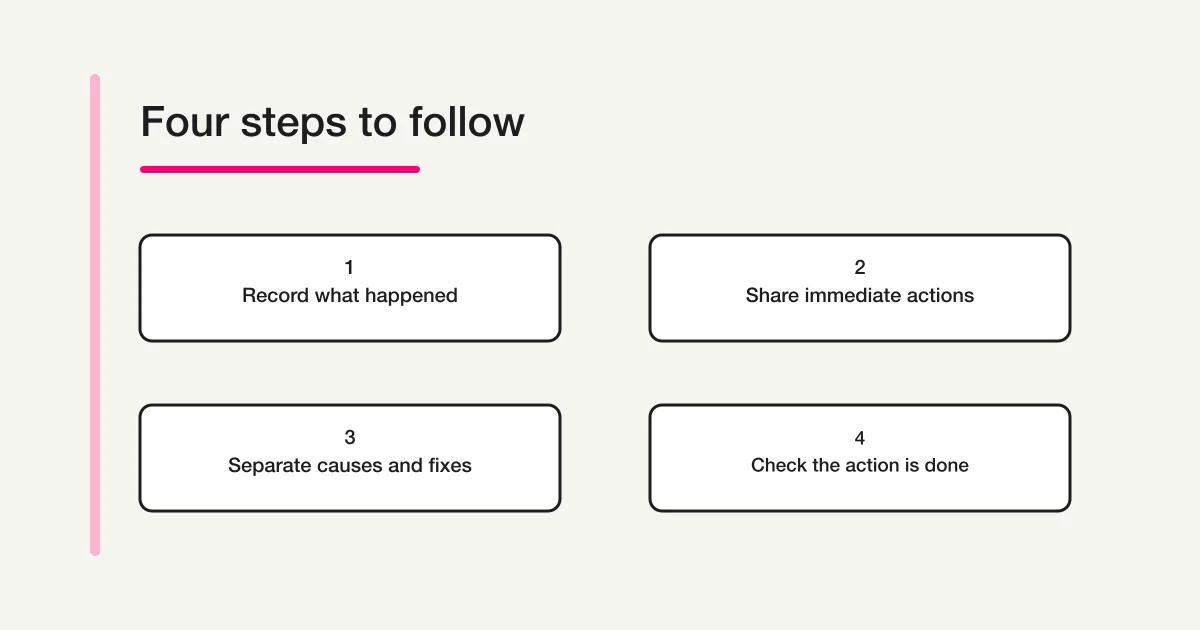
Plan the receiving side as carefully as the questions. A submitted record is the beginning of a review, not proof that a hazard has been removed.
- Check for a continuing danger. If an immediate response is needed, use the established safety escalation route. Do not wait for an ordinary periodic review of form submissions.
- Clarify the account. Compare the reported facts, the current site conditions, and any necessary clarification. Preserve uncertainty where the available information does not resolve it.
- Decide the response. Record the accepted action, responsible person, intended timing, and method for checking the result. Keep an unapproved suggestion distinct from an agreed measure.
- Verify what changed. “Moved the boxes” records work done. “The designated reviewer checked the crossing after the move” records a separate verification step. Describe the relevant findings rather than using a bare “complete” label.
- Return learning to the right people. Tell the reporter and affected colleagues what was reviewed and changed, while removing personal information they do not need to see.
For everyday progress sharing, use a Daily Report Format. For a fault requiring maintenance, the Repair Request Form Guide addresses repair intake. If one event generates both a near miss report and a repair request, connect the records and identify which process owns preventive follow-up.
When reviewing patterns, keep the interpretation modest. A higher report count may reflect a change in reporting practice, and a low count does not by itself establish that a workplace is safe. Read the accounts and review the conditions behind them. An intake total is useful context, but it is not a substitute for the responsible team's assessment.
Frequently asked questions
Can I submit a report before I know the cause?
Yes, a format can accept observed facts first and mark the cause as unconfirmed. Requiring a complete causal explanation can delay reporting or encourage guesses. Your workplace should define what the reporter handles and what is passed to the reviewer.
Should I use a spreadsheet or a web form?
A spreadsheet can work for a small group that already shares and reviews a controlled table. A form is helpful when people should submit the same fields without editing others' reports. Either approach still needs appropriate access, a named receiving process, and an agreed place for follow-up decisions.
Does the reporter's name have to be required?
Decide whether a contact is necessary for clarification and whether your organization accepts anonymous reports. Removing the name field does not guarantee anonymity: location, timing, or the event itself may identify someone. Check the questions and visibility rules before promising anonymity.
Is “be more careful” enough as a prevention proposal?
It can express an initial concern, but the reviewer should examine the relevant conditions. Record the accepted change, who will act, and how the result will be checked. Submission of the form alone should not be treated as evidence that prevention is complete.
Disclosure and Verification
This guide was written on November 1, 2026, after checking the cited Ministry guidance and FORMLOVA's plan definition. The template is an editorial suggestion and the filled-in example is fictional. The prompt is not an executed product test, and no workplace safety outcome has been measured here. Adapt the intake to your organization's reporting process and the responsible safety team's decisions.