Separate registration intake, attendance confirmation, and the check-in list. Decide whether capacity counts responses or people, whether guests are allowed, and who handles deadlines, cancellations, and waitlisting before adding fields.
Last updated: October 15, 2026
An event registration form is not just a place to collect names.
It starts the event operation.
The form decides who is on the attendee list, how capacity is counted, who receives a confirmation email, who gets reminders, how waitlist entries are handled, what the check-in team sees on the day, and what follow-up happens after the event.
If the form is too light, the organizer lacks context.
If the form is too heavy, people abandon registration.
If capacity and cancellation rules are not decided before launch, the first sold-out moment becomes manual chaos.
This guide explains how to build an event registration form for meetups, workshops, exhibitions, hiring events, community events, hybrid events, and paid sessions. FORMLOVA already has a separate guide for webinar and seminar registration. This article focuses more on event intake, attendee lists, waitlists, check-in, and operational readiness.
If you want the broader map across contact forms, lead capture forms, surveys, event registrations, and hiring forms, start with the FORMLOVA Form Creation Guide. It works as the parent guide for choosing the right use-case article.
Quick Answer: Design for Registration, Preparation, and Check-In
If you searched for an "event registration form" or "event sign up form," start with the day-of operation, not only the signup screen.
Before choosing fields, decide how far the form needs to support the event workflow.
| Role | What the form must collect | What operations must handle |
|---|---|---|
| Registration | Name, email, event/date, attendee count | Duplicate entries, deadline, capacity |
| Preparation | Format, requirements, accessibility notes | Confirmation email, reminders, cancellation |
| Check-in | Attendee name, company, ticket type | Attendee list, status, no-shows |
| Follow-up | Purpose, interest area, survey permission | Thank-you email, survey, next offer |
| Paid event | Ticket type, receipt name, payment state | Payment confirmation, cancellation policy |
The point is simple:
An event registration form should be built from the day-of operation backward.
If the check-in team needs company name, collect company name.
If seats are limited, define capacity and waitlist rules before publishing.
If you will send location updates or join links, collect an email address and write the confirmation flow.
If you want post-event follow-up, collect one or two intent signals without turning the registration form into a long survey.
Core Fields for an Event Registration Form
A minimal version starts with:
Full name
Email address
Event name or event date
Number of attendees
Data-use notice or consent
That is enough to accept registrations for a small free event.
Most real events need a little more structure.
| Field | Recommendation | Why |
|---|---|---|
| Full name | Required | Needed for check-in |
| Required | Needed for confirmation, reminders, changes | |
| Company or affiliation | Usually required for B2B | Useful for badges, networking, follow-up |
| Number of attendees | Required | Capacity depends on people, not submissions |
| Attendance format | Required for hybrid events | Venue and online instructions differ |
| Ticket type | Required when multiple passes exist | General, student, VIP, staff, sponsor |
| Accessibility or accommodation needs | Optional | Supports safety and attendee experience |
| Purpose for attending | Optional or single choice | Helps follow-up and planning |
| Questions for the organizer | Optional | Helps speakers and staff prepare |
| Cancellation policy consent | Required for paid or capacity-limited events | Reduces confusion later |
Do not make every field required.
The required fields should support attendance and communication. Optional fields should support planning and follow-up.
The person registering wants to attend the event. The form should help them do that, not make them justify their interest before they have a place.
Change Fields by Event Type
"Event" is too broad to use one universal form.
A meetup, hands-on workshop, hiring event, exhibition booth session, paid class, and hybrid event all need different information.
| Event type | Useful extra fields | Why it helps |
|---|---|---|
| Meetup or networking event | Company, role, interest area, referral source | Helps create useful introductions |
| Workshop | Experience level, device or materials, prep task | Reduces mismatch during exercises |
| Exhibition or trade event | Arrival window, interest category, meeting request | Helps staffing and follow-up |
| Hiring event | School, graduation year, desired role, questions | Supports candidate follow-up |
| Paid class | Ticket type, receipt name, cancellation consent | Supports payment and admin work |
| Hybrid event | Attendance format, online email, recording preference | Instructions differ by format |
Eventbrite's official help for order forms explains that organizers can choose attendee information, add custom questions, and mark questions as required or optional. The same principle applies when building your own event registration form in FORMLOVA:
Collect the information required to run this event, not every piece of information the team might be curious about.
For a workshop, experience level may be important.
For a networking event, interest area may be more useful.
For a paid class, receipt name and cancellation consent may matter more than job title.
Define Capacity and Waitlist Rules Before Launch
Capacity counts accepted responses, not the sum of an arbitrary attendee-count field. The trial below uses one response per attendee with no guests. Group bookings need a separately verified seat-counting process.
Decide deadline and time zone, closed-form messaging, cancellation review, and how the organizer offers an opening to a waitlisted person. Do not assume automatic waitlist promotion, restored cancellation capacity, or atomic seat allocation without verifying it.
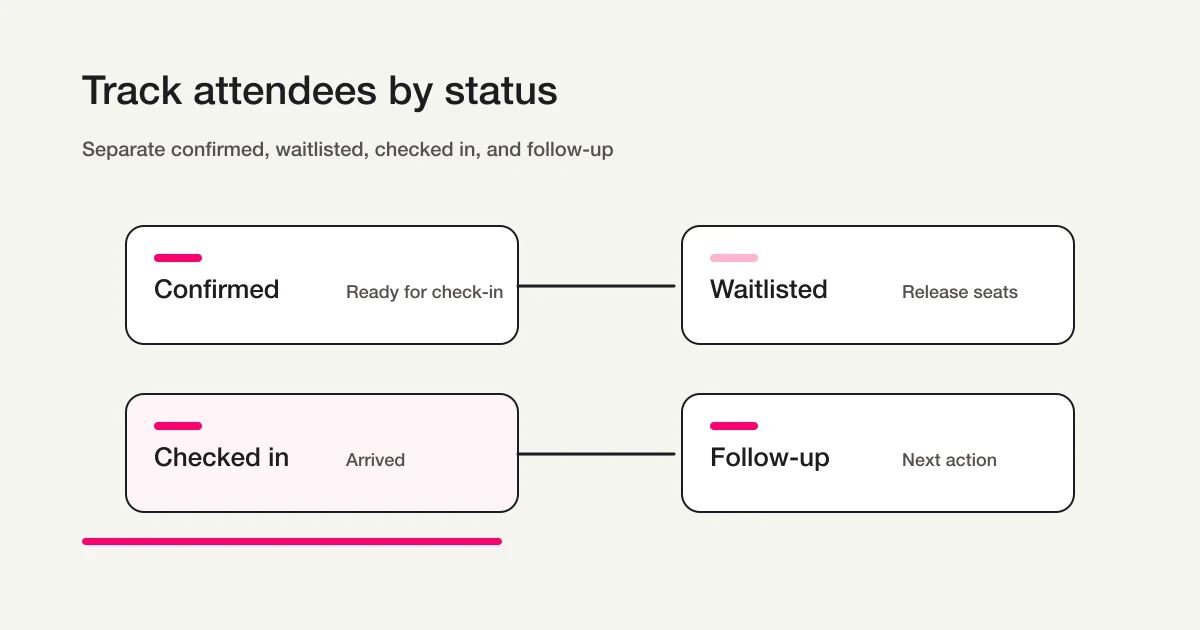
Confirmed, Waitlisted, and Checked in are organizer-list labels, not built-in FORMLOVA response-status values.
Make the Data-Use Notice Event-Specific
Event registration forms collect personal information such as name, email, company, affiliation, attendance purpose, and sometimes accessibility needs.
Japan's Personal Information Protection Commission explains in its guidelines that when personal information is collected, the purpose of use should be communicated or published, and when information is obtained directly from a person through a written or electronic form, the purpose should be shown in advance.
For event registration, keep the notice clear:
We will use the information you submit to process your event registration, confirm attendance, send event-related updates, manage check-in, and send post-event survey information.
If you want to send marketing updates after the event, keep that separate:
I agree to receive related event, resource, and product updates by email.
Do not hide future marketing inside the registration itself.
Accessibility or accommodation fields deserve extra care. If you ask about mobility support, dietary restrictions, interpretation needs, or other support requests, explain why:
If you need accommodation for check-in, seating, safety, food, or communication, you may provide details here. We will use this information only to prepare for the event.
The promise on the form should match the actual workflow.
Choose the Tool by Operational Role
When planning event registration, teams often ask whether they should use an event platform, a general form, or a form operations tool.
The answer depends on the center of gravity.
| Situation | Better fit |
|---|---|
| Ticket sales, public discovery, and event marketplace distribution matter most | Event management or ticketing platform |
| The event is small and you only need a simple attendee list | General form tool |
| The registration lives on your own site and needs reminders, check-in, and follow-up | Form operations tool |
| Post-event survey, resource request, CRM handoff, or sales follow-up matters | Prioritize response operations |
Eventbrite's official help covers event-specific order forms, confirmation messages, and waitlists. That is useful when ticketing and public event management are central.
If the event is part of your own customer, hiring, community, or partner workflow, the question changes:
How easy is it to search attendees, update status, export the list, sync with Sheets, and route follow-up?
FORMLOVA is strongest when registration is the first step in a broader workflow.
Build the Event Registration Form in FORMLOVA
- Decide the minimum fields and the operator’s next action.
- Register, verify email, and connect a supported AI client. Its terms and fees are separate.
- Request a saved draft. Check its form ID, required settings, choices, data-use wording, and mobile/desktop preview.
- After review, publish a test form and submit fictional data. A preview submission alone does not verify response persistence.
- Find a saved response, confirm its target ID before updating status, and fetch it again. CSV contains form fields and submission time, not internal response-ID or status columns.
The next example defines a Free-plan trial. Check the plan and permissions before adding mail, files, detailed analytics, or integrations.
Test capacity with one response per attendee
For the initial trial, use an event with one accepted response per attendee and no guests. A quantity field does not automatically make capacity count seats. Decide confirmation and waitlist communication as separate operating rules.
Suggested request; not an executed result:
Draft registration for a study session with no guests. Require name, email, and session; make organizer notes optional. Capacity is 20 responses, one attendee per response. Leave deadline date, time, and time zone for operator confirmation. I will review and manually publish a test. Do not configure confirmation emails or automatic waitlisting yet.
After publication, use fictional registrations to check persistence, display, deadline settings, and closed-form messaging. Test concurrent submissions and cancellation capacity behavior separately; do not present this as guaranteed seat reservation. Collection, search, and CSV are Free. CSV contains form fields and submission time, so add confirmation and check-in columns in the attendee list. Custom confirmations, reminders, and Sheets sync require Standard or above; paid forms require Premium or above.
Try this registration workflow on Free
For the initial trial, use an event with one accepted response per attendee and no guests. A quantity field does not automatically make capacity count seats. Decide confirmation and waitlist communication as separate operating rules.
Sign up free to draft event registration
After registration and email verification, connect a supported AI client and use the request above to draft the form. Review it before test publication. AI-client access and fees follow that provider’s terms.
Confirmation Emails Should Reduce Event Anxiety
The confirmation email is not a courtesy. It is part of the event operation.
Google Forms official help explains how to collect respondent email addresses and send response receipts. Eventbrite official help explains how organizers can customize order confirmation messages shown after purchase and in confirmation emails.
For an event, the confirmation email should answer:
Am I registered?
When is the event?
Where do I go?
What should I bring?
How do I cancel or change my registration?
Who do I contact?
A practical template:
Subject: Your event registration is confirmed

Hi {name},

Thank you for registering for {event_name}.
We have received your registration with the details below.

Date and time: {event_datetime}
Venue: {venue_name_and_address}
Check-in starts: {check_in_time}
Attendees: {attendee_count}

On the day, please check in using your name.
If you need to change or cancel your registration, contact {contact_email}.

We will send a reminder before the event.
Online attendees need join URL, start time, display-name rules, and recording information.
Venue attendees need address, check-in time, map, belongings, and emergency contact.
Paid attendees need payment confirmation, receipt handling, cancellation deadline, and support contact.
In FORMLOVA, custom auto-reply emails are available on Standard and above. Standard is JPY 1,480 per month. The Free plan still includes form creation, response collection, response search, status management, and CSV / Excel export.
For reusable patterns, see Form Auto-Reply Email Examples.
Use Reminders for Attendance, Not Noise
Registration does not equal attendance.
People forget. Plans change. Venue details get buried.
Use reminders to help people actually arrive.
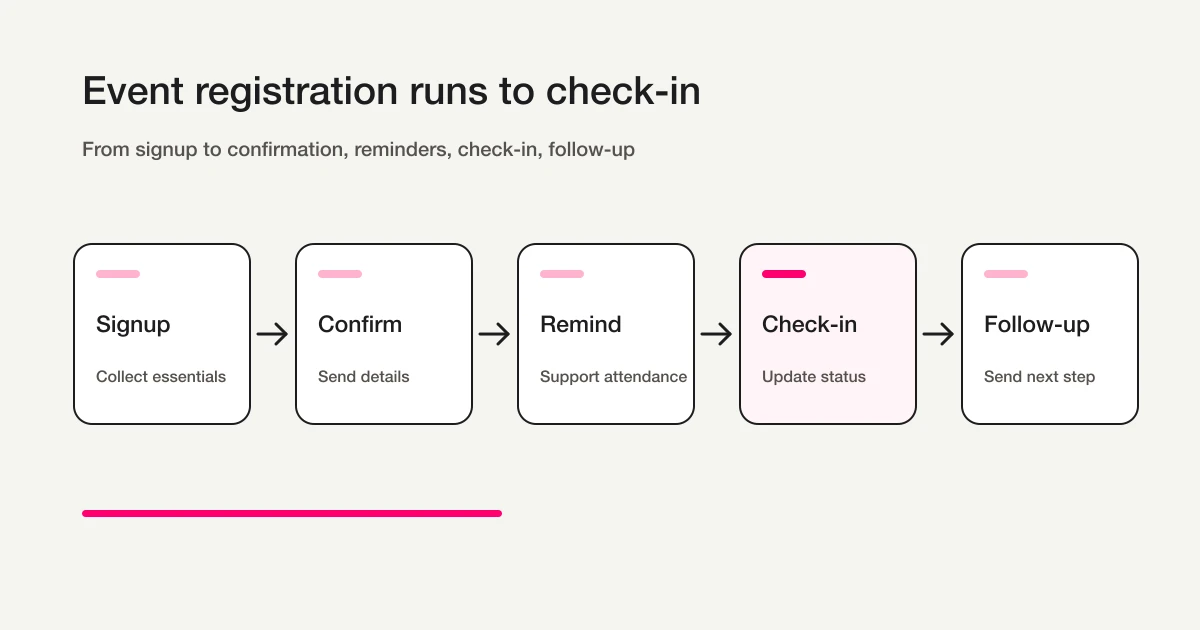
Useful reminder timing:
| Timing | Purpose | Include |
|---|---|---|
| 3 days before | Bring the event back into mind | Topic, audience, preparation |
| 1 day before | Restore attendance intent | Time, venue or URL, materials |
| Event morning | Help venue attendees arrive | Check-in time, map, contact |
| 1 hour before | Help online attendees join | Join URL, display-name rules |
Not every event needs four reminders.
A small free meetup may only need one reminder the day before. A paid workshop with preparation tasks may need a 3-day reminder and an event-day reminder.
In FORMLOVA, reminders are available on Standard and above:
Send event reminder emails at 6 PM the day before and 9 AM on the event day. Include venue address, check-in time, and contact email.
The reminder should help attendance. It should not become a promotional blast.
Prepare the Check-In List Before Event Day
Choose the fields needed by check-in staff. Export form answers and submission time, then add attendance confirmation, check-in, and cancellation columns in the attendee list. Exports do not include internal response-ID or status columns.
FORMLOVA response status is New, In progress, Resolved, or Spam; keep it separate from attendance and payment. Search and CSV/Excel export are Free. Sheets sync requires Standard or above and owner authorization. Verify a new submission and sync errors; do not assume historic-response or status-column backfill.
See the export and Sheets guide for the handoff.
Paid Events Need Payment State and Cancellation Rules
A paid event registration form has a second workflow:
Payment.
FORMLOVA supports paid event workflows with Stripe Connect on Premium. The fee is 4.6%.
For a paid event, include:
Full name
Email
Ticket type
Receipt name
Cancellation policy consent
Data-use consent
The confirmation email should include:
Payment confirmation
Ticket type
Receipt handling
Cancellation deadline
Support contact
Keep payment state separate from registration status.
Started registration
Payment complete
Payment incomplete
Cancelled
Refund under review
This prevents the team from treating an unpaid registration as confirmed attendance.
Post-Event Follow-Up Starts With Registration Data
The registration form can make post-event follow-up much better.
But only if it collects the right intent signals.
Do not ask for a long essay. One or two structured questions are enough.
| Registration signal | Follow-up path |
|---|---|
| Researching | Related resources and future events |
| Evaluating a product | Resource request or consultation |
| Hiring or career interest | Job page or 1:1 conversation |
| Partnership interest | Partner contact |
| Community interest | Community channel and next meetup |
After the event, send a survey, materials, or next step based on what the attendee indicated.
For survey design, see Survey Form Guide. If you need satisfaction scoring, recommendation intent, and low-score follow-up, use the NPS Form Template. For resource download follow-up, align the post-event offer with the attendee intent you collected at registration.
Launch Checklist
Before publishing, check the workflow:
Event name, date, venue, and format are visible.
Required fields are limited to check-in and communication needs.
Maximum attendees per submission is defined.
Capacity and waitlist behavior are defined.
Cancellation instructions are visible.
The data-use notice is visible before submission.
Confirmation email includes venue or URL, check-in time, and contact.
Reminder timing is defined.
The check-in list has the columns staff need.
Paid events separate payment state from registration status.
A test submission confirms response, notification, email, and attendee list behavior.
The most common missing item is cancellation handling.
As the event approaches, change requests increase. Put cancellation instructions in both confirmation and reminder emails.
Common Mistakes
The first mistake is turning registration into a survey.
The goal of an event registration form is to complete registration. Intent and planning questions are useful, but too many required long-answer questions add friction.
The second mistake is counting submissions instead of attendees.
If one submission can include two guests, capacity must be based on attendee count, not submission count.
The third mistake is sending a weak confirmation email.
People need the date, venue or join URL, check-in time, materials, and contact information. If they cannot find these, the organizer receives avoidable questions.
The fourth mistake is preparing the check-in list too late.
The check-in list is shaped by the form fields. Decide what the team needs to see before publishing the form.
The fifth mistake is ignoring post-event follow-up.
Events create momentum. Surveys, resources, next-event invites, and consultation paths should be planned before the event happens.
FAQ
Should phone number be required on an event registration form?
Usually, no.
If confirmation and reminders can happen by email, phone can be optional. Make it required only when the event has a strong operational reason, such as urgent venue changes, field events, child-related activities, or same-day coordination.
Can Google Forms handle event registration?
For small events, yes.
Google Forms can collect email addresses, send response receipts, and export responses. But if you need capacity rules, waitlist handling, attendee status, reminders, check-in lists, and post-event follow-up, the operation around the form needs deliberate design.
Should event registration and webinar registration be separate forms?
Often, yes.
Webinar registration usually centers on join links, reminders, recordings, and lead follow-up. Event registration often includes venue logistics, attendee count, ticket type, check-in, waitlists, and accommodation notes. In FORMLOVA, you can keep a shared base form and duplicate it for each event type.
Related Workflows You Can Use
For a standard event form, Event Reminder + Follow-up is the first Workflow Place route to attach. It connects registration, reminder, and post-event follow-up so the form is not just a static signup list.
If the event needs a fuller operating sequence, use Seminar Registration to Survey and Slack Notification + Sheets Log. Together they cover team visibility, attendance follow-up, and the survey loop after the session.
Summary
Start with the concrete form and checks above. Review the draft, publish a test, and inspect saved responses before deciding whether to migrate or automate. Keep the current tool if it meets the need. Add paid features for a named operational requirement, and verify setup and delivery rather than treating a suggested request as a completed workflow.
Disclosure and Verification
This guide is for organizers building an event registration form, signup form, or attendee intake form. I work on FORMLOVA, so I include the FORMLOVA workflow. I checked official information from Eventbrite, Google Forms, and Japan's Personal Information Protection Commission on June 26, 2026. The 2026-06-23 90d Search Console export showed early impressions for event registration form and event sign up form, so the title, meta description, and first answer now address those queries directly. Treat this as form operations guidance, not legal advice.
Related Articles
- FORMLOVA Form Creation Guide
- Form Field Examples Guide
- Registration Form Guide
- Reservation Form Guide
- Payment Form Guide
- How to Set Up Form Auto-Reply Emails
- FORMLOVA Form Automation Guide
- Webinar Registration Form Guide
- NPS Form Template