
Separate the fields needed to deliver a resource from optional context for a sales conversation. Explain delivery method and timing first. Keep a resource request distinct from consent to ongoing marketing updates.
Last updated: October 15, 2026
A lead capture form is easy to create and easy to damage.
Ask too little, and sales receives a list of email addresses with no context.
Ask too much, and the people who only wanted a useful resource leave before submitting.
That is the tension behind every whitepaper download form, resource request form, demo guide request, checklist download, and B2B lead form.
The form has two jobs:
Deliver the resource
Collect enough context for the next action
Those jobs should not be mixed together.
This guide explains how to design a lead capture form that is light enough to complete and structured enough for follow-up. I will cover required fields, optional qualification fields, privacy and marketing consent, FORMLOVA setup, auto-reply email, hot lead signals, CRM / Google Sheets handoff, and launch checks.
If you want the broader map across contact forms, surveys, event registrations, hiring forms, and lead capture forms, start with the FORMLOVA Form Creation Guide. It works as the parent guide for choosing the right use-case article.
Quick Answer: Separate Delivery From Qualification
Before choosing fields, define what the form must do after submission.
| Goal | Fields that usually help | Fields that often add friction |
|---|---|---|
| Deliver a resource | Name, email, requested resource | Phone number, budget, long comments |
| Qualify B2B leads | Company, role, company size, timeline | Detailed internal process questions |
| Route to sales | Pain point, timeline, consultation request | Required phone number for everyone |
| Send marketing updates | Marketing consent, interest area | Consent hidden inside the submit button |
| Sync to CRM | Company, email, lead source, interest area | Fields sales will never use |
The required fields should support delivery.
The optional fields should support qualification.
Consent fields should explain what happens after the resource is requested.
This separation keeps the form easier to complete and easier to operate.
Core Fields for a Resource Download Form
A minimal B2B version can start with:
Full name
Work email
Company name
Requested resource
Privacy notice or data-use consent
That is enough to deliver a document and keep a basic record.
If sales or marketing needs more context, add optional fields:
Role or department
Company size
Area of interest
Current challenge
Evaluation timeline
Would you like a consultation?
Would you like related updates by email?
Do not make all of these required.
The more required fields you add, the more you ask the visitor to justify their interest before they have received the resource.
Use the form to invite context, not force it.
| Field | Recommendation | Why |
|---|---|---|
| Name | Required | Useful for reply and record keeping |
| Required | Needed to deliver the resource | |
| Company | Usually required for B2B | Helps identify account context |
| Phone | Optional | Best tied to consultation request |
| Role | Optional | Useful for segmentation |
| Timeline | Optional or single choice | Helps prioritize follow-up |
| Pain point | Optional | Helps personalize sales response |
| Marketing consent | Separate checkbox | Do not mix with the download itself |
This gives sales more than an email address without turning the form into an interrogation.
Different Resources Need Different Forms
"Resource download" is not one intent.
A visitor downloading a beginner checklist is not in the same state as a visitor downloading a pricing sheet. A visitor reading a case study may want proof that a similar company solved the same problem. A visitor downloading webinar slides may only want to share the material internally.
Because the intent is different, the form should not always ask the same questions.
| Resource type | Visitor intent | Useful extra fields | Design to avoid |
|---|---|---|---|
| Whitepaper | Researching a problem | Interest area, industry, challenge category | Required phone number |
| Pricing sheet | Comparing vendors or budget | Company size, timeline, consultation request | Long free-text questions |
| Case study | Looking for a comparable example | Industry, company size, use case | Irrelevant demographic fields |
| Checklist | Solving an immediate task | Role, current workflow problem | Strong sales framing |
| Webinar slides | Reviewing or sharing material | Attendance, topic interest, future event consent | Blended marketing consent |
This matters because field pressure should match visitor intent.
Pricing-page visitors may tolerate a timeline question because they are closer to evaluation. Checklist visitors may not. A required phone number may make sense for a consultation request, but it feels excessive for a lightweight guide.
Instead of creating one universal lead form, create a base structure and adapt it by resource type.
Pricing resource: add timeline and consultation request.
Whitepaper: add interest area and challenge category.
Case study: add industry and company size.
Webinar material: add future event email consent.
In FORMLOVA, start with one base form, duplicate it, and adjust the optional fields for each offer. This keeps the required fields consistent while letting each resource collect the context that actually matters.
Required Fields Should Feel Necessary
Required fields should make sense to the visitor.
Email is natural because the resource needs to be delivered.
Company name is usually acceptable for a B2B resource because the content is business-oriented and account context matters.
Phone number is different.
Many visitors read a required phone field as "someone will call me." If the visitor only wants to download a checklist, that can be enough to stop them.
A better pattern is:
Would you like a consultation?
- Yes
- Not right now

Phone number, optional if you want a call
Timeline works the same way. Sales wants it, but visitors may not know the answer yet. Make it a single-choice question:
Evaluation timeline
- Now
- Within 3 months
- Within 6 months
- Researching
- Not sure yet
That gives the team a prioritization signal without requiring a long explanation.
Explain Data Use and Marketing Consent Clearly
Lead capture forms collect personal data.
Japan's Personal Information Protection Commission explains that when businesses request personal information, they should communicate the purpose of use, such as product or service information. Its public FAQ also uses member lists as an example where the purpose is decided and communicated to the person providing the information.
In practical form language, keep the notice clear:
We will use the information you submit to deliver the requested resource, respond to related inquiries, and understand interest in our services.
If you also want to send ongoing marketing emails, separate that from the resource request:
I agree to receive related resources, event information, and product updates by email.
Mailchimp's official GDPR form guidance uses the same broad principle: explain why you collect information, communicate each marketing activity clearly, and make sure your statements match your actual practices.
Even if your form is not primarily a GDPR form, the design idea is useful:
Do not hide marketing consent inside the download request.
Make the follow-up purpose visible.
Separate Notice, Contact Permission, and Marketing Permission
In practice, teams often collapse all permission language into one sentence near the submit button.
That is usually too vague for operations.
Use three separate concepts.
| Consent or notice | Purpose | Form pattern |
|---|---|---|
| Data-use notice | Deliver the resource, respond to related requests, understand service interest | Visible text near submit |
| Contact permission | Allow sales or a team member to follow up | Optional checkbox or selection |
| Marketing permission | Send related resources, events, or product updates | Separate optional checkbox |
Example language:
Data use:
We will use the information you submit to deliver the requested resource, respond to related inquiries, and understand interest in our services.

Contact permission:
If you request a consultation, we may contact you by email or phone using the information you provided.

Marketing permission:
I agree to receive related resources, event information, and product updates by email.
This separation also helps after submission.
Someone who only requested the resource gets the resource and a confirmation.
Someone who requested a consultation becomes a sales follow-up candidate.
Someone who opted into marketing can be added to an appropriate nurture segment.
The point is not to make the form look legalistic. The point is to make the promise on the form match the workflow behind it.
Keep the First Form Light, Then Let High-Intent Visitors Add Context
The best lead capture forms usually have layers.
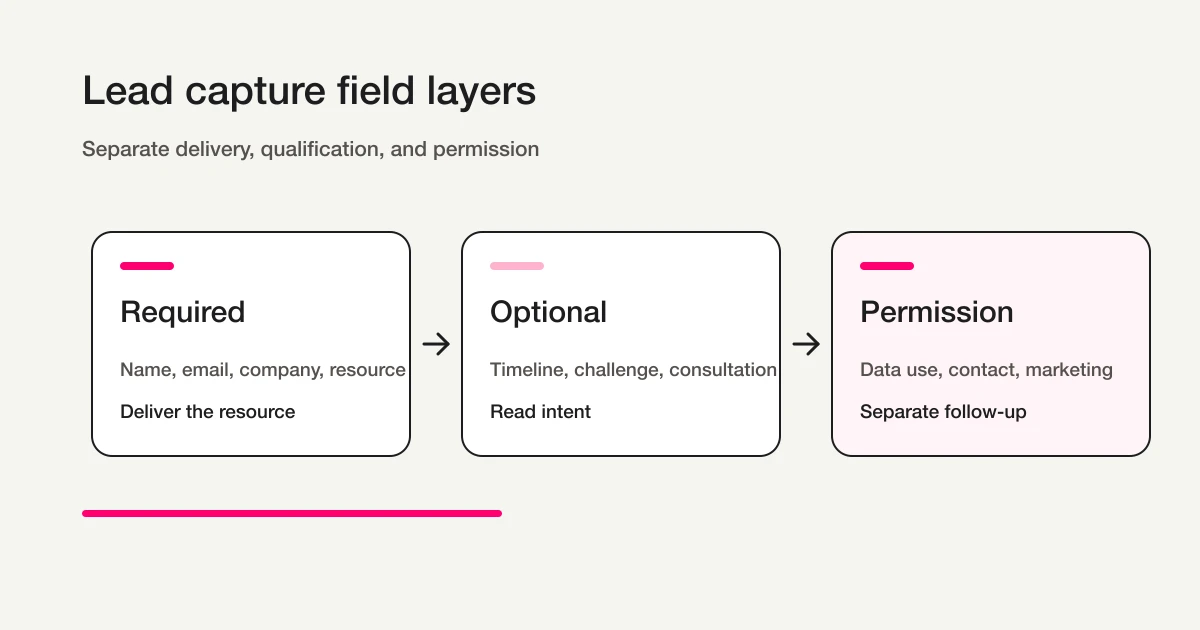
Use three groups:
Required: information needed to deliver the resource
Optional: qualification signals
Consent: follow-up and marketing permissions
For example:
Required:
Name
Email
Company
Requested resource
Optional:
Role
Area of interest
Timeline
Current challenge
Consultation request
Consent:
Privacy notice
Marketing updates checkbox
This structure lets casual researchers complete the form quickly.
It also gives high-intent visitors a way to raise their hand.
If someone selects "within 3 months," writes a specific challenge, and asks for a consultation, sales can treat that response differently from a casual download.
Build the Form in FORMLOVA
- Decide the minimum fields and the operator’s next action.
- Register, verify email, and connect a supported AI client. Its terms and fees are separate.
- Request a saved draft. Check its form ID, required settings, choices, data-use wording, and mobile/desktop preview.
- After review, publish a test form and submit fictional data. A preview submission alone does not verify response persistence.
- Find a saved response, confirm its target ID before updating status, and fetch it again. CSV contains form fields and submission time, not internal response-ID or status columns.
The next example defines a Free-plan trial. Check the plan and permissions before adding mail, files, detailed analytics, or integrations.
Make the resource delivery expectation explicit
A resource-request form needs a delivery expectation, not just contact fields. For the Free-plan trial, use manual delivery with timing and channel verified by the operator. Promise immediate automated delivery only after that workflow is configured.
Suggested request; not an executed result:
Draft a service-information request form with required name, email, and requested resource; company and consultation details are optional. State that an operator will send the resource separately, leaving delivery timing for review. Add a separate optional, unchecked checkbox for future marketing updates.
Send fictional requests with and without consultation details, then find the requested resource and stated consultation intent. Do not infer high intent from missing information. Collection, search, status management, and CSV are Free. Resource delivery through custom replies and Sheets sync require Standard or above; bulk campaigns and sequences require Premium or above.
Try this resource request on Free
A resource-request form needs a delivery expectation, not just contact fields. For the Free-plan trial, use manual delivery with timing and channel verified by the operator. Promise immediate automated delivery only after that workflow is configured.
Sign up free to draft resource request
After registration and email verification, connect a supported AI client and use the request above to draft the form. Review it before test publication. AI-client access and fees follow that provider’s terms.
Write the Auto-Reply Email Around Delivery and Expectation
A lead capture form should confirm the request immediately.
Google Forms official help explains collection of respondent email addresses and response receipts. HubSpot's form documentation describes using form submissions to trigger follow-up emails and workflows. The operational idea is the same: the submitter should know what happened and what comes next.
In FORMLOVA, custom auto-reply emails are available on Standard and above. Standard is JPY 1,480 per month. The Free plan still includes form creation, response collection, response search, status management, and CSV / Excel export.
A practical auto-reply:
Subject: Your requested resource is ready

Hi {first_name},

Thank you for requesting {resource_name}.

You can download it here:
{resource_url}

If you requested a consultation, a team member will follow up using the contact information you provided.
If you agreed to receive related updates, we may send relevant resources, event information, or product updates by email.

If you have questions, you can reply to this email.
Do not make the email clever.
Make it clear.
The visitor should know where the resource is, whether a human will contact them, and how future email updates are handled.
For reusable patterns, see Form Auto-Reply Email Examples.
Identify Hot Leads Without Reading Every Submission Manually
Not every resource request has the same intent.
Some visitors are researching. Some are comparing vendors. Some are preparing an internal proposal. Some are ready to talk.
Design the form so those differences are visible.
| Signal | Example | Next action |
|---|---|---|
| Near-term timeline | Now or within 3 months | Prioritize follow-up |
| Specific challenge | Clear pain point in text | Personalize response |
| Consultation request | Checkbox selected | Assign owner |
| Company context | Company and role present | Create or update CRM record |
| Multiple resources selected | Broad interest | Recommend related material |
Use structured fields wherever possible.
If timeline, interest area, and consultation request are structured, you can filter quickly. If everything is a long comment, someone has to read each answer before deciding what to do.
In FORMLOVA, you can ask:
Show resource requests where timeline is within 3 months and consultation request is yes.
Then:
Draft a handoff summary for the selected responses. Show the target IDs before changing one response to In progress; do not send to a destination yet.
This is where a lead capture form becomes a lead workflow.
For the broader routing pattern, see Route Post-Publish Responses by Intent and Send Hot Leads to Sales.
Prioritize by Next Action Before Building a Score
Do not start by inventing a complicated lead score.
Start by deciding what should happen next.
The following are business classifications for a separate lead record, not FORMLOVA response-status values:
| Lead classification | Example conditions | Next action |
|---|---|---|
| Sales now | Timeline within 3 months, consultation requested, clear pain point | Notify owner and send a personal reply |
| Nurture | Researching, marketing consent present, interest area known | Send related resources or event invites |
| Record only | Resource requested, no extra permission or urgency | Keep searchable history |
| Review | Missing company, unclear email, suspicious or incomplete data | Check before follow-up |
This is more useful than a fake precision score.
If the team cannot agree what happens to a "hot lead," a score will not fix the workflow. Define the next action first. Add scoring later when volume is high enough and the pattern is visible.
Prepare CRM and Google Sheets Handoff Before Launch
Resource request forms often feed a CRM or spreadsheet.
HubSpot's official form documentation describes creating contacts from submissions, setting lifecycle stage, notifying owners, and using submissions as workflow triggers. FORMLOVA supports external CRM sync and Google Sheets automatic sync on Standard and above.
Before connecting anything, standardize field names.
Email -> email
Full name -> name
Company -> company
Role -> role
Interest area -> interest_area
Timeline -> timeline
Consultation request -> consultation_requested
Lead source -> lead_source
This seems small, but it matters.
If one form uses "question," another uses "challenge," and another uses "what are you interested in?", downstream reporting becomes messy.
Decide where each type of response should go:
Sales follow-up -> CRM
Marketing analysis -> Google Sheets
Immediate delivery -> auto-reply email
Needs human action -> response status
Low-intent research -> nurture or no action
For exports and Sheets setup, see Export Responses to CSV or Sync Them to Google Sheets.
Launch Checklist
Before publishing, check the form as a workflow:
The resource name is clear.
Required fields are limited.
Phone number is not required unless there is a strong reason.
The data-use notice is visible.
Marketing consent is separate from the download request.
Consultation request is optional and explicit.
Timeline and interest area are structured.
The auto-reply email includes the resource link and next steps.
Sales follow-up criteria are defined.
CRM or Google Sheets field names are mapped.
A test submission confirms response, notification, and email behavior.
Test with three sample submissions:
Casual researcher
High-intent buyer
Marketing-consent-only subscriber
If those three cases are easy to distinguish, the form is likely ready.
If they all look the same after submission, add one or two structured qualification fields.
Common Mistakes
The first mistake is requiring phone number too early.
Phone can be valuable, but required phone fields can reduce trust when the visitor only wants a resource. Tie phone to consultation request.
The second mistake is mixing the resource request and marketing consent.
If a person requests a document, that does not automatically mean they understand ongoing promotional email. Make the marketing checkbox separate and specific.
The third mistake is asking for fields sales will not use.
Company size, department, budget, and timeline are useful only if the team actually uses them. Unused fields are just friction.
The fourth mistake is sending a cold auto-reply.
An auto-reply should confirm the resource, explain what happens next, and give a clear way to ask questions. A bare download link feels unfinished.
The fifth mistake is publishing the form before defining lead ownership.
Who reviews submissions? Which responses go to sales? Which stay in marketing? Which ones receive only the resource? Decide this before the form starts collecting leads.
FAQ
Should phone number be required on a lead capture form?
Usually, no.
Make phone optional unless the entire offer depends on a phone call. A better pattern is to ask whether the visitor wants a consultation, then show or request phone information only when it helps with that follow-up.
Should the resource be delivered on the thank-you page or by email?
Both can work.
A thank-you page gives immediate access. An auto-reply email gives the visitor a record they can return to later. For many B2B resource forms, using both is the clearest experience.
Do I need CRM integration from day one?
Not always.
If request volume is low, FORMLOVA response search and CSV / Excel export may be enough. Once volume increases, multiple people own follow-up, or lifecycle stage matters, CRM integration becomes more useful.
Summary
Start with the concrete form and checks above. Review the draft, publish a test, and inspect saved responses before deciding whether to migrate or automate. Keep the current tool if it meets the need. Add paid features for a named operational requirement, and verify setup and delivery rather than treating a suggested request as a completed workflow.
Disclosure and Verification
This guide is for B2B teams building a resource download, whitepaper request, or lead capture form. I work on FORMLOVA, so I include the FORMLOVA workflow. I checked official help from Japan's Personal Information Protection Commission, Google Forms, HubSpot, and Mailchimp on April 28, 2026. Treat this as form design guidance, not legal advice.
Related Articles
- FORMLOVA Form Creation Guide
- Form Field Examples Guide
- Form Conversion Optimization Guide
- Registration Form Guide
- FORMLOVA Form Automation Guide
- Route Post-Publish Responses by Intent and Send Hot Leads to Sales
- Resource Request Follow-Up Email Sequence