
Last updated: June 18, 2026
If you are looking for an inquiry tracking spreadsheet template, the first thing you need is not a beautiful spreadsheet.
You need columns that show who owns each inquiry, what status it is in, when the first reply is due, and what should happen next.
This guide gives you a free Excel or Google Sheets starting point for contact form inquiries. If you want the broader system/tool decision, read Inquiry Management From a Contact Form. If your team wants to run the process through Office 365, Microsoft 365, Teams, and Power Automate, read Inquiry Management with Office 365 and Teams. This page stays narrower: a copyable spreadsheet structure and the operating rules behind it.
Quick Answer: Copy This Header Row
Use this as the first row in Excel or Google Sheets.
received_at
inquiry_id
source
company
name
email
category
message_summary
status
owner
priority
first_response_due_at
last_updated_at
next_action
management_url
notes
That is enough to start.
The spreadsheet should not become a full archive of every message. Keep long free-text answers, phone numbers, addresses, attachments, and sensitive details in the original form response, inbox thread, or CRM record when possible. Use the sheet to move work forward: status, owner, deadline, next action, and a link back to the source.
What Each Column Does
| Column | Required | Job |
|---|---|---|
| received_at | yes | When the inquiry arrived |
| inquiry_id | yes | Stable identifier for duplicates and handoffs |
| source | recommended | Contact form, landing page, resource download, email |
| company / name / email | yes | Reply target and duplicate check |
| category | yes | Pricing, support, hiring, partnership, sales pitch |
| message_summary | recommended | Short working summary, not the full message |
| status | yes | new, in progress, waiting, done, excluded |
| owner | yes | Person or team responsible |
| priority | optional | high, normal, low |
| first_response_due_at | recommended | Deadline for the first human reply |
| last_updated_at | recommended | Finds stalled rows |
| next_action | yes | first reply, internal check, follow-up, exclude |
| management_url | recommended | Link to form response, inbox thread, or CRM record |
| notes | optional | Exceptions and context, not a status substitute |
The most important columns are status, owner, first_response_due_at, and next_action.
If those fields are empty, the spreadsheet is only a record. Inquiry management is not about making a log. It is about preventing missed replies.
Use Five Status Values
Start with five statuses.
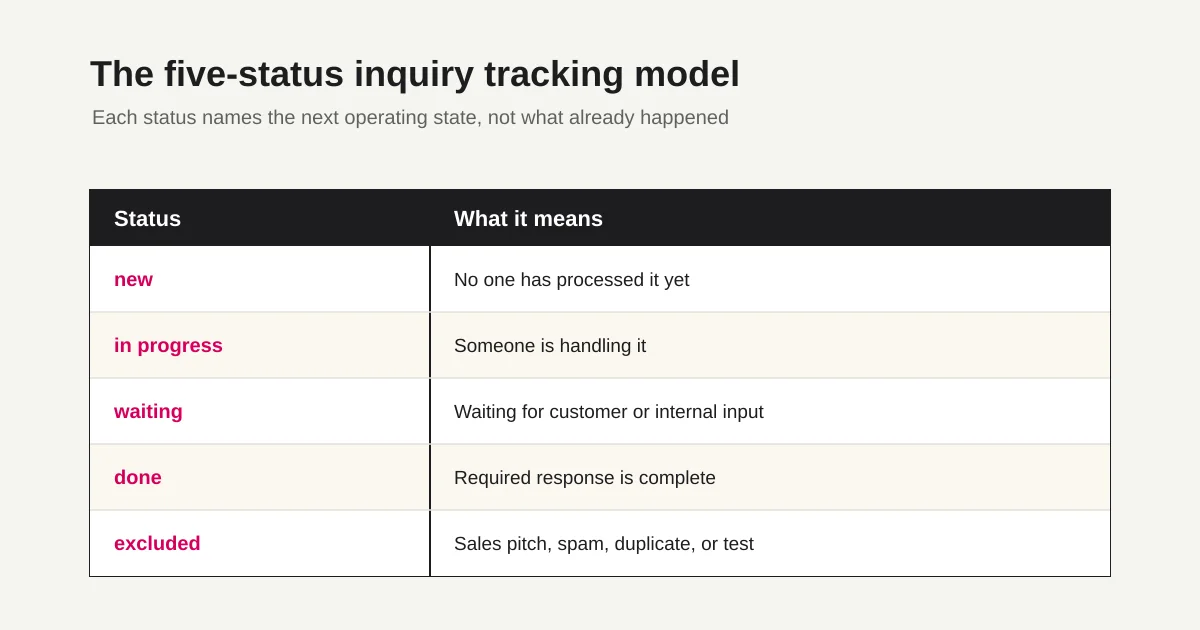
| Status | Meaning | What to check next |
|---|---|---|
| new | No one has processed it yet | Assign an owner and first-response deadline |
| in progress | Someone is handling it | Check reply, investigation, or internal coordination |
| waiting | Waiting for customer or internal input | Follow up when the deadline passes |
| done | Required response is complete | Use for reporting and improvement |
| excluded | Sales pitch, spam, duplicate, or test | Keep out of normal response metrics |
Avoid using read, forwarded, or notified as the main status.
Read means someone opened the message. Forwarded means someone sent it elsewhere. Notified means a Slack or email notification happened. None of those prove that the inquiry is being handled.
Status should describe the next operating state. The broader response-state model is covered in Form Response Status Management.
Add a First-Response Deadline
If the goal is to prevent missed replies, add a first-response deadline.
Example rules:
| Category | First response target | Reason |
|---|---|---|
| Sales or demo request | 1 business day | Commercial intent is high |
| Pricing or estimate | 1 business day | The buyer is comparing options |
| Support | Same or next business day | The user may be blocked |
| Hiring | 3 business days | Depends on the recruiting flow |
| Partnership or press | 3 business days | Internal review may be needed |
| Sales pitch | excluded or low priority | Separate from real customer inquiries |
You do not need complex formulas at first.
Start with a daily view: rows where status = new and first_response_due_at <= today. That single filter is often more useful than a complicated dashboard.
For FORMLOVA response exports and Sheets sync, use Export Responses to CSV or Sync Them to Google Sheets.
Common Spreadsheet Mistakes
Inquiry tracking spreadsheets usually fail in predictable ways.
| Mistake | What happens | Fix |
|---|---|---|
| Copying the full message | The sheet becomes heavy and exposes too much data | Use summary plus source link |
| Managing by color | Each person interprets colors differently | Use a status field |
| Leaving owner empty | Nobody is responsible | Make owner required |
| Weak done definition | A sent email is treated as completed too early | Define done clearly |
| Mixing sales pitches | New inquiry counts become noisy | Use excluded status |
| Duplicating files | Nobody knows which spreadsheet is current | Keep one source of truth |
The most common failure is file duplication.
If sales, support, and management each create their own copy, the team will lose sync quickly. Start with one shared operating table and limit exports to what each workflow really needs.
Why Form-Originated Tracking Works Better
A spreadsheet can work.
But if inquiries start from a form, the form should be the source of structure.
| Form-originated signal | Spreadsheet benefit |
|---|---|
| Submission timestamp | Stable received_at |
| Response ID | Stable inquiry_id |
| Inquiry category | Easier owner and deadline rules |
| Consent field | Clear handling boundary |
| Response detail URL | Less copying into the spreadsheet |
When everything arrives as free-text email, the team must classify each message after the fact. When the form collects category, company, consent, and request details, the spreadsheet can stay focused on work state.
For the full contact-form operations map, read the Contact Form Operations Guide. For daily execution, use Prevent Missed Contact Form Replies.
When to Move Beyond a Spreadsheet
Move from a simple template to a form-operations or inquiry-management tool when these are true:
Three or more people handle inquiries.
The team reviews new inquiries every day.
In-progress or waiting rows stall for too long.
Sales pitches or spam are common.
First-response deadlines matter.
You need update history or owner accountability.
Inquiries are used in weekly reporting or improvement meetings.
At that point, the spreadsheet is no longer just a template. It is trying to become a workflow system.
FORMLOVA lets you start with form creation, response collection, response search, status management, and CSV/Excel export on the Free plan. Custom auto-reply emails are available on the Standard plan and above. Standard is JPY 480 per month and includes up to 1,000 emails per month.
For the workflow layer, use Inquiry Owner Assignment, Unhandled Inquiry Digest, and Inquiry Auto-Reply + Escalation.
FAQ
Should I use Excel or Google Sheets for inquiry tracking?
Excel is fine for one person or a small offline workflow. Google Sheets is usually easier when several people need the same live view. Either way, keep status, owner, first-response deadline, and next action.
Can the template be smaller?
Yes. The minimum version is received_at, name, email, category, message_summary, status, owner, first_response_due_at, and next_action.
Should I copy the full inquiry text into the spreadsheet?
Usually no. Put a short summary in the sheet and link back to the original form response, inbox thread, or CRM record. That reduces duplication and unnecessary exposure of sensitive details.
Should sales pitches go into the same tracker?
Only if they are clearly marked as excluded. Do not let sales outreach inflate real customer inquiry counts. For that boundary, read Contact Form Spam and Sales Defense.
How is this different from the inquiry management article?
Inquiry Management From a Contact Form covers the broader system/tool decision. This article gives the spreadsheet template, columns, statuses, and response-deadline rules.
References
- Microsoft Support: Create a table in Excel
- Google Docs Editors Help: Create, edit, and format spreadsheets
- Tayori: Inquiry management system overview
- formrun official site
Disclosure and Verification
This article is a practical template guide for starting inquiry tracking in Excel or Google Sheets. On June 18, 2026, I checked FORMLOVA internal articles, the June 17 keyword research, and public information from Microsoft Excel, Google Sheets, Tayori, and formrun. Product features, pricing, and external service details can change, so check official sources before buying or standardizing on a tool.
Start with the spreadsheet if that is the fastest way to make work visible.
But keep the goal clear. The template exists to prevent missed replies, not to create another archive. Once volume, ownership, or deadlines matter, move the operating state back toward the form response, status, notification, and workflow layer.