
Last updated: July 2, 2026
A customer service request form has one job: turn "a customer needs something" into a piece of work your team can route, prioritize, and finish.
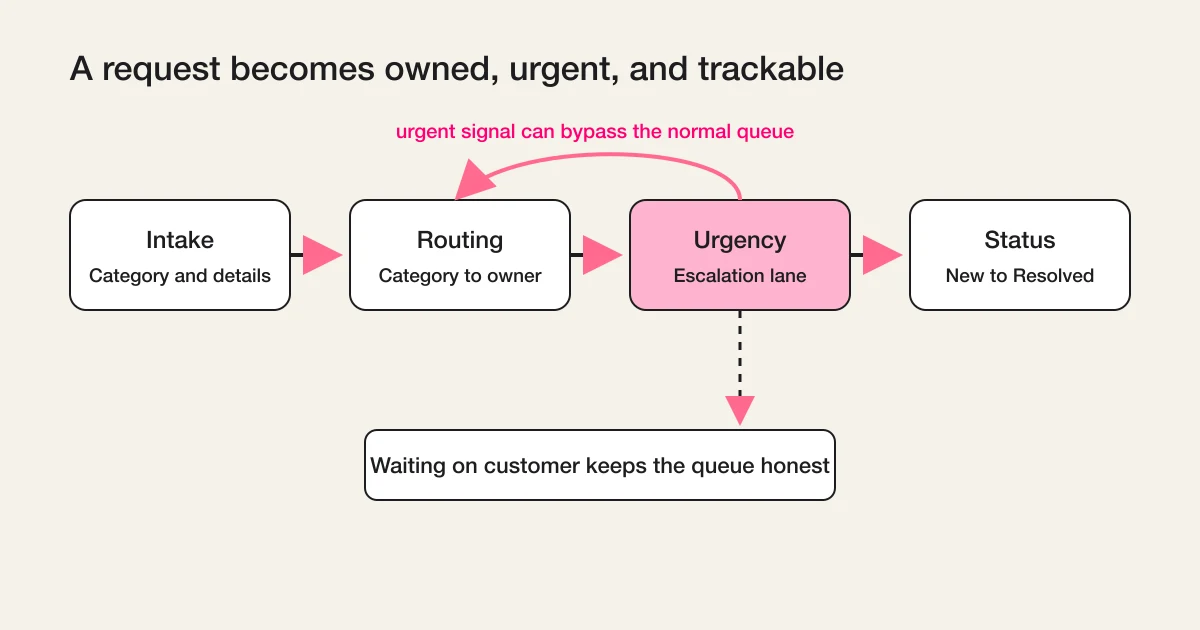
That means the form itself is only half the design. The intake fields decide whether a request is routable. The routing rules decide who owns it. The urgency handling decides what jumps the queue. The status schema decides whether anyone, including the customer, can tell what is happening.
If you only design the fields, you get a nicer inbox. Requests still pile up as unread messages, urgent ones wait behind routine ones, and customers write follow-up emails that just create more unrouted work.
This guide covers all four layers: intake, routing, urgency, and status. It also covers refund and policy-based requests, which need a different kind of status than ordinary service work.
The Short Answer
A working customer service request form needs these fields and this schema.
| Layer | Minimum design |
|---|---|
| Intake fields | Name, email, request category, description, one reference field (order number or account), file attachment |
| Routing | Each category maps to exactly one owner or team, with a fallback for "unclassifiable" |
| Urgency | Detected from content and category, not only from a self-reported dropdown |
| Status | New, Triaged, In progress, Waiting on customer, Resolved, Excluded |
| Refund and policy requests | Decision states: Received, Under review, Approved, Denied, Processed |
You can build this in an afternoon. The rest of this article explains why each piece is shaped this way, and where teams usually get it wrong.
How This Page Fits Together With Related Guides
Several FORMLOVA articles touch what happens after a submission, so the boundary matters.
| If you want to know... | Read this |
|---|---|
| How to design the request form and its routing, urgency, and status schema | This article |
| How contact form operations fit together as a whole | Contact Form Response Management Guide |
| How to design response status as a general model for any form | Form Response Status Management |
| How to evaluate inquiry management tools and prevent missed replies | Inquiry Management From a Contact Form |
| How to set up routing in FORMLOVA step by step | Set Up Inquiry Auto-Routing With FORMLOVA Workflows |
This page owns the service request form. The linked pages own the surrounding operations.
Intake: Fields That Make a Request Routable
The purpose of every intake field is to answer one of three questions: who is asking, what do they need, and what do we need to act on it.
| Field | Why it earns its place |
|---|---|
| Name and email | You cannot reply or verify the account without them |
| Request category | This is the routing key. Keep it to five to eight options a customer can actually choose between |
| Description | Free text, with a short prompt like "What happened, and what would resolve this for you?" |
| Reference field | Order number, invoice number, or account email. One field, clearly labeled, optional if lookup is possible |
| File attachment | Screenshots and receipts resolve requests faster than three rounds of email |
| Consent checkbox | Required where privacy rules apply, and it sets expectations about how the data is used |
Two design rules matter more than any individual field.
First, every field must be consumed downstream. If nobody routes on it, replies with it, or reports on it, delete it. A shorter form gets completed; an interrogation gets abandoned, and the customer emails you instead, which puts the request right back outside your routing.
Second, the category list is a routing contract, not a taxonomy. Categories exist so a request lands with the right owner. "Billing," "Something is broken," "How do I...," "Refund or cancellation," and "Other" route cleanly. "General inquiry type A" does not. Write categories in the customer's words, and keep an "Other" option so people are never forced into a wrong category, which silently corrupts your routing.
A note on templates: a service request form template is useful as a starting checklist, but the category list and the reference field are the two parts you must adapt. They encode how your team is organized and how your customers identify themselves, and no template knows either.
Routing: Every Category Maps to an Owner
Routing is a simple contract: for each category, exactly one owner or team, plus a fallback.
| Category | Owner | First action |
|---|---|---|
| Billing question | Finance | Verify the invoice, reply within one business day |
| Something is broken | Support engineer on duty | Reproduce, then confirm or escalate |
| How do I... | Support | Answer or link the guide |
| Refund or cancellation | Support lead | Check policy eligibility before replying |
| Other / unclassifiable | Triage owner | Reclassify within one business day |
The fallback row is the one teams forget. Some requests will not fit any category, and some customers will pick the wrong one. If unclassifiable requests have no owner, they become the oldest unanswered items in the queue. Give them a named triage owner and a deadline for reclassification.
The other common failure is routing to a channel instead of a person. Posting every request to a shared Slack channel feels like routing, but a channel cannot own anything. Notifications create awareness; ownership creates accountability. Route to a person or an on-duty rotation, and let the channel be a mirror, not the system of record.
In FORMLOVA, this mapping runs as a workflow: when a request arrives, Inquiry Owner Assignment reads the category and content, assigns an owner with a reply deadline, and updates the request's status so the assignment is visible on the record itself. The step-by-step setup is in Set Up Inquiry Auto-Routing With FORMLOVA Workflows.
Urgency: Do Not Outsource Triage to the Customer
Most request forms handle urgency with a dropdown: Low, Medium, High, Critical. Then two things happen. Anxious customers pick Critical for routine questions, and polite customers pick Low for genuine outages because they do not want to be a bother.
Self-reported urgency is a signal, not a verdict. Treat it as one input among three:
- What the customer selected
- What the category implies (a billing question is rarely an emergency; "I was charged twice" might be)
- What the content says (words like outage, cannot log in, charged twice, legal, or cancellation carry more information than the dropdown)
The practical pattern is an escalation lane. Routine requests flow through normal routing. Requests that match urgent signals skip the queue and alert a human immediately, with the matched reason attached so the person alerted knows why.
In FORMLOVA, Urgent Inquiry Keyword Alert is this lane: it detects urgent language in the request content, notifies the owner in Slack with the matched keywords and a summary, and marks the request's status as urgent so the escalation is recorded on the request, not just in a chat message. If you keep the urgency dropdown on the form, keep it as a courtesy signal. The detection lane is what protects you when the dropdown is wrong, which it regularly is in both directions.
One caution in the other direction: do not build ten priority levels. Nobody can define the difference between priority 4 and priority 5 under pressure. Two lanes, normal and urgent, resolve most of the real-world ambiguity, and you can add a third lane later if your volume proves you need one.
Status: The Request Lifecycle
Status answers the question every request eventually raises: what should happen next, and who is waiting on whom?
For service requests, six states cover almost everything:
| Status | Meaning | Exit condition |
|---|---|---|
| New | Arrived, nobody has looked at it | Triage within one business day |
| Triaged | Categorized, owned, urgency decided | Owner starts the work |
| In progress | Someone is actively working on it | Reply sent or fix made |
| Waiting on customer | You asked for information and are waiting | Customer replies, or a follow-up date passes |
| Resolved | The customer's need is met | Kept for reporting |
| Excluded | Spam, sales pitch, duplicate, or test | Removed from normal work and metrics |
Two of these deserve emphasis.
Waiting on customer is the state that keeps your queue honest. Without it, a request you answered three days ago looks identical to a request nobody has touched, and your team wastes attention re-reading it. With it, you can also automate the follow-up: if the customer has not replied in five days, send a gentle nudge or close with a reopen path.
Excluded keeps your metrics honest. Real request forms attract noise: sales pitches, tests, duplicates. If noise sits in New, your backlog looks worse than it is. If it gets marked Resolved, your handled count lies. The general version of this model, including why Excluded should exist from day one, is covered in Form Response Status Management; this section is that model specialized for service requests.
There is one more distinction service requests force on you: internal status and customer-facing status are different projections of the same record. Internally you may track "In progress, waiting on engineering, third reply drafted." The customer should see something calmer: Received, In progress, Resolved. Never expose internal states directly, and never let the customer-facing view go silent. A customer who hears "we received your request and expect to reply within one business day" does not send the "any update?" email that would otherwise land as a brand-new unrouted request.
Once statuses exist, the queue needs a heartbeat so nothing rots quietly. A daily summary of requests still open and past their deadline, grouped by owner, is enough. Unanswered Inquiry Digest does exactly this: it collects requests that have gone unanswered past a threshold, raises the priority of the oldest ones, and posts the list per owner, while skipping anything Resolved or Excluded.
Refund and Policy-Based Requests Need Decision States
Refunds, cancellations, warranty claims, and similar policy-based requests look like ordinary service requests on the form. Operationally, they are a different animal, for one reason: the outcome is a decision, not just an action.
"In progress" tells a customer nothing useful about a refund. What they want to know is: has a decision been made, what was it, and when will the money move? So policy requests need their own state track:
| Status | Meaning | What the customer should hear |
|---|---|---|
| Received | The request is logged and the reference is verified | "We received your request and will review it within N business days" |
| Under review | Someone is checking eligibility against the policy | Nothing new needed if the review window was stated |
| Approved | The refund or change was granted | "Approved. You will see the refund within N business days" |
| Denied | The request does not meet the policy | The reason, stated plainly, and any alternative offered |
| Processed | The money moved or the change took effect | "Completed" with the confirmation details |
Three design consequences follow.
First, the form should collect eligibility evidence up front: the order or invoice number, the purchase date, and the reason. A refund request without a verifiable reference cannot even enter Under review, so make the reference field required for the refund category even if it is optional elsewhere.
Second, Approved and Processed are different states. A customer told "approved" who then sees nothing for two weeks will open a second request. The gap between the decision and the money is exactly where trust is won or lost, so track it explicitly.
Third, Denied deserves as much care as Approved. A denial with a clear policy reason closes the loop; a vague denial generates an angry follow-up. If your denial rate for a given category is high, that is a form-design signal too: the policy should probably be stated on the form, before submission, in the agreement or description text.
You do not need a separate form for refunds. A refund category on your service request form, a required reference field for that category, and this decision-state track on the operations side cover it.
Where FORMLOVA Fits
FORMLOVA is a chat-first form service: you describe the form in chat, through the MCP connection to the AI tool you already use, and operate the responses the same way.
For a customer service request form, that means the whole pipeline in this article stays in one place. You create the form with its categories and reference field in a chat message. Routing, urgency detection, and status updates run as workflows over the responses. When you want to know where things stand, you ask, in words: "show me requests still New after two days," or "which refund requests are approved but not yet processed?"
The status model, the owner assignments, and the escalations live on the request records themselves, so the answers reflect the actual state of the queue rather than someone's memory of it.
Requests also deserve an acknowledgment the moment they arrive, because the first thing an anxious customer checks is whether the request went through. Custom auto-reply emails and file uploads are available on the Standard plan and above; the Free plan includes form creation, response collection, status management, and export, which is enough for a basic intake, routing, and status model without attachments.
If you want to put this intake, routing, and status model into practice, start building a customer service request form with FORMLOVA. You can describe the categories in chat and keep the owner, urgency, and response status on each request record.
FAQ
What fields should a customer service request form have?
Name, email, a request category with five to eight options, a free-text description, one reference field such as an order number, and an optional file attachment. File uploads are available on the Standard plan and above. Add a consent checkbox where privacy rules require it. Delete any field that nothing downstream consumes.
Should the form ask customers to rate the urgency of their request?
You can keep a priority dropdown as a courtesy signal, but do not route on it alone. Combine it with what the category implies and what the request text says, and run an urgent-keyword escalation lane so genuine emergencies skip the queue even when the customer undersold them.
What statuses should a service request go through?
New, Triaged, In progress, Waiting on customer, Resolved, and Excluded. Waiting on customer keeps the queue honest about who is blocking, and Excluded keeps noise out of your metrics.
Do refund requests need a separate form?
Usually not. Add a refund category to your service request form and make the reference field required for it. What refunds do need is a separate status track: Received, Under review, Approved, Denied, Processed, because the customer is waiting on a decision and then on the money, and those are different waits.
How is this different from inquiry management?
Inquiry management starts from the team's side: how to see, assign, and answer whatever comes in. A service request form starts from the customer's side: how to structure the ask so it arrives routable and trackable. If your problem is missed replies across all inquiries, start with Inquiry Management From a Contact Form instead.
Summary
A customer service request form is a small intake surface backed by three operational layers.
The fields make the request routable: category, description, reference, attachment. Routing gives every category an owner and every unclassifiable request a fallback. Urgency runs as a detection lane rather than a customer-supplied verdict. Status makes the work trackable in both directions, with Waiting on customer for ordinary requests and decision states, Received through Processed, for refunds and policy claims.
None of these layers is complicated. What breaks teams is skipping one: fields without routing become an inbox, routing without urgency delays the one request that mattered, and everything without status becomes memory.
If you want to see how this fits into contact form operations as a whole, continue with the Contact Form Response Management Guide. If you want to build the form now, describe your categories in chat and FORMLOVA will draft it, at https://formlova.com/en.
Disclosure and Verification
I wrote this as the developer of FORMLOVA, based on the design decisions behind FORMLOVA's request routing, urgency alert, and status workflows. The referenced workflows, Inquiry Owner Assignment, Urgent Inquiry Keyword Alert, and Unanswered Inquiry Digest, were verified as published in the FORMLOVA Workflow Place catalog on July 2, 2026. Plan boundaries for custom auto-reply emails were checked against FORMLOVA's plan definitions on July 2, 2026. This article makes no third-party product or pricing claims.
Image Generation Prompts
Inline diagram (request lifecycle)
Placement: inline, after "The Short Answer" section.
Prompt: A minimal flat diagram on a warm off-white background (#F5F2EB) showing a customer service request lifecycle in four labeled stages arranged left to right: "Intake", "Routing", "Urgency", "Status". Under "Status", a small horizontal chain of pill-shaped labels: "New", "Triaged", "In progress", "Waiting on customer", "Resolved", with a separate detached pill "Excluded" in muted gray (#BFBFBF). Use charcoal (#1D1D1F) for text and thin connector arrows, salmon pink (#FF6B8E) only as a small accent on the "Urgency" escalation arrow that bypasses the normal flow. Flat single colors only, no gradients, no shadows, no decorative illustration. All in-image text MUST be written in English. Font weight no heavier than 600. Wide 16:9 composition with generous margins.