
Last updated: April 28, 2026
When people search for a job application form template, they usually do not need another blank PDF.
They need to know what to ask first.
They need to know which fields help the hiring team compare candidates, which questions create legal or trust risk, and how the team will handle applications once they start arriving.
That last part matters more than it looks.
A job application form is not only an intake page. It is the first operational step in your hiring process. If the form collects too little, the team cannot screen applicants. If it collects too much, candidates drop off or feel that the company is asking for information it does not need. If the form has no follow-up workflow, applications pile up in an inbox or spreadsheet with no clear owner.
This guide walks through a practical job application form structure: the fields to include, the questions to avoid, when to ask for files, how to write a confirmation email, and how to manage candidate status after submission. I also show how to build the flow in FORMLOVA.
If you want the broader map across contact forms, event registrations, surveys, lead capture forms, and hiring forms, start with the FORMLOVA Form Creation Guide. It works as the parent guide for choosing the right use-case article.
Quick Answer: Build the Form Around Hiring Decisions
The best job application form starts with one question:
What decision do we need to make at this stage?
Do not start by copying every field from a resume. Start by mapping each field to a hiring decision.
| Decision | Useful fields | Better asked later |
|---|---|---|
| Can we contact the candidate? | Name, email, phone if needed | Detailed home address |
| Which role are they applying for? | Target role, location or work type | Offer paperwork details |
| Are they plausibly qualified? | Relevant experience, skills, portfolio, work samples | Full background checks |
| What should happen next? | Availability, interview preference, application source | Final employment documents |
| How do we manage the pipeline? | Candidate status, reviewer notes, tags | Private notes inside the application form itself |
The form should collect enough information to route and review the application. It does not need to collect everything the company might eventually need.
That distinction keeps the form lighter for candidates and easier for your team to operate.
Core Fields for a Job Application Form
A practical first version can look like this:
Full name
Email address
Phone number, if phone contact is part of your process
Role applied for
Current work status or availability
Preferred work arrangement
Relevant experience summary
Key skills
Portfolio, LinkedIn, GitHub, or work sample URL
Why this role interests you
Consent to the privacy notice
You do not need to make every field required.
For many teams, the required set can be shorter:
Full name
Email address
Role applied for
Relevant experience summary
Key skills
One role-specific screening question
Consent to the privacy notice
Phone number can be optional if your team communicates by email first. A portfolio URL can be required for design roles but optional for operations roles. A resume file can be useful, but it may not need to be required on the first screen.
The point is not to make the form short at any cost. The point is to make every required field defensible.
If the field helps the team review the candidate fairly, keep it. If the field only satisfies curiosity, remove it.
Role-Specific Field Examples
One generic application form rarely works well for every role.
Different roles require different evidence.
| Role type | Useful extra fields | Why they help |
|---|---|---|
| Engineering | GitHub, stack experience, systems owned, debugging example | Shows practical contribution and scope |
| Design | Portfolio URL, project role, tools used, before/after example | Shows output and process |
| Sales | Market segment, deal size, sales motion, achievement example | Shows repeatable experience |
| Support | Channels handled, ticket volume, escalation experience, writing sample | Shows day-to-day support fit |
| Retail or field staff | Availability, location, shift preference, certifications | Helps scheduling and placement |
| Internship | Learning area, availability period, project interests | Helps match growth goals to work |
This is where many templates become too broad.
They collect the same information from every applicant, then force the hiring team to interpret it manually. A better form changes only the fields that matter for the role. The base contact fields stay the same, but the role-specific evidence changes.
For example, an engineering application can ask for one debugging story. A support application can ask for a sample response to an angry customer. A sales application can ask for the type of buyer the applicant has worked with.
Those are job-related questions. They help the team evaluate capability.
Separate "Ask", "Avoid", and "Ask Later"
Before publishing the form, split the fields into three groups.
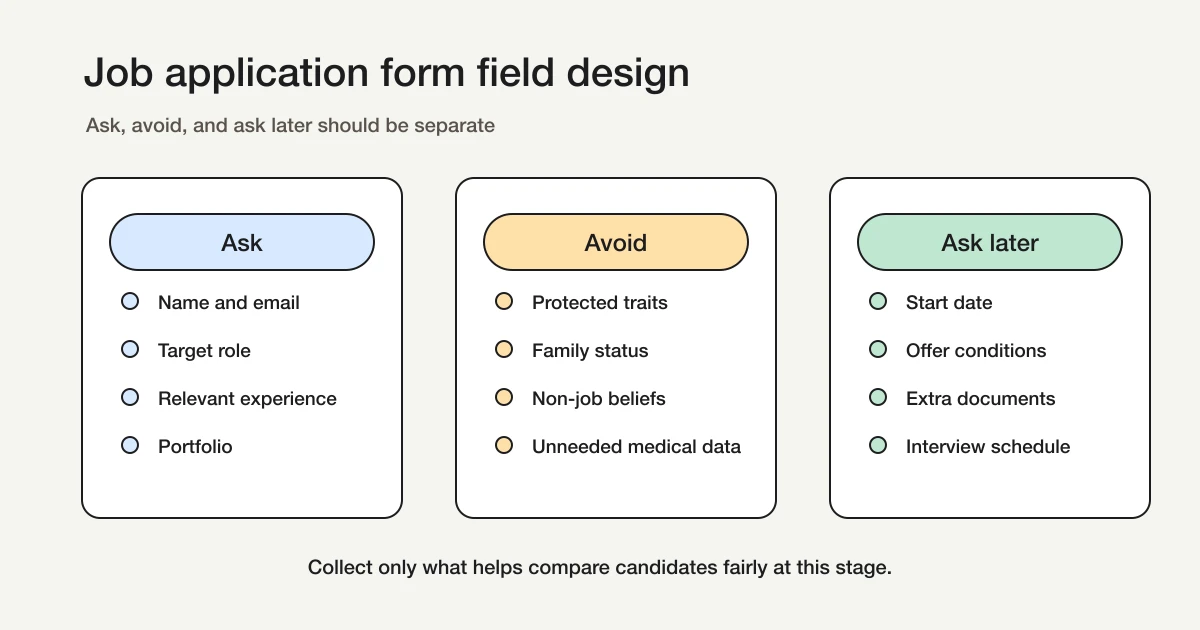
The first group is what you ask in the initial application.
This includes identity and contact fields, the target role, job-related experience, skills, work samples, availability, and consent to the privacy notice.
The second group is what you avoid.
The EEOC recommends avoiding questions about protected personal characteristics such as race, religion, ethnicity, age, pregnancy, and family plans unless a narrow exception applies. The EEOC also says disability-related questions and medical examinations generally should not happen before a conditional job offer.
Japan's Ministry of Health, Labour and Welfare frames the same issue through fair hiring selection. It explains that hiring should be based on aptitude and ability, and it highlights matters that may lead to employment discrimination, such as family information, birthplace, beliefs, religion, political support, and unnecessary medical examinations.
The details vary by jurisdiction, but the form-design principle is stable:
Ask questions that are related to the job. Avoid questions that are not needed for the current hiring decision.
The third group is what you ask later.
Start date, offer conditions, additional documents, references, full background checks, tax paperwork, and onboarding information usually belong later in the process. They may be legitimate, but that does not mean they belong in the first application form.
Privacy and Data Handling Need a Decision Before Launch
Application forms collect personal data.
At minimum, the hiring team should decide:
| Decision | Example |
|---|---|
| Purpose | Hiring review, candidate communication, interview scheduling, selection records |
| Access | Recruiter, hiring manager, interview panel, HR owner |
| Retention | Keep during the hiring cycle, then delete or archive according to policy |
| Export rules | Who can export candidate data and where it can be stored |
This does not mean every application form needs a long legal essay. Candidates need a clear privacy notice and a company process that matches it.
A simple notice can start like this:
We will use the information you submit for hiring review, candidate communication, interview scheduling, and selection records.
Access will be limited to the people involved in the hiring process.
Your actual wording should match your company policy and legal requirements.
The important operational point is this: do not build the form first and decide data handling later. Decide who can see the data, when it is exported, and how old applications are cleaned up before the form goes live.
How to Build the Form in FORMLOVA
In FORMLOVA, you can start from a plain-language request.
For example:
Create a job application form for a customer support role. Include full name, email, role applied for, relevant support experience, channels handled, a short writing sample, availability, and consent to the privacy notice. Make phone number optional.
FORMLOVA creates a private draft.
Then review the draft by asking four questions:
Is the field order friendly for candidates?
Are too many fields required?
Does every field relate to the role or the hiring process?
Do we know what happens after submission?
The field order matters. Start with easy fields: name, email, role. Move into role-specific questions after the candidate understands the purpose. Put longer text questions and consent near the end.
Then refine the form in chat:
Make the writing sample optional, and add a multiple-choice field for support channels handled: email, chat, phone, social, in-person, other.
Multiple-choice fields are useful in hiring workflows because they make later filtering easier. If you only collect long text answers, every review requires manual reading. If you collect structured signals for role, location, availability, and experience type, you can filter faster.
For the broader creation flow, see How to Create Forms with ChatGPT or Claude.
Add a Confirmation Email
A job application form should send a clear confirmation message.
Candidates want to know whether the application was received, what happens next, and whether they need to do anything else.
In FORMLOVA, custom auto-reply creation, editing, and test sending are available on the Standard plan and above. Standard is JPY 480 per month. The Free plan still includes form creation, response collection, response search, status management, and CSV / Excel export.
Here is a practical confirmation email:
Subject: We received your application

Hi {first_name},

Thank you for applying for the {role} position.
We received your application and will review it shortly.

What happens next:
If your experience matches the next stage, we will contact you within 5 business days to discuss the next step.
If we need additional information, we will contact you at this email address.

If you need to update or withdraw your application, please reply to this email.

Thank you,
Hiring Team
The wording should match your company process.
If every applicant receives a decision, say that. If only shortlisted candidates are contacted, say that carefully and respectfully. If timelines vary by role, do not promise a fixed date you cannot meet.
The goal is not to write a clever email. The goal is to remove uncertainty.
For more reusable templates, see Form Auto-Reply Email Examples.
Manage Candidate Status After Submission
The job application form is only the intake.
The hiring workflow starts after submission.
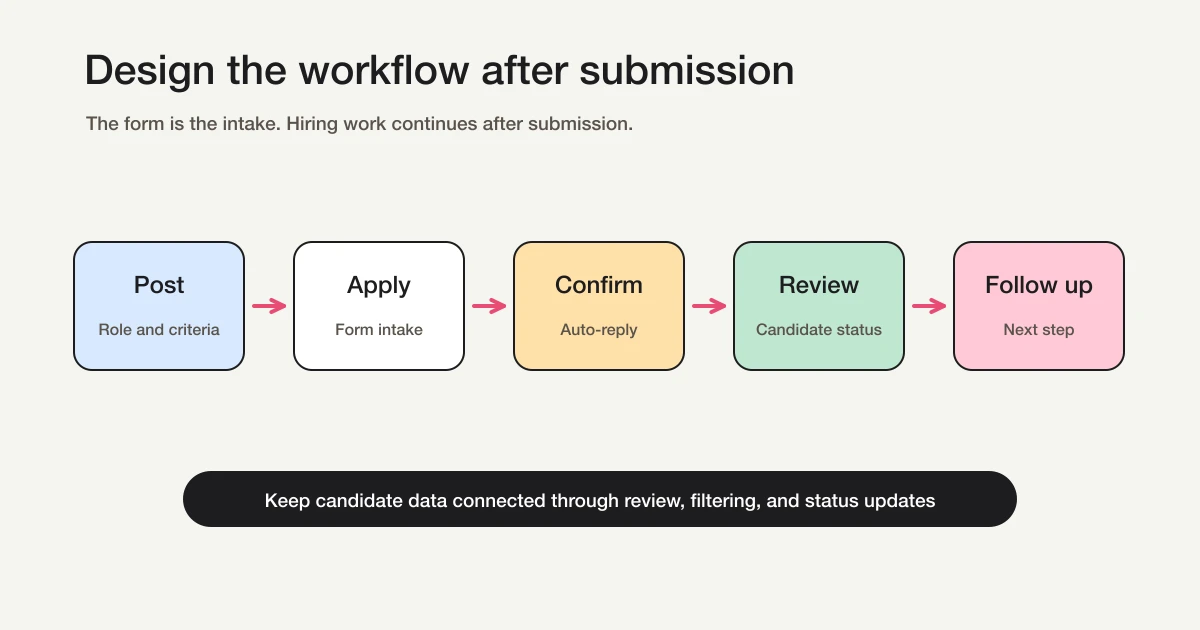
A simple status model is enough for most small teams:
| Status | Meaning | Next action |
|---|---|---|
| New | Not reviewed yet | Review application |
| Reviewing | Hiring team is checking fit | Decide next step |
| Interview scheduling | Candidate is being scheduled | Send times and confirm |
| Interview booked | Interview is on the calendar | Prepare interview notes |
| Hold | Needs more context | Revisit with owner |
| Rejected | Process ended | Send or record outcome |
| Offer / Hired | Moving forward | Start offer or onboarding |
In FORMLOVA, you can search responses, filter candidates, inspect details, and update status from chat.
For example:
Show me new applicants for the customer support role.
Then:
Filter to candidates who selected chat support experience.
Then:
Change these three candidates to Reviewing.
This is the operational difference between a form and a hiring workflow.
The form captures the application. Status management helps the team move applications forward. For the underlying response workflow, see View, Filter, and Update Response Status with FORMLOVA.
If you are evaluating whether AI should only draft the form or also help operate the workflow after submissions arrive, read the FORMLOVA MCP Form Service Guide next.
Launch Checklist
Before publishing the form, run this checklist:
The target role is clear.
Required fields are limited to what the team needs now.
Every role-specific question is job-related.
The form avoids protected or non-job-related personal questions.
The privacy notice is visible.
The confirmation email explains what happens next.
Candidate statuses are defined.
The internal owner is clear.
The team has tested one fake application.
Export rules are clear.
The most common mistake is making the first application too heavy.
Hiring teams often want to collect every possible detail immediately. That feels efficient internally, but it can make the candidate experience worse. A long form with repeated fields, unnecessary essays, and file requirements can reduce completion before the team ever sees the applicant.
A cleaner approach is staged collection:
Initial application: job-related signals and contact information
Before interview: scheduling details and additional context
After offer: employment documents and onboarding information
That keeps the first form focused.
Common Mistakes
The first mistake is turning the application form into a full resume replacement.
If you ask for work history, a resume upload, a portfolio, multiple essays, strengths, weaknesses, career goals, and availability all as required fields, many candidates will stop halfway. Use short structured fields first, then ask for deeper context later.
The second mistake is asking questions that are not tied to the job.
If the team cannot explain why a question is necessary for the role or the hiring process, remove it. Curiosity is not a good field requirement.
The third mistake is not assigning ownership after submission.
If applications go to a shared inbox and nobody owns the status, candidates wait. Define who checks new applications, how often, and what status means ready for review.
The fourth mistake is exporting too early.
Spreadsheets are useful, but they can become the source of confusion if every reviewer keeps a different copy. Keep status consistent in one place first, then export when the team needs a reporting or handoff file.
References
- What shouldn't I ask when hiring? -- U.S. Equal Employment Opportunity Commission
- Pre-Employment Inquiries and Disability -- U.S. Equal Employment Opportunity Commission
- Prohibited Employment Policies/Practices -- U.S. Equal Employment Opportunity Commission
- Fair hiring selection basics -- Japan Ministry of Health, Labour and Welfare
- Matters to consider during hiring selection -- Japan Ministry of Health, Labour and Welfare
Final Takeaway
A good job application form does three things.
It collects only the information needed for the current hiring decision.
It tells the candidate what happens next.
It gives the hiring team a clear way to review, filter, and move candidates forward.
FORMLOVA lets you create and publish the form, collect responses, search candidates, update status, and export CSV / Excel on the Free plan. When you need custom auto-replies, reminders, file uploads, and more advanced communication, Standard starts at JPY 480 per month.
If you want to design the post-submit workflow as a whole, read the FORMLOVA Form Automation Guide. In job application forms, auto-replies, candidate status, interview reminders, and export timing should be decided before application volume grows.
Start with one role. Keep the first application focused. Then build the candidate workflow around what happens after submission.
Disclosure and Verification
This guide is for hiring teams that need to build a job application form. I work on FORMLOVA, so I include the FORMLOVA workflow. I checked official guidance from the U.S. Equal Employment Opportunity Commission and Japan's Ministry of Health, Labour and Welfare on April 28, 2026. Hiring and privacy requirements vary by location, role, and company policy, so treat this as form-design guidance, not legal advice.