
Last updated: August 27, 2026
To make a Google Form anonymous from the form owner's point of view, do not enable email-address collection, do not ask for a name or another direct identifier, and test the published responder link outside the owner's signed-in browser. After one test submission, inspect both the Forms response view and the linked Google Sheet. The expected record should contain a timestamp and the answers you intentionally asked for, not an unexpected email or username column.
That is a useful and testable definition, but it is not a promise of universal anonymity. Three different questions are often compressed into the word “anonymous”:
- Can the form owner see a direct identifier in the response record?
- Can the owner infer a person from the answer content, timestamp, or a small population?
- Does the platform process technical information while providing and protecting the service?
A correct setup can reduce the first and second risks. It does not prove that Google, a Workspace administrator, a network operator, or another service processes no technical data. Google's Privacy Policy describes collection of information such as IP addresses, browser and device information, and request times in the course of operating Google services. This guide therefore uses “anonymous to the form owner” where that is the actual claim.
For question creation, publication, sharing, and response management as a whole, use the broader Google Forms setup guide. This page stays focused on anonymous-response settings and verification.
Start with a three-layer anonymity definition
| Layer | What to inspect | Common identity leak |
|---|---|---|
| Owner-visible response data | Forms summary and individual views, plus linked Sheets columns | Verified email collection, an email question, a name, or an uploaded file |
| Inference from the response | Free text, rare attributes, timestamps, and the size of the respondent group | A unique event, department, role, writing style, or combination of demographics |
| Service-provider processing | Applicable policy, account and Workspace controls, and security logs | IP, browser, device, request, account, or administrator-level information |
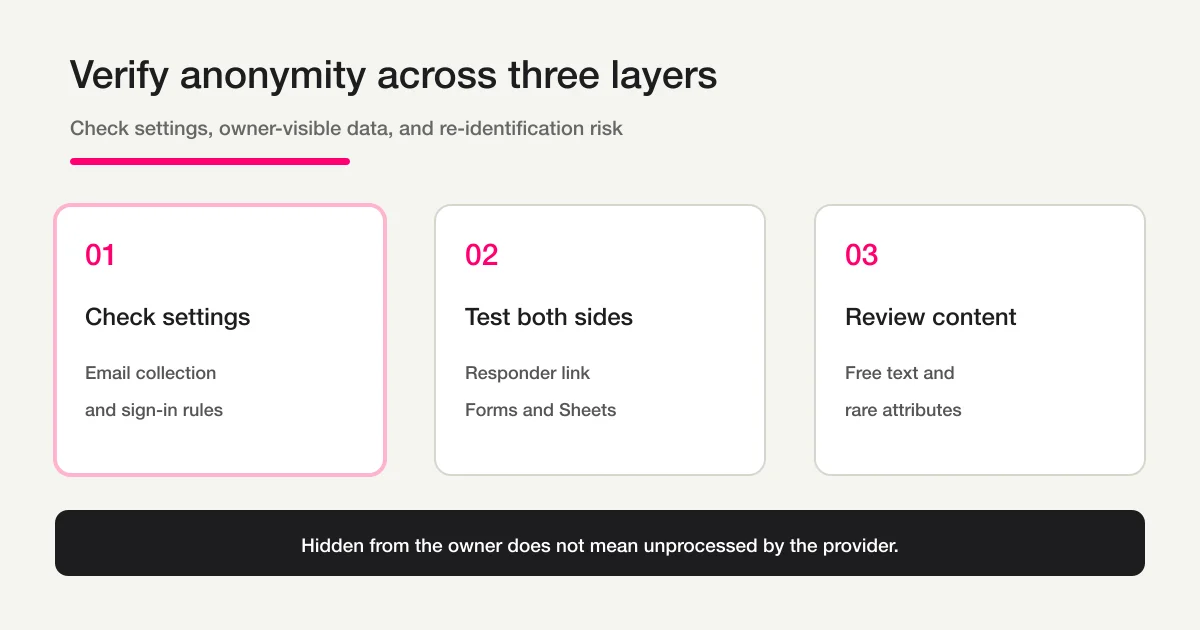
The distinction changes the statement you should place on the form. “The survey team does not collect your name or email address in the response” is narrower and more defensible than “nothing about you is ever collected.” If you work in research, employment, education, health, or misconduct reporting, align the wording with your consent process, organizational policy, Workspace administration, and applicable law.
Step 1: Turn off email collection and decide whether one response is worth sign-in
Google's current View and manage form responses help describes two email-collection modes. Verified collection asks responders to confirm that their Google Account email will be collected. Responder input requires the responder to type an email address. For an owner-anonymous survey, leave email collection off rather than selecting either mode.
Use this sequence:
- Open the form and select Settings.
- Expand Responses and confirm that email-address collection is off or set to Do not collect in the active interface.
- Decide whether Limit to 1 response is necessary.
- Check publication access and remove an organization-only restriction if the intended audience should answer without an organizational account.
The one-response control needs careful wording. Google's Publish and share your form with responders help says that responders must sign in to a Google Account when Limit to 1 response is enabled. The same help page says their usernames are not recorded unless the Responses setting collects email addresses.
Therefore, a sign-in screen is not by itself evidence that the owner receives the account email. It is still an important responder-experience constraint. Someone invited to an “anonymous survey” may reasonably distrust a form that unexpectedly requires an account. If you retain the control to reduce repeat submissions, explain that purpose and state whether email collection is off. If accountless access matters more, turn the one-response control off and handle duplicate risk separately.
Do not rely on the owner's editor session to assess this. Owners already have access, and the editor can hide the responder's actual access path. The published responder URL is the acceptance surface.
Step 2: Remove questions and answer combinations that identify a person
An email setting cannot anonymize a response that contains identity in another field. Review every question for direct and indirect identifiers.
Direct identifiers include:
- name, email address, telephone number, employee number, student number, or customer ID;
- a personal file, screenshot, photograph, or document;
- a unique case or transaction reference;
- contact details added to an “Other” response or free-text field.
Indirect identifiers become risky in combination. “Department,” “seniority,” and “office” may each look harmless, but a small organization may have only one senior manager in a particular office. A precise submission timestamp can be compared with a meeting attendance list or the time a survey link was sent. A paragraph can reveal a distinctive event, colleague, location, or writing style.
Use aggregation as a design tool. Replace exact age with a sufficiently broad range, a tiny team with a larger business unit, or an exact date with a month when the analysis does not need the precision. Make sensitive free text optional, tell responders not to include names, and define how rare combinations will be suppressed in reporting.
The survey design guide covers question order, required fields, scales, and open text in more depth. The privacy principle is simple: if an attribute is not necessary for the decision or analysis, do not collect it merely because Forms makes it easy to add another question.
Also separate anonymity from confidentiality. An anonymous dataset can still contain sensitive content. Restrict collaborators on the form and linked spreadsheet, define a retention period, and decide who may export raw responses. Conversely, a confidential named survey is not anonymous even if access is tightly controlled. Use the correct promise.
Step 3: Submit through a logged-out or private responder session
Test the same path the intended audience will use. A useful two-browser test is:
- From the editor, copy the responder link from Preview, Published, or Share.
- Open the link in a private window, a logged-out browser profile, or a separate test account.
- Look for an email-collection notice, a Google sign-in requirement, or an organization access restriction.
- Submit one deliberately non-sensitive test response.
If the form opens and submits while logged out, that is evidence about the current responder access configuration. It is not evidence that no provider processes an IP address or browser information. Private browsing primarily separates cookies and local history from the normal browser profile. It is a test tool, not an anonymity network.
A file-upload question changes this flow. Google's question-type help states that responders must sign in to a Google Account to answer a file-upload question. The uploaded file is stored in a new Google Drive folder for the form owner. The file content and metadata may also identify its author.
If a file is essential, do not bury that exception inside an otherwise anonymous survey. Explain the identity boundary or split the upload into a separate, appropriately controlled process. The Google Forms file upload without login guide owns the detailed choice between the native upload question and accountless alternatives.
Run the test again after any material setting or question change. Adding a file question, enabling a one-response limit, changing access, or turning on verified email collection can change the responder experience even though the distribution URL stays the same.
Step 4: Inspect the owner response record and linked Sheet
After the test submission, switch back to the owner account and verify the stored record rather than trusting the settings label.
- Open Responses in Google Forms and inspect Summary, Question, and Individual views.
- If responses are linked to Sheets, open the destination spreadsheet.
- Compare the columns with the questions you intended to collect.
- Confirm that there is no unexpected email, username, name, or identifier field.
- Ask a reviewer whether the test answer could be linked back to the tester from content or timing alone.
The Forms response record and the linked Sheet should be checked separately. A Sheet may be shared with people who are not current form collaborators, and removing a collaborator from one surface does not automatically prove that the other surface is restricted. Google's response-management help also warns that form and spreadsheet collaborator access may need to be removed separately.
Document the result in plain language. For example:
Verified on 2026-08-27 using the published responder URL in a signed-out browser.
Email collection: off.
One-response limit: off.
File upload: absent.
Owner-visible columns: timestamp plus the five declared survey questions.
Raw-data access: survey owner and one named analyst.
Residual risk: optional free text and a small department population.
This record is more useful than a screenshot of one toggle. It captures the test conditions, owner-visible result, access boundary, and remaining inference risk.
For the larger question of whether Forms, Sheets, Apps Script, or another operating layer owns each part of the process, continue to the parent Google Forms, Sheets, and Apps Script operations guide.
When can an “anonymous” Google Form still reveal identity?
| Condition | What the owner may receive or infer | Safer operating choice |
|---|---|---|
| Verified email collection | The confirmed Google Account email is attached to the response | Leave collection off for an owner-anonymous survey |
| Responder-input email | The manually typed email becomes response data | Remove it unless follow-up is an explicit purpose |
| Limit to one response | Sign-in is required; username is not recorded unless email collection is enabled | Explain the trade-off or allow repeat submissions |
| Organization-limited access | An eligible organizational account must open the form | Decide whether audience restriction or accountless access has priority |
| File upload | Google Account sign-in is required, and the file can identify its author | Split the upload or explain the exception |
| Rare demographics | Several answers narrow the population to one person | Broaden categories and suppress small groups |
| Free text | Events, names, locations, and style can identify the writer | Make it optional and warn against identifiers |
| Exact timestamp | Timing may be compared with another record | Broaden collection windows and limit raw-data access |
“Username not recorded” is a statement about the normal owner-visible response data described in Google's Forms help. It must not be stretched into “Google processes no account or technical data.” Google's Privacy Policy says the company may collect and process service-use information including unique identifiers, IP addresses, browser and device details, system activity, and request times. A Workspace administrator may also impose organizational controls outside an individual form owner's settings.
For a high-risk survey, ask what an adversary actually has. An owner with only aggregate results has a different inference ability from an owner who has raw text, exact timestamps, a staff roster, and a list of who received the link. Reduce the available joins, not just the visible email column.
A practical anonymity statement for the form description
Avoid an absolute sentence when the real guarantee is narrower. A practical description can say:
The survey team does not ask for your name or email address in this form.
Please do not include names or other identifying details in free-text answers.
Responses are reviewed in aggregate by the named survey team.
Google may process technical information when providing the service under its privacy policy.
Adjust this wording to the actual settings, access list, purpose, retention, and legal basis. Do not claim aggregate-only review if staff will inspect individual responses. Do not claim that email is not collected if a verified or responder-input email field is enabled. The disclosure must describe the current form, not the intended design.
How the FORMLOVA boundary differs
Anonymity also depends on who can read the collected responses. Use the Google Forms response-sharing guide to separate a broad response summary from form collaborators and view-only access to a linked Sheet.
A public FORMLOVA form does not require the responder to create or sign in to a FORMLOVA dashboard account, and the form owner can omit name and email fields. That is useful when accountless access and explicit field design are the requirements.
Accountless access and omission of owner-visible name or email fields do not establish complete anonymity or prove that no technical information is processed. For a real deployment, review the current privacy policy, the exact form fields, staff access, retention, and the legal requirements for the use case.
The service decision should therefore follow the requirement:
- If the priority is a familiar survey with owner-side email collection disabled, Google Forms may be sufficient.
- If the priority is accountless response access and deliberate field design inside one form product, FORMLOVA may fit.
- If the requirement is regulated, adversary-resistant anonymity, neither product should be approved from a marketing label alone; complete a privacy and threat assessment for the exact deployment.
Pre-publication checklist
[ ] Email collection is off.
[ ] No unnecessary name, email, ID, or contact question remains.
[ ] The one-response sign-in trade-off is documented.
[ ] There is no file-upload question, or its exception is disclosed.
[ ] The responder link was tested in a signed-out or private session.
[ ] Forms Individual view has no unexpected email or username field.
[ ] The linked Sheet has only the intended columns.
[ ] Rare attributes, timestamps, and free text were reviewed for inference risk.
[ ] Form and Sheet raw-data access is limited to named people.
[ ] The description says exactly who does not collect which identifiers.
Frequently asked questions
Can the owner identify me if I answer while signed in to Google?
Being signed in does not automatically mean the form owner receives your account name. Google's help says that even when the one-response control requires sign-in, usernames are not recorded unless email collection is enabled. Your answers, file content, rare attributes, or timing can still identify you indirectly.
Can a one-response Google Form still be anonymous?
It can avoid recording the username in the owner's response data when email collection is off, but the responder must sign in. Explain why the sign-in is required and do not call the experience accountless. If the sign-in itself undermines participation, choose a different duplicate-control strategy.
Can a Google Forms owner see my IP address?
Google's standard Forms help does not describe a raw IP column in the normal owner response view or linked Sheet. Google's Privacy Policy separately says Google may process IP addresses and other technical information while providing its services. Owner visibility and provider processing are different boundaries.
Is a file-upload Google Form anonymous?
Google's current question-type help says a responder must sign in to a Google Account to answer a file-upload question. The uploaded file can also contain names, authorship metadata, images, or other identifying content. Treat it as an explicit exception or separate it from the anonymous survey.
Does turning off email collection guarantee anonymity?
No. A name question, rare combination of demographics, exact timestamp, distinctive free text, or uploaded document can identify a person. Turning off email collection is one required control, not the complete anonymity design.
What is the best verification before publishing?
Submit through the published responder link in a signed-out or private browser, then inspect the individual response and linked Sheet as the owner. Confirm both the absence of unexpected identifier columns and the inability to infer the tester from the answer content.
Disclosure and Verification
I work on FORMLOVA. I verified this guide on August 27, 2026 against Google's publish and responder-access help, response and email-collection help, question-type and file-upload help, and the Google Privacy Policy. For FORMLOVA, this article states only that a public form does not require a responder dashboard account and that the owner can omit name and email fields. Google can change interface labels and Workspace controls, so repeat the two-sided test on the active form before distribution.
If you need an accountless public response path with only the fields you deliberately choose, try FORMLOVA for free with one real survey workflow.