
Last updated: 2026-08-13
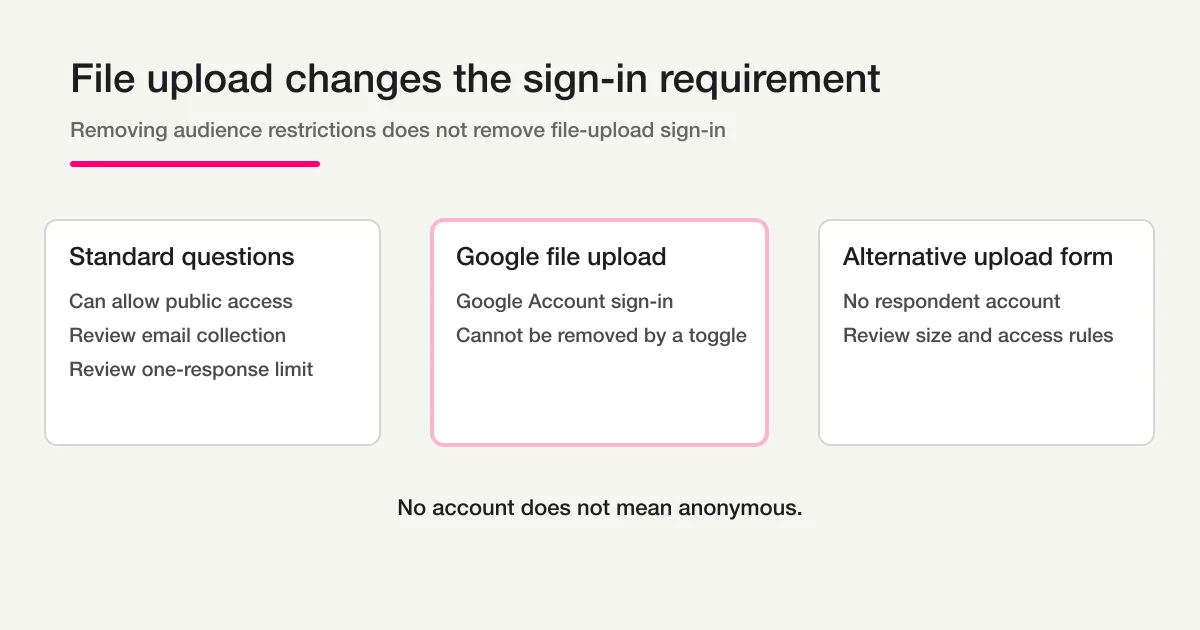
Google Forms requires a respondent to sign in to a Google Account before uploading a file. Turning off organization restrictions, email collection, or the one-response limit does not remove the file-upload sign-in requirement.
That does not mean every file intake process needs respondent accounts. It means you need a different upload surface if customers, applicants, parents, vendors, or event participants should submit files without creating or using a Google Account.
An important warning comes with that answer:
No respondent account does not mean anonymous.
A form may still collect an email address, name, IP-derived security signals, submission time, and the uploaded document itself. If the document is a résumé, ID, invoice, medical image, or repair photo, its contents may identify the person even when the upload page does not require registration.
The Google Forms answer is no
Google's responder help states that a person must sign in to a Google Account to complete a file-upload question. The form owner can restrict file count, type, and size, but cannot turn the upload question into a signed-out upload with a sharing toggle.
| Setting | Form with ordinary questions | Form with a file-upload question |
|---|---|---|
| Allow responders outside the organization | May remove an organization access barrier | File upload still requires Google Account sign-in |
| Stop collecting verified email | May remove one sign-in reason | File upload still requires sign-in |
| Turn off “Limit to 1 response” | May remove another sign-in reason | File upload still requires sign-in |
| Remove the file-upload question | Can permit a signed-out form if no other setting requires sign-in | No file is collected inside the form |
If a respondent says, “The form is public, but it still asks me to log in,” first check whether the form contains a file-upload question. A public link and an account-free upload are different requirements.
Google's current responder guidance is available in Fix common errors while you respond to a Google Form.
Why the sign-in prompt cannot simply be removed
A file is not just another text answer. The system must associate binary content with a submission, store it, apply owner-defined restrictions, and protect the storage destination.
Google handles that flow through Google Account authentication. The uploaded file is stored in the form owner's Google Drive environment, and the respondent identity boundary is part of the upload process.
The practical model is:
Standard question
-> browser sends text or a selected value
-> response record is stored

Google Forms file-upload question
-> respondent signs in to Google
-> browser uploads a file
-> Google associates and stores the file
-> response references the upload
Removing a checkbox would change that trust model. Google Forms does not expose such a setting.
Four alternatives to compare
Choose an alternative based on respondent friction, file size, sensitivity, and how reliably the file must stay linked to the response.
| Method | Respondent account | Response-to-file link | Good fit | Main risk |
|---|---|---|---|---|
| Google Forms file upload | Google Account required | Automatic | Internal or school workflows where everyone uses Google | External drop-off |
| Email attachment | Email access required | Manual | Very low-volume one-off intake | Wrong recipient, size limits, reconciliation work |
| Shared-storage request link | Depends on provider | Usually separate | Large files or existing storage workflows | Permission and matching complexity |
| Account-free upload form | No respondent registration | Kept with the submission | Applications, repair photos, claims, invoices | Public-link exposure, file limits, retention and review duties |
Email is not automatically the simple option. Attachments can be forwarded, detached from the form answers, or delivered to the wrong mailbox. A shared drive link may accept a file but leave the team matching it to a person later.
For moderate-size files that belong to a structured intake, an account-free upload field is often the clearest experience.
How account-free file upload works in FORMLOVA
FORMLOVA file-upload fields are available on paid plans. The respondent can open the public form and submit a permitted file without creating or signing in to a FORMLOVA account.
A creator can ask in chat:
Add a required file-upload field for PDF, JPEG, PNG, and WebP. Explain the effective size limit next to the field.
Then review the unpublished preview before publishing.
The account belongs to the form creator or team operating the form. Respondents use the public submission page. Their uploaded file is stored with the response so the operator can inspect or download it later.
This design removes respondent registration. It does not remove the need to decide who may access the public URL, what data is collected, who can view the uploaded file, and when the file is deleted.
For a wider field-design checklist, see Form Field Examples and Selection Guide.
The practical upload ceiling is 4MB
FORMLOVA's storage layer has a higher object-size capability, but public submissions pass through a server request path with a smaller request-body boundary. The effective per-file ceiling is therefore 4MB.
| File | Browser-side handling | Effective requirement |
|---|---|---|
| JPEG, PNG, or WebP that the browser can decode | Resize and JPEG re-encode before submission when appropriate | Compressed result must be 4MB or less; the target is about 3.5MB |
| PDF, Word, Excel, ZIP, and other non-image files | No automatic compression | Original file must be 4MB or less |
| HEIC or HEIF | Compression may be skipped when the browser cannot decode it | Original file must be 4MB or less |
| Image field that does not allow JPEG | Compression is skipped to avoid changing to a disallowed format | Original file must be 4MB or less |
The form creator cannot raise the public effective limit by setting a field validation value above 4MB. Client and server validation clamp the setting to the actual submission boundary.
If you need large videos, design files, scan archives, or multi-hundred-megabyte uploads, use a storage product designed for large-file requests. Do not split a large sensitive document into arbitrary public-form submissions just to fit the limit.
No account is not the same as anonymous
An account-free upload can still identify a respondent in several ways:
- a required name or email field
- a unique link sent to one person
- a filename containing a name or customer number
- visible information inside the document or photo
- submission timing and operational logs
- metadata retained in the uploaded file
If you promise anonymity, review the whole data path. Removing a login screen is only one part of that promise.
A more accurate form notice is often:
You do not need a FORMLOVA account to submit this form.
We collect the contact details and files shown below so that we can process your request.
That wording describes the experience without making an unsupported anonymity claim.
A public URL is not password protection
An unlisted form link limits casual discovery. It does not prove who opened the page.
Someone receives the URL
-> forwards it to another person
-> the other person can open the same public form
Before collecting sensitive files, decide whether link access is enough. Higher-risk workflows may need authentication, an expiring invitation, identity verification, encryption requirements, restricted staff roles, malware controls, shorter retention, or a dedicated secure portal.
FORMLOVA's account-free upload is appropriate when the risk assessment accepts a public submission URL plus the form's other protections. It should not be described as a replacement for every regulated document portal.
Test the full responder experience before publishing
Use a dedicated test form and non-sensitive files.
| Test | What to verify |
|---|---|
| Open in a private browser window | No respondent account or sign-in is requested |
| Upload a JPEG around 3MB | Compression, submission, and operator download work |
| Upload a PDF above 4MB | A clear error appears before an unusable submission |
| Upload an iPhone HEIC file | A file at or below the limit works, or the failure guidance is clear |
| Choose a disallowed extension | The field rejects it clearly |
| Forward the URL to another device | Operators understand that link possession grants form access |
| Submit twice | Duplicate handling matches the intended workflow |
| Download as an editor and a viewer | Team permissions match the access policy |
Also inspect the uploaded file after download. A successful form screen is not enough evidence if the operator receives a corrupted, transformed, or unreadable file.
Field design examples
Job applications
Ask for a résumé only when it is needed at the current stage. State accepted formats and the 4MB limit before the file picker. Avoid requesting identity documents during an initial application unless there is a clear legal and operational need.
Repair or technical support
Accept common image formats and explain what the photo should show. Ask for a model number in a text field so the file is still useful if its filename is generic.
Invoice or expense intake
Accept PDF and image formats. Keep vendor name, invoice date, and reference number in structured fields rather than expecting staff to read every value from the attachment.
Photo competitions
Be explicit about file type, size, usage rights, and whether compression may change the submitted image. A 4MB operational intake is not a substitute for collecting original high-resolution files from selected entrants later.
When to stay with Google Forms
Keep the Google Forms file-upload question when every respondent can sign in to an approved Google Account, the Drive-based storage model fits, and the sign-in step is acceptable.
Do not change platforms merely to remove a prompt that your controlled audience already expects.
Use an account-free alternative when the audience is external, a Google Account cannot be assumed, the upload belongs with structured form answers, and the file size and risk profile fit the alternative's boundaries.
For the broader point at which Forms, Sheets, and Apps Script turn into an operations system, read Google Forms + Sheets + Apps Script Operations.
FAQ
Can I change a Google Forms setting to remove sign-in for file uploads?
No. Turning off organization restrictions, verified email collection, or one-response limits can remove other sign-in causes, but a Google Forms file-upload question itself requires Google Account sign-in.
For ordinary responses without a file question, the Google Forms anonymous response setup guide covers email collection, one-response sign-in, and owner-visible data. This page remains the owner of the file-upload exception.
Can someone without Gmail upload to Google Forms?
The responder needs a Google Account for the file-upload question. A Google Account can use a non-Gmail email address, but the person still has to sign in to Google.
Do FORMLOVA respondents need an account?
No. A respondent can use a published FORMLOVA file-upload form without creating or signing in to a FORMLOVA account. The form creator needs an eligible paid plan.
What is the file size limit?
The effective public-form limit is 4MB per file. Supported images may be compressed in the browser first. Non-image files and undecodable HEIC/HEIF files must already fit below the limit.
Is an account-free upload anonymous?
Not necessarily. The form fields, file contents, filename, and operational metadata may identify the respondent. Describe the form as account-free unless the complete data path supports an anonymity promise.
Is a private-looking URL secure enough for identity documents?
Not by itself. A URL can be forwarded. Assess the sensitivity, authentication need, staff access, retention, and regulatory requirements before collecting high-risk documents.
Read next
- How to Use Google Forms
- Google Forms + Sheets + Apps Script Operations
- Form Field Examples and Selection Guide
- How to Start Form Automation with FORMLOVA
Create a free FORMLOVA account, connect through the setup guide, then verify the upload from a private browser window and an operator account before using the link publicly.
Disclosure and Verification
The author develops FORMLOVA. This article was verified on 2026-08-13 against Google's responder help and the current FORMLOVA file-upload implementation, including the public submission path, browser image handling, and the 4MB effective limit. File handling and platform requirements can change, so repeat the private-window and representative-file tests before launch.
Primary source: