
Last updated: October 15, 2026
Original verification record (retained; this rewrite does not re-certify every historical statement): Last verified: September 4, 2026
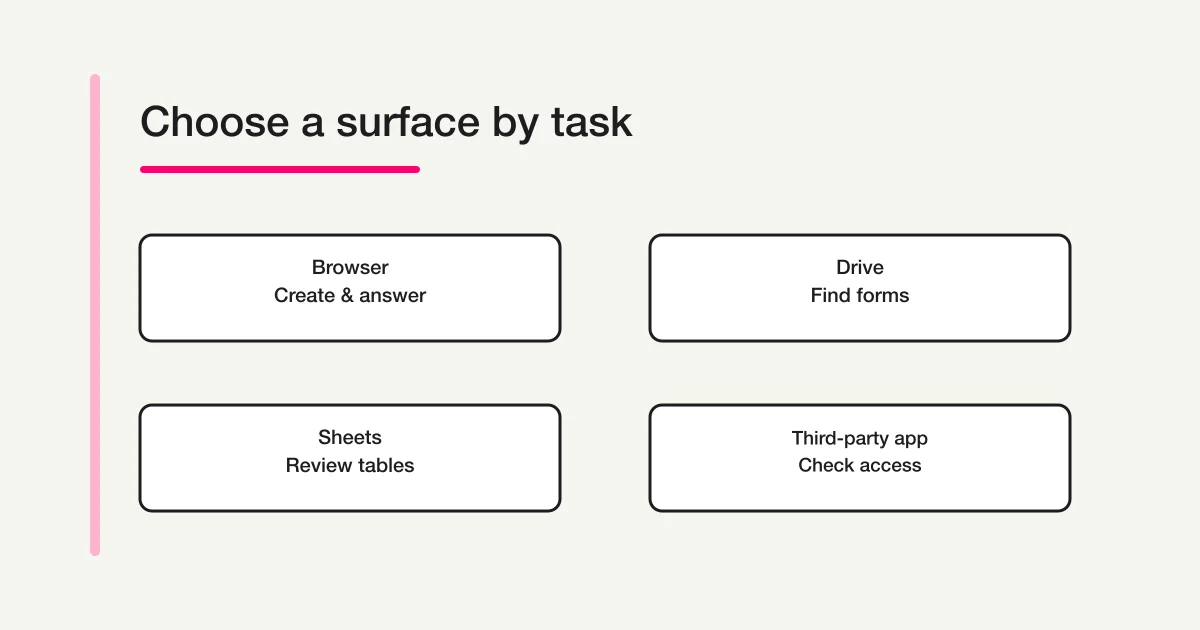
Use Google Forms in a mobile browser at forms.google.com. Google’s current iPhone/iPad and Android instructions use Safari or Chrome rather than a dedicated Forms app. Drive helps locate files and Sheets opens the response workbook; neither is the Forms editor app.
Decide which task must work on the phone: answering, a short edit, publishing, or detailed review. A home-screen shortcut changes the entry point, not the product’s capabilities or permissions.
Google does not currently list a dedicated Forms mobile app
An empty store search is not enough evidence on its own. I checked two official signals:
- Google's current iPhone, iPad, and Android Forms help routes users to a mobile web browser.
- The official Google developer catalogs on Apple App Store and Google Play do not list a dedicated Google Forms app.
Based on those checks, Google does not offer a dedicated official Google Forms app at the verification date. The Google Drive app can help you find an existing form; use the browser to edit it. Availability may change, so check the developer name and Google's current help page before installing anything.
Store searches can surface third-party products with names or icons that resemble Google Forms. That does not make every third-party app unsafe. It does mean you should inspect the developer, privacy policy, requested Google account scopes, and deletion process. Treat access to Drive files, form responses, or editing rights as meaningful account access, not as a routine install prompt.
What you can do on iPhone and Android
Google's mobile help describes this basic path:
1. Open Safari, Chrome, or another mobile browser.
2. Go to forms.google.com.
3. Create a form or open an existing one.
4. Add and edit questions, descriptions, images, or videos.
5. Preview and test the form.
6. Publish it and share the respondent link.
7. Review responses in Forms or a linked spreadsheet.
Respondents open the published URL in their browser. They do not need a dedicated Forms app. For events or printed material, you can also distribute a QR code. The exact sharing and test sequence belongs in the Google Forms QR code guide.
Create and edit from a phone
A short survey is realistic on mobile. You can name it, add a few questions, check required fields, preview it, and publish it.
The experience becomes slower when you are rearranging many questions, entering long option lists, checking several images, or comparing settings across sections. A sensible division is to draft or make urgent edits on the phone, then perform the full review on a computer. For the end-to-end interface sequence, see how to use Google Forms.
Google's iPhone and iPad help currently notes that date and time questions cannot be added there. Because controls and labels can differ by device, test every required question type on the device your operators will actually use.
Answer from a phone
Answering is the strongest mobile use case. A respondent taps the link, completes the web form, and submits it. No installation step is required.
Mobile availability does not automatically make a form easy to complete. Long instructions, excessive free-text fields, unexplained sign-in requirements, and large file uploads still create friction. Keep the first screen focused and explain any login or upload condition before the respondent reaches it. The mobile form optimization guide covers that service-neutral design work.
Review responses from a phone
You can review the Responses tab in the browser. Google's help also points to the Google Drive app when you need to locate an existing form. If you link responses to a spreadsheet, the Google Sheets app can serve as a companion view.
| Surface | Main role | Official Google Forms app? |
|---|---|---|
| Safari, Chrome, or another browser | Create, edit, publish, answer, and review Forms on the web | No; it opens the Forms web product |
| Google Drive app | Find and organize existing files | No |
| Google Sheets app | Review or edit a linked response spreadsheet | No |
| Third-party form app | Depends on the vendor | No; review developer and permissions |
If your goal is a new-response alert rather than mobile editing, use the Google Forms response notification guide. This page deliberately does not duplicate those settings.
Add Google Forms to your home screen
You can place the Forms homepage or a specific form on your home screen so that you do not type the URL each time. This is a shortcut to a web page, not proof that a dedicated Google Forms app was installed.
iPhone and iPad
Apple's guide tells you to open the page in Safari, use the Share menu, and select Add to Home Screen. Some versions also offer Open as Web App. An app-like window still does not turn Google Forms into a Google-published native Forms app.
Android
Chrome Help's current sequence is More > Install and create shortcut > Create shortcut > Add. Labels and menu order can vary by device or Chrome version. For Google Forms, describe the outcome conservatively as a home-screen entry that opens the web experience.
On a shared device, check which Google account remains signed in. Do not distribute an editor URL. Respondents should receive the published respondent URL only.
Where a phone-only workflow works
Browser-first mobile operation is a good fit when you need to:
- create a short survey;
- correct a title or deadline while away from your desk;
- inspect response counts or individual submissions;
- share a respondent URL or QR code; or
- check whether registration is progressing.
A computer is usually easier when you need to:
- restructure many questions or sections;
- enter a long list of choices;
- analyze a wide spreadsheet;
- review sharing and access across several collaborators; or
- manage Apps Script code, triggers, and execution history.
The useful question is not merely whether the page opens on mobile. Decide which parts of creation, response, sharing, notification, and analysis must be completed there. The Google Forms, Sheets, and Apps Script operations guide helps with the wider system boundary.
Four questions before choosing an app-based alternative
1. Should respondents have to install anything?
For a public survey, an install-free browser form usually removes one step. A managed internal workforce with standardized devices may have a different requirement.
2. What must the creator edit on mobile?
A title or acceptance-period change is different from rebuilding complex branching. If complex mobile administration is routine, compare a product with a deliberate mobile management surface or another control surface such as chat.
3. Where will notifications and response work happen?
An inbox alert may be enough for a small survey. A service desk may need assignment, status, and searchable history. The presence of an app does not solve that operating model by itself.
4. Can you govern account permissions?
A third-party app connected to a Google account may access data within the scopes you approve. If the developer, purpose, and deletion process are unclear, the official browser route is easier to reason about.
FORMLOVA also uses browsers and chat, not a dedicated mobile app
As of September 4, 2026, FORMLOVA does not claim or implement a dedicated iOS or Android app, and I found no Web App Manifest, service worker, or install-prompt implementation supporting a PWA claim. Respondents open a public URL in their mobile browser. The public form components use layouts that adapt to the available width.
Operators can use the browser dashboard and, through a supported AI client, create or inspect forms in chat. This is not a promise that every dashboard task is fully optimized for every phone. Verify the specific operation on the devices your team will use.
FORMLOVA can also generate a PNG QR code for an authenticated user’s own published FORMLOVA form through chat. The current implementation accepts a size from 100 to 1,000 pixels and a margin from 0 to 10. It converts the public FORMLOVA URL into a QR image; it does not distribute a mobile app.
FORMLOVA fits teams that want respondents to open an install-free public form while operators use chat for common creation and review tasks. The Google Forms web route remains natural when your operating model centers on Google Drive, Sheets, and Apps Script. For the broader product decision, see Google Forms limitations and alternatives.
These statements were checked against FORMLOVA's public forms, shared URLs, published-form QR generation, dashboard surfaces, and current PWA-related implementation on September 4, 2026.
Try a short visitor survey across phone and desktop
This is a proposed trial, not an operation or result measured for this rewrite. Use a private test draft first.
Create a private visitor-feedback draft with visit purpose, a single-choice satisfaction question and optional comment. Avoid file uploads and unnecessary personal information. Keep the introduction short and do not publish. Show form and completion previews for phone and desktop review.
Before proceeding, check:
- Test keyboard opening/closing, label wrapping, scrolling and final action on actual target devices.
- Operator chat capability depends on that AI client’s mobile app/browser, plan and organization settings; connect only where supported.
- Review the saved draft first, then use controlled publication to verify a non-sensitive response. Do not claim a measured completion-time or conversion improvement.
Inspect an install-free visitor survey on Free
Free supports this draft and response collection. It is a browser form, not a native app or a guarantee that every AI client supports creation on every phone.
Register free and draft visitor feedback
Register, verify your email, connect a supported AI client, and paste the proposed request above. Check the saved draft before publishing. AI-client account and usage requirements apply separately.
Run a five-minute mobile acceptance check
Before choosing a third-party app or committing to a phone-only process, test the browser route with one disposable form. This gives you evidence about the actual device, account policy, and question types your team uses.
1. Create a short form in the mobile browser.
2. Add each question type the real form requires.
3. Publish it and copy the respondent URL.
4. Open that URL in a private window or on another phone.
5. Submit one response and confirm where it appears.
6. Add the editor or form list to the home screen.
7. Sign out and confirm that a shared device does not retain editor access.
Record the phone model, operating-system version, browser, Google account type, and any missing control. A personal Google account and a managed Workspace account can have different sharing policies even on the same device. Testing both editor and respondent paths also catches a common mistake: the owner can open a form while signed in, but the intended respondent cannot.
If the only failure is cumbersome editing, keep the browser form and move complex edits to a computer. If the response path itself is difficult, changing the operator app will not fix the respondent experience. Review the form layout or compare another service instead.
FAQ
Is there an official Google Forms app for iPhone?
No dedicated official iPhone app was listed as of September 4, 2026. Google's instructions say to open forms.google.com in a mobile browser such as Safari.
Is there a Google Forms app for Android?
No dedicated official Android app was listed. Use a browser such as Chrome. Google Drive and Sheets are official companion apps, but neither is the Forms editor itself.
Can I put Google Forms on my home screen?
Yes. On iPhone or iPad, use Safari's Add to Home Screen action. On Android Chrome, the current path is More > Install and create shortcut > Create shortcut > Add. Treat either result as an entry to the web experience, not as installation of an official native Google Forms app.
Can I build a Google Form entirely on a phone?
You can create and publish a short form. A computer is easier for long forms, large option sets, and broad review. Google's iPhone and iPad guidance also identifies a limitation for adding date and time questions.
Are unofficial Forms apps safe?
There is no universal answer. Confirm the developer, privacy policy, requested Google account scopes, and data deletion method. Do not assume a similar name or icon means Google publishes the app.
Official sources
- Google Docs Editors Help: Use Google Forms on Android
- Google Docs Editors Help: Use Google Forms on iPhone and iPad
- Google Play: Apps by Google LLC
- App Store: Google developer page
- Apple Support: Bookmark a website in Safari on iPhone
- Google Chrome Help: Add websites to your Android home screen
I checked these help pages and official store catalogs on September 4, 2026. Labels, capabilities, and app availability can change.
Pre-publish checklist
- Distinguished the official web product from third-party apps
- Shared the respondent URL rather than an editor URL
- Completed a real response on iPhone and Android
- Verified required question types on the operator's phone
- Did not describe a home-screen shortcut as a native app
- Assigned separate roles to Forms, Drive, and Sheets
- Avoided unnecessary third-party account permissions
- Decided where notifications and response handling will occur
This article will be reviewed again on October 16, 2026. The Japanese target query had a monthly volume of 1,600, SEO difficulty of 33, CPC of USD 0.58, and a latest-month change of -16.1% versus its 12-month average in the Rakko Keyword 24-month dataset checked on September 4, 2026. Those values do not guarantee rankings or traffic.
What to do next
Use the official Google browser route first, then test the tasks your operators and respondents actually need. Compare another service by that observed route, not by whether its icon looks like an app.
Disclosure and Verification
The author develops FORMLOVA. Google Forms availability and operation were checked against Google help and official store catalogs, home-screen behavior against Apple and Chrome help, and FORMLOVA claims against the current implementation on September 4, 2026.
To test an install-free public form from your phone, create a free FORMLOVA account.