
Original verification record (retained; this rewrite does not re-certify every historical statement): Last verified: September 4, 2026
Last updated: October 15, 2026
An interview-sheet template should prepare one next decision: the meeting agenda, scope, proposal or hiring brief. Start with purpose, present situation, desired outcome and constraints; leave unknown budgets and detailed preferences optional rather than forcing guesses.
Use the general template below, then select the website, sales or internal hiring questions that have a named use. A submitted answer is input to a conversation, not an approved requirement or hiring judgment.
What is an interview sheet?
An interview sheet is a structured questionnaire used before or during a meeting to capture context, goals, constraints, preferences, and next steps. Depending on your work, you may call it a discovery questionnaire, project brief, or interview worksheet.
It differs from a broad survey because the main task is usually to understand one person or organization, not to aggregate a large sample. It goes deeper than a basic contact form because it prepares a later conversation or decision. A formal requirements specification comes later: the intake answers still need clarification and agreement.
These boundaries can overlap. You may send a detailed interview sheet after a short contact request. What matters is the job after submission. For the wider map, use the form creation guide. The established canonical for cross-industry goals, budget, files, and kickoff handling is the client intake form guide.
Decide four things before writing questions
- Purpose: Choose one job, such as preparing a proposal, scoping a website, or briefing an interviewer.
- Respondent: Decide whether the client, daily user, decision maker, hiring manager, or candidate can answer each question reliably.
- Use: Connect each answer to a decision, follow-up question, estimate, or handoff.
- Time: Tell respondents how long completion should take and leave detailed discussion for the meeting.
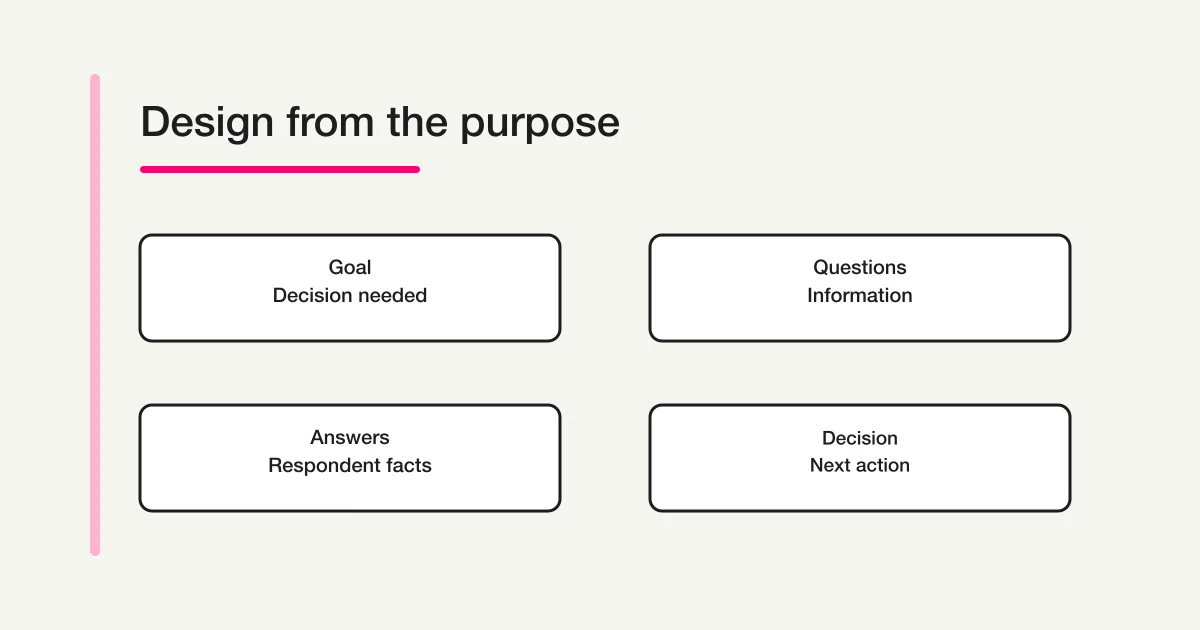
Before adding a question, ask: “Could we make the next decision without this answer?” If yes, make it optional, ask it live, or remove it. The form field examples guide explains how common field types support different jobs.
Copyable general interview sheet template
Start with these 12 items. Replace the text in brackets with your own context.
Title: [Project or consultation] intake form
Description: This form takes about 5–8 minutes. “Not decided” is a valid answer.

1. Your name and organization
2. Your role in this project or decision
3. In one sentence, what would you like to discuss?
4. What is the current situation?
5. Which problems are you trying to solve? Select all that apply.
6. What impact do those problems have today?
7. What outcome would count as success?
8. Which outcome or constraint has the highest priority?
9. Is there a preferred date or fixed deadline?
10. What budget or resources can you share at this stage?
11. Who is involved in evaluation and approval?
12. What should we review or prepare before the meeting?
Do not make every item required. Contact details, the main objective, and a real deadline may be necessary. Budget, internal stakeholders, and supporting documents may be better as optional fields during early discovery. Include choices such as “not decided,” “not sure,” and “discuss during the meeting” so respondents do not invent an answer.
Choose the right field type
| Information | Useful field type | Why |
|---|---|---|
| Objective, problem category, timeframe | Radio buttons or select | Easier to compare and route |
| Multiple needs or requested capabilities | Checkboxes | Preserves multiple applicable choices |
| Context, success criteria, nuance | Short open text | Captures facts outside the options |
| Amount, headcount, or date | Number or date | Reduces formatting differences |
An all-open-text questionnaire creates work for both sides. An all-choice form can erase context. Use structured fields for the outline and reserve open text for reasons, exceptions, and details.
Website project discovery questions
Ask what work the website must perform before asking which pages the client wants.
1. Is this a new website or a redesign?
2. What is the primary goal: enquiries, bookings, recruitment, sales, or information?
3. Who are the main users?
4. What action should those users take?
5. What is not working in the current site or process?
6. Which pages or capabilities do you currently expect?
7. Are copy, photography, logos, and brand guidelines ready?
8. Who will update the site, and how often?
9. What is the target launch date, and why does that date matter?
10. Who reviews and finally approves the work?
11. Which reference sites are useful, and what exactly is useful about each one?
12. How will you measure whether the site succeeds?
A reference URL alone is ambiguous. The client may like the visual tone, navigation, content, or a specific capability. Ask what the reference means. Treat these answers as discovery input, not an approved requirements document. Confirm scope, dependencies, acceptance criteria, and ownership in later conversations.
For the specialized workflow that turns a website hearing into a Figma wireframe, continue to Turn Client Design Briefs Into Figma Wireframes With MCP.
Sales discovery questions
Sales discovery should help you prepare a relevant decision, not create an excuse to recite product capabilities.
1. What prompted you to look for help now?
2. How is the work handled today?
3. Which problem has the highest priority?
4. What happens if nothing changes?
5. What have you already tried, and what happened?
6. Which measure would show that the change worked?
7. Is there a preferred date or immovable deadline?
8. Which alternatives are you evaluating?
9. Which teams or roles participate in the decision?
10. How is budget evaluated and approved?
11. Are there security, legal, integration, or operational constraints?
12. What must be answered in the next conversation?
Budget and approval questions can be useful, but forcing them during an early enquiry may suppress honest answers. Offer “not decided” or “being reviewed internally,” and explain why you ask. If the only job is to schedule and prepare a product demonstration, use a shorter demo request form guide.
Recruitment intake questions
Keep two different forms separate: the brief a recruiter collects from a hiring manager, and the questions sent to a candidate. This section focuses on the internal hiring brief.
1. Role title
2. Why is the role open?
3. What should the person accomplish in the first three to six months?
4. What work will they do regularly?
5. Which experience or skills are essential, and why?
6. Which experience or skills are useful but not essential?
7. Which team and stakeholders will they work with?
8. What location, hours, and working arrangements apply?
9. Which abilities should the selection process assess, and how?
10. Who interviews, and who owns each assessment?
11. What is the target hiring date?
12. Which challenges and attractive aspects should candidates understand?
When questioning candidates, collect only information relevant to the role and process. Do not add health, family, beliefs, or other sensitive questions merely because they appeared in a generic template. Portfolio and file collection is a separate task covered by the recruitment portfolio submission form guide.
Intake form mistakes to avoid
Collecting every stakeholder's question
Combining every request from sales, delivery, finance, and leadership produces a long form. Separate questions into three groups: required before the meeting, useful if known, and better discussed live. Complete the form yourself and test it on a phone. The form conversion optimization guide covers field load and error experience in more detail.
Using open text for everything
Repeated “please explain” prompts create inconsistent answers. Use choices for problem category, timeframe, and status. Use open text for causes, exceptions, and desired outcomes.
Asking two things at once
“Tell us your budget and deadline” often receives only one answer. Split it into two fields. One question should have one clear response job.
Hiding the purpose of collection
Japan's Personal Information Protection Commission explains that a purpose should be specific enough for a person to reasonably anticipate how their information will be used. Whatever law applies to your organization, plain language is good form design: state why you collect the answers, who uses them, and how long you plan to keep them. Legal requirements vary by location and data, so seek qualified advice when needed.
Treating an interview response as an approved requirement
IPA's requirements-definition guide separates business requirements, system requirements, requirements management, and the resulting documents. It also emphasizes shared interpretation among stakeholders. An interview sheet is an input to that work, not the final agreement. Confirm terminology, priorities, constraints, ownership, and acceptance criteria with the people responsible.
Turn the worksheet into an online form
- Remove questions that do not affect the next decision.
- Separate structured choices from explanatory text.
- Keep required fields to the minimum.
- Show follow-up questions only when they apply.
- Explain purpose, completion time, deadline, and contact route.
- Submit a test response on a phone and a computer.
- Share the respondent URL and assign the person who reviews submissions.
Validation is not only a visual convenience. OWASP recommends validating input on the server before processing it because client-side checks can be bypassed. It also recommends explicit allowed values for discrete choices and reasonable length and range checks. When evaluating a form service, confirm that its submission path validates answers rather than relying solely on browser hints.
Trim the template in three passes
First, label each question with the decision it supports: meeting agenda, scope, timing, ownership, or follow-up. Remove any question that has no named decision. A question can be interesting without being useful at this stage. Keep it for the live conversation instead of making every respondent complete it in advance.
Second, separate what must be known before the meeting from what can be clarified together. Contact details, the central topic, and a fixed deadline may be necessary early. Detailed preferences, speculative features, or a full history often work better as optional fields. If a selection makes a later question irrelevant, use conditional display rather than asking everyone to skip it manually.
Third, test the sheet with one realistic response. Read it as the person responsible for the next action. Can that person identify the facts, open questions, and owner without guessing? A useful confirmation note might say: “We understood that the launch date is fixed, the budget is still under review, and Mia will confirm content ownership by Friday.” Ask the respondent to correct that summary. This preserves the difference between a submitted answer and an agreed requirement, while keeping the worksheet focused on the immediate interview rather than expanding into a broader client-intake process.
Build the intake form in FORMLOVA
Turn the template into a private draft through a supported AI client, then check saved questions, help text, required settings and conditional display. Free covers creation, collection, search and CSV/Excel export. File questions and custom replies require Standard or above; template reuse does not remove those plan checks.
A saved user template can reuse fields and design and remap recorded field references when a new form is created. Recheck every branch, current deadline and email setting after reuse. Do not treat a shared URL as confidentiality or put client secrets into a prototype.
FORMLOVA does not currently include a system template named “interview sheet.” Saved user templates can reuse fields, design and email templates, subject to the separate sending-plan requirements. You can export CSV, JSON, or Excel on every current plan. Free owner notifications are a six-hour digest, outside sending quota.
Make a website discovery draft that accepts “not decided”
This is a proposed trial, not an operation or result measured for this rewrite. Use a private test draft first.
Create a private website-discovery draft with new site/redesign, primary goal, target users and desired launch timing. Show current-site URL and redesign problem only for redesign. Make budget and references optional, with Not decided and Discuss in meeting choices where suitable. Do not request attachments, publish or send mail.
Before proceeding, check:
- Try new-site, redesign and undecided answers; check that irrelevant required fields do not block the route.
- Inspect URL and length constraints and actual fixed validation errors on phone and desktop.
- After a controlled test, read the response as facts, assumptions and next questions. CSV/Excel has fields and submission time, not automatic response-ID/status/owner columns.
Try the discovery questions before sharing a client link
Free covers this text-and-choice draft and export. Attachments, custom receipts and team permissions have separate plan conditions.
Register free and draft website discovery
Register, verify your email, connect a supported AI client, and paste the proposed request above. Check the saved draft before publishing. AI-client account and usage requirements apply separately.
Decide what happens after submission
For every response, record four things:
- facts you can already confirm
- assumptions and unanswered questions for the meeting
- constraints that affect scope, cost, or timing
- the next owner, deadline, and status
Do not convert an intake answer directly into a requirement or candidate judgment. Repeat important assumptions and confirm them with the respondent. Keep business stages such as clarification needed or preparing proposal in defined fields or an operating ledger. FORMLOVA response status has only new, in_progress, resolved and spam; the business stages are not additional supported status values. The form response status guide owns the detailed operating model.
FAQ
How many questions should a client intake form contain?
There is no universal number. The general template here has 12 items, but only fields needed for the next decision should be required. State the expected completion time and move detailed discussion to the meeting.
Should I use a spreadsheet or an online form?
A spreadsheet can work when one internal person records every interview. An online form is often easier when external respondents answer on different devices and you need required-field checks, consistent formats, or searchable submissions. Compare permissions and storage practices when the answers are confidential.
Should budget be required?
Not always. It may be essential for a scoped proposal, yet genuinely undecided during early discovery. Explain the reason and include “not decided” or “would like advice” rather than forcing a false number.
Can I use the same template for website and sales discovery?
Reuse the general context, goal, constraint, and timing fields. Tailor the rest. Website discovery emphasizes users, content, assets, ownership, and launch. Sales discovery emphasizes current impact, previous attempts, success measures, alternatives, and the decision process.
Do I need consent to collect personal information?
This guide cannot determine a legal requirement for every organization, jurisdiction, or data type. Define a specific purpose, collect only necessary data, and establish access, retention, sharing, and deletion practices. Seek qualified guidance for sensitive, recruitment, health, or regulated information.
What to do next
Keep only questions that prepare the next meeting, and have the receiving person review one fictional submission. Confirm important assumptions with the respondent before converting them into scope or evaluation.
Primary references
- Japan Personal Information Protection Commission: APPI Guidelines Q&A
- OWASP Input Validation Cheat Sheet
- IPA: User's Requirements Definition Guide, Second Edition
The references and FORMLOVA implementation were checked on September 4, 2026. Policies, product behavior, and interfaces can change.
Pre-publish checklist
- State the purpose and intended use of the answers.
- Require only fields needed for the next decision.
- Give choices and open text separate jobs.
- Allow “not decided” or “not sure.”
- Ask one thing per question.
- Avoid collecting sensitive data “just in case.”
- Submit test answers on a phone and a computer.
- Assign the reviewer, deadline, and status after submission.
Create a free interview form in FORMLOVA
Disclosure and Verification
The author develops FORMLOVA. Product examples were checked directly against the implementation and specification, while the interview-design guidance uses primary material from public and security organizations. This article offers question-design and product guidance; it does not replace legal advice, hiring review, or an information-security assessment.