Last updated: October 15, 2026
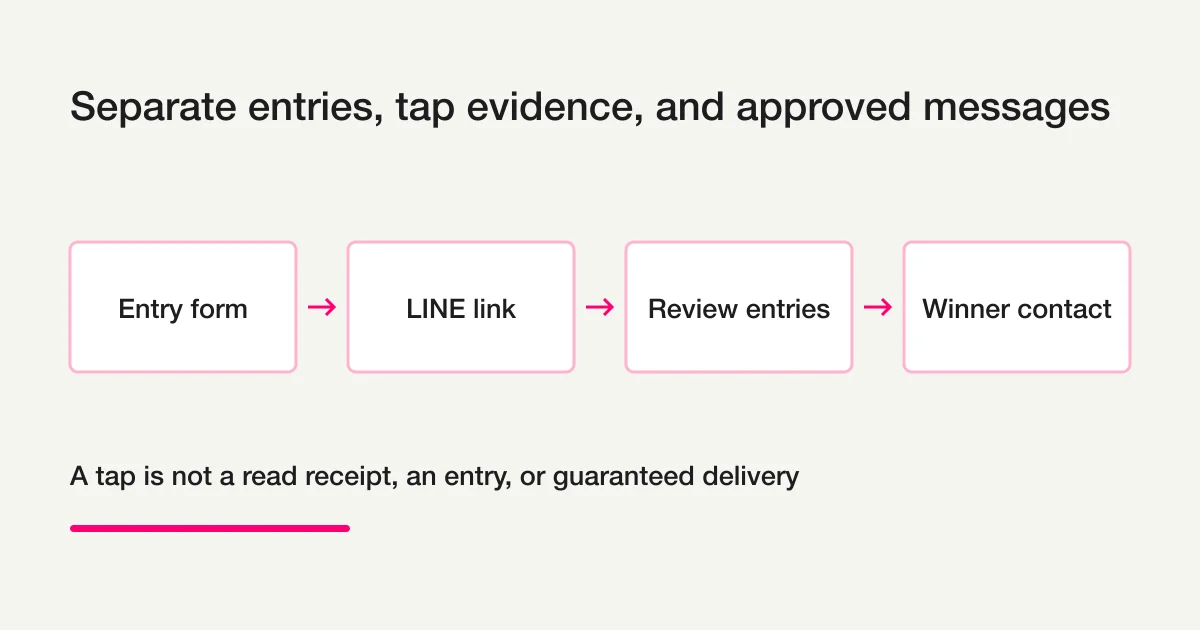
To collect entries from a LINE Official Account, separate the form, the link placed in LINE, the tap evidence, and any winner message. FORMLOVA can test the entry form and duplicate controls on Free. LINE tap memory and approval-gated delivery require Premium. A display name alone does not verify an entrant’s identity.
Distinguish the Three Meanings of Applying Through LINE
| Meaning | What to evaluate |
|---|---|
| LINE’s official campaign offering, LINE de Oubo | The current campaign product and contract from LINE |
| Job applications initiated through LINE | Recruitment and applicant-tracking requirements |
| Your own entry form linked from a LINE Official Account | Fields, entry rules, consent, evidence, and communication you operate |
This guide covers the third case. It does not explain how to purchase or configure LINE’s official campaign offering, nor replace an applicant-tracking system. For other form types, use the form creation guide.
Build the Form, Then Choose the LINE Link
First create and review your form. To distribute an ordinary form URL through LINE, set the appropriate destination in the account you manage. To use FORMLOVA tap memory, a suitable Premium connection issues a LINE capture link that you place in the chosen URL destination.
Do not replace a whole rich menu unnecessarily. Where another service manages a postback button, preserve it and test a URL in a new message first. Link capture and the existing chat or webhook system are different layers; the destination can still conflict even if the webhook is unchanged.
LINE Login and Messaging API channels need the same LINE Developers provider for their user IDs to align. Test the intended link and operator-controlled account before using a real audience.
Ask for Entry Information You Actually Need
For a giveaway, start with name, email, the prize or entry content, and acknowledgment of the rules. Future marketing permission is optional and separate. Request shipping details from selected winners later unless the operation requires them earlier.
Do not use a LINE display name as the identity key: names can change or be shared. Explain whether email is a fallback channel and how it will be used. Draft data-use wording around the drawing, winner contact, and prize delivery, then have the operator review it. The privacy consent guide covers the wording structure.
FORMLOVA offers email-based, browser-based, or no duplicate restriction on Free. These are submission controls, not proof that one real person entered only once. Browser changes and alternate email addresses can bypass such policies; verify eligibility using the disclosed campaign rules before the drawing.
Test the Entry Form on Free Before Adding LINE
This is a suggested request, not a preconfigured campaign:
Draft a giveaway entry form to be promoted through LINE.
Require name, email, chosen prize, and entry-terms acknowledgment.
Future-marketing permission is optional and unchecked.
Collect shipping details only after selection.
Set an email-based duplicate rule for review.
Show the fields, data-use wording, and thank-you page before publication.
First test with a normal URL. Do not issue LINE links, select winners,
or send winner notifications yet.
Review mobile and desktop display, required fields, rule wording, and the thank-you page. After a reviewed test publication, submit fictional entries using the same email again and a different address. Verify saved responses, repeat-entry behavior, category search, and CSV columns. The preview itself does not save responses.
CSV contains form fields and submission time, not internal response-ID, status, tag, or note columns. Keep drawing and eligibility evidence in an operator-controlled record. This normal-URL test does not verify LINE identity linkage.
Test the giveaway entry form on Free
Use the fields above to verify saved responses and search. LINE tap memory and approval-gated messaging require Premium and a checked connection.
Create a free account and prepare this form
After registration and email verification, connect a supported AI client and use the request above. Review before test publication. AI-client terms and fees are separate.
Compare Tap Evidence and Entries Carefully
A FORMLOVA-issued LINE link records only activity captured through that flow. Response comparison is limited to responses actually linked to the same LINE identity on the server. Ordinary URL entries and responses from another channel cannot automatically be assigned to every tap.
A recorded tap is not a read receipt, proof of entry, or guaranteed delivery. An unmatched identity is a candidate for review, not proof that a person did not enter elsewhere. Check the form, time period, linkage, and exclusions. Do not join masked contact details or ask the AI for a raw LINE-ID address list.
For the feature boundary, see the LINE tap-memory update. The automation guide places it in the wider workflow.
Select Winners and Review Communication Separately
The native LINE segment criteria support tap activity, responded/not-responded status, periods, and supported contact states or preferences. They do not accept an arbitrary response-ID list or a Winner response tag as a winner-only audience. If the supported criteria cannot produce an audience verified to match the intended winners, stop the LINE send; do not substitute all entrants or a broader group. For explicit winner targeting, prepare individual email replies tied to verified response IDs or a separate Premium-or-higher bulk-email campaign. Confirm recipients through supported record identifiers rather than copying masked addresses, and review permissions, quota, content, and actual send results.
Use the published rules and your documented drawing process or another tool to select winners. Read current response tags and notes immediately before appending the operator-confirmed result, preserving existing context. Do not confuse a Winner tag with a supported response status. FORMLOVA’s response states are New, In progress, Resolved, and Spam.
Custom entry acknowledgments require Standard or above. Bulk email campaigns require Premium or above. Ordinary individual replies are a separate operation with recipient and quota conditions. LINE delivery requires Premium plus the connection and LINE-side allowance.
Before any LINE job, review the sending account, eligible targets, message, quota estimate, and intended test recipient in the dashboard. Test, approve, and inspect actual job results. A draft or approval alone is not evidence that every winner received the message. Do not promise arrival or read receipts.
Use Recipes as Reviewed Requests
Event follow-up, unhandled-response review, and survey follow-up can help structure a chat session around the relevant saved responses.
Opening or pasting a recipe does not start continuous monitoring or a scheduled LINE campaign. Confirm supported tools, permissions, real targets, and saved settings. When an operation is unavailable, stop at a draft or review note rather than inventing a completed send.
Connection Checklist
- Confirm ownership of the LINE Official Account and the channels.
- Put LINE Login and Messaging API under the same provider.
- Use the operator-controlled test account to verify capture, response linkage where used, and intended test delivery separately.
- Preserve another tool’s postback buttons and check the chosen URL destination.
- Check current LINE-side allowance and job results.
- If separately enabling delivery-operations management, complete its webhook forwarding, stop handling, and exclusion-sync checks. The basic tap flow does not complete those settings automatically.
FAQ
Can someone enter without being a friend of the LINE account?
The ordinary form can accept an entry under its own access settings. That does not guarantee the entrant is sendable through the LINE connection. Check the actual eligible audience before delivery and provide the promised fallback contact process.
Does email duplicate prevention verify one person?
No. It restricts the repeated value under that form’s rule. Review eligibility and alternate paths according to the campaign terms.
Can I recover old rich-menu clicks?
No. Activity from ordinary URLs or links not captured by FORMLOVA is not reconstructed retrospectively.
Are LINE features included when I register for free?
No. Free can test the underlying form and saved responses. LINE tap memory and approved delivery require Premium. LINE Official Account charges and allowances are separate.
Official Sources and Next Steps
- LINE’s official campaign offering
- LIFF overview
- User IDs and provider boundaries
- Messaging API pricing
- Messaging API reference
- Event registration form guide
- Form creation guide
Start with the reviewed entry form and fictional responses. Add LINE only after the plan, connection, and test evidence are clear, then review winner communication as its own action.
Disclosure and Verification
I work on FORMLOVA. This is the English counterpart of the existing Japanese guide, adapted to the current product specification, plan definition, LINE identity-linking behavior, and official LINE sources on October 15, 2026. Examples describe proposed checks, not a completed campaign or measured improvement. This English article and its planned assets are not yet published.