
Last updated: October 15, 2026
A second-round portfolio form records the submitted work, version, contribution and review access. It is separate from first-round application and from the human hiring decision. Define job-related criteria and submission/replacement rules before asking candidates to upload.
Start with URLs and explanations. Files require Standard or above; neither submission nor a resolved response proves a candidate passed or granted public reuse rights.
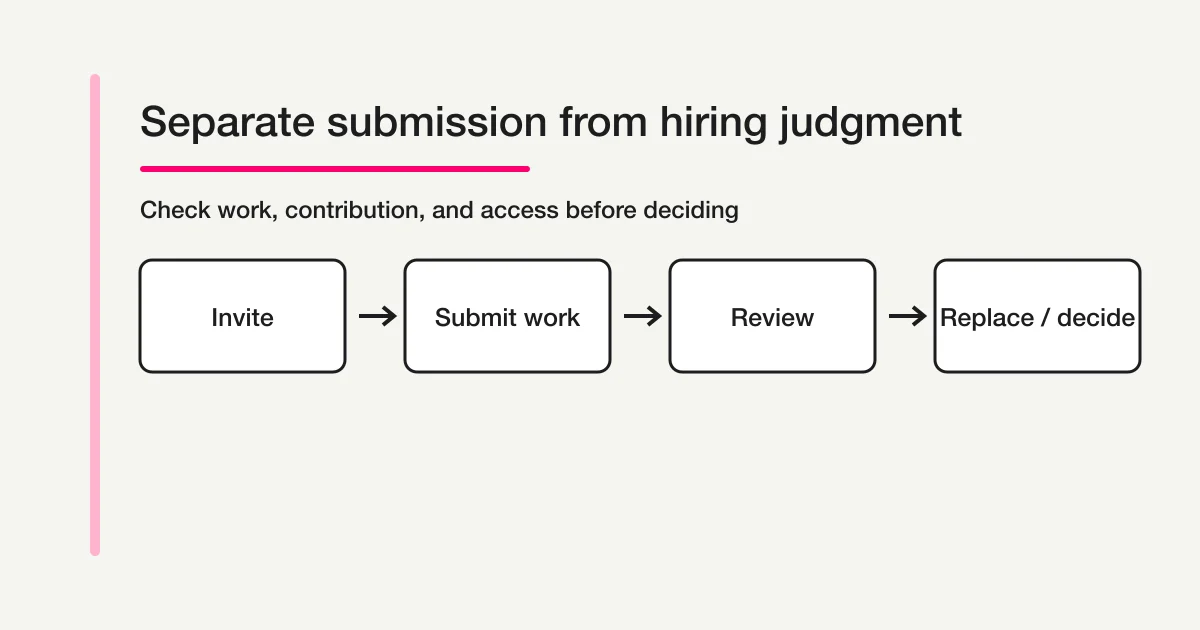
The short answer: separate submission from hiring judgment
Design two layers instead of one “passed” or “failed” label.
| Layer | What to record | What completion means |
|---|---|---|
| Invitation | Candidate, role, requested work, deadline | The candidate was invited |
| Submission | URL, file, title, submitted time, version | The response arrived |
| Access check | Whether the reviewer can open the work | The material can be reviewed |
| Context check | Contribution, tools, constraints, permissions | The reviewer can interpret the material |
| Review | Reviewer, notes, follow-up questions | A human is evaluating the material |
| Replacement | Old/new version, reason, replacement time | The review version is known |
| Decision | Next stage, hold, or no further process | The hiring team recorded its decision |
The immediate acknowledgement should confirm receipt, not a second-round pass. A candidate should not have to infer the review state from an untracked email thread.
How this differs from a first-round application
The job application form guide covers the initial application. It may collect a portfolio URL for roles where that is useful, but it does not need to become the workflow for every later assignment.
| Question | First-round application | Second-round submission |
|---|---|---|
| Who uses it? | Anyone applying to the role | A candidate invited after document screening |
| Main purpose | Capture contact, role, experience, and motivation | Make work samples comparable and reviewable |
| What is submitted? | A summary or representative URL | Specific work, assignment, version, and explanation |
| What is the clock? | Application closing date | Individual deadline, extension, and replacement window |
| What is the state? | Received, screening, interview | Awaiting submission, access check, under review, replacement, decision |
Do not ask a candidate to re-enter their whole application. Carry forward the candidate ID or application email and request only the context needed for the new review.
Step 1: Define the work sample and the review purpose
“Please send your portfolio” leaves too much room for inconsistent submissions. Write one sentence that tells the candidate what the reviewer needs to learn.
For the product designer second-round review, submit one to three representative
projects and explain your contribution, tools, constraints, and the decision you
would improve today. The assignment is optional and is described below.
If there is an assignment, state its purpose, expected effort, format, deadline, evaluation dimensions, and contact for questions. Do not hide the entire assignment brief inside a field label.
The Japanese Ministry of Health, Labour and Welfare's fair recruitment guidance describes selection based on suitability and ability for the work. Apply that principle here by tying the review dimensions to job-related skills. Do not add questions about family, beliefs, birthplace, or other information unrelated to the role. For a specific legal or labor question, use your own HR or legal review.
Step 2: Collect URLs, files, and contribution as separate fields
A URL and an uploaded file fail in different ways. Keep them distinct so the reviewer can tell what was submitted and what needs fixing.
| Field | Format | Required or optional? |
|---|---|---|
| Candidate name and application email | Short text and email | Required for matching the invitation |
| Candidate or application ID | Short text | Required when the hiring team has an existing record |
| Target role | Choice list | Required when one form serves multiple roles |
| Representative work URL | One to three URL fields | Required when the review depends on public or private work |
| Work title and date | Short text | Useful for identifying a version |
| Assignment file | File upload | Required only when the assignment is part of this round |
| Additional reference URL | URL | Optional, so candidates are not forced to add unrelated work |
| Contribution | Choice plus short explanation | Required for collaborative work |
| Tools or technologies | Choice plus short explanation | Ask only what matters to the role |
Contribution is not a request for a private performance review. It is a way to distinguish “led the research,” “designed the interface,” “implemented the feature,” “managed delivery,” and “supported the team.” A URL without contribution context can make collaborative work difficult to evaluate fairly.
Step 3: Check access, publication permission, and confidential material
A reviewer may receive a private Figma, Git repository, case-study link, or password-protected page. The fact that a candidate can open the URL does not prove that the hiring team can.
Use clear confirmations such as:
The hiring reviewers may access the submitted work.
The work does not expose a client's confidential data or personal information.
I have redacted restricted material where necessary.
Select the permitted use: reviewers only / recruiting presentation with permission /
public portfolio only / permission pending.
Hiring-review access and public recruiting use are different permissions. A work sample may be visible to a small review panel but not to a website, social post, or case study. Ask for the intended scope and keep the answer with the submission.
Never ask for a password, API key, private key, production credential, or other secret in the form. Instead, provide a redacted version, grant a temporary reviewer account through the appropriate system, or ask the candidate for a safe view-only link. Do not invite real customer data into an assignment just to make the sample look realistic.
Step 4: Make deadlines and replacements explicit
If the form says only “submit by Friday,” the team will still have to answer what happens when a link changes or a candidate needs an extension.
| Rule | Example | Record |
|---|---|---|
| Initial deadline | August 31, 6:00 PM Japan time | Invitation deadline and time zone |
| Replacement window | Resubmit before the deadline; review the latest version | Old URL, new URL, reason, timestamp |
| Extension | Request an extension before the deadline | New deadline and approving owner |
| After the deadline | Accept only after the hiring team confirms | Decision and confirmation time |
A replacement is not an edit to history. Keep the old version linked, mark the current review version, and write why it changed. This prevents a reviewer from evaluating a different artifact than the one recorded in feedback.
Step 5: Acknowledge receipt without implying a decision
Template placeholders for receipt numbers, deadlines and source references must be replaced with values actually provided by your fields or operating ledger. Do not promise automatic numbering or unsupported merge variables.
The receipt message should reduce uncertainty and duplicate submissions.
Subject: We received your portfolio submission ({submission ID})

Hello {candidate name},

We received your second-round submission.
This confirms receipt only; it is not a hiring decision or a confirmation that the
submission has passed review.

Submission ID: {submission ID}
Deadline: {deadline}

Our review team will check the work link, file, and submission context. If access or
additional information is needed, we will contact you using this ID.
Write a response target only if the hiring team can meet it. Keep the submission acknowledgement separate from the decision email so a technical receipt cannot be mistaken for a selection result.
Step 6: Model submission status and review result separately
The stages in this section are business-ledger categories, not additional FORMLOVA response-status values.
FORMLOVA response management supports searching responses and updating general response status restricted to new, in_progress, resolved, and spam. A second-round hiring process needs more context than those generic states alone, so use tags, notes, and the team's approved hiring record for the detailed states.
| Detailed state | Meaning | Next action |
|---|---|---|
| Awaiting submission | Invitation sent, no response yet | Reminder before the deadline |
| Received | A response arrived | Match candidate and invitation |
| Access check | URL or file needs review | Ask for a viewable version if needed |
| Clarification needed | Contribution, permission, or brief detail is missing | Send a precise question |
| Under review | Reviewer is evaluating the work | Store job-related notes |
| Replacement requested | A new or corrected version is expected | Keep the old and new versions linked |
| Review complete | The submitted material was reviewed | Move to the decision owner |
| Next stage / hold / no further process | Hiring decision recorded | Send the appropriate candidate message |
| Duplicate or out of scope | Another record owns the work or it is not part of this round | Link records and stop duplicate review |
“Resolved” means the response has been handled; it does not mean the candidate passed. Keep the hiring decision with the authorized reviewers and the criteria they actually applied.
Draft a URL-first portfolio submission
This is a proposed trial, not an operation or result measured for this rewrite. Use a private test draft first.
Create a private web-design portfolio draft with candidate ID, name, email, work URL, title, contribution, tools and viewing/public-reuse choices. Keep confidential information and passwords out. Ask for actual deadline/timezone and replacement policy; do not create hiring decisions. Use text/URL fields first and propose any file field separately. Do not invite candidates, publish or send.
Before proceeding, check:
- Are review access and public reuse separate?
- Can the reviewer identify the work/version and the candidate’s contribution?
- Do mobile/desktop explain deadlines and safe access without secrets?
Check submission clarity before inviting candidates
Free covers text/URL drafting, preview, response search/four-status work and export. File fields/custom automatic replies need Standard or above; team/bulk operations need Premium. Human business decisions remain separate.
Register, verify your email, connect a supported AI client, and paste the proposed request above. Check the saved draft before publishing. AI-client account and usage requirements apply separately.
Step 7: Build the draft, check the preview, publish, and run a controlled test submit
Before publishing, check the candidate and reviewer experience in the preview. An unpublished preview does not save response data, so run a controlled test submit with synthetic data only after publishing and then confirm the response record, notification, and acknowledgement.
Use this draft-first sequence in FORMLOVA:
- Describe the role, candidate ID, URLs, files, contribution, tools, permission, deadline, replacement rule, and acknowledgement needed for the draft.
- Review required and optional fields, privacy copy, access setting, and upload configuration.
- Open the preview at a mobile width. Check long URLs, work titles, deadlines, and assignment instructions.
- In the preview, check every conditional path, including “assignment included,” “permission pending,” and the clarification path.
- Review the acknowledgement copy and confirm that it says received, not selected.
- Before publishing, define the checks for owner notification, response search, tags/notes, and status; perform them with the synthetic post-publication test below.
- Finish the explicit publication review before sharing the live URL.
- After publishing, send one controlled test submit from the public URL using synthetic data only; do not use a real candidate, real work, or confidential information. Confirm the response record, notification, owner record, acknowledgement, tags/notes, and status, then delete the test response or label it clearly as a test before sharing the form with candidates.
FORMLOVA creates an unpublished draft first, provides a preview for iteration, supports conditional display rules, and keeps publication behind a review gate. File uploads depend on the plan and form configuration. None of those steps scores a portfolio or replaces a human hiring decision.
When a submission is missing, inaccessible, or underspecified, the Portfolio Request Follow-up Workflow is a relevant next step. It checks the response and prepares a request with the due date and required materials. Confirm the target, recipient, deadline, and human review step before sending; it does not decide hiring outcomes or publication permissions.
What to check after launch
Measure whether the form produces reviewable submissions, not only how many candidates clicked send.
| Metric | What it tells you |
|---|---|
| Invitation-to-submission rate | Whether the request and deadline are clear |
| Inaccessible URL count | Whether the access instructions are adequate |
| Clarification rate | Whether the form asks for enough context |
| Replacement count | Whether version and deadline rules are clear |
| Time in access check | Whether the review owner is assigned |
| Time under review | Whether the review capacity and criteria are workable |
| Extension requests | Whether the assignment size and window are realistic |
| Follow-up after decision | Whether the result message explains the next step |
Do not use submission volume as a proxy for candidate quality. The form should make relevant evidence reviewable while keeping the candidate's burden and data exposure proportionate.
Frequently asked questions
Should every applicant submit a portfolio?
Not necessarily. This page is for candidates invited after a document screen. Decide whether the role actually requires work samples and communicate the purpose before asking for a larger submission.
Can the portfolio URL be required?
Require it when the reviewer cannot make the stated decision without it. If private work is common, offer a safe alternative such as a redacted file or a view-only link and explain the access requirement.
Can I collect a private repository password?
No. Do not collect passwords, keys, credentials, or production data in a general form. Use an approved invitation or a redacted sample.
How should we handle a new portfolio version?
Keep the original submission, link the replacement to the same candidate and submission ID, and record the reason and timestamp. Mark one version as current for review.
Can FORMLOVA decide who passes the second round?
No claim should be made that it does. FORMLOVA can provide the intake, preview, conditional paths, response search, status, and notification foundation. Authorized hiring reviewers must apply the job-related criteria and record the decision.
Keep business evidence separate from response handling
Native response status is exactly new / in_progress / resolved / spam. The business-stage table above is a ledger/tag/note convention, not additional enum values. Preserve existing notes/tags and retrieve after any authorized update. Basic CSV/Excel includes fields and submission time, not response-ID/status/owner columns or arbitrary chosen-column export. MCP masks email/phone; do not infer raw recipients or manually join displays to private records. Free notifications are a six-hour owner digest outside outgoing-mail quota; custom replies/routing require Standard or above. Opening a recipe is not saved automatic monitoring. Preview checks display/input and does not save responses; verify actual storage/send results only after a controlled publication decision.
Summary
A second-round portfolio submission form is not a longer job application. It is a focused record for candidates who have already passed the document screen.
Define the work and review purpose first. Collect the URL, file, contribution, tools, permission, deadline, and replacement context separately. Never request secrets or unredacted confidential data. Acknowledge receipt without implying selection, then keep access check, clarification, review, replacement, and decision visible as different states.
In FORMLOVA, use the unpublished draft, preview for display and conditional-path checks, publication review, and a synthetic-data controlled test submit after publishing to confirm the response record, notification, and acknowledgement. Keep the actual hiring judgment with authorized people, documented criteria, and the company's own privacy and retention rules.
Create a second-round portfolio submission draft with FORMLOVA
Related articles
Sources and verification
- Ministry of Health, Labour and Welfare: Fair Recruitment
- FORMLOVA form creation guide (drafts and previews)
What to do next
Use the proposed private intake to check fields and completion wording first. Decide real publication, external actions and human approval using the saved record and the system that owns the decision.
Disclosure and Verification
I checked FORMLOVA's draft creation, preview, conditional logic, publication review, response search/status, notification, and file-upload implementation and specification on August 31, 2026. Verify hiring criteria, candidate privacy, portfolio rights, confidentiality, retention, and publication permission against your own policies, contracts, HR process, and legal review. This article is operational guidance, not legal advice. The Rakko full export had no direct volume for the primary keyword, so no demand or difficulty figure is asserted.