
Last updated: October 15, 2026
Original verification record (retained; this rewrite does not re-certify every historical statement): Last verified: September 4, 2026
An anonymous survey needs more than an absent name field. Define who should be unable to identify the respondent, then review direct and indirect identifiers, technical processing, raw access and reporting groups. A timestamp and distinctive comment can identify someone even without email.
If individual follow-up is required, choose a clearly identified confidential process or a separate voluntary contact channel. Do not promise anonymity while quietly joining those records.
Choose anonymous, confidential, or identified collection first
| Model | Can the survey operator identify a respondent? | Appropriate use | Claim to avoid |
|---|---|---|---|
| Anonymous | Identification should be sufficiently unlikely after considering reasonably available information | Trends and candid feedback where individual follow-up is unnecessary | “There is no name field, so it is completely anonymous” |
| Confidential or identified | Identity is collected, but purpose and access are restricted | Applications, case handling, and direct follow-up | Calling the survey anonymous |
| Separated contact channel | The response dataset has no contact field; volunteers contact you through a different form | Candid feedback plus optional support | Quietly joining the two datasets by a common token or timestamp |
Replacing a name with a response code is usually pseudonymisation if someone retains a lookup table. The UK Information Commissioner's Office explains that pseudonymised data can be attributed to a person with additional information and should not be confused with anonymisation. Japan's Personal Information Protection Commission separately defines legally anonymised processed information through statutory processing and non-restorability requirements.
Do not assume that your everyday “anonymous survey” label satisfies either legal framework. The relevant jurisdiction, subject matter, contracts, and internal policy can change the answer. Seek advice from your privacy or legal team when the consequences of re-identification are significant.
Step 1: Define the purpose and inventory identifiers
Write one sentence stating the decision the responses will support. Then ask whether you truly need to contact an individual. If the goal is to compare broad experience across teams, a name or employee number may not be necessary. If someone must investigate each report, run a confidential identified process or provide a separate optional contact channel instead of making an anonymous promise.
Inventory three groups of information:
- Direct identifiers: name, email, phone number, employee or customer ID, portrait, and account username.
- Indirect identifiers: a small department, job title, location, age band, start year, project, shift, and submission time.
- Identifying content: names and unusual events in open text, plus the content and metadata of an uploaded file.
Each field may look harmless by itself. Together, “regional office, executive role, over 20 years' service” may describe only one person. The ICO's current anonymisation guidance says identifiability assessments should consider other datasets, personal knowledge, public sources, access by insiders, and governance rather than focusing only on obvious identifiers.
For every question, ask: “Could we still make the intended decision without this field?” Remove fields that fail the test. Coarsen necessary attributes: report a division instead of a tiny team, broad tenure ranges instead of an exact start date, and a collection window instead of an individual timestamp. For wording, order, scales, and leading-question checks, use the survey question design guide. This page stays with identity risk.
Step 2: Verify identity controls and technical processing in the tool
Do not choose a product merely because its screen uses the word “anonymous.” Check current official documentation and submit a test response. Your review should cover:
- Whether email, account name, user ID, or another identity value is attached to a response.
- How sign-in, one-response limits, or organisation-only access affect the information visible to the owner.
- Who can process or view submission time, IP address, device or browser data, and audit logs.
- Whether notifications, exports, integrations, spreadsheets, or webhooks copy an identifier elsewhere.
- Hosting and retention terms, deletion controls, and what happens after the contract ends.
Google's current Forms help says a username is not recorded merely because a one-response limit requires sign-in; the owner must enable email collection for it to be recorded with the response. That is a statement about the response data shown to the form owner, not a promise that nobody in the delivery chain processes technical information. The Google Forms anonymous-response guide covers the Google-specific switches, file-upload sign-in, linked Sheets columns, and owner-side test.
Microsoft Forms says Anyone can respond submissions arrive without names recorded, while a work or school form limited to the organisation can have Record name cleared. Microsoft's own anonymous-survey page warns that asking for personal information, inviting only a few known people, or combining timestamps with time zones can defeat the intention not to record names.
Across products, distinguish “the owner does not see a name column” from “the provider, hosting layer, network operator, and organisation never process technical data.” Unless the current product contract explicitly supports a claim such as no IP processing, do not promise it. Opening the form in a private browser window is a useful access test, but it does not prove complete anonymity.
Step 3: Write the respondent notice and restrict raw-data operations
Replace a vague “This survey is anonymous” badge with a short, accurate notice. For example:
We use this survey to prioritise service improvements.
The questions do not ask for your name, email address, or employee ID.
Do not include names, case references, or details that identify you or another person in open text.
Two research staff members can access raw responses. We combine groups with fewer than ten responses before reporting.
Raw response data will be deleted 90 days after analysis is complete.
Only publish statements that match the actual product configuration and operating process. Describe what you do not collect, who can read raw data, the small-group threshold, and the deletion schedule. If respondents may request individual help, link to a separate contact form. Keep that dataset separate and do not create an easily joinable token unless you intend to run a confidential, identified process and explain it as such.
Use least-privilege access. List every form editor, response viewer, export recipient, integration administrator, and storage location. Define how access is removed when responsibilities change. Reports should use grouped results rather than a broadly shared raw-data export.
Workplace surveys require an additional layer because managers and employees have an ongoing relationship and non-response can itself become sensitive. The anonymous employee survey guide covers invitation language, participation pressure, reminders, and returning results. This page focuses on the cross-tool privacy boundary.
Do not keep raw data indefinitely “just in case.” Define the collection, analysis, reporting, challenge, and deletion periods. Record who deletes responses, exported files, local copies, and integration data, and who verifies completion. Check backup and audit-log retention against the product contract and your organisation's policy rather than assuming the delete button removes every copy immediately.
Step 4: Test re-identification and set reporting thresholds
Before distribution, test from the same conditions as a respondent. Inspect not only the public form but also the owner's individual-response view, exported CSV or workbook, notifications, and each destination integration.
Hide the test respondent's identity and ask a second authorised reviewer whether they can infer the person. If a timestamp, team, role, writing style, or incident makes the answer obvious, remove or coarsen the attribute, strengthen the open-text notice, or suppress the timestamp from reports. Repeat the test after material changes to the questions, access scope, or integrations.
Set a minimum reporting group before seeing the results. A survey can have 500 responses overall and only three in one role-location combination. Publishing that small cell or its verbatim comments can expose individuals. No universal threshold makes every dataset anonymous; assess the population, sensitivity, and other information available to readers. Decide whether small cells are suppressed or rolled into a broader category and apply the rule consistently.
Report counts alongside percentages. Review comments for names, projects, exact dates, rare events, and distinctive phrasing. When a quotation is unnecessary, summarise the theme rather than lightly editing a verbatim comment. Keep the raw text with the restricted dataset, not in a slide deck sent to a broad audience.
For broader aggregation, open-text coding, and improvement planning, continue with the survey response analysis guide. The boundary here is preserving the anonymity design before, during, and after that analysis.
Using FORMLOVA for an anonymous-survey design
Free supports a draft without name or contact fields, response collection, search and CSV/Excel export. That does not guarantee anonymity. Submission times, free text, technical processing, access and copies still need review.
FORMLOVA’s sales-message classification is enabled by default and can send response content to an external classification service depending on configuration. Review the current privacy policy and form setting; disable classification when it is unnecessary for this survey. Custom semantic rules have a separate external-processing boundary. Omitting identifiers or seeing masked contacts in MCP does not prove that raw data contains none. Custom retention and team-management features also have their own plan conditions.
You can export CSV, Excel, or JSON. A masked email display does not establish that the source contains no identifying data.
Review a no-contact improvement survey with fictional answers
This is a proposed trial, not an operation or result measured for this rewrite. Use a private test draft first.
Draft a private service-improvement survey asking for one improvement category and an optional reason. Do not ask names, contacts, IDs or small-team attributes. Warn against identifying details in comments. Propose a notice with raw-access and deletion placeholders for human confirmation. Show the classification/privacy settings before any publication; do not publish.
Before proceeding, check:
- Replace notice placeholders only after assigning real access and deletion owners.
- Inspect classification and any custom semantic rule; do not use real sensitive text in a prototype.
- After controlled publication, inspect owner records, timestamps, export and notifications, then ask an authorized reviewer about inference risk. A private-window test is only one check.
Inspect a minimal survey before collecting real opinions
Free lets you review the draft and export behavior. Registration does not certify anonymity or legal anonymisation; adopt it only after checking the actual configuration and operating rules.
Register free and inspect the minimal draft
Register, verify your email, connect a supported AI client, and paste the proposed request above. Check the saved draft before publishing. AI-client account and usage requirements apply separately.
Pre-launch checklist
[ ] We chose anonymous, confidential, or identified collection deliberately
[ ] A separate optional contact channel is used when individual follow-up is not part of the response dataset
[ ] Direct identifiers and unnecessary indirect identifiers are removed
[ ] The open-text notice asks respondents not to identify themselves or others
[ ] Email, account, timestamps, and technical processing were checked in current official documentation
[ ] Raw-data viewers and export destinations are restricted
[ ] A rule for suppressing or combining small groups is documented
[ ] Retention period, deletion scope, owner, and verification date are documented
[ ] A respondent-condition test and owner-side export review are complete
[ ] The notice does not promise perfect anonymity or that nobody can identify a respondent
Frequently asked questions
Is a survey anonymous if it does not collect email addresses?
Not necessarily. Department, role, submission time, free text, and uploaded files can identify a person individually or in combination. Check collected fields, technical processing, access, and reporting—not just the email switch.
Does a one-response limit make a survey identified?
It depends on the service and configuration. Some tools use sign-in for duplicate prevention without recording the account name in the owner's response dataset. That does not automatically eliminate provider-side processing, administrator access, or re-identification from the answers. Verify the current official specification and your test response.
Can we report a very small department separately?
Small groups increase re-identification risk. There is no universal safe number for every context. Consider sensitivity and what readers already know, then define a minimum cell size and suppress or roll up groups below it before you see the result.
How can an anonymous respondent request follow-up?
Use a separate optional contact form when practical. Do not require an email address in the anonymous response or silently join the datasets. If the operational need requires joining identity to each answer, call the process confidential or identified and explain its purpose and access controls.
Does choosing a tool that does not show IP addresses guarantee anonymity?
No. IP handling is one question among many. A person may still be identified through attributes, timestamps, free text, integrations, access, or other datasets. Evaluate the current contract and the complete operating context.
Official sources
- Personal Information Protection Commission of Japan: Guidelines on pseudonymously and anonymously processed information
- ICO: How do we ensure anonymisation is effective?
- ICO: Pseudonymisation
- Google Docs Editors Help: Publish and share your form with responders
- Google Docs Editors Help: View and manage form responses
- Microsoft Support: Set up your survey so names aren't recorded
What to do next
Complete the identifier and processing review before collecting real opinions. Publish only a notice that matches observed behavior, and keep small-group reporting and every exported copy within the same policy.
Conclusion
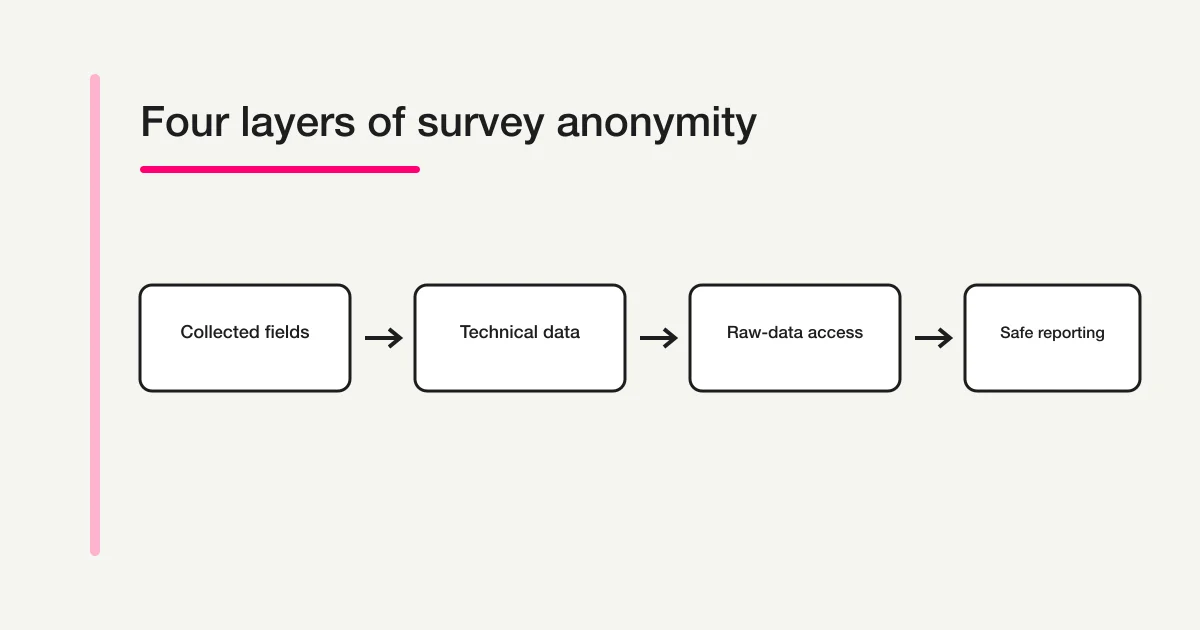
Anonymous surveys are built through four coordinated layers: the fields you collect, technical and operational data, raw-response access, and the level at which results are reported. Remove direct identifiers, then test indirect identifiers, free text, timestamps, small cells, retention, and every copy of the data. Tell respondents exactly what is and is not collected instead of using a blanket promise.
To build a public form with deliberately selected questions and test FORMLOVA's response search, status management, and CSV/Excel export, start with FORMLOVA for free. Before publishing, verify that your notice, permissions, retention plan, and observed behaviour agree.
Disclosure and Verification
I work on FORMLOVA. I checked the privacy concepts against current PPC and ICO material and the product controls against Google and Microsoft documentation on September 4, 2026. FORMLOVA statements were checked against the current repository implementation for public forms, fields, response persistence, search and status management, CSV/Excel export, and plan definitions. This article does not guarantee that a particular use satisfies a statutory anonymisation standard, that no technical information including IP data is processed, or that complete anonymity is achievable.