
Last updated: August 29, 2026
An internal survey does not collect honest feedback simply because the form says “anonymous.” Employees need to know what is collected, who can view it, how small groups are handled, and what will happen after they answer. The survey also needs questions that are short enough to finish and specific enough to support a decision.
This guide shows how to create an internal survey from that operating reality. It covers anonymous question examples, response-rate failures, employee notices, deadlines, reminders, aggregation, and the feedback loop after the survey. It is written for people-operations teams, HR partners, and team leads who need a practical first survey rather than a research textbook.
The short answer: design the conditions for honest feedback first
Start with the decision you will make after the responses arrive. Then remove every question that does not support that decision or protect the interpretation of the result.
| Decide first | Practical question | Design consequence |
|---|---|---|
| Purpose | Are you improving workload, communication, support, policy, or the work environment? | Do not collect unrelated demographics |
| Anonymity | Who can see raw answers, and what could identify a respondent? | Remove direct identifiers and overly narrow groups |
| Follow-up | Will the result lead to an aggregate change, a discussion, or a voluntary contact? | Explain the next action and keep contact optional |
| Feedback | When will employees hear what changed? | Put the result date in the invitation |
“Anonymous feedback” and “contact every low scorer” are competing requirements. You can keep a survey anonymous and provide a separate, voluntary conversation channel. You can also offer an optional contact field, but explain exactly whether it remains with the response or is routed separately.
Explain anonymity as three different promises
The word anonymous often combines three different claims:
- The form owner does not receive a name or email address.
- The response cannot be inferred from the answers or demographic combination.
- The form provider, workplace administrator, or network operator does not process technical information.
Form settings can address part of the first two claims. The third requires the provider's privacy information, contract, and workplace policy. Do not promise “no one can ever identify you” unless your organization can actually support that statement.
Questions and combinations that can identify someone
An answer can become identifiable when it is combined with other data:
- a very small department, location, or shift;
- a specific job title plus tenure and a unique project;
- an exact start date or event date;
- a free-text prompt that invites project names or personal details;
- a response timestamp that can be compared with a roster;
- a cross-tabulation that displays a group with only a few people.
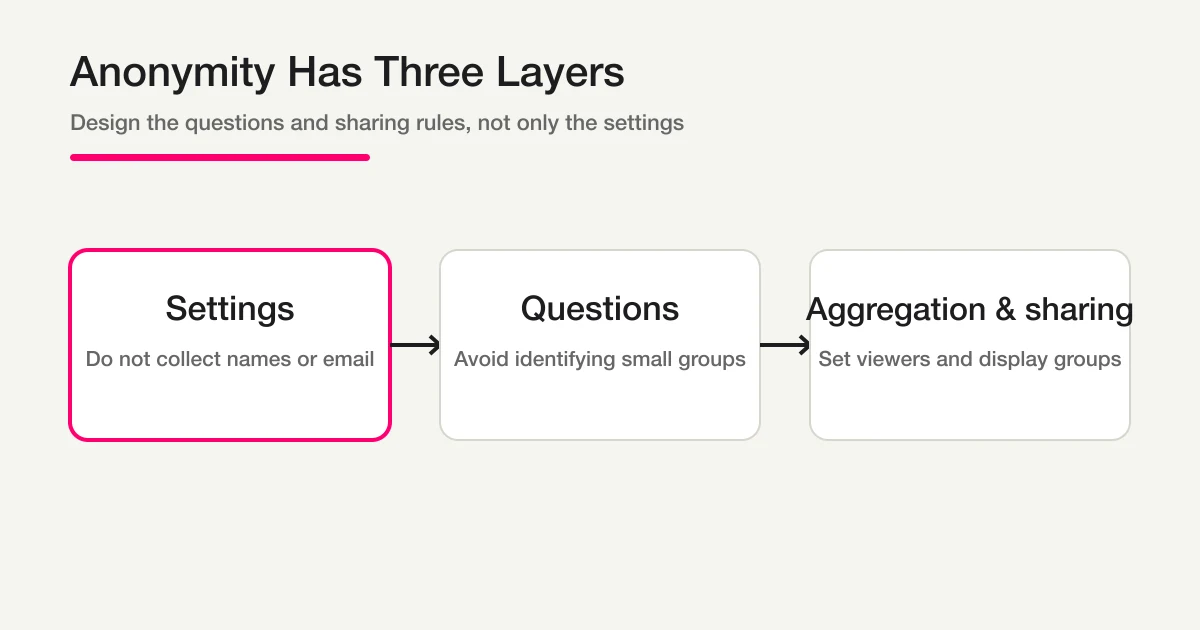
Remove attributes that do not change the decision. When a comparison is necessary, use broad groups and establish a minimum group size before collection. If a group is too small, combine it or suppress the result. Anonymity is a system of question design, access permissions, aggregation, and sharing—not a single checkbox.
Employee survey question examples you can adapt
Separate questions into three jobs: questions that create a measurable signal, questions that explain why, and questions that identify a practical next step. Do not make every question required. Add “not applicable” or “prefer not to answer” where it is meaningful.
Workload and work environment
Q1. How would you describe your current workload?
• Much lighter than manageable • Slightly lighter • Manageable • Slightly heavier • Much heavier • Prefer not to answer

Q2. Which parts of your work create the most burden? Select all that apply.
• Volume of work • Deadlines • Meetings • Information sharing • Tools or procedures • Staffing • Other • None of these

Q3. If one of those burdens improved, what would change for you? (Optional)
Q1 provides a signal that can be tracked over time. Q2 turns a broad complaint into categories. Q3 is optional so that employees who want to explain a situation can do so without forcing everyone to write an essay.
Psychological safety and access to support
Q4. When you are stuck, how easy is it to find someone to ask for work-related help?
• Very easy • Somewhat easy • Neither easy nor difficult • Somewhat difficult • Very difficult • Prefer not to answer

Q5. When you raise a concern, do you feel that it is heard?
• Strongly agree • Somewhat agree • Neither agree nor disagree • Somewhat disagree • Strongly disagree • Prefer not to answer

Q6. Which topics would be useful for a future discussion? Select all that apply.
• Workload • Roles and ownership • Information sharing • Management practices • Policies • Work environment • None of these
Avoid wording such as “Please rate your manager.” In a small team, that can make respondents feel exposed and turn a workplace question into personal blame. Ask about observable conditions and behaviors first. For harassment, health, safety, or urgent concerns, an ordinary survey is not a substitute for a dedicated reporting or support channel.
Prioritizing an improvement
Q7. Which one area should we improve first during the next one to three months?
• Workload • Procedures • Tools • Information sharing • Meetings • Work environment • Other

Q8. What would tell you that this improvement is working? (Optional)

Q9. Is there anything else you want the team to know? (Optional)
Asking for one priority separates the number of mentions from the decision about what to do first. Keep the success condition and the general comment as separate optional questions so the results are easier to read in a review meeting.
If you need a voluntary contact option
Do not require a name or email in a survey whose central promise is anonymous feedback. If a respondent may want a conversation, make the choice explicit:
Q10. Would you like a member of the designated team to contact you about your response?
• Yes, I would like contact • No, thank you

Q11. If you selected yes, enter a preferred contact method. (Optional)
State whether the contact detail stays in the response record or is sent through a separate intake channel. If you want a genuinely separate path, create a different support form and explain why. Do not design a hidden way to identify anonymous respondents.
Designs that reduce an employee survey response rate
Reminders cannot repair a survey that feels unsafe, pointless, or exhausting. Employees are likely to skip a survey when its purpose is vague, the anonymity promise is abstract, the questions are too long, or no result ever comes back.
| Failure | What the employee may think | Better design |
|---|---|---|
| The invitation only says “please cooperate” | I do not know what this will change | Name the decision and the date for sharing results |
| The form only says “anonymous” | I do not know who can see raw answers | Describe collected fields, viewers, and small-group handling |
| Several open-text questions appear in a row | I have to write a report | Use a category question, then one optional explanation |
| Detailed demographics are required | My answers will identify me | Keep only attributes used for a safe comparison |
| Every reminder goes to everyone | The sender is monitoring me | Send one neutral reminder to nonrespondents, if appropriate |
| Results are never shared | Answering does not matter | Report the signal, action, and what will not change yet |
Put the purpose, estimated completion time, deadline, anonymity scope, and result-sharing date at the top of the invitation. A short, accurate explanation builds more trust than a long assurance that the reader cannot verify.
A practical notice, deadline, and reminder sequence
Prepare the operating plan before distributing the link.
- Assign responsibilities: record who drafts the questions, who can view raw responses, who decides improvements, and who communicates the result.
- Write the notice: include purpose, estimated time, deadline, anonymity scope, result date, and a support contact.
- Run a respondent test: ask two or three people with different roles to read the questions and estimate completion time. Test whether any answer combination feels identifying.
- Set the window: publish a start date and close date. Send one reminder before the deadline when it fits the workplace context. If you extend the window, tell everyone why and state the new date.
- Close and freeze the scope: record the response period and any exclusion rule before analyzing.
- Return the result: share the overall pattern, the actions you will take, what you will not change yet, and the next review date.
Here is a notice you can adapt:
We are running a short internal survey to improve our day-to-day work environment. It should take about five minutes. We will not ask for names or email addresses in this form. The designated team will review aggregate results, and groups that are too small to protect respondents will not be shown separately. Please respond by [date]. We will share the summary and planned improvements on [date]. If you want an individual conversation, please use the separate support channel.
Change this copy to match the actual form, access list, retention policy, and workplace rules. Saying “anonymous” while editors can see identifying fields is a trust failure, not a copy issue.
Analyze in the order: overall signal, safe groups, themes, action
After responses arrive, do not begin by reading every open-text answer. Use a consistent order:
- check the response count and whether some groups are missing;
- review the overall distribution for workload, support, or agreement items;
- compare only groups that are large enough for your privacy rule;
- classify open text into themes tied to the question;
- choose an action, an owner, a due date, and a follow-up measure.
Small-group cross-tabs are both privacy risks and unstable statistics. Decide the minimum displayable group size before collecting answers. Limit raw-response access to people who need it, and give shared exports an expiry or review date.
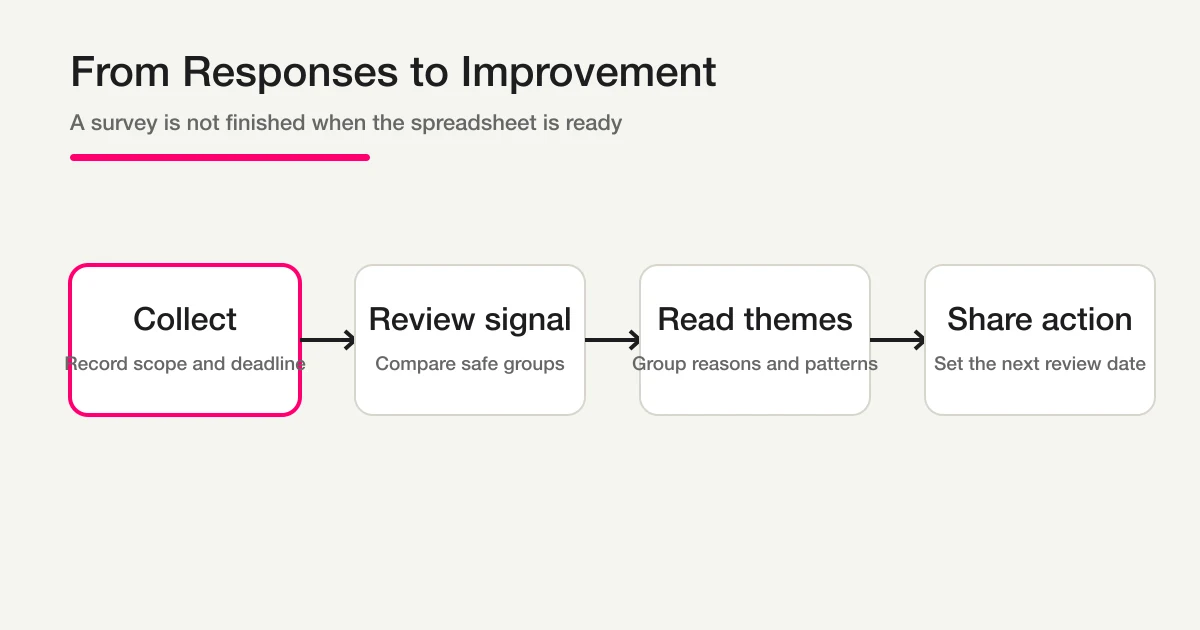
The survey ends when employees can see what happened to their feedback—not when a spreadsheet is created. For deeper survey aggregation and open-text organization, use the survey form guide.
Create an internal survey in FORMLOVA in four stages
Once the purpose and privacy boundary are clear, FORMLOVA can draft the form through chat. The four stages below describe what to enter and what to inspect. They are not a fictional screenshot or a claim that a generated diagram is a product screen.
Step 1: State the purpose and anonymity boundary
Input
Create an internal survey to understand workload and information-sharing problems. I want aggregate results that make respondents difficult to identify. Do not require names or email addresses. Make improvement comments optional.
Returned content
The draft should turn that request into a purpose, respondent scope, privacy boundary, comparison fields, and a proposed post-survey action.
Actual screen
Open the form preview URL returned after the draft is created. Read the introduction and the questions as a respondent, not as the owner who already knows the plan.
Note
“Anonymous” is not enough as an instruction. State which fields are not collected and how small groups will be handled.
Step 2: Check the questions and answer choices
Input
Keep the survey focused on workload, information sharing, and access to support. Use mostly choice questions, limit free text to two optional questions, and include a prefer-not-to-answer choice where it is appropriate.
Returned content
The draft should separate measurable signals from explanations and show which fields are required or optional.
Actual screen
In the form preview, test duplicated choices, required badges, descriptions, and the mobile reading experience. Remove a question if no one can name the decision it supports.
Note
Do not add demographics before deciding who will compare the results and whether each group is large enough.
Step 3: Test the respondent path before distribution
Input
Review the respondent view and the completion message. Check that the anonymity explanation, optional fields, deadline, and support route are accurate before distribution.
Returned content
You should receive a checklist for confusing wording, missing explanation, optional contact handling, and the completion message.
Actual screen
Open the form preview and thank-you preview, submit a personal-data-free test response, and then inspect the owner-side response list. Do not call a generated diagram a real UI screenshot.
Note
The respondent experience and the owner's response view answer different questions. Verify both after any field or privacy change.
Step 4: Decide the review and improvement action
Input
Review the responses by overall signal, safe comparison groups, themes in optional comments, and voluntary contact requests. Suggest the next improvement, owner, and review date.
Returned content
The result should separate response volume, choice distributions, open-text themes, voluntary follow-up, and proposed action.
Actual screen
Review the response list, search and filters, CSV or Excel export, and any available analysis view in that order. Confirm the plan and permissions before continuing with detailed analysis.
Note
If the team cannot name the action and the date for reporting back, the survey is not ready to distribute.
When FORMLOVA fits—and when to pause
FORMLOVA fits when you want to draft a form, collect responses, search or manage response status, export the data, and continue the review through a chat-centered workflow. A public FORMLOVA form does not require respondents to create a FORMLOVA dashboard account, and the owner can omit name and email fields.
Those capabilities do not turn a sensitive workplace process into a legal or HR-compliance decision. For harassment, health, safety, or highly sensitive employment information, confirm the organization’s policy, access controls, retention rules, and support process before choosing a survey tool. A small-group complaint may need a dedicated confidential channel instead of a normal survey.
You can start with FORMLOVA for free when the question design and privacy boundary are ready, then evaluate whether the collection and follow-up workflow fits your team.
Frequently asked questions
Should an internal survey be anonymous?
For topics where hierarchy may suppress honest feedback, omitting names and email addresses can reduce pressure. It does not prevent inference from a rare role, a small team, a timestamp, or distinctive free text. Explain the actual scope and the people who can view raw responses.
Can I ask for department and job title in an anonymous survey?
Only when the comparison changes a decision and the groups are large enough to protect respondents. Use broad categories, remove unused attributes, and establish a minimum displayable group size before collecting responses.
How many questions should an employee survey include?
There is no universal number. Keep the questions that support a decision, use choice fields for the main signal, and keep explanations optional and limited. Test the survey with people in different roles and remove the parts that create avoidable effort.
Can I contact a low-scoring respondent?
Not if the survey promises that the respondent cannot be identified. Offer a voluntary contact choice, an optional contact field with a clear explanation, or a separate support form. Do not build a hidden tracking path into an anonymous survey.
Can I use Google Forms for an internal survey?
Yes, but separate email collection, sign-in requirements, file uploads, response permissions, and inference from the answers. The Google Forms anonymous-response guide covers the Google-specific settings and two-sided verification. The internal-survey design principles here apply regardless of the tool.
Summary: anonymity is an operating promise, not a setting
Define the decision before you write questions. Use choice fields for the signal, a small number of optional text fields for reasons, and broad attributes only when they support a safe comparison. Explain who can view responses, how small groups are handled, when the survey closes, and when employees will hear the result.
After collection, review the overall signal, safe groups, open-text themes, and action plan in that order. Share what changed and what still needs evidence. That feedback loop is how an internal survey earns trust for the next round.
Related guides
For general question design and reusable survey templates, see the survey design guide. For a broader map of form creation, use the FORMLOVA form creation guide. For Google Forms-specific anonymity checks, use the anonymous Google Forms guide.
Disclosure and Verification
This guide is for planning and operating an internal survey. Anonymity depends on the actual fields, access permissions, aggregation rules, provider behavior, and workplace policy. Verify those conditions before distribution, especially for sensitive employment information. For FORMLOVA, this article describes only the current boundary in which a public form does not require a respondent dashboard account and the owner can omit name and email fields. I work on FORMLOVA.