
Last updated: July 2, 2026
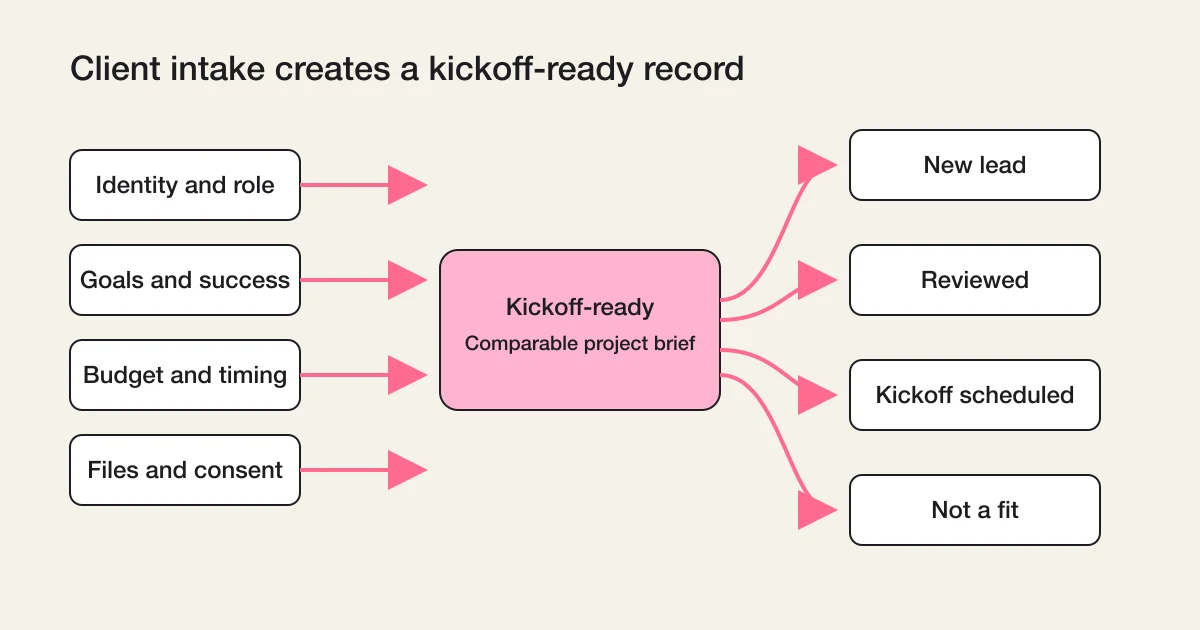
A client intake form should collect five things: who the client is, what outcome they want, the constraints around that outcome, the materials you need to start, and consent plus a clear next step.
That is the whole checklist. In field terms, it means contact and company basics, goals in the client's own words, budget range and timeline, file uploads for briefs and assets, and a privacy consent checkbox with an honest promise about what happens after submit.
But the form is only half of client intake. The other half is what your team does in the hours after submission: assign an owner, set a status, chase missing items, and schedule the kickoff. A beautiful intake form with no workflow behind it produces the same outcome as a messy email thread, just more politely.
This guide covers both halves. First the fields, with a reusable client intake form template that works across agencies, consultants, professional practices, and freelancers. Then the kickoff workflow state that turns a submission into a started engagement.
Client intake is one branch of a larger discipline. If you want the full picture of what happens to form responses after they arrive, the Contact Form Operations Guide is the parent map. This article stays on the intake branch.
What a Client Intake Form Is, and What It Is Not
A client intake form is the structured entry point for a new engagement. It runs before or at the very start of the work relationship, and its job is to replace the first scattered round of calls, emails, and chat messages with one complete, comparable record.
It is not a contact form. A contact form invites anyone to say anything. An intake form assumes a serious prospect or a signed client and asks for the specifics work depends on.
It is not a new client onboarding form either, although the two are often confused. The difference is timing and content:
| Form | When it runs | What it asks |
|---|---|---|
| Client intake form | Before or at the start of the engagement | Goals, scope signals, budget range, timeline, decision process, initial files |
| New client onboarding form | After the agreement is in place | Billing details, points of contact, account access, brand assets, meeting cadence, tool preferences |
Intake decides whether and how to start. Onboarding operationalizes a start that has already been decided. Many teams merge them into one long form, and that is usually a mistake: prospects who have not committed yet will abandon a form that asks for billing contacts, and committed clients get annoyed re-answering qualification questions. Two shorter forms at two moments beat one long form at the wrong moment.
One more boundary. If your intake is specifically a web design hearing that should turn into wireframes, that specialized workflow has its own article: Turn Site Design Hearings into Forms. This guide stays industry-neutral.
The Five Blocks Every Client Intake Form Needs
Whatever your industry, the intake form has the same skeleton.
| Block | What it captures | Why it matters at kickoff |
|---|---|---|
| Identity | Name, company, role, contact channel | You know who you are talking to and who can decide |
| Goals | The outcome in the client's own words, success criteria | The engagement has a target before the first meeting |
| Constraints | Budget range, timeline, hard deadlines, known blockers | You can scope honestly instead of discovering limits mid-project |
| Materials | Briefs, existing documents, brand assets, examples | Work can start without a "please send the files" email chain |
| Consent and next step | Privacy consent, how their data is used, what happens after submit | The client knows the process is professional and moving |
Everything else is an industry-specific add-on. Resist the urge to ask every question you might ever need. Each additional required field costs completions, and an abandoned intake form tells you nothing at all.
A working rule: the intake form collects what the kickoff meeting depends on. Anything you could comfortably ask in the kickoff itself stays out of the form.
A Client Intake Form Template, Field by Field
Here is a cross-industry client intake form template. Fifteen fields, five pages, roughly five minutes to complete.
Page 1 -- About you
| Field | Type | Required |
|---|---|---|
| Full name | Text | Yes |
| Company or organization | Text | Yes |
| Role | Dropdown (owner, executive, manager, specialist, other) | Yes |
| Yes | ||
| Preferred contact channel | Dropdown (email, phone, video call) | No |
Page 2 -- Goals
| Field | Type | Required |
|---|---|---|
| What outcome do you want from this engagement? | Long text | Yes |
| How will you know it succeeded? | Long text | No |
| What have you already tried? | Long text | No |
Page 3 -- Constraints
| Field | Type | Required |
|---|---|---|
| Budget range | Dropdown of ranges | Yes |
| Desired start | Dropdown (as soon as possible, within a month, within a quarter, exploring) | Yes |
| Hard deadline, if any | Date | No |
Page 4 -- Materials
| Field | Type | Required |
|---|---|---|
| Brief, requirements document, or anything written | File upload | No |
| Brand assets, examples, or references | File upload | No |
| Links we should look at | Text | No |
Page 5 -- Consent and confirmation
| Field | Type | Required |
|---|---|---|
| Privacy consent | Checkbox with a link to your policy | Where required |
| Anything else we should know? | Long text | No |
Three design choices in this template do most of the work.
Multi-page beats single-page for intake. Fifteen questions on one screen looks like an exam. The same questions across five short pages, each with a clear theme, feel like a conversation. The order also mirrors how you will read the response: who, what, within which limits, with which materials.
Dropdowns wherever answers need to be comparable. Role, budget range, and desired start are dropdowns, not free text. Free-text budget answers give you "flexible," "depends," and "let's discuss," which are three ways of saying nothing. Ranges give you data you can route on: a below-minimum range can trigger a polite decline template, and a top-tier range can notify a senior person immediately.
Materials are optional at intake. Clients often do not have the brief ready on the day they reach out. If file fields are required, they postpone the whole form until "the documents are ready," and many never come back. Accept the submission, then chase files as a tracked follow-up item. Missing files are a workflow state, not a validation error.
Asking About Budget Without Losing the Client
Budget is the field teams are most tempted to drop, and dropping it is almost always wrong. An intake without a budget signal forces a full proposal cycle just to discover a 10x mismatch.
The problems with budget questions are real, though. A required free-text "What is your budget?" reads as "quote me a number I can hold you to," and clients either inflate, lowball, or abandon.
Three adjustments fix most of it.
First, use ranges, and make the ranges honest. The lowest range should sit at or just below your actual minimum engagement. If your projects start at a certain level, a range beneath it plus an "exploring options" choice lets mismatched prospects self-identify without wasting anyone's time.
Second, explain why you are asking, right in the field description. One sentence is enough: "A range helps us propose something realistic instead of guessing." Context turns an interrogation into collaboration.
Third, if your sales motion truly cannot ask for budget upfront, keep the field but make it optional, and treat an empty budget as a routing signal: the owner asks about it in the first reply instead. The point is not to force an answer. The point is to make sure the question cannot be forgotten.
Files, Assets, and Access
Materials are where intake forms earn their keep. Every service business knows the ritual: the kickoff happens, everyone agrees to start, and then a week evaporates while briefs, logos, exports, and access credentials trickle in over email.
Put file collection in the intake form, with two rules.
Ask for documents, never for secrets. Briefs, requirement documents, brand assets, screenshots, and reference material belong in an upload field. Passwords, API keys, and login credentials never do, on any form. Access to client systems should be granted through each tool's own invitation or sharing mechanism after the engagement starts, and the onboarding form can ask "who on your side will grant access?" instead of asking for the credentials themselves.
Accept common formats generously. If a client's brief is a PDF, a Word file, or a slide deck, the form should take all of them. Overly strict format allowlists produce failed uploads, and a failed upload at the last step is where intake submissions go to die. Keep required-format constraints for cases where a downstream process genuinely depends on them.
In FORMLOVA, file upload fields are available on the Standard plan and above, and uploaded files stay attached to the response so the owner reviews the goals, the budget, and the brief in one place instead of reconciling a form entry with an email attachment.
For requests where the document itself is the product, such as sending a brochure or whitepaper to the requester, that is a different form with different follow-up logic: see the Material Request Form Guide.
The Kickoff Workflow State: What Happens After Submit
Here is the half most intake guides skip. A submitted intake form is not a started engagement. Between the two sits a small state machine, and running it deliberately is what separates a professional start from a slow one.
The minimum kickoff workflow has five states:
Received      - the intake exists as a record, client acknowledged
Owned         - a specific person is responsible for this engagement
Reviewed      - the owner has read goals, budget, and files
Waiting       - missing items requested: files, budget, availability
Kickoff set   - the first meeting is scheduled; onboarding begins
Each state answers a different question, and collapsing them causes specific failures.
Received without Owned is the classic one: the form posts to a shared channel, everyone sees it, nobody owns it, and the prospect who was excited on Tuesday is comparing competitors by Friday. Assign an owner on every intake within hours, by round-robin if nothing smarter exists. An imperfect owner beats a perfect queue.
Owned without Reviewed produces the embarrassing kickoff where the client repeats everything they carefully wrote into the form. If the client invested five minutes writing, the owner owes ten minutes of reading before any reply. The first reply should prove it: reference their stated goal, confirm the budget range fits, name the files received.
Waiting deserves to be an explicit state rather than a mental note. Intake responses are routinely incomplete, and that is by design: you made materials optional so the form would get submitted at all. The cost is that someone must track what is missing per client and chase it with a date attached. When "waiting for the brief" is a visible status with a follow-up date, briefs arrive. When it lives in an owner's memory, engagements quietly stall for weeks and both sides blame each other.
The status vocabulary here is deliberately the same one that works for any form response: new, in progress, waiting, done. If you want the general model behind it, read Form Response Status Management. And if you want the broader map of everything that can happen after any submission, from auto-replies to notifications to reporting, the post-submit workflow guide covers the full lifecycle. This section is that model applied to one high-stakes case: the start of a paid relationship.
One more state matters at the front: the acknowledgement. The auto-reply to an intake submission should say what actually happens next -- "We review intake forms within one business day, and your kickoff owner will reply personally" -- rather than a generic thanks. The intake form made a promise about your professionalism; the first automated message either keeps it or breaks it. In FORMLOVA, customizing the auto-reply email is available on the Standard plan and above.
Building the Intake Form in FORMLOVA
FORMLOVA is a chat-first form service: you describe the form to an AI assistant in Claude, ChatGPT, Cursor, or another MCP client, and it builds, publishes, and operates the form with you. That fits intake work well, because an intake form is easier to describe than to click together:
Create a client intake form with five pages: contact basics, goals,
budget and timeline, file uploads for briefs and assets, and consent.
Budget is a dropdown with these four ranges. Files are optional.
The draft comes back in seconds, and refinements stay conversational: change the budget ranges, add an industry dropdown for your niche, tighten the goal question wording. Before publishing, FORMLOVA runs a review that checks the operational pieces intake depends on, such as the thank-you page and duplicate protection, so the form does not go live half-configured.
The same conversation continues after publication, which is where intake operations actually live:
Show me this week's intake submissions that still have no owner.
Which intake responses are waiting on files for more than three days?
Draft a friendly follow-up for each.
The response record, the status, the owner, and the attached files stay in one system, and the chat layer operates across them. The setup guide covers connecting your AI client.
Related Workflows You Can Use
Three official FORMLOVA workflows map directly onto the kickoff states in this article.
Inquiry Owner Assignment closes the Received-without-Owned gap: it assigns an owner candidate from the response content the moment an intake arrives, with a reason and a reply deadline, so no engagement waits in a shared queue.
AI Lead Summary to CRM helps with the Reviewed state: it condenses a long intake response into a structured note, so the goals, budget signal, and open questions are ready before the kickoff call. It is available on the Standard plan and above and requires checking the connected CRM requirements before enabling it.
Demo Request Handoff covers the handoff pattern from a submitted request to a scheduled first meeting, which is the same motion as intake-to-kickoff for sales-led teams. It is available on the Standard plan and above; confirm the form and notification requirements before enabling it.
FAQ
What is a client intake form?
A client intake form is a structured form a service business uses at the start of a new engagement to collect the client's identity, goals, budget range, timeline, initial files, and consent in one record, replacing the first scattered round of emails and calls.
How is a client intake form different from a new client onboarding form?
Timing and content. The intake form runs before or at the start of the engagement and asks qualification and scoping questions: goals, budget, timeline. The onboarding form runs after the agreement and collects operational details: billing contacts, access arrangements, brand assets, meeting cadence. Keeping them separate keeps both forms short.
Should an intake form ask for budget?
Yes, as a dropdown of honest ranges rather than a required free-text number, with one sentence explaining why you ask. If your sales process cannot ask upfront, keep the field optional and treat an empty answer as something the owner raises in the first reply.
How many questions should a client intake form have?
Ten to twenty, split across themed pages. The test for each field: does the kickoff meeting depend on this answer? If you could comfortably ask it in the kickoff itself, leave it out of the form.
Should file uploads be required on an intake form?
No. Clients often reach out before their materials are ready, and required file fields cause abandonment. Make uploads optional, then track missing files as an explicit waiting status with a follow-up date after submission.
Summary
A client intake form does two jobs. On the form side, it collects identity, goals, constraints, materials, and consent, using ranges instead of free text where answers must be comparable, and keeping files optional so the submission actually happens. On the workflow side, it feeds a small state machine: received, owned, reviewed, waiting on missing items, kickoff scheduled.
Most intake failures are workflow failures wearing a form costume. The client filled everything in; the response just sat unowned, unread, or silently incomplete. Design the five states with the same care as the fifteen fields, and the engagement starts the way the form promised it would.
For the wider operational picture around every form response, continue with the Contact Form Operations Guide.
Related Articles
- Contact Form Operations Guide
- Form Response Status Management
- Turn Site Design Hearings into Forms
- Material Request Form Guide
- Workflow Templates or Manual Follow-Up After Form Submission?
Disclosure and Verification
I wrote this as the developer of FORMLOVA, drawing on client-work experience from over 100 website projects before building the product, and on the product decisions behind FORMLOVA's multi-page forms, file upload fields, auto-reply emails, response status, and workflow recipes. Plan availability notes (file upload fields and auto-reply customization on the Standard plan and above) were checked against FORMLOVA's plan definition on July 2, 2026. This article makes no third-party product or pricing claims.