
Last updated: July 2, 2026
A waitlist form is easy to build. A waitlist operation is not.
The form itself needs only a few fields: name, email, what the person is waiting for, and consent to be contacted. The hard part starts the moment your capacity is full and the first seat opens up again. Who is next? How do they find out? How long do they have to answer? What happens if they do not?
If you cannot answer those four questions before you publish the form, the waitlist becomes a list of names that never converts.
This guide covers the whole loop: the waitlist signup form fields, the capacity rule that triggers the waitlist, the priority order, the promotion notification with a response window, and the follow-up that turns a promoted entry into a confirmed participant or customer.
One boundary before we start. If you are building the registration form for an event itself, use the Event Registration Form Guide. If you are building a booking or reservation form, use the Reservation Form Guide. This article owns what happens after "full": the waitlist as its own operation.
Quick Answer: The Four Decisions Behind Every Waitlist Form
Before choosing fields, decide these four rules. Every waitlist failure I have seen traces back to one of them being undefined.
| Decision | Question to answer | Common failure when skipped |
|---|---|---|
| Capacity trigger | At what count does registration switch to waitlist mode? | People keep registering as "confirmed" past the real limit |
| Priority order | When a seat opens, who is offered it first? | The team argues about fairness while the seat stays empty |
| Promotion window | How is the offer sent, and how long does it stay open? | One silent person blocks the entire queue |
| Conversion step | What must the promoted person do to confirm, and what happens if they do not? | Promotions go out, but the seat is never actually filled |
Write the four answers down before the form goes live. First come, first served with a 48-hour response window is a complete, defensible policy. No policy is not.
When You Need a Waitlist Form
A waitlist form makes sense whenever demand can exceed supply and you want to capture the overflow instead of losing it:
| Scenario | What the waitlist protects |
|---|---|
| Product launch or beta access | Early demand signal and a launch-day email list |
| Restock or limited inventory | Purchase intent that would otherwise go to a competitor |
| Classes, workshops, and cohorts | Enrollment for the next opening or the next cohort |
| Memberships and communities | A controlled intake pace without rejecting people outright |
| Services with limited capacity | Booked-out consultants, clinics, salons, and studios |
In all of these, the waitlist entry is a warm lead with explicit intent: the person told you exactly what they want and agreed to hear from you when it becomes available.
Waitlist Signup Form Fields
Keep the waitlist signup form shorter than a normal registration form. The person is not getting the thing yet; do not make them work as if they were.
| Field | Required | Why it is on the form |
|---|---|---|
| Name | Yes | Addressing the promotion email personally |
| Email address | Yes | The promotion notification channel |
| What they are waiting for | Yes, if you have multiple items | Session, cohort, product variant, or service type |
| Quantity or party size | If capacity is counted in seats | One cancellation may not free enough seats for a party of four |
| Consent to be contacted | Yes | The promotion email must be expected, not a surprise |
| Flexibility or alternatives | Optional | "Would you accept a different date?" widens your matching options |
| How they found you | Optional | Demand-source signal for the next launch |
Two details matter more than they look.
First, quantity. If a cancellation frees two seats, promoting a waitlisted party of four creates a new problem. Collecting party size lets you match open seats to the right entry instead of the next entry.
Second, consent wording. Be explicit on the form: "We will email you if a spot opens up. Offers expire after 48 hours." That one sentence sets the response-window expectation before the offer ever goes out, which makes the response window clear and reduces misunderstandings about when the offer closes.
Here is a waitlist form template as a FORMLOVA chat prompt you can adapt:
Create a waitlist form titled "Autumn Cohort Waitlist". Required fields: full name, email address, preferred cohort (October / November), and consent to be contacted about openings. Optional fields: party size (default 1), whether a different cohort date is acceptable, and how they heard about us. Thank-you message: "You are on the waitlist. If a spot opens, we will email you an offer that stays valid for 48 hours."
The form is the easy 20 percent. The next three sections are the operation.
Capacity: Define the Trigger Before You Publish
A waitlist only works if "full" is a precise state, not a feeling.
Define three things:
| Rule | Example |
|---|---|
| Capacity count | 50 confirmed seats, counted by party size, not by submissions |
| Waitlist trigger | Submission 51 and later are waitlisted automatically, not rejected |
| Closing condition | Registration closes entirely on October 10 or when the waitlist reaches 30 entries |
The third rule is the one most teams forget. If your realistic cancellation rate frees five seats, a 200-person waitlist means 195 people who waited for nothing. Capping the waitlist, or telling people their position range, keeps the promise honest.
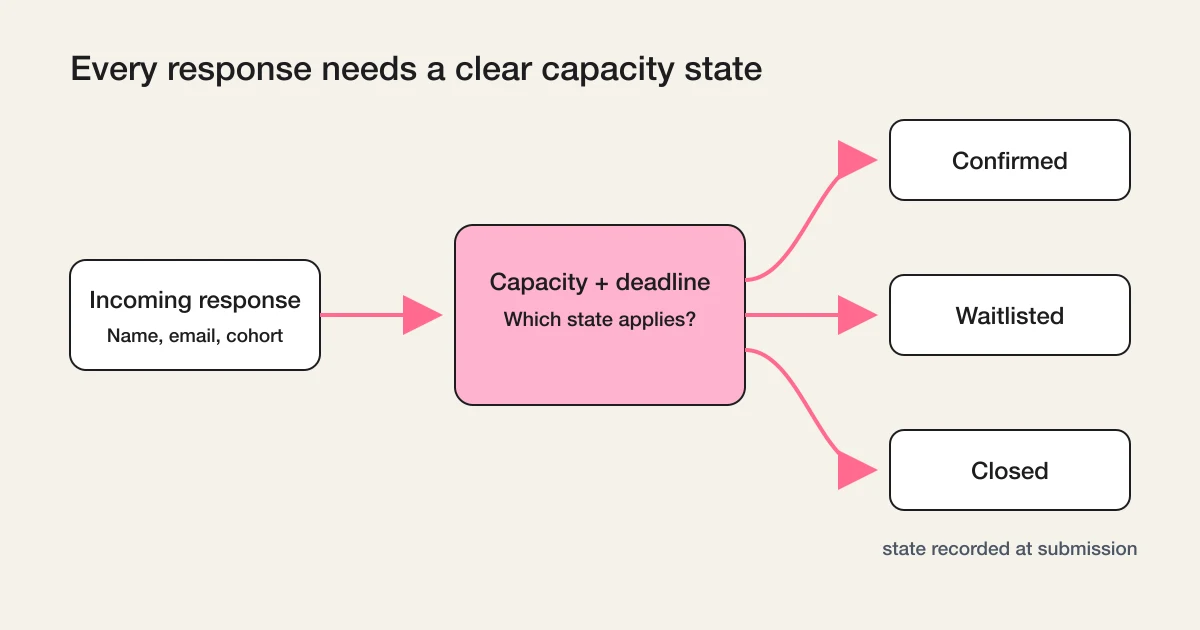
Operationally, every incoming response should land in one of three states the moment it arrives: confirmed if capacity remains, waitlisted if capacity is full, closed if the deadline has passed. In FORMLOVA, the Event Capacity + Waitlist workflow implements exactly this switch: it checks capacity and deadline, notifies the respondent, and records the state at submission time instead of during a manual recount. Free plan users can run it.
Priority: Decide the Order Before the First Cancellation
When a seat opens, the order of promotion must already be decided. Deciding it while the seat is empty is how seats stay empty.
There are three honest priority models:
| Model | How it works | Best for |
|---|---|---|
| First come, first served | Promote in submission order | Most cases; easiest to explain and defend |
| Segment priority | Members before non-members, returning students before new ones | Memberships, cohorts, loyalty programs |
| Fit-based matching | Match open seats to party size, date flexibility, or variant | Limited inventory with constraints |
First come, first served is the default for a reason: it needs no justification. If you use segment priority, say so on the form. "Existing members are offered openings first" is a fine policy when it is disclosed, and a trust problem when it is discovered.
Fit-based matching is not favoritism; it is constraint handling: if the open capacity is two seats, only an entry with party size two or less can fill it. This is why quantity and flexibility belong on the signup form.
Whatever model you choose, encode it as a sortable state, not tribal knowledge: timestamp, segment, and party size visible next to each entry, so anyone on the team can answer "who is next" in one glance.
Promotion Notification: The Offer Needs a Response Window
The promotion notification is the moment the waitlist proves whether it works. Three properties make it reliable.
First, the offer must be explicit. "A spot has opened up and it is being held for you" is an offer. "We have availability, reply if interested" is an announcement, and announcements get ignored.
Second, the offer must expire. A response window of 24 to 72 hours is typical. State the exact expiry in the email, ideally as an absolute time rather than "within 48 hours".
Third, expiry must cascade. When the window closes without an answer, the offer moves to the next entry automatically or by a simple manual step. The cascade is the difference between a waitlist and a pile of stale offers.
A minimal promotion email contains:
| Element | Example |
|---|---|
| What opened | "A seat in the October cohort is now available" |
| Who it is held for | "This offer is reserved for you as the next person on the waitlist" |
| The action | "Confirm your spot from this link" |
| The deadline | "This offer expires on Thursday, July 9 at 6:00 PM JST" |
| What happens after expiry | "After that, the seat is offered to the next person in line" |
That last row removes the guilt-driven late replies that arrive after you have already promoted someone else.
The most common source of open seats is cancellation, and cancellation handling is where manual operations fall behind: the email arrives at night, and nobody processes it until the next afternoon. FORMLOVA's Reservation Cancel + Waitlist workflow is built for this handoff: a cancellation updates the seat state and triggers the offer to the next waitlisted entry, so the promotion starts when the seat opens, not when someone notices. It is available on the Standard plan and above; confirm the form and notification requirements before enabling it.
In FORMLOVA, customizing the wording of automated emails such as the promotion offer is available on Standard and above; the Free plan covers form creation, response collection, search, status management, and CSV or Excel export. For the delivery and content mechanics of these emails, see How to Set Up Form Auto-Reply Emails.
Conversion After Promotion: A Promotion Is Not a Yes
Here is the number most waitlist operators never measure: of the people you promoted, how many actually confirmed?
A promotion is an offer, and offers convert at a rate. If you send ten offers and three confirm, filling five open seats requires roughly seventeen offers, not five. Knowing that rate changes how you run the cascade: offer to two entries at once for time-sensitive openings, or lengthen the window for high-value seats.
To make conversion measurable, every promoted entry needs to end in one of four states:
| State | Meaning | Next action |
|---|---|---|
| Offered | The promotion email went out; the window is open | Wait, or send one reminder near expiry |
| Converted | The person confirmed within the window | Move them to confirmed; send the normal confirmation |
| Declined | The person answered no | Promote the next entry immediately |
| Expired | The window closed with no answer | Promote the next entry; optionally keep them waitlisted |
Two follow-up habits raise the conversion rate more than any wording change.
Send one reminder before expiry. A single "your offer expires tomorrow at 6:00 PM" message catches the people who opened the offer on a phone and forgot. One reminder is service; three are pressure.
Chase silence as an operational state. Offers still sitting in Offered near their deadline are exactly the kind of unmoved response that gets lost in a busy inbox. FORMLOVA's Unhandled Response Reminder workflow is available on the Premium plan and above and surfaces responses that have not advanced to the next state: every offer about to expire with no answer, before it expires.
And decide in advance what Expired means. Some teams drop expired entries to the back of the queue; some remove them. Either is fine. Silent re-insertion at the front is the one option that breaks the queue's logic.
The Status Model That Holds It Together
Put together, a waitlist entry moves through a small, explicit lifecycle:
| Status | Set when |
|---|---|
| Waitlisted | Submission arrives after capacity is full |
| Offered | A seat opens and the promotion notification is sent |
| Converted | The person confirms within the window |
| Declined | The person answers no |
| Expired | The window closes without an answer |
| Closed | Registration ends and remaining entries are notified |
Six states may look heavy for a signup list, but each one answers a question someone will actually ask: how many are waiting, how many offers are out, how many seats did we recover, and how many people should get the "we are closing the list" email at the end.
Do not let the list end in silence. When the event runs or the product sells through, send the remaining waitlisted entries a closing note, ideally with the next opening attached. A waitlist that ends with an email converts into the next cycle's first registrations.
This lifecycle is a specialized version of FORMLOVA's general response status model. If you want the underlying thinking about states, transitions, and keeping noise out of reporting, read Form Response Status Management.
Running the Waitlist From Chat
FORMLOVA is operated through chat and MCP as well as the dashboard, and waitlist operations are cross-step by nature, which is where expressing intent beats clicking through screens:
Show me the waitlist for the October cohort in submission order, with party size.
A seat for two just opened. Offer it to the next waitlisted entry with party size 2 or less, with a 48-hour expiry, and show me the draft before sending.
Which offers expire in the next 24 hours with no reply?
The product still enforces the rules: statuses, email quotas, confirmation gates, and logs. Chat expresses the operation; FORMLOVA keeps it safe and recorded.
For the broader map of use-case forms and which guide to read for each, the parent hub is the FORMLOVA Form Creation Guide.
FAQ
What is the difference between a waitlist form and a registration form?
A registration form confirms participation immediately while capacity remains. A waitlist form collects intent after capacity is full and promises a future offer. The fields overlap, but the operation is different: a registration ends at confirmation, while a waitlist entry still needs a priority position, a promotion offer, and a conversion step.
How long should a waitlist promotion offer stay open?
24 to 72 hours works for most cases. Shorter than 24 hours punishes people for sleeping or traveling; longer than 72 hours lets one silent person block the queue. Match the window to the seat's shelf life: a workshop starting in three days needs a shorter window than a cohort starting next quarter.
Should I offer an open seat to more than one person at once?
For time-sensitive openings, offering to two or three entries with "first to confirm gets the seat" fills seats faster, but you must say so in the offer email. For high-trust contexts such as memberships or small cohorts, sequential one-at-a-time offers are safer for the relationship.
Do I need special software, or is a form enough?
A form plus a clear status model covers most waitlists. You need the form to capture entries with quantity and consent, a visible status per entry, and a repeatable promotion step. Dedicated ticketing or booking systems earn their place when seat maps, payments at promotion time, or venue-scale volume enter the picture.
Can the waitlist promotion be automated end to end?
The mechanical parts can: state assignment at submission, the cancellation-to-offer handoff, expiry tracking, and reminders. The judgment parts often should not be: choosing between two equally ranked entries, extending a window for a special case, or deciding when to close the list. Automate the cascade, keep the exceptions human.
Summary
A waitlist form is a promise with a queue attached. To keep the promise:
- Define the capacity trigger so every entry is confirmed, waitlisted, or closed at submission time.
- Decide the priority order before the first cancellation, and disclose it if it is not first come, first served.
- Send promotion offers with an explicit action, an absolute deadline, and an automatic cascade on expiry.
- Track Offered, Converted, Declined, and Expired so conversion is a number, not an impression.
- Close the list with an email, not silence.
The form takes ten minutes. The four rules take one honest conversation. Together they turn "sold out" from a dead end into the start of your next full house.
Start free with FORMLOVA and build the waitlist form, then attach the capacity, cancellation, and follow-up workflows to run the whole loop from one place.
Disclosure and Verification
This guide is for teams running waitlists for events, cohorts, launches, restocks, and capacity-limited services. I work on FORMLOVA, so the workflow examples use FORMLOVA directly, including the Event Capacity + Waitlist, Reservation Cancel + Waitlist, and Unhandled Response Reminder official workflows. Plan and feature availability statements were verified against FORMLOVA's plan definitions on July 2, 2026. The capacity, priority, and promotion-window patterns are described generically and are not claims about any specific third-party product. Treat this as form operations guidance, not legal advice on consumer protection, refunds, or marketing consent rules in your jurisdiction.