
Last updated: July 2, 2026
Voice of customer is not just the clean survey chart.
It is the free text in a contact form. The concern in a resource request. The frustration in a support message. The pre-event question in a registration form. The cancellation reason. The low-rating comment. The doubt someone writes before they ever talk to sales.
All of that is customer voice.
But nobody has time to read every open-ended answer. As responses grow, low ratings, improvement requests, pre-purchase anxiety, and support friction get buried in the pile.
Voice of customer analysis with AI means sorting free text into themes, sentiment, priority, follow-up needs, and improvement candidates, so that people can make the next decision faster.
That is the whole job. Not replacing judgment. Organizing the reading so judgment becomes possible.
This guide explains how to structure inquiries, surveys, and form responses for voice of customer analysis, what to hand to AI, and where humans must stay in the loop. One point matters throughout: FORMLOVA does not run an LLM on its servers to analyze your responses. The analysis happens in your own AI client, such as Claude or ChatGPT, which reads response data through FORMLOVA's MCP connection and reasons over it in your session. You stay in control of the model, the prompt, and the conclusions.
If customer voice should also drive notifications, owners, reports, and integrations, the full operating map is in the FORMLOVA Form Automation Guide. This article stays focused on the analysis itself.
The Short Answer: Split VoC Analysis Into Five Axes
When you analyze customer voice with AI, five axes turn raw text into operational work.
| Axis | What to look at | Next action |
|---|---|---|
| Theme | Pricing, features, support, adoption concerns, materials, scheduling | Turn it into an improvement theme |
| Sentiment | Frustration, expectation, hesitation, urgency, goodwill | Set the priority |
| Needs response | Reply required, owner check, low rating, contact requested | Hand it to an owner |
| Segment | New vs existing, plan, traffic source, event type | Isolate the cause |
| Improvement candidate | FAQ addition, flow fix, field change, clearer copy | Feed the backlog |
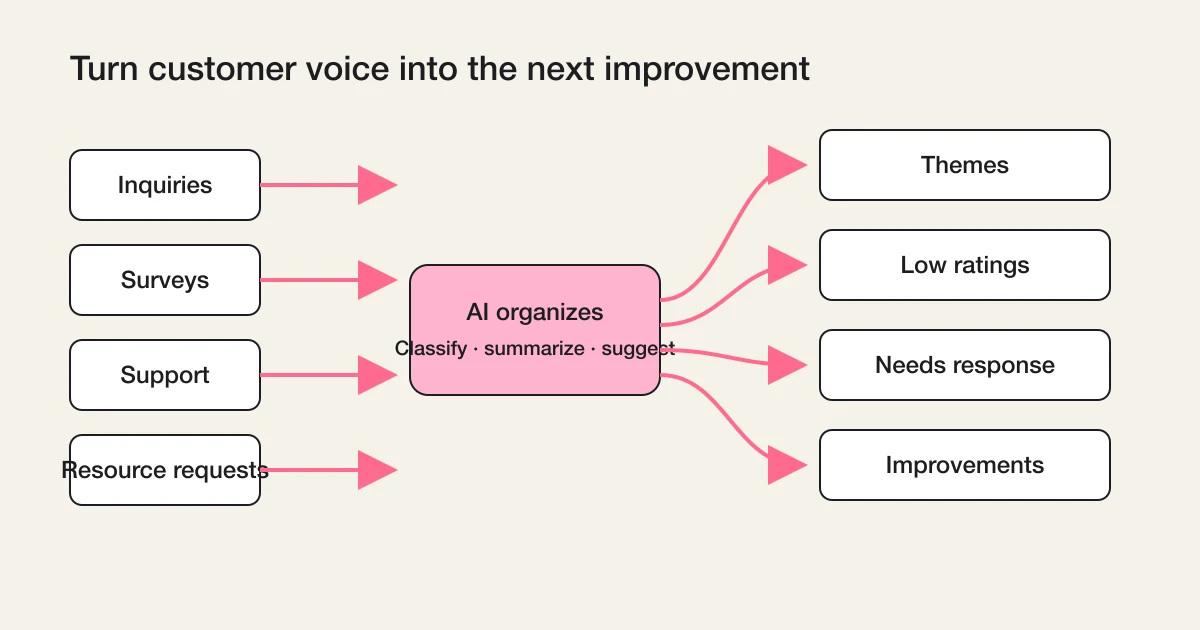
AI is good at three of these jobs: classification, summarization, and candidate generation.
Humans own the rest: important judgments, actual replies, anything shared publicly, and the final decision about what to build or fix.
If you keep that boundary, voice of customer analysis becomes a weekly habit instead of a quarterly archaeology project.
Where Customer Voice Actually Lives
When people say VoC analysis, they usually picture a survey.
But customer voice arrives through many more doors.
| Source | Example of customer voice | What you want to learn |
|---|---|---|
| Contact form | Pre-purchase concerns, pricing questions, vendor comparison | Barriers before buying |
| Support requests | Confusing steps, errors, missing explanations | Improvement priority |
| Surveys | Satisfaction, low-rating reasons, open-ended comments | Themes, low ratings, improvement ideas |
| Resource requests | What they want to know, timeline, budget signals | Sales temperature |
| Event registrations | Attendance goals, pre-event questions, expectations | Content improvement |
| Cancellations | Why they left, what did not fit | Churn prevention |
Each source carries its own bias.
If you only read surveys, you hear from people willing to answer surveys. If you only read inquiries, you hear from people who are already stuck. Survey respondents skew engaged; support requesters skew frustrated.
Voice of customer analysis works when you keep the sources separate enough to respect the bias, and then look for the themes that repeat across them. A pricing complaint that shows up in surveys, inquiries, and cancellation reasons is not an anecdote anymore. It is a pattern.
Prepare a Few Columns Before Handing Data to AI
AI can analyze a bare column of free text. It will produce something.
But if you want the output to drive action, give the data minimal structure first.
submitted_at
source_form
customer_segment
category
message
score
status
owner
followup_permission
sales_or_legitimate
Not every form needs every column.
But if you cannot tell which form a comment came from, who it concerns, whether it has been handled, and whether the person agreed to be contacted, the analysis stops at "interesting" and never reaches "actionable". A low-rating comment with follow-up permission is a task. The same comment without permission is only a signal.
The sales_or_legitimate column matters more than it looks. Contact forms attract sales pitches, and if they flow into your customer feedback analysis unlabeled, they distort every theme count.
If the responses live in FORMLOVA, the practical starting points are the shared status model in Form Response Status Management and the export path in Export Responses to CSV or Sync Them to Google Sheets.
What to Ask AI, and What Not to Delegate
Handing customer voice to AI with a plain "summarize this" is weak. You get a paragraph that sounds informed and changes nothing.
Ask questions that end in a decision instead.
1. Classify the customer voice into at most five themes.
2. Extract responses that contain a low rating or strong dissatisfaction.
3. List responses that likely need a reply, with the reason.
4. Split the feedback into pricing, features, support, adoption concerns, and unclear explanations.
5. Suggest three things to improve next week.
6. Do not include personal information in the report body.
Notice what is not on the list: "decide what we should build". AI proposes candidates. A person weighs sample size, business priority, customer importance, and implementation cost before anything ships.
Also notice where this analysis runs. When you use FORMLOVA through MCP, your AI client fetches the response data and performs the classification in your own session, with your own model. FORMLOVA provides the structured data, the operations, and the audit trail; it does not process your customer voice through a server-side LLM on your behalf. That keeps the reasoning inspectable and the cost model honest.
If you want a first repeatable output in FORMLOVA, the closest workflow is AI Response Report. It gathers responses from inquiry, survey, and application forms and organizes major themes and open questions into an internal report your team can actually discuss. It is a Premium+ workflow, so check the plan and connected-form requirements before enabling it.
If you have not connected an AI client yet, the setup path is in Using FORMLOVA from ChatGPT; the same MCP connection works from Claude and other MCP-capable clients.
How This Differs From Survey Analysis AI
Survey analysis AI is a subset of voice of customer analysis.
Surveys give you satisfaction scores, NPS, structured open text, low-rating reasons, and segment differences. That specific discipline, including how to prepare survey data and report on it, is covered in Survey Analysis AI: Summarize, Classify, and Report Form Responses. NPS and CSAT metric design itself belongs in the NPS Form Template, and this article deliberately does not cover score design or cross-tab aggregation.
Voice of customer analysis includes everything surveys miss.
The inquiry that says "your pricing page confused me". The resource request that asks for a comparison table. The support message that says "I got lost in setup". The event registration that asks "is this beginner friendly?".
None of these carry a score. All of them are usable improvement input.
For grouping open-ended text by theme, the Open-text Theme Report workflow makes low ratings and improvement requests easy to bring into a meeting, instead of leaving them as a spreadsheet nobody opens.
How This Differs From Inquiry Response Handling
Inquiry handling puts the response first.
Who replies? Is it urgent? Is it a sales pitch? Should it be excluded? Is it still unanswered? Those are operational questions with deadlines, and they are covered by routing and ownership design in Route Contact Form Inquiries by Category.
Voice of customer analysis looks at what remains after the replies are sent.
Why does the same question keep arriving?
Which pricing explanation makes people hesitate?
Which feature name is not landing?
What are the reasons behind low ratings?
Which inquiries could an FAQ or a better form field eliminate?
The two disciplines feed each other. Inquiry handling closes tickets; VoC analysis closes the loop by removing the reason the ticket existed.
For the weekly rhythm, Inquiry Weekly Status Report reviews unanswered items, categories, and owner checks in the same format every week, which connects the response work to the improvement work. It is available on the Standard plan and above; confirm the connected-form requirements before enabling it.
Keep Low Ratings and Strong Complaints Out of the Average
If you only look at averages, you will lose the responses that matter most.
Overall satisfaction can be high while the low-rating free text contains "I wish I had known this before adopting", "the reply took too long", and "the explanation did not make sense". Averaged away, those voices disappear. Read separately, they are a to-do list.
Keep a standing side-channel for signals like these.
Low rating
Contact requested
Cancellation reason
Urgent wording
Bug or outage report
Refund or contract issue
High-importance customer
AI is well suited to surfacing these candidates from a large pile of text. It is fast, it does not get bored, and it does not skim.
But whether to actually contact someone, issue a refund, or change the product is a human decision. AI flags; people decide. The moment that order reverses, your customer feedback analysis becomes a liability instead of an asset.
Make the Report Fit the Improvement Meeting
A long AI summary of customer voice will not be read. A report earns its place in the meeting by being short and ordered.
Use the same structure every week.
1. This week's conclusion from customer voice
2. Response count and which forms are included
3. Major themes
4. Low ratings and needs-response items
5. Questions that keep repeating
6. Candidates for the next fix
7. Items that need a decision
Customer voice exists to be acted on, not archived.
Fix the FAQ. Change a form field. Clarify the pricing page. Add the expected reply time to the auto-reply email. Publish the missing support article. Add the comparison table to the sales deck.
Only when the analysis flows back into changes like these does VoC analysis produce value. That is the response loop: collect, classify, decide, change, and then listen again to see whether the change worked.
Common Failures
Five failures show up repeatedly in customer voice AI analysis.
| Failure | What happens | Countermeasure |
|---|---|---|
| Only reading surveys | Inquiries and cancellation reasons are lost | Separate source_form and analyze across sources |
| Producing only a global summary | No next action emerges | Split out needs-response, low ratings, and improvement candidates |
| Treating AI labels as final | Misclassification leads to the wrong fix | Review samples and representative quotes |
| Sharing personal data widely | Internal exposure grows quietly | Keep reports anonymized and summary-centric |
| Reading a different format every time | Nothing is comparable week to week | Fix the weekly report template |
Voice of customer analysis is not something that improves the business just because AI was added.
It works when the team reads the same format every week, a person verifies the important voices, and the findings are handed to whoever owns the fix. The AI shortens the reading. The loop does the improving.
The Practical Order to Start in FORMLOVA
If you are starting voice of customer analysis in FORMLOVA, this order is realistic.
- Collect inquiries, surveys, and resource requests as form responses in one place
- Maintain
source_form,category,status,owner, andscorewhere you can - Ask your AI client to extract major themes, low ratings, needs-response items, and improvement candidates through MCP
- Turn the output into an internal report with no personal information in the body
- Hand only the needs-response items to owners
- Review the same report format weekly
- Feed the findings back into FAQs, form fields, landing pages, and support articles
To collect customer voice through forms and connect it to AI reports, theme classification, and owner review, start FORMLOVA for free. If you want to try response review and report generation from your AI client first, use the FORMLOVA setup guide.
Do not let customer voice end as sentiment trivia.
Read the responses, find the themes, catch the items that need a reply, and route the lessons back into the product.
Once that loop runs, form responses stop being an inbox to clear. They become the raw material that improves your product and your marketing every single week.
Related Articles
- FORMLOVA Form Automation Guide
- Survey Analysis AI: Summarize, Classify, and Report Form Responses
- Survey Form Guide
- Form Response Status Management
- Route Contact Form Inquiries by Category
- Using FORMLOVA from ChatGPT
Disclosure and Verification
This is a FORMLOVA blog article, and I am the developer of FORMLOVA. On July 2, 2026, I reviewed the Japanese pair article, the survey analysis AI guide, the automation hub, the response status and inquiry routing guides, and the workflow catalog to position this article as the English canonical for voice of customer analysis. The specifications and pricing of external VoC tools, generative AI tools, and CRM products change, so verify current official information before adopting any of them. For responses involving personal data, contracts, healthcare, finance, hiring, or legal matters, do not publish or send AI summaries as-is; follow your organization's policies and consult the relevant experts.