
Last updated: October 15, 2026
A quote request form should collect the name, reply address, request, and desired timing needed for a first response. Keep budget and supporting details optional. You can start without attachments on Free; file uploads and custom auto-reply require Standard or above.
If you want the general template for contact forms first, start with the Contact Form Template Guide. This article narrows that template down to quote requests.
Quick Answer: The Fields a Quote Request Form Needs
The schemas and owner/deadline examples below describe an operating model, not automatic response columns. Native FORMLOVA status accepts only new, in_progress, resolved, and spam. Keep ownership, waiting stages, SLA timestamps, and AI suggestions in documented notes/tags, purpose-built form fields where appropriate, or a separate ledger. A needs_review flag is a review convention, not a fifth native status. When tags are updated, read and preserve the existing array. Confirm each approved status change by response ID and retrieve the record again.
MCP CSV/Excel exports contain form-answer columns and submission time, not native response IDs, status, owner, notes, or tags. Export covers the whole form; filter a controlled working copy afterward if needed. For ID/status analysis, retrieve supported response details separately rather than inventing CSV columns or joining by raw contact information. Email and phone values returned through MCP are masked; never reuse a masked value as a recipient or CRM identity key. Native Sheets automatic sync likewise writes submission time and form fields; additional owner/status columns belong in a separate working ledger. Free owner notifications are a six-hour digest, exempt from the email quota. They are different from quota-counted custom/respondent email and from a chat-generated backlog report.
The minimum structure looks like this.
Full name
Company name
Email address
What you want quoted
Quantity or scale
Desired deadline
Budget range
File attachments
Consent to the stated data use
You do not have to make every field required.
But the information you need to judge a quote is worth asking for up front.
| Field | Recommendation | Why |
|---|---|---|
| Full name | Required | Needed to address the reply |
| Company name | Required for B2B | Used for account context, invoicing, and deal judgment |
| Email address | Required | Needed to reply |
| Phone number | Optional | Only for urgent work or industries that need an on-site check |
| What you want quoted | Required | Nothing moves if you do not know what to quote |
| Quantity or scale | Lean required | Needed to estimate unit price and effort |
| Desired deadline | Lean required | Drives reply priority and feasibility |
| Budget range | Optional | Helps align on the price band early |
| File attachments | Optional | Useful when drawings, site photos, or specs exist |
| Data-use consent | Where required | Use the label and policy link required by your jurisdiction and internal policy |
For a quote request, a name and an email address are not enough.
If that is all you collect, the first reply becomes a list of questions, and the requester has to write the real request twice. Some of them will not bother the second time.
At the same time, a form with too many fields does not get submitted.
Every extra required field asks the requester to do more work before they know whether you can help them at all. A quote request is often sent to more than one vendor, and the form that demands the most up front is the easiest one to abandon.
The key is to separate the information you need for the first reply from the information you need for the formal quote.
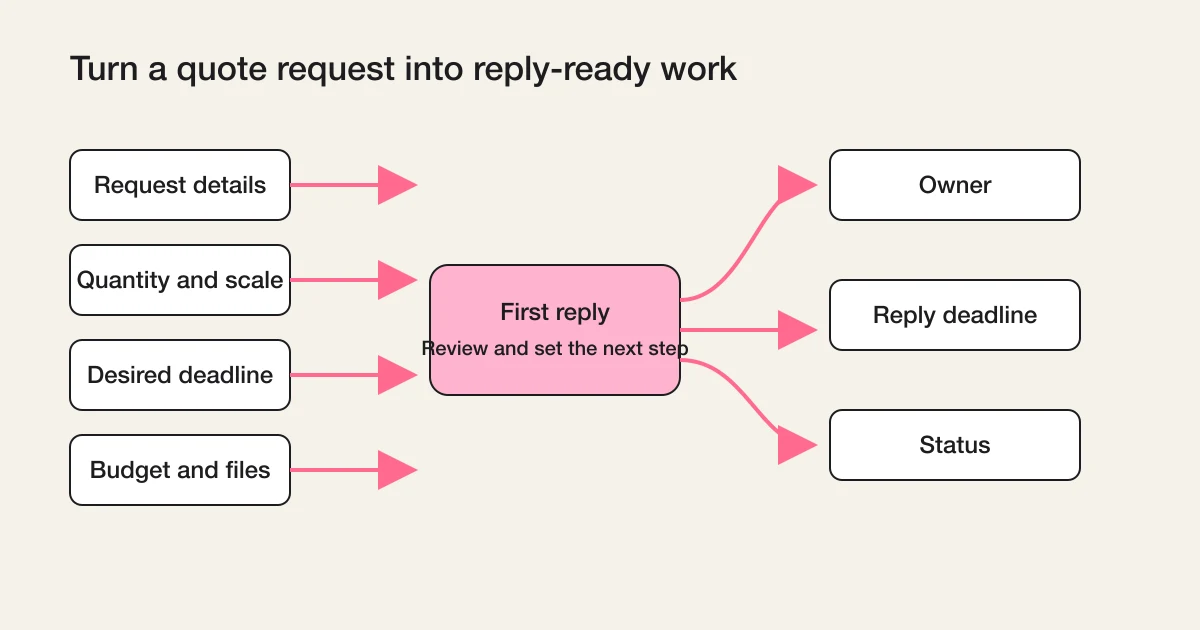
The first reply only needs enough to respond meaningfully: what is being requested, roughly at what scale, and by when. The formal quote can wait for the details you confirm in that reply.
Draft a quote intake without attachments
This is a proposed exercise, not an executed result. Begin with a draft or fictional data; use real responses only after defining the form, period, and allowed data.
Proposed analysis or ledger schema; fields must exist or remain unknown. This is not an executed output or a native CSV schema.
Draft an unpublished quote request form. Require name, company, email, request, and desired timing; keep quantity and budget range optional. Stay within Free by omitting file upload and custom auto-reply. Propose a data-use notice and a realistic first-response window. Keep owner, quote stage, and next contact date in notes or a separate ledger. Wait before publishing or sending.
Preview required fields, undecided timing and budget, and wording that avoids a binding quote promise. After approval and publication, use a controlled fictional submission to verify storage, and check any configured notifications with controlled recipients rather than real customers.
Free covers form creation, publishing, collection, response search/status, export, and basic analytics. AI reasoning here runs in your connected client under that provider’s terms and any separate fees. Custom auto-reply, reminders, imports, detailed analytics, file uploads, and native automatic Sheets sync require Standard or above; bulk email and sequences require Premium or above. External-MCP recipes can be run from Free when the necessary external connections, permissions, and provider conditions are met. They do not start background monitoring merely by being copied into chat.
Collect the details needed for a first quote reply
Start with the draft and review exercise above on Free, then add paid automation only when the operation needs it.
Sign up free and draft this form
After signup and email verification, connect a supported AI client and use the request above. Review its draft before publishing; the AI provider’s availability, terms, and fees also apply.
Make Only First-Reply Information Required
On a quote request form, it is safer not to over-expand the required fields.
The first goal is not to complete the formal quote.
It is to reach a state where quoting can begin.
For preventing missed replies after a quote request comes in, the workflow is covered in Inquiry Management From a Contact Form.
In most cases, these five required fields are enough.
Full name
Company name
Email address
What you want quoted
Desired deadline
Quantity, budget, and file attachments matter, but they can start as optional.
If the requester is still early in their evaluation, they may not be able to state a budget. The drawings or specifications may not exist yet.
Blocking the submission in that state helps nobody. It is more realistic to accept the request first and confirm the missing pieces in the first reply.
Ask for Budget as a Single-Choice Field
If the budget field is free text, the answers scatter.
You get "undecided," "let's discuss," "as cheap as possible," and "around 10 grand," and they are hard to sort later.
Free-text budgets also make the requester hesitate. Writing a number feels like a commitment, so many people leave the field empty or write something deliberately vague. A set of ranges is easier to answer honestly, because choosing a band does not feel like naming a final price.
Start with a single-choice field instead.
Undecided
Under 1,000 USD
1,000 to 3,000 USD
3,000 to 5,000 USD
5,000 to 10,000 USD
Over 10,000 USD
Prefer to discuss
Adjust the ranges to your typical deal size, your market, and your currency.
The point of asking about budget is not to screen people out. It is to change what you send back.
If the budget is undecided, reply with the conditions that need confirming. If the band is clear, reply with what is possible and what is difficult inside that band. If the quote is large, assign an owner quickly.
That is what the field is for.
Notice that both "Undecided" and "Prefer to discuss" are legitimate options, not failure states. A requester who honestly says the budget is undecided has still told you something useful: the first reply should focus on scoping, not pricing.
Separate the Urgent Path in the Desired Deadline
On a quote request form, how you ask about the deadline matters.
If the deadline is free text only, urgency becomes hard to read.
"Sometime soon" and "by the end of the month" sit next to each other in the same list, and the person triaging responses has to interpret each one before deciding what to open first. That interpretation step is exactly where urgent requests get delayed.
The recommended pattern is a single-choice field combined with a supplementary text field.
As soon as possible
Within 1 week
Within 2 weeks
Within 1 month
Timing not decided
Other
Below it, add a short follow-up field.
If you have a specific date or background, tell us here
The single-choice field gives you a sortable urgency signal. The supplementary field catches the context a fixed list cannot hold, like an event date or an internal approval deadline that explains why the timing matters.
A quote request that selects "as soon as possible" should not be treated like an ordinary inquiry.
If you split the owner notification or the Slack notification for that path, the first response is far less likely to slip.
To start a similar operation in FORMLOVA, the Pricing Inquiry Follow-up workflow is the entry point (available on Standard and above). It is a reusable prompt for reviewing budget, timing, and request context in chat. Any configured reminder, conditional email, or scheduled follow-up must be checked separately; it does not contact a requester merely because the recipe was copied.
A Workflow page supplies a reusable chat prompt. Run it in an active client session and inspect the requested tools and plan requirements before execution; it does not install a per-response listener or schedule by itself. A recurring report/reminder requires supported Standard-or-above settings or a separately configured scheduler; external Slack/Sheets MCP access has its own connection and provider conditions.
Keep File Attachments Optional
Attachments are genuinely useful for quote requests.
In FORMLOVA, file uploads are available on the Standard plan and above. The Free plan can start with basic intake without attachments, then expand to file collection when the operation requires it.
For example:
- Site photos
- Drawings
- Specification documents
- Reference images
- Existing materials
- Past quotes
But making attachments required increases drop-off.
Someone is hunting for a photo on their phone. A file exceeds the size limit. The document only exists on an office PC. Any of these can stop a submission right before the send button.
The frustrating part is that these are exactly the requesters you want: people with real drawings and real specifications. A required attachment field punishes them for not having the file at hand at the moment they found your form.
Start with attachments optional.
In exchange, add a helper text under the field.
Attach drawings, photos, or specifications if you have them. If nothing is ready yet, leave this empty.
The broader thinking behind attachment fields and other field types is covered in the Form Field Examples Guide.
Do Not Let the Auto-Reply End at "Received"
For quote requests, an auto-reply that only says "we received your request" is weak.
What the requester wants to know is what happens next.
Include at least these three things.
That the request was received
When to expect the first reply
That additional questions may follow
Here is an example.
We have received your quote request.
We will review the details and a team member will contact you, usually within 1 to 2 business days.
Depending on the request, we may ask follow-up questions about quantity, deadline, specifications, or attached materials.
Stating a reply window makes waiting easier for the requester.
A person comparing several vendors is deciding, in the hours after submitting, whether to keep waiting for you or move on. "Within 1 to 2 business days" gives them a concrete reason to wait.
It also creates a deadline on your side of the desk.
Once the auto-reply promises a window, the team has an explicit first-reply deadline instead of a vague intention to respond soon. That shared deadline is the foundation for everything in the next two sections.
In FORMLOVA, custom auto-reply emails are available on Standard and above. The full setup is covered in the Form Auto-Reply Email Setup Guide.
Split the Owner Notification
Quote requests often run hotter than ordinary inquiries.
Behind a quote request there is usually a concrete plan and, in many cases, a comparison against other vendors already in progress. A day of silence costs more here than it does on a general question.
If everything flows to the same notification channel, the important requests get buried.
The team sees one undifferentiated stream, and the urgent, well-specified request with a clear budget waits in line behind newsletter questions.
At the start, splitting on just these conditions already helps.
| Condition | Notify | Why |
|---|---|---|
| Budget range is clear | Sales owner | Likely to become a deal |
| Deadline is urgent | Owner + manager | Avoid a slow first response |
| Attachments included | Quoting owner | Content needs review |
| Company name present, large quantity | Sales lead | High importance |
| Request is unclear | First-touch reviewer | Clarifying questions needed |
With FORMLOVA, the Inquiry Owner Assignment workflow turns the request content into an owner candidate, a reason, and a reply deadline that you can record in notes or a linked operating ledger, not native owner/deadline columns.
For notification design across all inquiry types, the Contact Form Operations Guide is the parent reference.
Track Five Quote Stages Separately From Native Status
Once quote requests arrive, you need status management.
Use five quote stages in notes or a separate quoting ledger. They are not additional native FORMLOVA status values. New maps to new; review, awaiting details, and quote sent normally stay in_progress; Done maps to resolved only when handling is complete.
New
Reviewing
Awaiting details
Quote sent
Done
If you need them later, add "lost," "on hold," and "excluded."
Start too granular, and nobody updates the field.
| Ledger quote stage | Meaning | Next action |
|---|---|---|
| New | Nobody has looked at it | Review content, assign owner |
| Reviewing | An owner is checking it | Sort conditions, judge feasibility |
| Awaiting details | Waiting on the requester for missing info | Watch the reply, follow up |
| Quote sent | The quote went out | Set a follow-up date |
| Done | Handling is finished | Keep the record |
The fundamentals of state design are covered in Response Status Management.
If you manage quote requests in the same list as ordinary inquiries, Inquiry Management From a Contact Form walks through the minimum design for owner, handling status, and reply deadline.
The Finished Quote Request Form
Putting it all together, the initial structure of a quote request form looks like this.
Full name: required
Company name: required
Email address: required
Phone number: optional
What you want quoted: required
Quantity or scale: optional
Desired deadline: required
Budget range: optional
File attachments: optional
Consent to the stated data use: where required
Form description:
If the details are not decided yet, fill in what you know.
We will review the request and a team member will contact you, usually within 1 to 2 business days.
Pre-publish checks:
- The reply email address is required
- The desired deadline is a single-choice field
- The budget range is optional
- File attachments are optional
- The auto-reply states when to expect the first reply
- The owner notification conditions are decided
- A follow-up date can be recorded after the quote is sent
Once these checks pass, the quote request form stops being a mailbox and becomes the entry point that moves the response forward.
To try fields, owners, and a linked quoting process, start FORMLOVA for free and build the quote request form there. If you first want to see how this differs from order intake, the Order Form Guide is the closest comparison.
Building It in FORMLOVA
With FORMLOVA, you do not stop at building the quote request form. You connect it to the operations that follow each response.
The following is a proposed request. File upload and custom auto-reply require Standard or above; omit them for a Free draft:
Proposed analysis or ledger schema; fields must exist or remain unknown. This is not an executed output or a native CSV schema.
Create a quote request form.
Fields: full name, company name, email address, phone number, what you want quoted, quantity, desired deadline, budget range, file attachments, and data-use consent.
Propose the urgent-deadline notification rule and identify its plan and external connection requirements before configuring it. Keep owner and follow-up date in notes or a separate ledger. Do not publish, send, or claim an unsupported column was created.
If you prefer starting from an AI client, use the setup guide.
Summary
A request a quote form is a kind of contact form.
But its job is different from a general inquiry.
What you need is not just to receive submissions. It is to collect the material for a reply, decide the owner, hold a first-reply deadline, and keep a follow-up date after the quote goes out.
You do not need a full sales management system on day one.
Start by trimming the required fields, making the desired deadline and budget range single-choice, keeping attachments optional, and stating the first-reply window in the auto-reply.
That is a form your team can actually answer.
Related Articles
- Contact Form Template Guide
- Contact Form Operations Guide
- Inquiry Management From a Contact Form
- Inquiry Tracking Spreadsheet Template
- Response Status Management
- Route Inquiries Automatically by Category
Disclosure and Verification
This is a FORMLOVA blog article, and the author builds FORMLOVA. On 2026-07-02, I reviewed the FORMLOVA contact form, inquiry operations, tracking table, status management, and pricing inquiry follow-up workflow articles, along with the keyword and Search Console research behind the Japanese canonical, and published this article as the English canonical for quote request forms. This is the English pair of the Japanese quote request form guide. For form operations touching personal data, contracts, quote terms, or industry regulations, follow your company's own policies and professional review.
Rewrite verification (October 15, 2026): the form operations, plan boundaries, export schema, and proposed exercises above were checked against the current repository. Earlier dated research below or above remains historical; the fictional examples are not measured outcomes.