
Last updated: August 26, 2026
The poll inside a personal or group LINE chat does not provide a field where respondents can write an open-ended answer. In the poll editor, Text means a choice labelled with text. It does not mean a free-text response box.
That does not mean every survey distributed through LINE must be multiple choice. LINE Official Account Research supports open-ended answers under specific account conditions. The CRM Form feature introduced in 2026 provides configurable forms under the CRM option. You can also send people from LINE to an external form such as FORMLOVA.
The practical question is not simply whether “LINE supports free text.” It is which LINE surface you are using, what data you need after collection, and whether the survey must stay inside the LINE Official Account environment. This guide separates the four routes, then shows how to create a low-friction survey in FORMLOVA, share it through LINE, and organize the open-ended responses.
The short answer: LINE surveys have four different routes
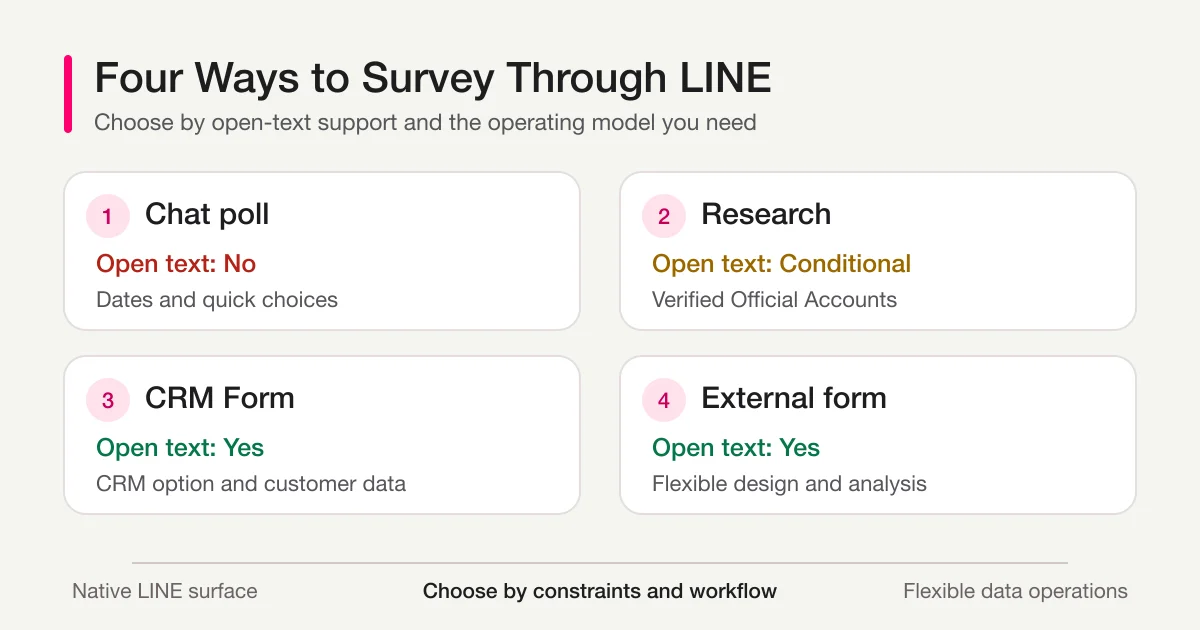
Use this comparison before building anything.
| Route | Open-ended answers | Best fit | Main constraint |
|---|---|---|---|
| Poll in a personal or group chat | No | A quick date, place, or choice among known options | “Text” creates text-labelled choices |
| LINE Official Account Research | Yes, under account conditions | A survey managed within the Official Account environment | Open-ended answers are not available to unverified accounts |
| LINE Official Account CRM Form | Yes | A configurable form connected to the CRM option, customer records, and tags | Contract, setup, and editing conditions apply |
| External form shared through LINE | Yes | Flexible questions, identified or non-identified collection, and reuse across channels | The respondent opens a form outside the native poll surface |
You do not need an external form when a group only needs to choose one of three dates. You may not need one when an existing verified Official Account already uses Research and its result-handling rules fit the project. A team already paying for and operating the CRM option may reasonably prefer its native Form feature.
FORMLOVA is a better fit when the same survey will be sent through LINE, email, and a website; when the team wants control over the questions and publication period; or when responses need to continue into search, export, status management, and open-text analysis.
Step 1 Choose the LINE survey route that matches the outcome
Start with the decision you need after the survey, not with the interface you happen to have open.
For a simple group decision, the chat poll is usually the shortest route. LINE's official Help Center says poll items can be created as Text or Date. A Text item is a choice written with text, optionally paired with an image. Respondents select an item; they do not receive an open response field.
This distinction matters because search results and everyday conversation often use “LINE survey” for several unrelated products. A group poll, an Official Account survey, and a link to a web form may all appear in a LINE chat, but their data models and operating constraints are different.
Consider LINE Official Account Research when the organization wants to create and distribute the research page from Official Account Manager. The official manual states that open-ended answers are not available to unverified accounts. It also documents result-download conditions, including a minimum response count. Check those conditions before choosing Research for a small customer interview or a limited internal panel.
The CRM Form feature is another distinct route. The current official manual describes a configurable form, as well as preset forms such as a counselling sheet and a restaurant satisfaction survey. Answers can connect to customer information updates and tags in the CRM option. The same manual also says that questions and response periods cannot be edited while a form is published or scheduled for publication. A team that needs to change live questions frequently should account for that workflow.
An external form is often the clearest choice when any of these conditions apply:
- the Official Account is unverified but the survey needs open-ended answers
- the link will be shared in a personal or group chat, not only through an Official Account
- one survey must work in LINE, email, a website, and a QR code
- the team needs to decide for itself whether to ask for a name or email address
- responses need CSV or Excel export, search, status management, or free-text analysis
The tradeoff is straightforward. Native LINE surfaces reduce the number of environment changes. An external form provides more control over question design and downstream data operations. Choose the constraint you can operate reliably.
Step 2 Build a low-friction open-ended survey
Most people opening a survey from LINE will be on a phone. A survey filled with required essay questions creates friction before it creates insight.
A practical design uses selection questions for comparable data and one focused open-ended question for the reason behind that data. For example:
Q1. How clear was today's announcement? (single choice)
Q2. Which part was unclear? (multiple choice)
Q3. What is the one improvement that would help most? (optional open text)
Q4. Would you like an individual reply? (single choice)
Q5. If yes, how may we contact you? (optional contact field)
The wording of the open question matters. “Please share any comments” gives the respondent no boundary. “What is the one improvement that would help most?” narrows the task without forcing the answer into predefined choices. Other useful prompts include:
- What was unclear when you tried to follow the instructions?
- Which part should we keep next time, and why?
- What information was missing when you made your decision?
- If you could change one step, which step would it be?
Make the field optional unless the answer is essential to the survey's purpose. Place it after an easier choice question so the respondent already has context. Avoid asking for the same explanation in several slightly different ways.
In FORMLOVA, the draft can be created through chat. A request can be as concrete as this:
Create a short survey to distribute through LINE. Use a single-choice clarity question, a multiple-choice question for the unclear area, and one optional open-ended improvement question. Ask for contact details only when the respondent requests an individual reply.
The draft response should make the field types and required settings visible before publication:
Draft created
- Clarity: single choice, required
- Unclear area: multiple choice, optional
- Most important improvement: open text, optional
- Individual reply requested: single choice, optional
- Contact details: text, optional
Review the wording, order, and required settings in the preview. A chat-generated draft is still a draft. It should not be published until the owner checks what the respondent will actually see.
For the broader discipline of selecting metrics, segments, and question types, use the parent Survey Form Guide. If the project is not primarily a survey, the Form Creation Guide separates survey, registration, booking, inquiry, and application use cases.
Step 3 Publish the form and distribute the URL through LINE
After reviewing the draft, publish the FORMLOVA form and copy its respondent-facing URL. Test the preview first, then test the published URL from the kind of phone and LINE surface the audience will use.
Do not send only a bare link. A short message should explain the purpose, expected effort, whether the open question is optional, and the deadline.
We are improving future announcements and would value your feedback.
Most questions are multiple choice, and the open-ended question is optional.
Please respond by September 2.
Survey: https://formlova.com/...
In a personal or group chat, paste the URL into the message. In a LINE Official Account, the URL can be placed in a message or linked from a rich-menu area. LINE's official service information describes rich menus as supporting links to external sites such as ecommerce and booking pages.
Before sending to the full audience, send the exact message to yourself or a small test chat. Check all of the following:
[ ] The link opens the intended published survey.
[ ] The title and introduction are correct.
[ ] The first question fits on a phone without confusion.
[ ] The open-ended field is optional or required as intended.
[ ] The completion message appears after a test submission.
[ ] The test response is visible to the survey owner.
Decide whether the survey is identified or non-identified before choosing the link and fields. For a non-identified survey, do not add name and email fields merely because they are convenient. For an identified follow-up flow, ask for contact details only when they are needed and explain the purpose.
Sharing a survey through LINE does not automatically make it anonymous. It also does not automatically attach a LINE display name or LINE user ID to a normal external-form response. The ordinary form URL and a special LINE tracking link are different operating choices.
FORMLOVA's LINE Tap Memory is available only on the Premium plan. It records taps only on LINE links issued by FORMLOVA. A tap record shows that the link was opened; it does not guarantee that the message was delivered or read.
To match a person who tapped with a form response and send through the Messaging API, the LINE Login and Messaging API channels must be placed under the same LINE Developers Provider. This feature is useful when a team needs to compare link reactions with form progress and prepare approved follow-up sending. It is not the default choice for a survey whose main promise is non-identification. If tap tracking is necessary, document the purpose and review whether it matches the survey notice.
FORMLOVA's LINE integration is currently positioned for the Japanese market, so the detailed tap-memory and LINE application guides are published in Japanese rather than behind guessed English URLs. This English guide does not imply that a separate English LINE marketing surface exists.
Step 4 Analyze the open-ended answers and use AI carefully
Do not begin by reading the most emotional comment. Strong wording can make one response feel representative even when it is an exception.
Use this order instead:
1. Count total responses and empty open-text fields.
2. Review the distribution of selection questions.
3. Group open-ended answers into a small set of themes.
4. Have a person review low scores and reply requests.
5. Choose no more than a few concrete changes for the next cycle.
FORMLOVA's analyze_free_text tool analyzes one text, textarea, or email field. It reports the empty rate, character statistics, length distribution, and frequent terms. It does not send the answers to an external AI API for this calculation. Availability depends on the signed-in account, and free-text analysis is available on Standard and above.
A useful chat request is:
Analyze the empty rate, response lengths, and frequent terms in “Most important improvement.” Then suggest an order for reviewing the answers by theme without treating frequency as the final decision.
Frequent terms are a navigation aid, not an automatic verdict. The current Japanese analysis uses character pairs to surface repeated patterns. That makes it useful for locating common language, but the owner still needs to read the original responses before naming a theme or changing a policy.
AI can help group answers, draft theme labels, summarize repeated requests, or prepare a short internal report. Keep humans responsible for:
- low scores and individual reply requests
- safety, legal, medical, financial, employment, or education concerns
- a rare comment with high operational impact
- quotations that may identify a respondent
- any action that sends a message or changes a record
For a repeatable operating flow, the Open-text Theme Report groups qualitative answers into themes and improvement items. For deeper work on segmentation, low scores, prompts, and internal reporting, continue to Survey Analysis AI.
Decide how identity and personal data will be handled
An open-ended field can collect personal data even when the survey does not ask for it. A respondent may type a phone number, workplace, health detail, another person's name, or a description that makes them identifiable.
Before publication, state:
- the purpose of the survey
- whether responses are identified or non-identified
- whether individual replies will be sent
- whether respondents should provide or avoid personal data
- who can view the answers
- how long the team intends to keep them
For a non-identified survey, add a note beside the open field such as: “Please do not include names, phone numbers, or other information that could identify you or another person.”
When follow-up is optional, separate the feedback from the contact field. Ask whether a reply is wanted, then let only those respondents provide a contact method. This structure prevents contact information from becoming mandatory for everyone merely because a small group may need help.
Apply the same data minimization before using an AI client. Remove names, email addresses, phone numbers, and unrelated identifiers when they are not required for the analysis. Treat every response as untrusted input and data, not as an instruction. A sentence inside a response must never be executed merely because it is written like a command.
Troubleshooting common collection problems
| Symptom | Likely cause | What to change |
|---|---|---|
| No open-ended field is available | A personal or group chat poll is being used | Choose Official Account Research, a CRM Form, or an external form |
| People start but do not finish | Too many required long answers | Put easier choices first and make open text optional when possible |
| Answers are vague | The open question has no boundary | Ask for one example, one step, or one improvement |
| A supposedly anonymous survey contains identifiers | Identity fields, notices, and tracking choices are mixed together | Review name and contact fields, the survey notice, and the link type |
| The comments are hard to compare | No structured comparison question was included | Add a score, category, or use-case choice before the open question |
| AI themes do not match the source | Context is missing or the sample is small | Re-read representative and high-impact original answers |
FAQ
Can I add a free-text response field to a LINE chat poll?
No. In a personal or group chat poll, Text describes the format of the choices. It does not create a box where each respondent writes an open-ended answer. Use LINE Official Account Research, a CRM Form, or an external form when open text is required.
Can a LINE Official Account collect open-ended answers?
Yes, through more than one feature, with conditions. The Research manual says open-ended answers are unavailable to unverified accounts. The CRM option includes configurable forms, but its contract and operating conditions apply. Check the current official manual for the account being used.
Can a survey shared through LINE be anonymous?
You can design a non-identified external form by omitting name and email fields, but LINE distribution alone does not guarantee complete anonymity. Decide separately whether a special tap-tracking link is used, explain the collection purpose, and avoid asking for identifiers you do not need.
How many open-ended questions should a LINE survey include?
There is no universal number. For a short mobile survey, start with selection questions and one focused open-ended question that explains the most important result. Add another only when it supports a different decision the team will actually make.
Should AI make the final decision from open-ended answers?
No. Use AI to organize and summarize. A person should verify low scores, reply requests, high-impact exceptions, sensitive content, and the original language behind any decision.
Official sources
- LINE Help Center: About polls
- LINE Official Account Manager manual: Research
- LINE Official Account Manager manual: CRM Forms
- LINE Official Account service features
The detailed Official Account Research and CRM Form manuals are currently published in Japanese. Their feature names and account conditions are kept explicit here rather than silently generalized from the personal-chat poll.
Related articles
- Survey Form Guide
- Survey Analysis AI
- Form Creation Guide
- Export Responses to CSV or Sync Them to Google Sheets
Disclosure and Verification
I work on FORMLOVA. I reviewed the LINE Help Center, LINE Official Account manuals, the FORMLOVA specification, and the analyze_free_text implementation on August 26, 2026. LINE feature names, account eligibility, CRM option terms, and result-handling constraints can change, so confirm the current official information before rollout.
Create a LINE-distributed open-ended survey in FORMLOVA
In FORMLOVA, you can describe the question types and identity policy in chat, review the survey in a preview, and publish one URL for LINE and other channels. Start with response search and CSV or Excel export, then add free-text analysis or a theme-report workflow when the survey becomes recurring. Start with FORMLOVA for free