
Last updated: October 15, 2026
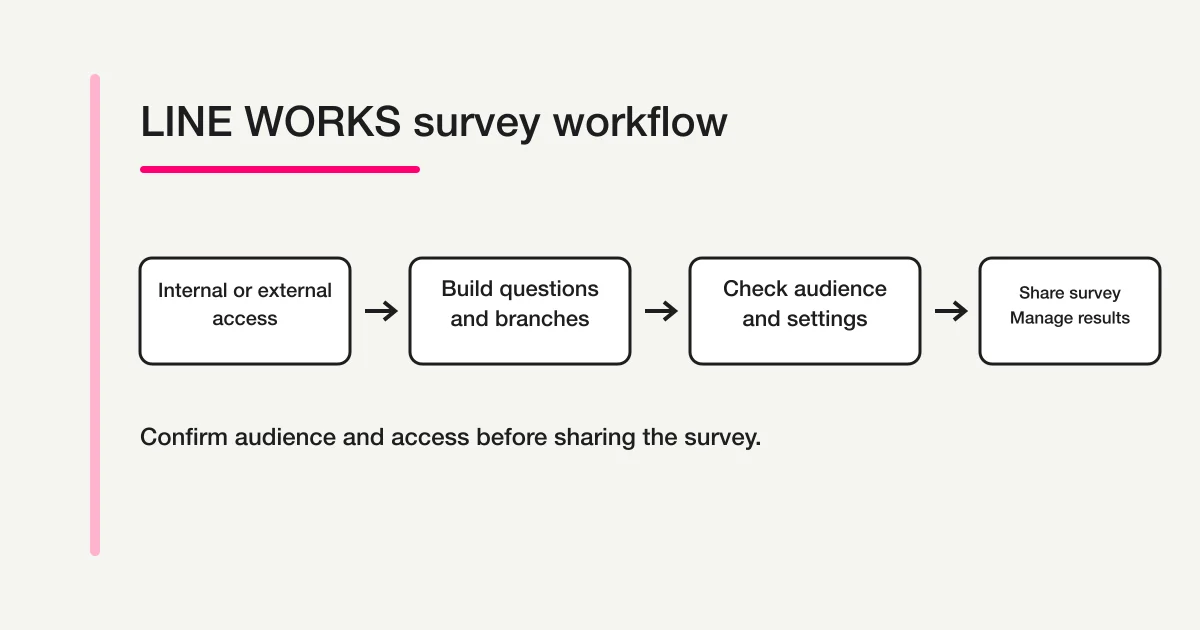
Create a LINE WORKS survey from Form, choose Internal or External Use, then build questions and review audience, period, anonymity and result visibility before sharing. External Use is for eligible external contacts, not unrestricted internet access.
Current official creation help and pricing include survey functionality in Free guidance, while the creation category still says Advanced only. Check your tenant and administrator policy rather than treating that documentation conflict as a product limitation. The comparison later is about audience and operating needs.
Official help pages also currently differ on plan availability. Check the current contract and administrator controls before promising availability.
Start here: decide what the survey must do
Do not begin with a long list of questions. Write the decision that the result will support. “Collect feedback” is vague. “Choose the three training topics to revise before the next session” gives the survey a usable finish line.
Use this short decision table before opening the editor.
| Decision | Main choices | Why it matters |
|---|---|---|
| Who should respond? | Organization members or external contacts | Determines Internal Use or External Use |
| Should managers identify respondents? | Named or anonymous | An administrator may restrict this choice |
| What evidence is needed? | Choice, text, schedule, rating, or date/time | Branching support differs by question type |
| Who may inspect the result? | Creator, co-managers, respondents, or link recipients | Changes the exposure of individual and summary data |
LINE WORKS supports a quick survey from a message room and fuller creation from the Form area. A template can be suitable for safety confirmation, attendance, or schedule coordination. A blank survey is the clearer route when the team needs original questions, pages, or branches.
LINE WORKS is different from LINE Official Account. The names share “LINE,” but the products, administration surfaces, respondent models, and survey features are not interchangeable. If the job is to send research or a CRM form from a customer-facing account, use the separate LINE Official Account survey guide.
Step 1: Choose the purpose and access type
Open Home, choose Form, and create a new survey. Select Internal Use when the respondents are members of your LINE WORKS organization. Select External Use only after identifying the external contacts who are expected to answer.
The first-party creation guide says External Use can survey LINE users or users of another LINE WORKS organization who have been added as external contacts. It also says only members whose administrator has enabled the relevant external connection can create an external survey. That is a defined contact boundary, not evidence that any anonymous visitor with the URL can respond.
Record the operating decision in plain language:
Purpose: choose the training material changes for the next session
Respondents: members who attended the September 4 session
Deadline: September 11 at 5:00 p.m.
Result owner: two training coordinators
Action: select the top three themes and review supporting comments
If you reuse a collaborative survey, the official creation flow allows a copy and asks whether to copy the respondent audience and response period. Open the copied settings and inspect both values. Reusing last quarter’s questions should not silently reuse last quarter’s people or deadline.
The draft help page also says work in progress is saved automatically in real time and can be resumed from drafts. Automatic saving protects the draft; it does not replace an editorial review of the questions or an access review before distribution.
An employee survey needs an additional privacy judgment. Even when a tool labels responses anonymous, a narrow department, exact timestamp, role, project name, or distinctive comment may identify a person. The anonymous employee survey guide covers that tool-neutral design problem. This page stays with the LINE WORKS controls.
Step 2: Build questions and branches
Current official help lists multiple choice, free response, schedule vote, dropdown, rating, date/time, and image questions. A question can be required, and supported choice questions can allow multiple selections. Choose the smallest set that supports the decision you wrote in Step 1.
A post-training survey could use this structure:
Q1. Did you attend the training? (single choice, required)
Q2. How applicable is the material to your work? (rating, required)
Q3. What should be improved? (multiple choice, optional)
Q4. Please give a reason or example. (free response, optional)
Q5. Which topic should the next session cover? (single choice, optional)
Use pages before configuring branching. The current question guide says branching can start from a single-answer multiple-choice question, a single-answer schedule vote, a dropdown, or a rating. Each answer sends the respondent to a selected page or follows the normal path.
For example, “Did not attend” can lead to a closing page, while “Attended” can lead to the rating and improvement questions. A partial attendee can receive a separate question about the portion attended. This prevents a person who did not experience the session from being forced to rate it.
Create a branch map before publishing:
| Answer | Destination | Test expectation |
|---|---|---|
| Attended | Rating and improvement page | All required fields are reachable |
| Attended partly | Attendance scope, then rating | Result remains distinguishable from full attendance |
| Did not attend | Closing page | No experience rating is required |
Run each path in preview. Check more than the visible jump. Confirm that a required question does not become impossible to reach, the closing message fits the answer, and the result can still be interpreted after different paths.
Good branching cannot repair a biased question. Avoid asking two things at once, such as whether the content was “clear and useful.” A respondent may find it clear but irrelevant. Keep choices mutually understandable, explain rating endpoints, and use optional free text for context. The broader survey question design guide owns that methodology.
Step 3: Check audience, anonymity, and response settings
Before completing the survey, inspect the audience and response period. Then review whether responses are named or anonymous, whether respondents may see a result summary, whether duplicate responses are allowed, whether a submitted response can be edited, and whether results may be shared.
These options do not belong entirely to the survey author. LINE WORKS administrator help describes organization-wide controls for the permitted respondent scope, named or anonymous modes, result visibility to respondents, duplicate responses, response editing, and result sharing. If the authoring screen does not offer an option, ask whether the administrator has restricted it instead of assuming that the interface is broken.
The administrator guide also says changed settings apply to forms created after the change. When policy matters, do not assume an existing survey inherited a later administrator update. Inspect the actual survey and, if needed, create a controlled test survey after the change.
Use this pre-share checklist:
1. Is this Internal Use or External Use?
2. Exactly which members or external contacts may respond?
3. Are the deadline and time zone correct?
4. Is the survey named or anonymous?
5. Are duplicate submissions allowed?
6. May a respondent edit a submitted answer?
7. Will respondents see a result summary?
8. Are co-managers and result recipients limited to people who need access?
9. Has every branch been tested?
Do not promise anonymity based on one toggle. Remove direct identifiers unless they are necessary, avoid tiny demographic segments, explain who will read free text, and decide how long exports will be retained. If individual follow-up is needed, a named survey with a clear purpose may be more honest than an “anonymous” survey that asks for identifying details later.
Plan availability needs its own verification. On September 4, 2026, the Japanese individual pages for creating a survey and editing questions, as well as the current pricing page, included the feature in FREE-plan guidance. The Japanese category page for survey creation said Advanced only. Because those current first-party surfaces do not provide one consistent answer, this article intentionally does not map the function to a plan. Check the feature shown in your tenant, the current pricing material for your region, and your administrator’s settings before promising a rollout.
Step 4: Share the survey and manage results
Current official help lists message rooms, boards, email, URL, and QR code as sharing routes. It also describes a service notification when a target audience is specified. Choose the route that matches the same audience reviewed in Step 3. Sharing a URL into a wider room must not be used to bypass the intended respondent scope.
Before broad distribution, submit at least one test answer from the expected audience and test access from an account that should not respond. Confirm the title, introduction, first question, each branch, deadline, closing message, and appearance of the test result.
Give the message enough context to make an informed choice:
This survey will help improve our training material.
Audience: attendees of the September 4 session
Deadline: September 11 at 5:00 p.m.
Estimated time: three minutes
Two training coordinators will review the results for the next revision.
The LINE WORKS overview describes automatic real-time result analysis, charts for respondent counts and response rates, reminders to people who have not answered, and collaborative management. Treat each as a separate operating action. A message delivered or read is not a completed response. A survey link forwarded to another room does not automatically expand the valid denominator. A response-rate chart is meaningful only when the intended audience is configured correctly.
If the author shares a result link, current help describes that link as a summary view for internal members and allows sharing to be ended. A co-manager, a respondent who can see a summary, a result-link recipient, and a person receiving a CSV do not necessarily receive the same view. Review free text and individual details before granting access, and stop sharing when the operating need ends.
Record the result with its context:
| Record | Example |
|---|---|
| Audience and denominator | 42 training attendees |
| Collection window | Closed September 11 at 5:00 p.m. |
| Main result | More practical examples requested |
| Action | Add two role-specific examples |
| Owner and deadline | Training coordinator, September 25 |
Do not present a response rate, average rating, or comment theme as proof that the program caused an outcome. The survey describes responses from its configured audience at a particular time. Compare later results only when wording, audience, access, and timing remain sufficiently stable.
For broader work on question-to-decision design, distributions, free-text review, and improvement ownership, return to the parent survey creation and analysis guide.
Choose between the built-in survey and an external form
Keep the native survey when respondents are members or eligible contacts and native reminders/results fit the job. Consider an independent public form for an open event or website audience. Sharing its URL in LINE WORKS does not synchronize members, nonresponders, submissions or results.
Draft feedback for an open workshop
This is a proposed trial, not an operation or result measured for this rewrite. Use a private test draft first.
Create a private feedback draft for an open workshop. Ask whether they attended; show usefulness and an optional improvement comment only to attendees. Do not request LINE WORKS identity. Explain who reads the results and that this is a separate form, not a LINE WORKS survey sync. Do not publish.
Before proceeding, check:
- Test attendee and non-attendee routes and exclude non-attendance from ratings.
- Review identifiable free text and default classification/external AI handling before actual sensitive collection.
- Keep a separate handoff owner and response source of truth; no native LINE WORKS response-rate denominator is inherited.
Test an open-workshop survey independently
Free covers form creation, conditional display, response collection and basic counts. Detailed distributions and free-text analysis require Standard or above. No LINE WORKS integration is included.
Register free and draft workshop feedback
Register, verify your email, connect a supported AI client, and paste the proposed request above. Check the saved draft before publishing. AI-client account and usage requirements apply separately.
Frequently asked questions
Is the LINE WORKS survey available on the free plan?
This guide does not give a yes-or-no answer because current official help pages differ. Individual Japanese creation and question pages say all plans, while the Japanese survey-creation category says Advanced only. Regional English material uses different eligibility language. Verify your tenant, current regional pricing information, and administrator settings.
Can anyone answer an External Use survey?
Do not interpret External Use as an unrestricted internet form. Current official help describes LINE users or users at another LINE WORKS organization who have been added as external contacts. The survey creator must also have the relevant external connection enabled by an administrator.
Does anonymous mode guarantee that nobody can identify a respondent?
No. It can hide the respondent identity in the result interface, subject to administrator policy, but the answers themselves may reveal a person. Small teams, exact timestamps, rare roles, named projects, and distinctive free text can make re-identification possible. Minimize the collected data and explain who will see it.
Are LINE WORKS surveys the same as LINE Official Account surveys?
No. LINE WORKS is an organization-oriented work communication service. LINE Official Account is a customer communication product with different research and CRM-form surfaces. Use product-specific instructions and do not assume a setting exists in both.
Can FORMLOVA results synchronize automatically with LINE WORKS?
No direct integration is verified in the current FORMLOVA specification. You can share a FORMLOVA public URL through LINE WORKS, but URL distribution and result synchronization are different capabilities. Use a documented export or another integration only after that path has been verified.
Should results be shared with every respondent?
Only when that visibility supports the survey purpose and does not expose sensitive information. Confirm the administrator policy, the survey-level setting, and the contents of free-text answers. A high-level summary may be appropriate even when individual responses are not.
Summary: verify the audience before sharing
The dependable order is to choose Internal Use or External Use, build the questions and branches, check audience and response controls, and then share the survey and manage the result. Test every branch and at least one allowed and disallowed account before broad distribution.
The main risks are semantic rather than technical: treating External Use as public internet access, promising anonymity without reviewing the questions, overlooking administrator restrictions, or assuming that sharing a separate form URL creates product integration. Keep those boundaries explicit and the survey becomes easier to operate.
What to do next
Choose the native or separate form by audience and handoff, then test permitted and excluded routes. Confirm plan access in the actual LINE WORKS tenant before promising rollout.
Disclosure and Verification
This guide reviewed the first-party LINE WORKS pages for creating surveys, saving drafts, editing questions, survey settings, administrator controls, sharing a survey, viewing results, sharing results, the survey overview, the survey-creation category, and the pricing page on September 4, 2026. The cited help pages are in Japanese; labels and availability may differ by region, language, plan, and administrator policy. FORMLOVA claims were limited to the same-day specification and implementation review.
If respondents outside the LINE WORKS contact boundary need one public URL and you want the form system to own branches and response analysis, you can start a survey draft in FORMLOVA.