
Last updated: 2026-08-13
A lead magnet follow-up sequence should not turn one download into unlimited permission to sell.
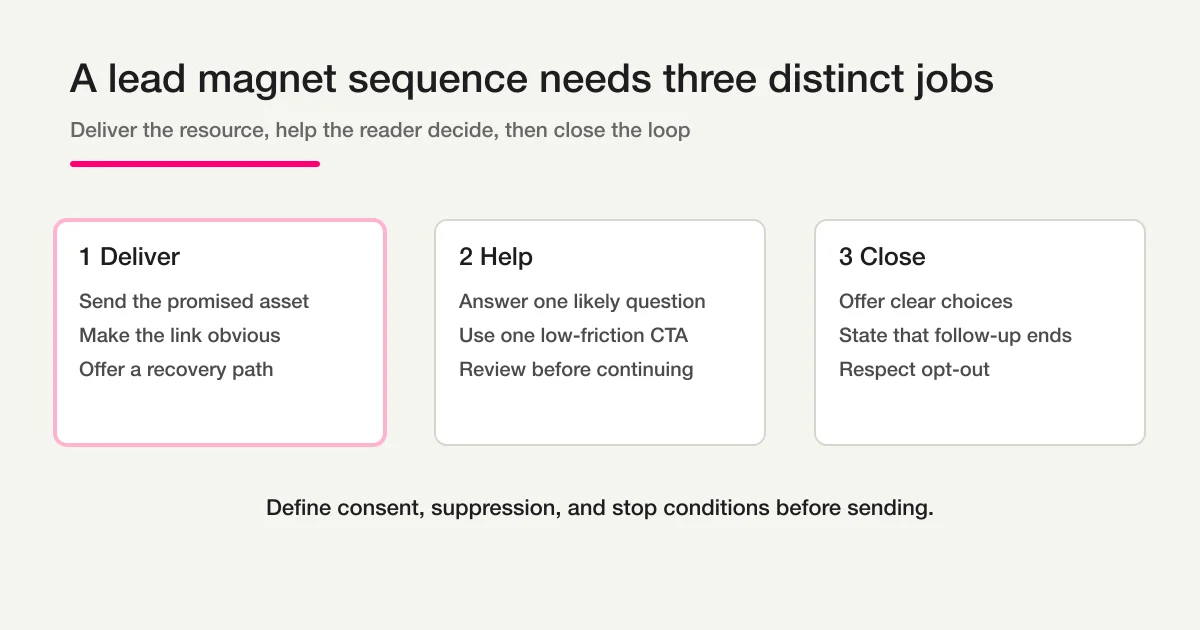
Use three distinct jobs:
- Deliver: send the brochure, guide, ebook, checklist, or report the person requested.
- Help: answer one likely decision question after the reader has had time to look.
- Close: offer clear next steps and end the planned follow-up if there is no response.
This structure keeps the first email transactional in purpose, makes the second useful, and prevents the third from becoming another generic “just checking in” message.
Compliance depends on the recipient, region, relationship, and message purpose. A U.S. commercial email, a U.K. electronic-marketing message, and a requested resource delivery can have different rules. This article gives an operating design, not universal legal advice.
The three-email sequence at a glance
| Example timing | Job | Primary action | Stop condition | |
|---|---|---|---|---|
| 1 | Immediately after request | Deliver the promised resource | Open or download it | Invalid address or request withdrawn |
| 2 | Two to four business days later | Help with one decision | Reply or read one relevant page | Unsubscribed, sales conversation active, individual handling underway |
| 3 | Five to seven business days after the request | Close the planned follow-up | Choose “not now,” “ask a question,” or “talk” | Reply, unsubscribe, qualification change, or sequence end |
These intervals are a starting point. They are not a guaranteed conversion recipe. A complex procurement report, a consumer checklist, and a product brochure have different reading and buying cycles.
FORMLOVA uses elapsed minutes, not a business-day calendar. If you need exact weekday and holiday handling, calculate and manage that outside the simple sequence model.
Email 1: Deliver the requested resource
The first message should make the promised asset easy to find.
Place the resource name and link near the top. Add a recovery path if the link does not work. Keep the sales request secondary or omit it.
Subject examples
Your copy of the {{resource_name}}
Download: {{resource_name}}
Here is the guide you requested
Template
Hi {{first_name}},

Thanks for requesting {{resource_name}}.

You can download it here:
{{resource_url}}

It covers {{one_sentence_description}}.

If the link does not work, reply to this email and we will help.

{{company_name}}
{{contact_details}}
Do not hide the download below a long founder story, product tour, or meeting pitch. The person completed the form for the resource. Fulfill that request first.
The thank-you page should also provide the download or a recovery instruction when appropriate. Email delivery can be delayed, mistyped, or filtered.
Email 2: Help with one decision
The second message should help the reader use the resource.
Choose one likely question, not a catalogue of product benefits.
Subject examples
One question to use with {{resource_name}}
How to choose between {{option_a}} and {{option_b}}
The section readers usually use first
Template
Hi {{first_name}},

One question often comes up after reading {{resource_name}}:

{{decision_question}}

As a starting point, choose {{option_a}} when {{condition_a}}.
Choose {{option_b}} when {{condition_b}}.

If your situation does not fit either one, reply with the constraint that matters most.

{{company_name}}
The action can be a reply, a single related page, or one short diagnostic question. It does not have to be a meeting booking.
Avoid unsupported certainty such as “This will double your results” or “Your company definitely needs option A.” The follow-up should reduce decision friction, not manufacture urgency.
Email 3: Close the loop
The third message gives the recipient control and ends the planned sequence.
Subject examples
Should we close the loop on {{resource_name}}?
What would be useful next?
We will pause this follow-up here
Template
Hi {{first_name}},

We will pause the planned follow-up for {{resource_name}} after this email.

If useful, reply with the number closest to your situation:

1. I am still researching. No more follow-up is needed.
2. I may revisit this around {{timeframe}}.
3. I have one question.
4. I would like a short conversation.

If we do not hear from you, we will close this sequence.

{{company_name}}
If the message says the follow-up ends, the automation and human process must honor that statement. Do not send a fourth “final” message by default.
Resource delivery and marketing consent are not identical
A person may ask for one guide without agreeing to an ongoing marketing list.
Separate these decisions in the form and data model:
- delivery of the requested resource
- the described short follow-up sequence
- broader newsletter or promotional subscription
- individual sales contact
A clear form notice might say:
We will email the requested guide and up to two follow-up messages about using it.
You can unsubscribe from ongoing messages at any time.
Whether that notice and a particular consent mechanism are sufficient depends on applicable law and the context. Do not copy it into every region without review.
Store what the person saw and did:
- request time and resource name
- consent or other legal basis used for each communication purpose
- notice version
- unsubscribe or objection time
- handoff to individual sales follow-up
- final sequence status
U.S. CAN-SPAM operating checklist
The U.S. Federal Trade Commission's CAN-SPAM compliance guide explains that the law covers commercial messages, including business-to-business email. It requires accurate header information, non-deceptive subject lines, a valid postal address, a clear opt-out method, and prompt honoring of opt-out requests.
For an operator, that means:
[ ] From, Reply-To, and routing information identify the sender accurately
[ ] Subject matches the message content
[ ] The message classification is reviewed
[ ] Valid postal address is present where required
[ ] Opt-out method works and remains available
[ ] Suppression is applied across relevant future marketing sends
[ ] Vendors and agencies are monitored
Do not treat a resource request as a permanent exemption from future-message controls.
U.K. electronic marketing and consent
The U.K. Information Commissioner's Office maintains guidance on direct marketing using electronic mail and planning direct marketing.
The ICO emphasizes that consent, when relied on, must be freely given, specific, informed, and unambiguous, and people must be able to withdraw it. Its electronic-mail guidance also covers the PECR rules and context-specific alternatives such as the soft opt-in.
Do not reduce that analysis to “they downloaded something, so we can email them.” Identify who the recipient is, what relationship exists, what the message promotes, what rule or basis applies, and how objection or withdrawal is honored.
One-click unsubscribe is a protocol control, not the whole policy
RFC 8058 defines a one-click mechanism for list email using List-Unsubscribe and List-Unsubscribe-Post headers.
FORMLOVA sequence messages include an unsubscribe link and List-Unsubscribe headers, and suppressed addresses are excluded from later steps. That technical path helps recipients stop mail.
It does not answer every upstream question:
- Was this person eligible for the sequence?
- Was the scope of follow-up explained?
- Does the sender identity match the notice?
- Did a human sales process continue after unsubscribe?
- Does another system have a stale copy of the audience?
Consent, audience selection, suppression, and protocol headers are separate controls that must agree.
Define send-stop conditions before automation
| Recipient state | Treatment |
|---|---|
| Unsubscribed | Stop sequence mail |
| Invalid address or hard bounce | Stop and inspect source quality |
| Active sales conversation | Avoid overlapping automated and human messages |
| Individual support underway | Do not send generic nurture that contradicts the conversation |
| Existing customer | Do not use new-lead copy automatically |
| Internal test | Exclude from sales and performance reporting |
| “Not now” or objection | Stop and preserve the decision |
FORMLOVA automatically stops sending sequence steps to suppressed addresses. The current public operation does not support removing one active recipient from a sequence merely because they replied, booked a meeting, or changed response status.
If per-recipient lifecycle cancellation is a hard requirement, use a system that supports it or separate audiences before enrollment. Do not rely on an undocumented manual trick.
The broader relationship between response status, ownership, and automation is covered in Contact Form Operations.
Configure the sequence in FORMLOVA
FORMLOVA email sequences are Premium-only. A sequence supports 1 to 10 steps and is processed by a five-minute cron job.
1. Confirm the intake and notice
The form should identify the requested resource and collect only the contact information needed for delivery and the described follow-up. Review the notice and any consent control with the applicable region and audience in mind.
The intake itself is covered in How to Create a Lead Magnet or Resource Request Form.
2. Draft all three roles
Prepare Deliver, Help, and Close as separate messages. Do not repeat one sales email three times.
Example request:
Create a three-step sequence for the test resource-download form. Deliver the guide at delay 0, send one decision aid three days after the first email, and close the loop four days after the second. Keep it disabled until I approve the full preview.
3. Convert timing to elapsed minutes
FORMLOVA does not use a business-day calendar.
| Step | Example delay | Meaning |
|---|---|---|
| 1 | 0 minutes | Eligible after submission; not guaranteed same-second delivery |
| 2 | 4,320 minutes | Three calendar days after step one is sent |
| 3 | 5,760 minutes | Four calendar days after step two is sent |
The later delays begin after the previous successful send. They are not cumulative offsets from form submission.
4. Preview and explicitly confirm
Review the form, sequence name, subjects, bodies, links, delays, sender identity, reply address, unsubscribe experience, and whether the sequence will be enabled.
The configuration operation requires explicit confirmation and a one-time token bound to the proposed content.
5. Test the end-to-end path
Use team-controlled addresses and a test form. Verify:
- the thank-you page and email both deliver the right resource
- each link opens the intended asset
- mobile rendering is readable
- reply reaches the right team
- unsubscribe works
- a suppressed address receives no later step
- operators understand that reply or meeting status does not automatically cancel one enrollment
6. Review live changes carefully
Updating the sequence replaces every stored step for the form. If active enrollments exist, changing steps can create duplicate or skipped expectations. Read the current configuration and active-enrollment warning before replacing it.
Generic mechanics and safety boundaries are explained in How to Build a Form Submission Follow-Up Email Sequence.
Measure usefulness, not only meetings
A short sequence can be reviewed with several signals:
- successful resource access or recovery requests
- replies that clarify the reader's stage
- unsubscribe and complaint rate
- duplicate contact reports
- sales handoff timing
- meetings or qualified next steps
- people who choose “not now”
Do not interpret silence as a qualified lead. The Close email exists partly to let the sequence end cleanly.
FAQ
How many follow-up emails should a lead magnet have?
There is no universal number. This guide proposes three because delivery, help, and closure are distinct jobs. Add more only when each message has a clear purpose and the audience and consent design support it.
Should the first email contain an unsubscribe link?
Classification depends on the message's primary purpose, applicable law, and relationship. FORMLOVA sequence mail includes an unsubscribe path and headers. Review whether the resource delivery should be a separate transactional message from later promotional follow-up.
Can FORMLOVA schedule exact business days?
No. Sequence delays use elapsed minutes. Calendar-aware business-day timing requires another scheduling design.
Does a reply stop the next email?
No. Suppression stops future steps, but reply, meeting, or sales status does not currently remove one recipient from an active sequence.
Does CAN-SPAM require prior opt-in?
CAN-SPAM is not a universal prior-consent rule, but it imposes requirements on commercial messages and opt-out handling. Other laws, platform rules, contracts, and audience contexts may be stricter.
Can I use the same consent wording in the U.S. and U.K.?
Do not assume so. Review the recipient, purpose, applicable rules, and legal basis for each region. Use the FTC and ICO primary guidance and obtain legal advice where appropriate.
Read next
After the sequence is live, use the Inquiry Weekly Status Report to review open ownership and follow-up work separately from email delivery. Use the AI Response Report when the team needs a summarized view of response content. These workflows support review; they do not replace consent, suppression, or per-recipient stop decisions.
- Contact Form Operations
- How to Start Form Automation with FORMLOVA
- How to Create a Lead Magnet or Resource Request Form
- How to Build a Form Submission Follow-Up Email Sequence
- How to View, Filter, and Manage Response Status
Create a free FORMLOVA account, connect through the setup guide, create a Premium test form, and verify Deliver, Help, Close, suppression, and handoff with controlled addresses before enabling a real audience.
Disclosure and Verification
The author develops FORMLOVA. This article was verified on 2026-08-13 against the current FORMLOVA sequence, cron, quota, suppression, and unsubscribe implementation. Legal sections use U.S. FTC, U.K. ICO, and IETF primary sources rather than translating Japanese market guidance. This article is operational information, not legal advice.
Primary sources: