
Last updated: June 17, 2026
A reservation form is harder than a normal contact form.
The reason is expectation.
When someone submits a booking request, they may believe the time is already reserved. But your team may still need to check availability, assign a staff member, confirm location, review the request, or propose another time.
That gap creates operational problems.
Consultation requests, store visits, product demos, interviews, trial lessons, repair appointments, and facility tours can all start from a form. But the form needs more than name and email. It needs a clear booking model, time preferences, confirmation language, cancellation rules, status management, and follow-up.
This guide separates two common cases:
- The visitor chooses an available slot and the booking is confirmed immediately.
- The visitor submits preferred times and your team confirms the reservation later.
That distinction decides whether a standard form is enough or whether a dedicated scheduler such as Google Calendar appointment schedules, Microsoft Bookings, or Calendly is a better fit.
If you specifically want to build the request form in Google Forms, read How to Make a Booking Form in Google Forms, and Where It Stops. This page is the broader reservation-form parent.
Quick Answer: Use a Scheduler for Real-Time Availability, Use a Form for Reservation Requests
Before you create fields, decide whether submission means confirmation.
If that is unclear, the form will disappoint someone. The customer thinks they booked. The team thinks the request is pending.
| Booking need | Better fit | Why |
|---|---|---|
| Show available slots and confirm immediately | Dedicated scheduler | Availability, staff calendars, duration, buffers, reminders, and conflicts are scheduling concerns |
| Collect first, second, and third preferred times | Reservation request form | A human can review context before confirming |
| Register people for a fixed event or webinar | Event or webinar registration form | Capacity, attendee lists, reminders, and check-in matter more than individual availability |
| Let people request a consultation after explaining context | Contact form plus reservation fields | Routing and qualification come before exact time selection |
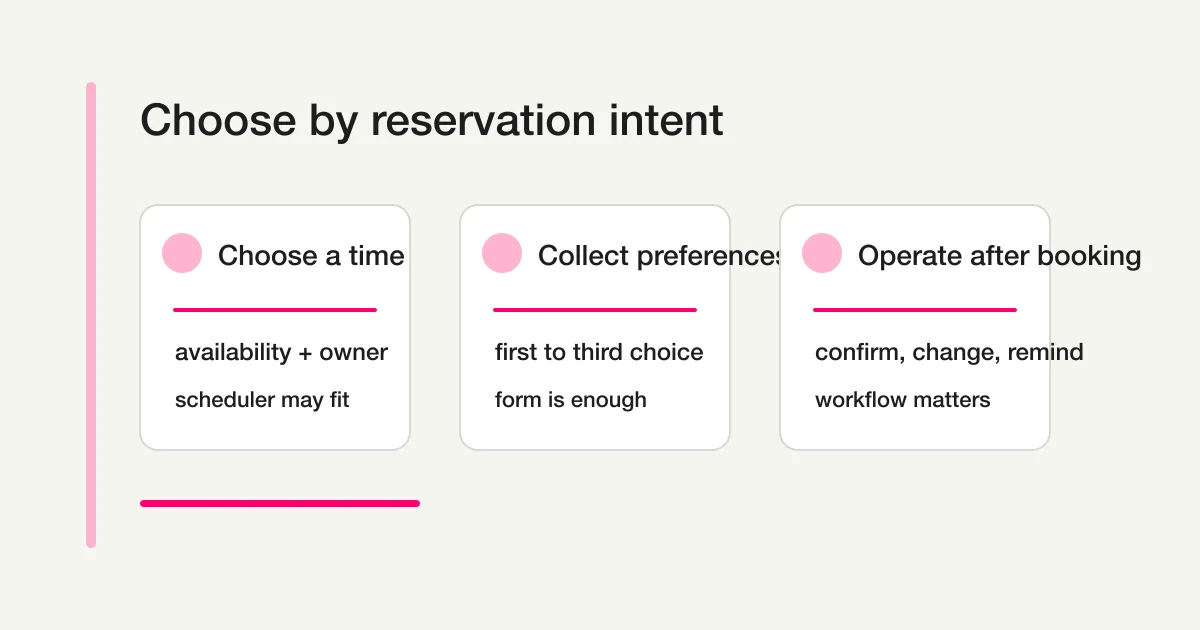
Google Calendar appointment schedules let people book time with you through a booking page based on availability. Microsoft Bookings includes a web-based booking calendar, Outlook sync, notifications, reminders, staff management, and service management. Calendly uses event types for one-on-one, group, collective, and round-robin scheduling.
So if your core requirement is real-time slot selection, calendar conflict avoidance, automatic staff assignment, or immediate booking confirmation, use a scheduling tool or compare one seriously.
But not every reservation should be fully automatic.
For high-touch consultations, B2B demos, hiring interviews, repair requests, store visits, and custom services, the team may need to review the request before confirming a time. In those cases, a reservation request form is often more appropriate.
FORMLOVA fits that second case: collect the request, make the confirmation state explicit, manage response status, send the right emails, and connect the form to follow-up workflows.
Reservation Forms Are a Special Type of Registration Form
A reservation form is related to a registration form, but it adds time and inventory.
In a webinar registration form, the session usually already exists. In an event registration form, attendees join a fixed date. In a job application form, the person submits information and the interview is scheduled later.
A reservation form is different because the respondent expects to claim a specific time, place, service, or staff capacity.
That means the form must answer four questions.
| Design question | Example | Risk if unclear |
|---|---|---|
| When is the reservation confirmed? | On submit, after staff review, after payment | Double booking, wrong customer expectation |
| How are preferred times collected? | First/second/third choice, date, time range | Too much email back-and-forth |
| How are changes handled? | Deadline, contact method, cancellation policy | Last-minute changes disappear |
| Who owns the response? | Store, staff member, team, online/offline owner | No one follows up |
Think of the reservation form as a workflow, not a page.
Fields to Include in a Reservation Form
Start with the smallest useful form.
Most reservation request forms need:
Name
Email address
Phone number or urgent contact method
Service or appointment type
First preferred date and time range
Second preferred date and time range
Third preferred date and time range
Meeting method: online, in person, phone, store visit
Purpose or request details
Cancellation/rescheduling agreement
Data-use notice or consent
Phone number is optional on many contact forms. It may be justified on a reservation form when same-day changes, store visits, delays, or emergency contact are realistic.
Do not collect everything just because it might be useful later. Address, date of birth, detailed personal information, and business details should be added only when the reservation workflow genuinely needs them at this stage. For the data-use consent line itself -- checkbox wording, purpose statements, and examples -- see Contact Form Privacy Consent Wording -- Checkbox, Purpose, and Examples.
Use case changes the fields.
| Use case | Extra fields | Watch out for |
|---|---|---|
| Store visit | Location, menu, number of visitors, rough duration | Store hours and staff availability |
| Free consultation | Topic, current problem, preferred contact method | Say that the booking is not confirmed yet |
| Product demo | Company, team size, timeline, use case | Decide whether this is lead capture or booking |
| Interview scheduling | Role, candidate name, online/in-person choice | Keep hiring fields job-related |
| Trial lesson | Participant details, experience level, guests | Collect sensitive details only when necessary |
| Repair request | Item, symptoms, purchase timing, photo option | Explain quote and visit conditions |
Google Forms can create questions, descriptions, media, sections, and required questions. That is enough for a basic reservation request.
But a form is not a calendar.
If you need people to select a truly available 15-minute slot and receive instant confirmation, use a scheduling tool. If you only need first, second, and third preference collection, a form can be enough.
Do Not Make Time Preferences Pure Free Text
A common mistake is asking for preferred time in one open text field.
Responses then look like this:
Sometime next week
Weekday evening is best
May 10 or May 12 afternoon
As soon as possible
Humans can interpret those answers, but they are hard to sort, export, filter, or use for reminders.
Split time preference into structured fields.
| Field | Recommended format | Why |
|---|---|---|
| First preferred date | Date | Easy to sort |
| First preferred time range | Choice | Prevents impossible times |
| Second preferred date | Date | Reduces follow-up email |
| Second preferred time range | Choice | Makes alternatives easier |
| Preferred meeting method | Choice | Separates email, phone, online, in person |
| Notes | Short text | Keeps exceptions separate |
For request-based booking, coarse time ranges are often better than tiny intervals. "Morning," "13:00-15:00," and "15:00-17:00" can be easier to operate than every 15-minute increment.
If 15-minute precision is essential, use a scheduler.
Separate "Request Received" from "Booking Confirmed"
Confirmation email wording matters.
If the team still needs to check availability, do not write "Your reservation is confirmed."
For a request-based form, use this structure:
Subject: We received your reservation request

Hi {Name},

We received your reservation request.
Your reservation is not confirmed yet.

Our team will check availability and send either a confirmed time or alternative options, usually within 2 business days.

Request details:
Service: {Service}
First choice: {First preferred date} {First preferred time range}
Second choice: {Second preferred date} {Second preferred time range}
Contact method: {Preferred contact method}

To change or cancel this request, reply to this email.
For an instantly confirmed booking, the email can be different:
Subject: Your reservation is confirmed

Hi {Name},

Your reservation is confirmed.

Date and time: {Confirmed date and time}
Location or meeting link: {Location}
Duration: {Duration}
Staff member: {Owner}

To change or cancel, contact us at least 24 hours before the appointment.
The difference is operationally important. A request email prevents false certainty. A confirmed email gives the customer the exact details they need.
For broader email structure, see Form Auto-Reply Email Examples.
Manage Reservation Responses with Status
Submission is not the end of booking work.
It is where the work starts.
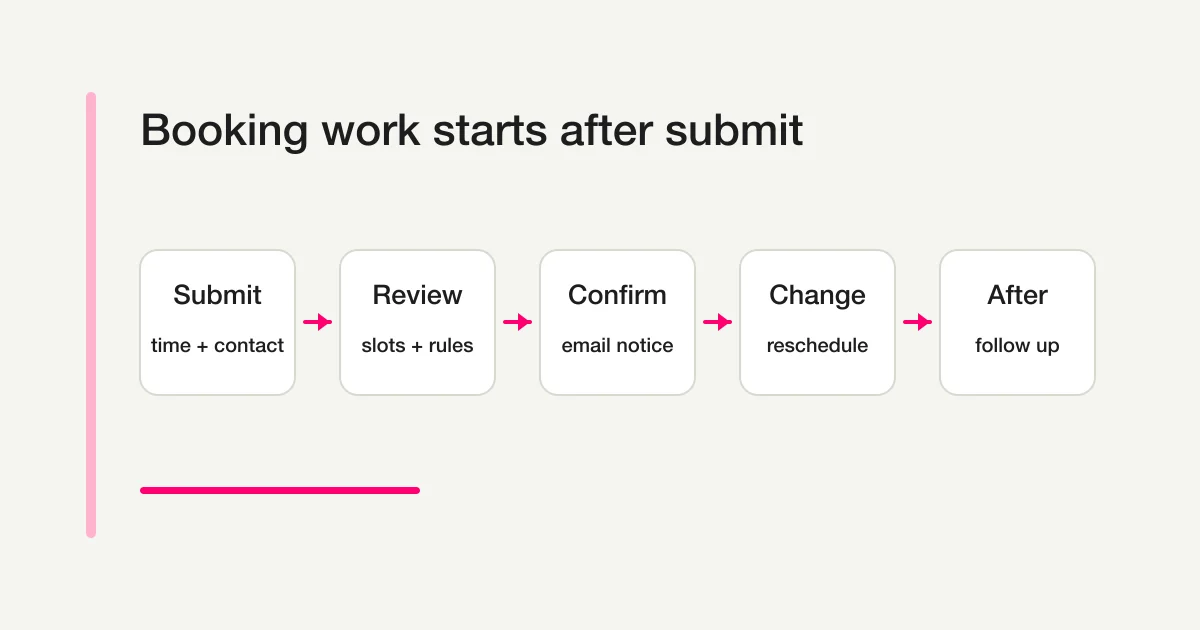
In FORMLOVA, treat each reservation response as something with state.
| Status | Meaning | Next action |
|---|---|---|
| New request | Not reviewed yet | Check context and availability |
| Checking availability | Staff or calendar is being checked | Hold or propose a slot |
| Alternative sent | Requested time does not work | Wait for customer response |
| Confirmed | Time, place, and owner are fixed | Send confirmation and reminder |
| Change requested | Customer wants to reschedule | Reopen scheduling |
| Canceled | Booking is canceled | Release capacity and record reason |
| Completed | Appointment happened | Follow up or request feedback |
| No-show | Customer did not attend | Decide future booking policy |
The operational risk is not that the form fails. It is that the response disappears into an inbox.
The Response Status Guide explains how to view, filter, and update response status. Reservation workflows need that discipline more than many other form types because time keeps moving after submission.
Put Cancellation and Rescheduling Rules in the Form
Do not hide cancellation rules until after the booking is confirmed.
At minimum, state:
How soon changes or cancellations must be requested
Where the customer should contact you
What happens after repeated no-shows
What happens if the customer is late
For a free consultation:
To change or cancel, reply to your confirmation email.
Please contact us at least 24 hours before the scheduled time.
Repeated no-shows may limit future bookings.
For an in-person visit:
If you arrive more than 10 minutes late, we may shorten the appointment or ask you to reschedule.
If payment, cancellation fees, deposits, or regulated services are involved, put the full terms in a separate page and reference them from the form and confirmation email.
How to Create a Reservation Form in FORMLOVA
Start with a direct prompt.
Create a reservation request form for a free consultation.
The reservation should not be confirmed on submission.
Ask for first, second, and third preferred times.
The auto-reply must clearly say that the booking is not confirmed yet.
For a store visit:
Create a store visit reservation form.
Ask for location, service menu, number of visitors, first preferred date and time, second preferred date and time, phone number, and cancellation agreement.
Staff will review the request and email the confirmed time.
For a B2B demo:
Create a product demo reservation form.
Ask for company, name, email, team size, timeline, use case, and preferred meeting times.
Sales will review the request and send either a confirmed time or alternative options.
After the draft exists, review these points:
- Does submission mean request or confirmation?
- Are dates and time ranges structured instead of pure free text?
- Is the contact method usable for same-day changes?
- Does the auto-reply avoid promising confirmation too early?
- Can the team manage status in the response list?
- Will CSV or Google Sheets exports sort cleanly by date?
- Is a reminder or post-appointment follow-up needed?
For exports, see Export Responses to CSV or Sync Them to Google Sheets. For reminders and broader automation, see the FORMLOVA Form Automation Guide.
Google Forms, Scheduling Tools, and FORMLOVA
A reservation workflow often spans several tools.
Use this comparison as a practical starting point.
| Tool | Best fit | Watch out for |
|---|---|---|
| Google Forms / Microsoft Forms | Collect preferred times and manually confirm later | Not ideal for real-time slot confirmation or staff-level conflicts |
| Google Calendar appointment schedules | Let people book available times from a booking page | Complex pre-booking intake may still need a form |
| Microsoft Bookings | Microsoft 365 appointment workflows with staff, services, Outlook, and notifications | Feature availability depends on plan and organization setup |
| Calendly | External scheduling for one-on-one, group, collective, or round-robin meetings | Scheduling is not the same as response operations or analysis |
| FORMLOVA | Request-based booking with intake, status, auto-replies, exports, and workflow operations | Use a dedicated scheduler when instant real-time booking is the main requirement |
FORMLOVA should not be described as a replacement for every scheduling product.
It is strongest when the reservation is a workflow: intake, review, status, confirmation, reminders, exports, and follow-up.
For MCP-based form operations, see the FORMLOVA MCP Form Service Guide.
Pre-Launch Checklist
Before publishing the reservation form, check:
[ ] The form says whether submission is a request or confirmed booking
[ ] First, second, and third preferred times are separate
[ ] Date and time are not only free text
[ ] Time zone and online/in-person options are clear
[ ] Contact details support urgent changes
[ ] Cancellation and rescheduling rules are visible
[ ] Auto-reply wording separates received from confirmed
[ ] Response owner and status workflow are assigned
[ ] Reminder timing is decided
[ ] CSV or Sheets columns will sort cleanly
W3C WAI recommends labels that identify the purpose of each form control. MDN explains that client-side validation helps users catch mistakes, but server-side validation is still needed because client-side checks can be bypassed.
For reservation forms, that means clear labels such as "First preferred date," "First preferred time range," and "Cancellation agreement." It also means requiring only fields the workflow actually uses.
Common Mistakes
The first mistake is saying "confirmed" before the team has confirmed anything.
Use "request received" when availability still needs review.
The second mistake is using one free-text field for time preference.
It may feel flexible, but it creates manual work when responses need to be sorted or exported.
The third mistake is leaving out cancellation contact details.
If customers do not know how to change a booking, they will contact you through random channels.
The fourth mistake is not assigning ownership.
"Someone will check the form" is not an operating model. Decide who reviews new requests, who proposes alternatives, and who sends confirmation.
The fifth mistake is forcing a form to behave like a scheduler.
If real-time availability, staff assignment, and calendar conflicts are central, use or integrate a scheduling tool.
Summary
A reservation form is not just a list of fields.
It is the beginning of a time-sensitive workflow.
The most important decision is whether submission means booking confirmation or only a reservation request. If confirmation must happen instantly from live availability, use a scheduler. If the team should review context before confirming, use a reservation request form and make the workflow explicit.
FORMLOVA is useful when you need intake, auto-replies, response status, CSV or Sheets exports, reminders, and follow-up around the booking request. Start from the broader FORMLOVA Form Creation Guide if you are still choosing a form type. If the reservation is closer to a fixed event or webinar, read the Event Registration Form Guide or Webinar Registration Form Guide next.
Official References
- Google Calendar Help, "Create an appointment schedule", checked May 1, 2026
- Google Calendar Help, "Learn about appointment schedules in Google Calendar", checked May 1, 2026
- Microsoft Learn, "Microsoft Bookings service description", checked May 1, 2026
- Calendly Help, "Event types overview", checked May 1, 2026
- Google Docs Editors Help, "Edit your form", checked May 1, 2026
- W3C WAI, "Labeling Controls", checked May 1, 2026
- MDN Web Docs, "Client-side form validation", checked May 1, 2026
FAQ
Can I create a reservation form with Google Forms?
Yes, if you only need to collect preferred times and confirm manually later. If you need real-time availability, automatic confirmation, staff assignment, or calendar conflict handling, compare scheduling tools such as Google Calendar appointment schedules, Microsoft Bookings, or Calendly.
Should a reservation form require a phone number?
It depends on the workflow. Phone numbers are often justified for store visits, same-day changes, delays, and urgent contact. For online consultations or low-urgency requests, email may be enough. If you require a phone number, explain why.
What should a booking confirmation email include?
For a request-based workflow, say the request was received and is not confirmed yet. For a confirmed booking, include date, time, location or meeting link, duration, owner, and rescheduling instructions.
Are reservation forms and event registration forms the same?
No. Use a reservation form when each person needs an individual time slot or appointment. Use an event registration form when people are joining a fixed event date and the main work is attendee capacity, reminders, check-in, and follow-up.
Can FORMLOVA replace a scheduling tool?
FORMLOVA can handle reservation request intake, status, confirmation messaging, exports, reminders, and follow-up. If the main requirement is real-time slot selection with calendar conflict avoidance, use a dedicated scheduler or combine FORMLOVA with one.
Disclosure and Verification
This guide is for teams creating a reservation or booking form. I work on FORMLOVA, so the workflow examples use FORMLOVA directly. I checked official information from Google Calendar appointment schedules, Microsoft Bookings, Calendly, Google Forms, W3C WAI, and MDN on May 1, 2026. Treat this as product and form-design guidance, not legal advice for payments, cancellation fees, privacy, regulated services, healthcare, or local business rules.