
Last updated: 2026-08-13
Historical form-response import is a database change, not a file-upload convenience.
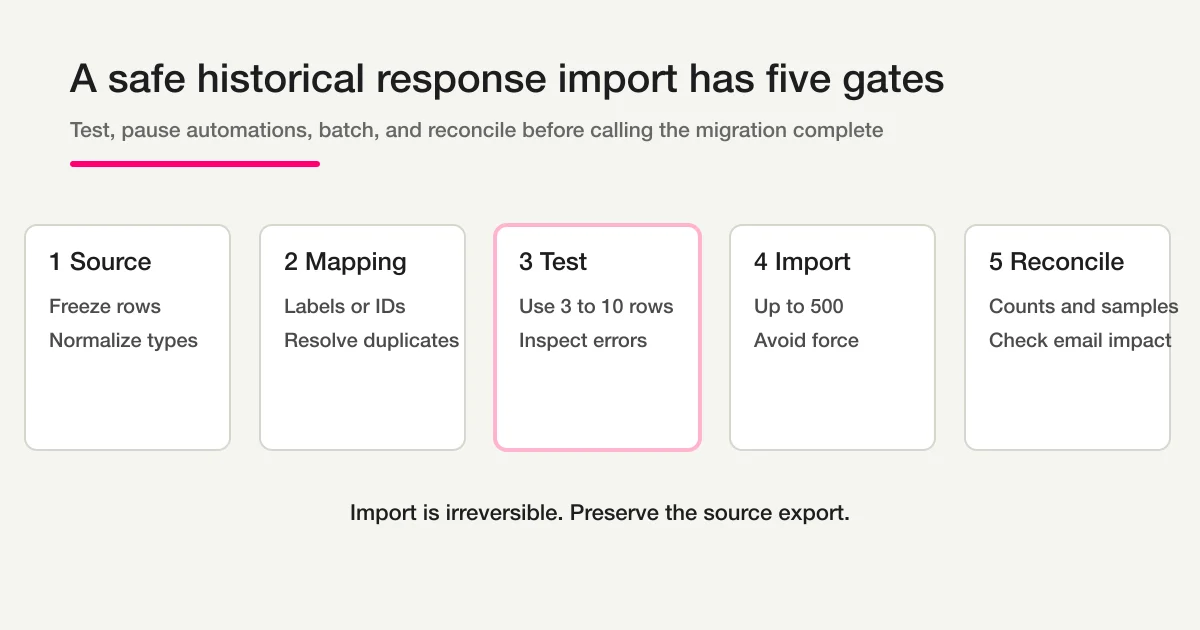
The safe workflow is:
- Freeze and preserve the source export.
- Confirm the destination questions and field mapping.
- Disable any automation that should not run for historical records.
- Test three to ten representative rows.
- Import in batches of no more than 500 records.
- Reconcile source rows, imported rows, skipped rows, and validation errors.
FORMLOVA imports are irreversible through the import operation. The 24-hour duplicate guard reduces accidental replays of the same payload, but force=true can bypass that guard. Use force only when a second identical batch is an intentional, approved business event.
Question migration and response migration are separate
Moving a form usually contains at least three distinct jobs.
| Job | Purpose | Guide |
|---|---|---|
| Move questions and settings | Recreate the input surface | Export Google Form Questions |
| Export submitted values | Preserve source records | Export Google Forms Responses to CSV |
| Import historical responses | Search and analyze old records in the destination | This article |
Do not infer a complete destination schema from a response CSV. A column may contain historical values that no longer match the intended question type or current choice list.
Finish the destination form and test it before importing history.
The biggest risk is not a type error
The biggest operational risk is that imported history looks like new activity.
A response insert can affect systems that react to new rows. In FORMLOVA, an enabled email sequence enrolls responses when they are inserted. If you import historical records into a form with an active sequence, old contacts can enter that sequence.
That creates a serious failure mode:
Historical submissions from last year
-> imported as response rows today
-> active sequence sees new rows
-> follow-up emails are scheduled
Before importing into a live form:
- disable the email sequence, or use a separate migration form with no sequence
- review webhooks and external workflows
- separate test and internal addresses
- tell operators not to treat imported timestamps as new leads
- document the maintenance window and rollback decision
The current import operation does not offer a switch that marks every row “historical and automation-exempt.” Sequence enrollment and response import must therefore be designed together.
Enabling a sequence after the import does not retroactively enroll existing responses. The risky direction is importing while the sequence is already enabled.
FORMLOVA expects structured records, not an opaque CSV file
The import_responses operation accepts an array of objects. A CSV or spreadsheet can be the source, but it needs to be parsed into structured data before import.
Source table:
| Name | Interest | Applied at | |
|---|---|---|---|
| Alex Kim | alex@example.com | Setup | 2026-05-03 |
Structured payload:
[
  {
    "Full name": "Alex Kim",
    "Email address": "alex@example.com",
    "Interest": "Setup",
    "Application date": "2026-05-03"
  }
]
If you provide a CSV in chat, the client can convert it to this structure before calling the import tool. The server then validates and maps the records. The raw spreadsheet formatting is not imported as a spreadsheet.
Preserve the original file separately. An import result is not a replacement for the source archive.
Map by label or field ID
Each object key can be a destination field label or a field ID.
| Mapping method | Good fit | Risk |
|---|---|---|
| Field label | Small migration with unique, stable labels | Duplicate labels, whitespace, or renamed questions |
| Field ID | Repeatable migration or duplicate labels | IDs belong to one destination form and must not be reused elsewhere |
Build a mapping sheet before transforming all records:
| Source column | Destination label | Field ID | Type | Transformation |
|---|---|---|---|---|
| name | Full name | 101 | text | Trim whitespace |
| Email address | 102 | Distinguish blank and invalid | ||
| purpose | Interest | 103 | single select | Normalize to current choice text |
| applied_at | Application date | 104 | date | Convert to ISO date string |
FORMLOVA matches labels case-insensitively. That convenience does not solve duplicate destination labels. Unique labels or explicit field IDs create a safer contract.
Validate types before the first write
The import validates values by destination field type. A row with an invalid mapped value is skipped and reported as an error rather than partially inserted.
| Field type | Expected shape | Common source problem |
|---|---|---|
| String with valid email form | Missing @, spreadsheet converted value | |
| rating scale | Integer of 1 or greater | Decimal, zero, or text label |
| date or datetime | Parseable ISO-style string | Locale-formatted dates or impossible dates |
| multi-select | Array | One comma-separated string |
| single-select | String or number | Object or array |
| phone | String | Spreadsheet removed a leading zero |
Normalize before import. Do not rely on the server error list as your data-cleaning process for thousands of rows.
Pay special attention to empty values. “No historical answer,” “question did not exist,” and “blank response was submitted” can have different analytical meanings even if they all become an empty cell.
The controlled import procedure
1. Freeze the source
Save the original export, its row count, export time, source form, filters, and file hash if the migration is audit-sensitive. If responses continue arriving, choose a cutover time and capture a final delta later.
2. Confirm the destination form
Use get_form or the form editor to review the exact destination fields. Confirm labels, IDs, types, required settings, and choice values.
Required fields in the live form do not justify inventing historical data. Decide whether a missing historical value should remain absent, use a documented migration placeholder, or cause the row to be excluded.
3. Pause automations
Disable the email sequence and inspect any workflow that reacts to new responses. Record the original state so it can be restored deliberately after reconciliation.
4. Create a representative test set
Choose three to ten rows that include:
- a complete normal record
- optional blanks
- non-ASCII names
- a multi-select response
- a date near a format boundary
- a phone number with a leading zero
- an intentionally invalid row
Import the sample into a dedicated test form whenever possible.
5. Inspect the result
Review imported count, skipped count, and row errors. Open the response list and compare several values field by field.
Do not continue because the tool returned a success heading. A partial batch can be successful while invalid rows are skipped.
6. Divide production data into batches
The input limit is 500 records per call. Use batches of 500 or fewer, and give each batch an external identifier in the migration log.
Batch A: source rows 2-501
Batch B: source rows 502-1001
Batch C: source rows 1002-1278
Do not change transformation rules halfway through without versioning the mapping and rechecking earlier batches.
7. Reconcile before restoring automation
For every batch, record:
source rows
= imported rows
+ skipped rows

skipped rows
= documented validation errors or intentional exclusions
Then compare total destination response count before and after the migration, sample values, respondent emails, and date interpretation.
Only restore intended automations after the historical population is complete and no sequence enrollments were created accidentally.
How the 24-hour duplicate guard works
FORMLOVA creates a content hash from the destination form and canonicalized input data. For 24 hours, rerunning the same payload with force=false returns the first completed result instead of inserting the same response rows again.
This is an operation-level guard, not a permanent person-level deduplication rule.
It means:
- object key order differences do not create a different logical payload
- array row order matters
- a changed value creates a different payload
- after 24 hours, the same payload can be treated as a new import
force=truebypasses the completed-batch guard immediately
| Situation | Use force? | Safer action |
|---|---|---|
| Result disappeared from the chat | No | Rerun unchanged and use the replayed result |
| Network failed and completion is unclear | No | Rerun unchanged, then reconcile counts |
| One field value was corrected | No | Import a deliberate corrected payload and document how duplicates are handled |
| Identical business record must exist twice | Consider only with approval | Record the reason, owner, and expected count |
| Repeating a test without deleting old test rows | No | Use new test values or a fresh test form |
force=true is not a troubleshooting flag. It is permission to create another batch from identical content.
Import is irreversible
The import operation does not provide an undo transaction that removes the exact batch later.
Response deletion exists as a separate destructive operation with its own access and confirmation controls. Deleting a mistaken batch after the fact is not equivalent to an atomic rollback, especially if automations, analytics, or external systems already observed the rows.
That is why the order matters:
test first
-> import one bounded batch
-> reconcile
-> continue
Never begin with force=true and the full dataset.
A migration log template
Keep a small control sheet:
| Batch | Source range | Source count | Imported | Skipped | Error file | Operator | Time |
|---|---|---|---|---|---|---|---|
| Test-01 | Selected rows | 7 | 6 | 1 | test-01-errors.json | Dana | 09:15 UTC |
| Prod-01 | 2-501 | 500 | 498 | 2 | prod-01-errors.json | Dana | 10:00 UTC |
Include the destination form ID and mapping version at the top. If someone changes a label or field type during migration, stop and start a new mapping version.
Ongoing operations after migration
Imported history becomes part of search, analytics, and response counts. Decide how operators distinguish it from new submissions.
Useful options include a migration tag, a source field, an imported-at record in the external migration log, or a dedicated archive form. Choose the method before import because retroactively inferring source can be unreliable.
For status and ownership after migration, use How to View, Filter, and Manage Response Status. For the full operations layer, return to How to Start Form Automation with FORMLOVA.
FAQ
Can I upload a CSV directly?
The CSV can be the source, but import_responses receives structured objects. The client parses the file, then the server validates and maps the records.
Can I migrate questions and responses in one operation?
No. Build and verify the destination fields first. Then map and import historical responses.
What if I have more than 500 records?
Split the data into batches of 500 or fewer. Reconcile each batch before continuing.
Does one invalid row fail the entire batch?
No. Invalid rows are skipped and reported while valid rows are inserted. That makes count reconciliation mandatory.
What happens if I submit the same payload twice?
For 24 hours, the same destination form and payload with force=false replay the first completed result. After the window, or with force=true, another import can occur.
Will enabling a sequence after migration email old respondents?
Existing responses are not retroactively enrolled merely because the sequence is enabled later. The dangerous case is importing while an active sequence already exists.
Read next
- How to Start Form Automation with FORMLOVA
- Export Google Forms Responses to CSV
- Export Google Form Questions
- How to View, Filter, and Manage Response Status
Create a free FORMLOVA account, connect through the setup guide, create a test form with no live automations, and import a representative sample before planning production batches.
Disclosure and Verification
The author develops FORMLOVA. This article was verified on 2026-08-13 against the current import_responses schema, field mapping and validation, 500-record input limit, import-batch ledger, 24-hour content-hash replay behavior, force bypass, response insertion, sequence enrollment trigger, and response count recalculation. The migration procedure is an operational safety recommendation, not a promise of automatic rollback.