
Last updated: 2026-08-13
A form submission follow-up sequence sends each respondent a planned series of messages on their own timeline.
It is useful when one receipt is not enough, but the next helpful message does not depend on a fixed event date. A typical sequence might acknowledge the inquiry, provide one useful resource later, and then offer a low-pressure way to reply.
The safest sequence is short. Each email should have one job, and the operation needs stop rules before automation begins.
In FORMLOVA, email sequences are Premium-only. A sequence can contain 1 to 10 steps. Processing runs every five minutes, and delays after the first email are measured from the time the previous step was sent, not cumulatively from the original submission.
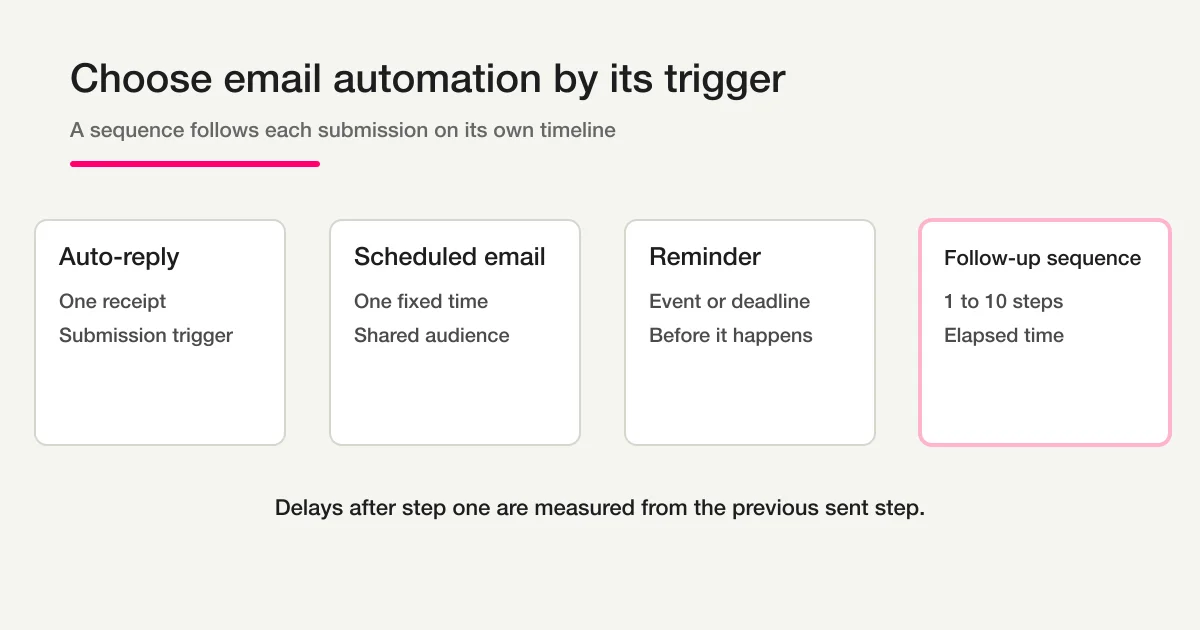
First choose the correct email automation
These features sound similar, but the trigger changes the operation.
| Feature | Trigger | Typical message count | Best use |
|---|---|---|---|
| Auto-reply | A form submission | 1 | Receipt, response copy, expected reply time |
| Scheduled email | A fixed date and time | 1 | One announcement to an audience |
| Reminder | An event or deadline | One or more | Attendance or deadline preparation |
| Follow-up sequence | Each respondent's submission time | 1-10 | Education, check-in, qualification, next step |
If everyone must receive the email at the same time, use scheduling. If the message belongs before an appointment, use a reminder. If every respondent starts their own timeline when they submit, use a sequence.
For a single receipt, start with How to Set Up Form Auto-Reply Emails. Do not send an immediate auto-reply and an immediate first sequence step with nearly identical content.
A practical three-email structure
Most inquiry forms do not need ten emails. Start with three clear jobs.
| Step | Example timing | Job | Example subject |
|---|---|---|---|
| 1 | After submission | Confirm receipt and set expectations | We received your inquiry |
| 2 | After one day | Provide one relevant resource | One resource that may help |
| 3 | After another three days | Make replying easy | Is there anything you would like us to clarify? |
The timing is an initial operating hypothesis, not a universal conversion formula. Adjust it based on reply time, sales cycle, business days, unsubscribes, complaints, and whether a human has already taken over.
Each message needs one primary action:
Step 1: understand what happens next
Step 2: read one useful resource
Step 3: reply with one simple choice
A sequence becomes heavy when every message repeats the product pitch, adds several buttons, and assumes that silence means interest.
Define stop conditions before writing copy
Automation needs a clear answer to “Who should not receive the next message?”
At minimum, consider:
- the recipient unsubscribed
- the address bounced or is invalid
- a human is already handling the conversation
- the respondent became a customer or entered another lifecycle
- the inquiry was spam, a sales pitch, or a test
- the respondent explicitly said no further follow-up
FORMLOVA automatically excludes suppressed email addresses from sequence sending. However, the current public sequence operation does not provide a per-recipient button or tool to remove one active respondent because they replied or entered a sales conversation.
That limitation should shape the workflow. If individual cancellation is essential, use a delivery system that supports lifecycle-based enrollment controls. Do not promise a sales team that changing a response status will automatically cancel FORMLOVA's current sequence.
Set up the sequence in FORMLOVA
Email sequences require the Premium plan. Use a test form first.
1. Confirm the source form
The form needs a respondent email address. Confirm which field supplies it, who owns the form, and whether the operator has editor access.
2. Draft every step before enabling anything
Prepare the name, subject, body, and delay for each step. Keep personalization tokens minimal until the plain version is verified.
Example chat request:
Create a three-step follow-up sequence for the test inquiry form. Send the receipt at delay 0, a setup checklist one day later, and a reply invitation three days after step two. Keep the sequence disabled until I approve the preview.
FORMLOVA's set_email_sequence operation requires an explicit confirmation flow. The confirmation summary includes the sequence name, step count, subjects, and delays. Approval uses a one-time confirmation token tied to that content.
3. Understand delay semantics
The first step is scheduled from the submission. Later steps are scheduled after the previous step is sent successfully.
Submission
-> Step 1 delay: 0 minutes
-> Step 1 is processed and sent
-> Step 2 delay starts from the Step 1 send time
-> Step 2 is sent
-> Step 3 delay starts from the Step 2 send time
Suppose step two has a 1,440-minute delay and step three has a 4,320-minute delay. Step three is not “three days after submission.” It is three days after step two is sent.
This matters when a message is delayed by processing, quota exhaustion, or a temporary send failure.
4. Preview and approve the exact content
Review:
- form and sequence name
- every subject and body
- every delay in minutes
- links and reply address
- unsubscribe presentation
- whether the sequence starts enabled
Do not approve a token and then change the content invisibly. FORMLOVA binds confirmation to a hash of the sequence content so changed steps require a new confirmation.
5. Submit your own test response
Use an address controlled by your team. Verify the rendered email on desktop and mobile, reply behavior, links, branding, and unsubscribe flow.
Five-minute processing is not exact-time delivery
The email-sequence job runs every five minutes. A delay of zero means “eligible immediately,” not “delivered in the same second as submission.”
12:01 submission
-> eligible for step one
-> next processing run picks it up
-> provider accepts the email
-> recipient mail system delivers it
If the response page must show something immediately, put the essential confirmation or download link on the thank-you page as well. Email is a separate delivery path and can be delayed or filtered.
The worker processes a bounded number of enrollments per run and uses a lease plus an idempotency key to reduce duplicate sending during concurrent or retried jobs. Those controls improve operational safety. They do not create a delivery-time guarantee.
Updating a sequence replaces every step
FORMLOVA stores one sequence per form in the current operation. Updating it replaces all existing steps.
That means “fix step two” is not a small isolated patch at the storage boundary. The complete supplied step array becomes the new sequence definition.
Before updating a live sequence:
- Read the current form and sequence configuration.
- Preserve every step that should remain.
- Check whether active enrollments exist.
- Confirm the full replacement.
- Submit a new test response after the update.
When active enrollments exist, changing steps can create skipped or duplicated expectations for people already in progress. FORMLOVA returns a warning count, but the operator still needs a rollout decision.
For a material rewrite, the cleanest option may be a new form or a planned pause rather than modifying a live audience midway.
Premium plan and quota planning
Email sequences are Premium-only. The Premium monthly email allowance is 10,000 messages across features that count toward the account's sending quota.
Estimate sequence load before launch:
expected monthly submissions x enabled steps
= planned sequence messages
For 600 monthly submissions and a three-step sequence, the upper-bound plan is 1,800 messages before suppression, missing-email, or lifecycle effects.
Include auto-replies, bulk mail, reminders, and other quota-counted messages in the same operational forecast. When the quota has no remaining capacity, sequence processing waits rather than silently converting the email into a free send.
Three reusable message templates
Step 1: receipt and expectation
Subject: We received your inquiry

Hi {{name}},

Thank you for contacting us. We received your message about {{topic}}.

Our team reviews inquiries within {{response_window}}. If you need to add context,
reply to this email so the details stay together.

{{company_name}}
Step 2: one helpful resource
Subject: A short resource for your {{topic}} question

Hi {{name}},

While we review your inquiry, this guide may help with the most common decision:
{{resource_url}}

If your situation is different, reply with the one constraint that matters most.

{{company_name}}
Step 3: a low-friction reply
Subject: What would be most useful next?

Hi {{name}},

Which option is closest to your situation?

1. I am still gathering information.
2. I would like a short setup recommendation.
3. I am ready to discuss implementation.
4. I do not need further follow-up.

You can reply with the number only.

{{company_name}}
These are operational starting points. Replace placeholders with tested data or remove them. An empty personalization token is worse than a simple, accurate greeting.
Unsubscribe and suppression behavior
Sequence emails are ongoing respondent communications. FORMLOVA adds an unsubscribe link and List-Unsubscribe headers, and checks the suppression list before each step. Once an address is suppressed, the enrollment is completed without sending further steps.
An unsubscribe mechanism does not replace consent and audience design. It is one control inside them. Resend's unsubscribe guidance explains why relationship-building and marketing-style messages should provide a clear way to stop future mail.
Do not remove an address from suppression simply because an operator wants to resume a campaign. FORMLOVA requires the recipient's own resubscription action for suppression removal.
A sequence is not a response-management system
Email delivery and inquiry ownership are different states.
Form submitted
-> sequence enrollment
-> email sent

Inquiry operations
-> triage
-> owner assigned
-> reply in progress
-> resolved or excluded
Keep an explicit response status and owner. A sent email does not prove that the team handled the inquiry, and a Slack notification does not prove ownership.
Contact Form Operations covers the broader operating model. How to Start Form Automation with FORMLOVA is the parent guide for choosing notifications, status, reports, and workflows.
To keep sequence delivery separate from unresolved inquiry work, use the Inquiry Weekly Status Report as the operational review surface. For a content-level summary of accumulated responses, use the AI Response Report. Neither workflow cancels an individual email enrollment; they make the human review queue visible.
FAQ
How many steps can a FORMLOVA sequence contain?
One sequence can contain 1 to 10 steps.
Is the feature available on Free or Standard?
No. Email sequences are Premium-only.
Will a zero-minute delay send immediately?
It makes the email eligible immediately, but the processing job runs every five minutes. Provider acceptance and recipient delivery add more variability.
Are later delays measured from form submission?
No. After step one, each delay starts when the previous step is sent successfully.
Can I edit only one step?
The current operation replaces the entire step set. Read the existing configuration and submit the complete intended sequence.
Does a reply automatically stop the sequence?
No. Suppressed addresses are stopped, but the current public operation does not offer per-recipient cancellation based on reply or sales status.
Who can configure the sequence?
The authenticated user needs editor access to the form and an eligible Premium plan. Access is checked again before scheduled sending.
Read next
- How to Start Form Automation with FORMLOVA
- Contact Form Operations
- How to Set Up Form Auto-Reply Emails
- How to View, Filter, and Manage Response Status
Create a free FORMLOVA account, connect through the setup guide, create a dedicated test form, and verify all steps with your own mailbox before enabling a real audience.
Disclosure and Verification
The author develops FORMLOVA. This article was verified on 2026-08-13 against the current plan definition, set_email_sequence tool, enrollment behavior, five-minute cron route, suppression logic, quota handling, and unsubscribe implementation. Timing examples are operating starting points, not guaranteed performance claims.
External reference: